






AI Prompt Optimizer

Rewrite a prompt you already wrote: keep its facts, name the role, task, context, limits, and output format, then review what changed before you run it.

AI writing
Claude
GitHub
Google
Linear
Microsoft
Monday
Netlify
Notion
OpenAI
Sentry
Slack
Stripe
Supabase
Claude
GitHub
Google
Linear
Microsoft
Monday
Netlify
Notion
OpenAI
Sentry
Slack
Stripe
Supabase
A crumpled prompt card with ragged, uneven lines refines through three nodes into a clean structured panel with six ordered sections.

Rewrite the request, keep the facts

Start from the exact prompt that missed and what it returned. The rewrite adds audience, sources, limits, and output shape while your numbers, names, and quotes stay as written; the side-by-side read is where you catch any that moved. When one sentence only needs tightening, the Sentence Rewriter is the smaller tool.
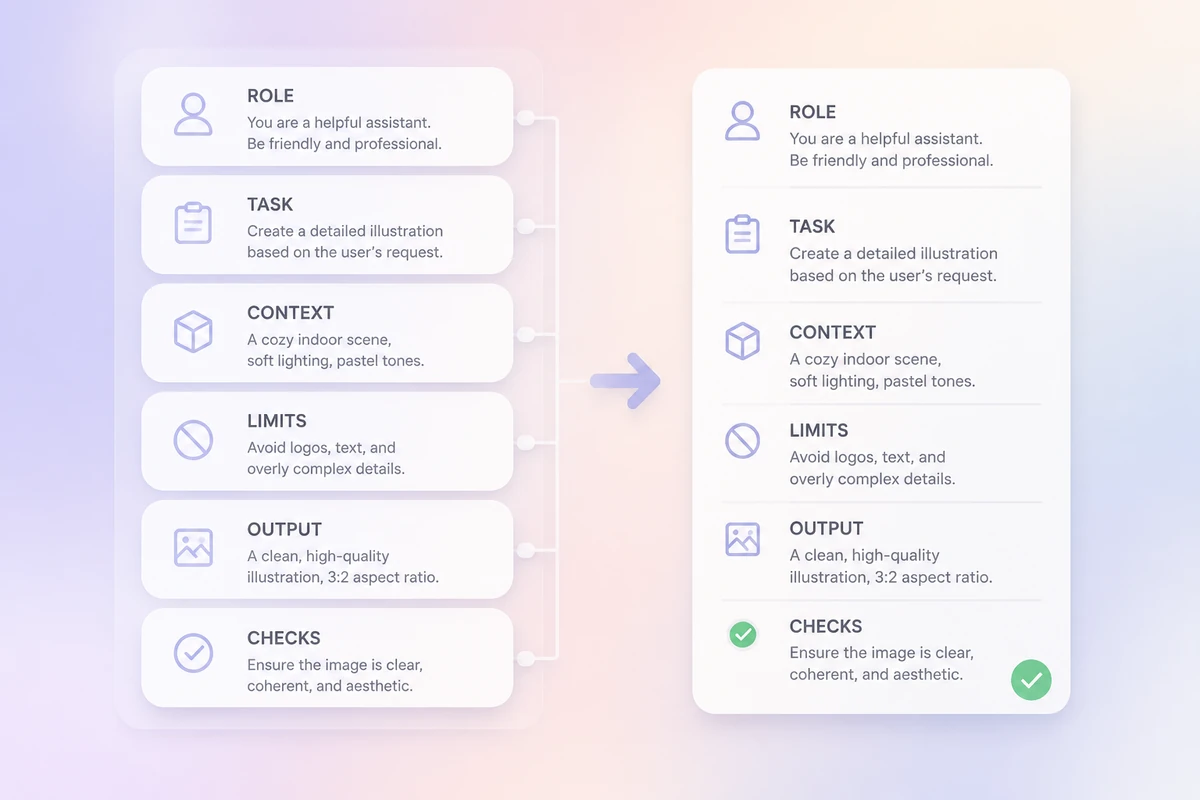

Six labeled blocks for role, task, context, limits, output, and checks stack into one ordered prompt panel marked with a completion check.

Six blocks make it reviewable

A rewritten prompt lines up as role, task, context and sources, limits, output format, and checks. That fixed order shows what the model was told and what it was never told. Building a prompt from a blank page is a different job, which the AI Prompt Generator covers.

One pinned prompt card fans out through a reuse loop into a chat panel, a four-step workflow strip, and a two-column document.

One prompt, several places to run it

An approved prompt usually outlives the tool you tested it in. Restate the output format for the next chat window, a coding agent, or a document workflow, and keep the blocks that carried the meaning. Storing it with its project context is the habit described in How to Manage Project Context with Ottermind: Organize and Reuse Background.

What you can do with Ottermind

Salvage a prompt that missed

A report request came back generic. Add the reader, the section order, the sources you allow, and the length you actually need, then hand the result to the AI Report Generator.

Hand a prompt to a teammate

Rewrite the prompt you use every Monday so a colleague can run it without asking which file to attach or what "on brand" means.

Move a prompt to another tool

Carry an instruction that works in one chat window into a coding agent or a longer build workflow, such as the AI Landing Page Builder, with the output format restated for the new destination.

Trim a bloated prompt

A 400-word prompt with three contradictions keeps its real limits and loses the repeats, instead of simply getting shorter.

How to optimize a prompt in 3 steps

Step 01

Paste the prompt that failed

Use the exact wording you ran and one line about what it returned. The distance between the request and the result is what the rewrite works from.

Step 02

Name the missing context

Say which facts are fixed, who reads the output, and what cannot be shared. Missing pieces should come back as questions, not guesses; the [AI Note Taker](https://ottermind.ai/tools/ai-note-taker) keeps the decisions.

Step 03

Compare before you run it

Read both versions line by line. Keep the rewrite only if your facts survived, then test it on one real input before it joins a workflow.

Why creators choose Ottermind

Your original stays visible

Keep the original beside the rewrite, so a dropped fact or a softened limit is easy to catch before you run it.

Gaps come back as questions

Missing audience, sources, or success criteria are asked for rather than filled in with a guess.

Nothing locked in the tool

The rewrite comes back as text, so you can edit one block by hand, drop it, or keep the version in your own notes.

Review is part of the rewrite

Ask for the change list in the same request, so a version that reads well but says something else gets rejected.

Wording a teammate can run

A prompt written this way survives a handoff: the next person does not have to ask what a phrase meant.

Frequently asked questions

What does an AI prompt optimizer actually change?

Structure, not the model. A rewrite states the role, the task, the context and sources, the limits, the output format, and the checks a reader can apply. Your facts are supposed to survive unchanged, and anything the prompt cannot support should be labeled rather than invented.

Will a rewrite change my meaning or drop my facts?

It should not, which is why you compare. Read the original beside the rewrite: a missing fact, a moved number, or a new assumption is a reason to reject that version. A gap should surface as a question, the review step in Human-in-the-Loop AI.

Does a more structured prompt guarantee a better answer?

No. Detail helps only when it is relevant, consistent, and testable. A long prompt can still carry a contradiction or a false premise, so run the rewrite on one representative input and check the output against your own sources before you rely on it.

Should I shorten a long prompt or add more detail?

Remove what repeats or contradicts, keep what constrains. Shorter prompts cost fewer tokens, but clarity is a separate question. When the length comes from pasted source material, compress the source first with the Text Summarizer instead of trimming the instruction that constrains the answer.

Can I reuse one optimized prompt in ChatGPT, Claude, or Gemini?

Instructions about role, task, and output format generally travel between chat models. Model-specific behavior does not, so note what you changed, keep the approved version, and retest the output format in the new tool before you depend on it.

When is prompt optimization the wrong job?

When the task depends on a decision only a person can make, or when you are tuning prompts against a test set and scoring them at scale. That second job belongs to evaluation and automated optimization tooling, not to rewriting one prompt a person wrote.

Discover more

More from the blog

Rewrite the prompt you already wrote

Paste the version that missed, say what it returned, and leave with a structured prompt you can check line by line. The public experience can be tried without signing in for a limited number of free rounds.

Optimize prompt