Dzine AI Review: Plans, Credits, and What It Actually Ships
Dzine runs on a production canvas with its own credit rules. If the next step is a poster, a campaign set or a photo treatment, write that brief here and continue in Ottermind Studio, where the request is staged for your review before anything is generated.
Optional
JPG / PNG / WebP
This is Ottermind's composer. It does not open Dzine, call Dzine's models or spend Dzine credits.
· 10 min read
Dzine is a browser-based AI creative suite built around a production canvas, not a single prompt box. You place nodes for images, video, audio and text on a shared board, run a model inside each one, and keep the results as assets other people on the same project can reuse. In November 2026 the site sells that as "the creative canvas for serious AI production", and the tool families behind it cover image generation, video, lip sync, photo and video editing, and style filters.
That breadth is the reason to look at it and the reason the pricing is hard to read. Four plans, an entry tier that costs less than a sandwich, and a credit system where the same word — "generation" — buys anything from 2 credits to 400.
The short answer for most readers: Dzine fits when you are producing a set of assets that must share a look — a poster and its social crops, one character at several angles, a still that becomes a lip-synced clip — and one asset library plus one credit balance is worth more to you than the cheapest possible per-image price. It fits badly when you need one cheap image, a per-image price you can forecast, or an editable layered master file.
How this review was prepared: Dzine's official pages were opened on November 17, 2026: the homepage, the pricing page, the FAQ, the tools index and the API page. This is a documentation and interface review: we did not create a Dzine account, spend credits, or measure output quality, speed or reliability, so no Dzine result appears here. The three screen captures are real screenshots of Dzine's public pages taken on that date. The cover artwork and the two still-life illustrations were generated with Image 2.5 for this article; they show the shape of the work, not Dzine's interface or its output. Ottermind publishes this article and offers the image workflows linked below; it is not connected to Dzine.
What Dzine actually is in November 2026
The homepage leads with a canvas, and the canvas is the product. Its node list names five things you can drop onto a board: an asset library, script analysis that turns a script into scenes, an image generator, a video generator, and an audio generator. The surrounding navigation splits the same capability into five families — Lip Sync, Video AI, Image AI, AI Editor and AI Filter — and each family is a page of single-purpose tools.
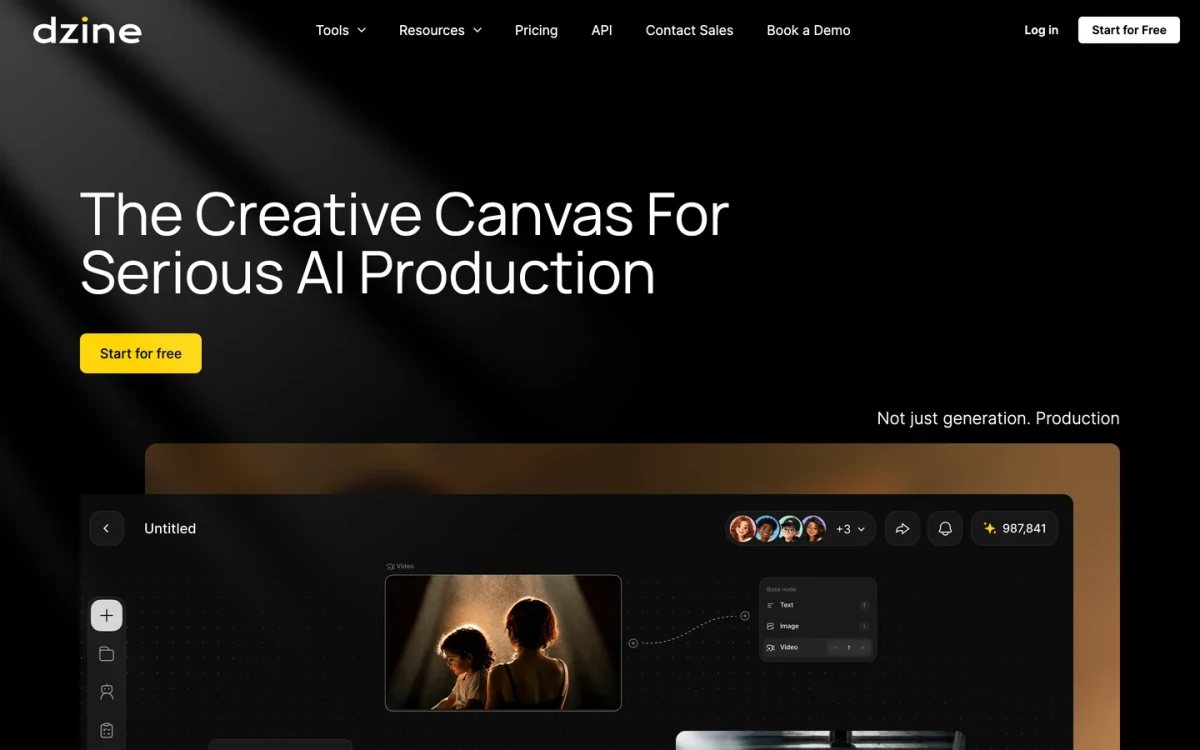
Real screenshot of dzine.ai, 17 November 2026. The hero sells the canvas; the interface below it shows the node model, a shared cursor, teammate avatars and a credits counter. The counters and filenames in that mock-up belong to Dzine's own demo, not to a test we ran.
That combination tells you who the product is aimed at. A single-purpose generator asks you to produce one image; Dzine asks you to assemble a scene and then branch from it. The same board holds the reference photos, the generated still, the clip made from it and the audio track, and the collaborators' avatars sit in the top bar.
Dzine also advertises a governance layer that most generators do not have: real-time collaboration, seat and budget management, character assets that stay consistent across shots, motion capture, clip switching between takes, plus a "chain of title" that records references, prompts, model choices, edits and approvals, and infringement detection that flags potential copyright, likeness or trademark risk. Those are the claims that justify a higher plan, and a documentation review cannot confirm them: they sit behind an account, and the homepage shows them as product marketing rather than as tested behaviour. Treat them as the first thing to verify if they are why you are considering the product.
The model menu is where the site gets confusing. The headline strip names Nano Banana Pro, Sora 2, Kling 2.6, Hailuo AI, Wan 2.6, Veo 3.1, Z-image and Seedream 4.5. The plan cards on the pricing page name a partly different set: GPT Image 2.5, 2.0 and 1.5, Seedream 5.0 Pro and Lite, Seedream 5.5, Nano Banana 2 and 2.1, Ideogram 4.5, Flux.3, Midjourney, Qwen Image and Grok Imagine. Neither list is wrong — one is a marketing strip, the other is a billing surface — but it means the honest answer to "does Dzine have model X" is "check the plan card and then check the generation screen", not "yes".
Who Dzine is for — and who should skip it
| If this is your job | Dzine is worth a trial | Why |
|---|---|---|
| A campaign that needs a poster, a square post and a story from one direction | Yes | The canvas keeps the versions in one project instead of three browser tabs |
| Product stills that also need to move | Yes | Image, video and lip sync are billed from one balance and share one asset library |
| A character that must stay on model across shots | Plausibly | Reusable character assets are advertised; consistency is exactly what needs testing |
| A team that has to account for AI spend per seat | Plausibly | Seat, budget and member-credit views are advertised on the homepage |
| One image for a blog post | No | A metered suite is the expensive way to buy one picture |
| A layered master file you will keep editing | No | There is no verified layered-source export in the public material |
| Fixed, forecastable cost per asset | No | Cost moves with model, resolution, reference count and output count |
The pattern is consistent: Dzine pays off when the unit of work is a family of assets, and it costs you when the unit of work is one picture.
The free tier is real, but read the two conditions
The FAQ states the offer plainly, and both halves matter:
- 100 credits on sign-up, valid for 12 months, usable across image and video.
- Images from free accounts are public and may be selected for Dzine's community feed. Private generation is a paid feature.
- Commercial use is paid-plan only. The same FAQ restricts free-tier output to personal projects.
So a free account is a genuine way to price a job — you can run the model you actually intend to use and watch the deduction — but it is not a way to produce client work, and it is not private. If the thing you are generating is a client's unreleased product, do not test it on the free tier.
The four plans, and the arithmetic behind them
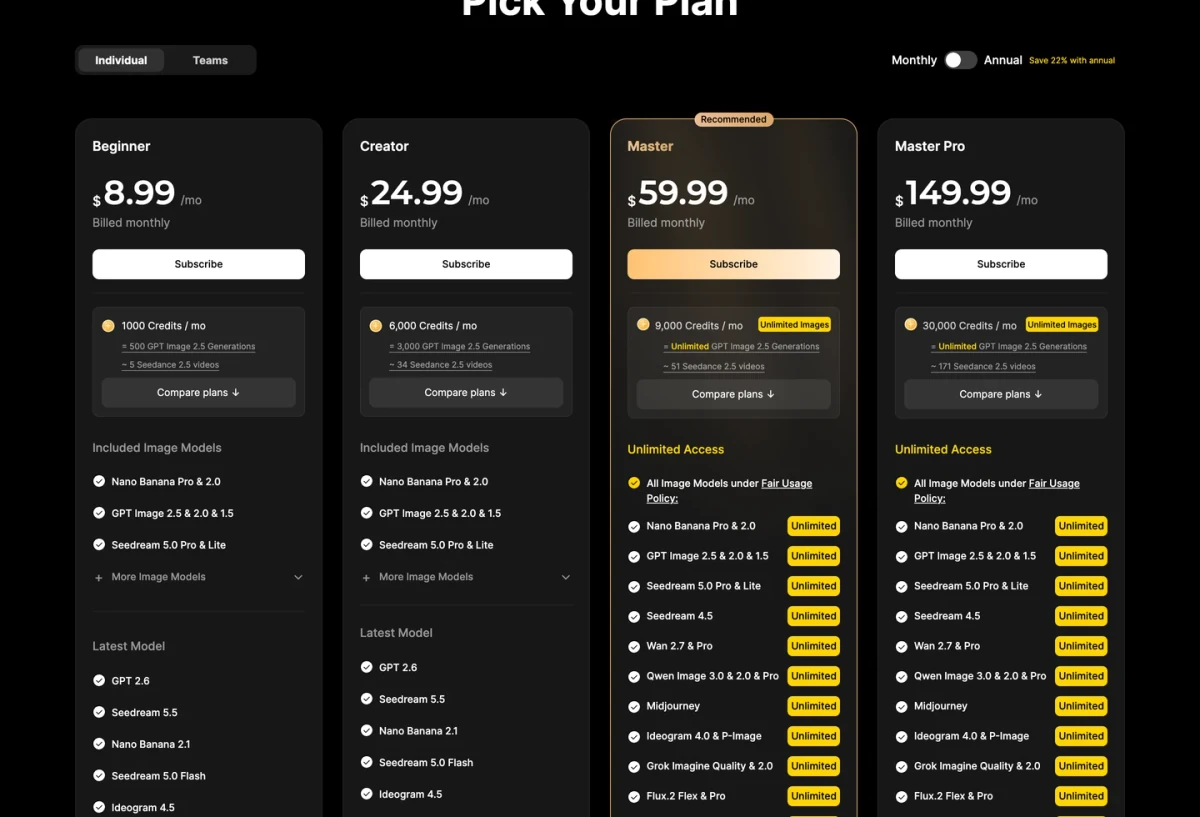
Real screenshot of dzine.ai/pricing, 17 November 2026, monthly billing selected. The Unlimited Images badge applies to image models only and is labelled "under Fair Usage Policy"; video is still deducted from the credit balance on every plan.
| Plan | Price | What you get |
|---|---|---|
| Beginner | $8.99/mo · $84 / yr ($7 per month) | 1,000 credits · 10 characters |
| Creator | $24.99/mo · $240 / yr ($20 per month) | 6,000 credits · 10 characters |
| Master | $59.99/mo · $600 / yr ($50 per month) | 9,000 credits + unlimited images · 60 characters |
| Master Pro | $149.99/mo · $1,440 / yr ($120 per month) | 30,000 credits + unlimited images · 120 characters |
Prices and quotas checked on 17 November 2026. Annual billing is advertised as 22% cheaper and, on the Beginner tier, as a discounted first month.
Two details in that table are easy to miss and change the decision more than the headline price does.
Credit rollover starts at Creator. The pricing page lists "Credit up to 3 months" for rollover on Creator, Master and Master Pro, and not on Beginner. If you work in bursts, the cheapest plan is also the one where unused credits expire fastest.
"Unlimited images" is not "unlimited work". On Master and Master Pro the image models are marked Unlimited under a Fair Usage Policy, and the same card still quotes a video estimate — about 51 five-second clips at 9,000 credits, about 171 at 30,000. Video generation keeps consuming credits on every plan in the table. If your project is video, the unlimited badge does nothing for you, and you should be buying the video capacity in the credit column.
The vendor's own arithmetic disagrees with itself in one place. A Beginner card converts 1,000 credits into "~5 Seedance 2.5 videos", which works out to about 200 credits per five-second clip; the FAQ's credit table lists Seedance 2.5 at 175 credits per five-second video. The difference is not enormous, but it tells you which number to trust when you budget: the per-action table, and then the actual deduction in your own account. The card's conversion is an estimate for a specific setting, not a rate.
Why "one generation" is not a price
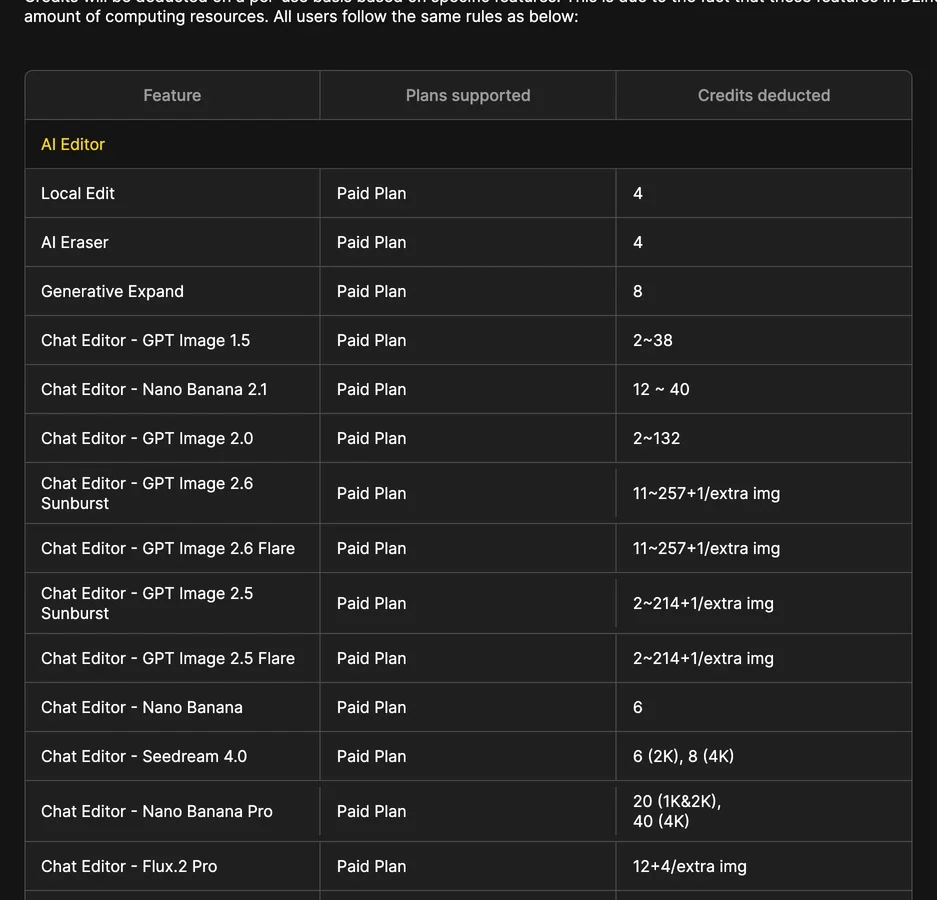
Real screenshot of the expanded credit table in dzine.ai/faq, 17 November 2026. The same column runs from 2 credits to 257 credits for what a buyer would call "one image".
Reading that table is the fastest way to understand how Dzine bills. A representative slice, as published:
| Action | Credits | Plan |
|---|---|---|
| Remove background | 2 | All plans |
| Local edit / AI Eraser | 4 | Paid |
| Generative expand | 8 | Paid |
| Character generation (fast / normal) | 4 / 8 | All plans |
| Chat Editor — GPT Image 2.5 Flare or Sunburst | 2–214, +1 per extra image | Paid |
| Chat Editor — GPT Image 2.6 Flare or Sunburst | 11–257, +1 per extra image | Paid |
| Chat Editor — Nano Banana Pro | 20 (1K and 2K), 40 (4K) | Paid |
| Chat Editor — Seedream 4.5 | 8 (2K), 10 (4K) | Paid |
| Lip sync (image or video) | 6 | Paid |
| Video, 5s — Seedance Pro / Kling 2.1 STD / Kling 2.6 / Seedance 2.5 / Veo 3.1 | 25 / 37 / 85 / 175 / 400 | Video plans |
| Export 1× / 3× or 4× / SVG | 0 / 4 / 10 | 1× all plans; higher tiers Creator and up |
Credit table as listed on dzine.ai/faq, 17 November 2026. Ranges are the vendor's; they vary with resolution, the number of attached images and the number of outputs.
Four variables move the price, and only one of them is the model:
- Model. Nano Banana Pro at 20 credits and GPT Image 2.6 at up to 257 credits are both "an image" in the same editor.
- Resolution. Seedream 4.5 doubles from 8 to 10 credits between 2K and 4K; Nano Banana Pro doubles from 20 to 40.
- Attached references. Two of the ranges add a credit for every extra image you attach. A six-reference edit is not priced like a one-reference edit.
- Number of outputs. Where the table says "per extra image", asking for four variants multiplies the line, not the job.
That is why the plan comparison has to be done against your own job. "How many images do I get" is unanswerable at the plan level; "what does my brief cost at the settings I would actually pick" is answerable in one free-tier run.
Five checks before you pay
Each of these is a bounded action you can finish inside the free 100 credits or a single month of the cheapest plan. Do them in this order.
- Price your own brief on the expensive model. Take one real job, choose the best model you would realistically pay for, generate once, and write down the exact deduction — not the credit number the card implies. This is the only measurement that transfers to your invoice.
- Test the reference path, not just the prompt path. Dzine's FAQ describes image-to-image as a merge that keeps the relative position, size and orientation of the elements you laid out. If your work depends on holding a layout, that behaviour is the feature to test, and one attempt is enough to see whether it holds yours.
- Export at the size you actually deliver. The credit table charges for 3×, 4× and SVG separately and gates the higher ones to Creator and above. A plan that generates well but exports small is not a plan that finishes the job, and no layered-source export is documented.
- Confirm the model you need is on the plan you are buying. The pricing cards and the tool pages list overlapping but different model sets. Check the generation screen for the model, not the marketing strip.
- Check the terms attached to the tier you are on. Free: public feed, personal use only. Paid: commercial use permitted according to the FAQ. If your client work is the reason you are buying, put that check before the credits check.
If you need a larger reference for any of those steps — a poster brief you can compare across tools — the guide on poster ideas and briefs covers the layout and hierarchy decisions that make the comparison meaningful.
Where Dzine stops and the rest of the workflow starts
This is the part most reviews skip. Dzine is a suite, and a suite still has edges.
| The job | Where it belongs |
|---|---|
| A still image, a poster, a campaign set from one brief | Dzine's Image AI, or Ottermind's image tools — either works, pick by price and by whether you want the canvas |
| Editing a photo with local changes, expansion or cleanup | Dzine's AI Editor is built for this; a general image generator is the wrong tool |
| Lip sync, talking heads, image-to-video, motion capture | Dzine's video side. Ottermind's composer on this page does not run Dzine's video models and is not a substitute |
| A timeline with cuts, sound design and finishing | Neither. Use a video editor; the suite produces clips, not an edit |
| A layered master you keep editing | Neither, unless the vendor documents a layered export. Plan to rebuild type in a design tool |
| Rights clearance for a face, a logo or a reference | Neither. Dzine's infringement detection flags risk; it does not clear it |
If your work is video-first, the honest recommendation is to evaluate Dzine as a video tool and read the best AI video generators comparison for that side of the market. What follows here is the image-side route, which is what the composer on this page can hand off.
For the image side, the handoff is a brief, not a model choice. Ottermind's Graphic Design AI turns a goal, an audience, a message and your reference files into a visual direction you can inspect and revise across formats. The AI Poster Generator is the narrower entry when one poster with a clear hierarchy is the whole job. When the photo already exists and needs a treatment rather than a redesign, Image Effects is the right door. None of these replaces Dzine's canvas, its video models or its team controls; they cover the step before that, where the direction is still being decided.
A brief you can run today
Here is the same job written three ways. The composer at the top of this page takes the first one; the other two are worth keeping because they fix the things that usually go wrong when a brief becomes a set of files.
Design a three-format poster set for LANTERN CINEMA, a repertory cinema's late-night film club: A3 poster, 1080 × 1350 post, 1080 × 1920 story. Cut-paper lanterns over a night canal, deep teal ground, warm ochre light, cream type. Headline "Late shows, all winter", then dates and address smaller. Same three colours everywhere; keep the bottom fifth clear.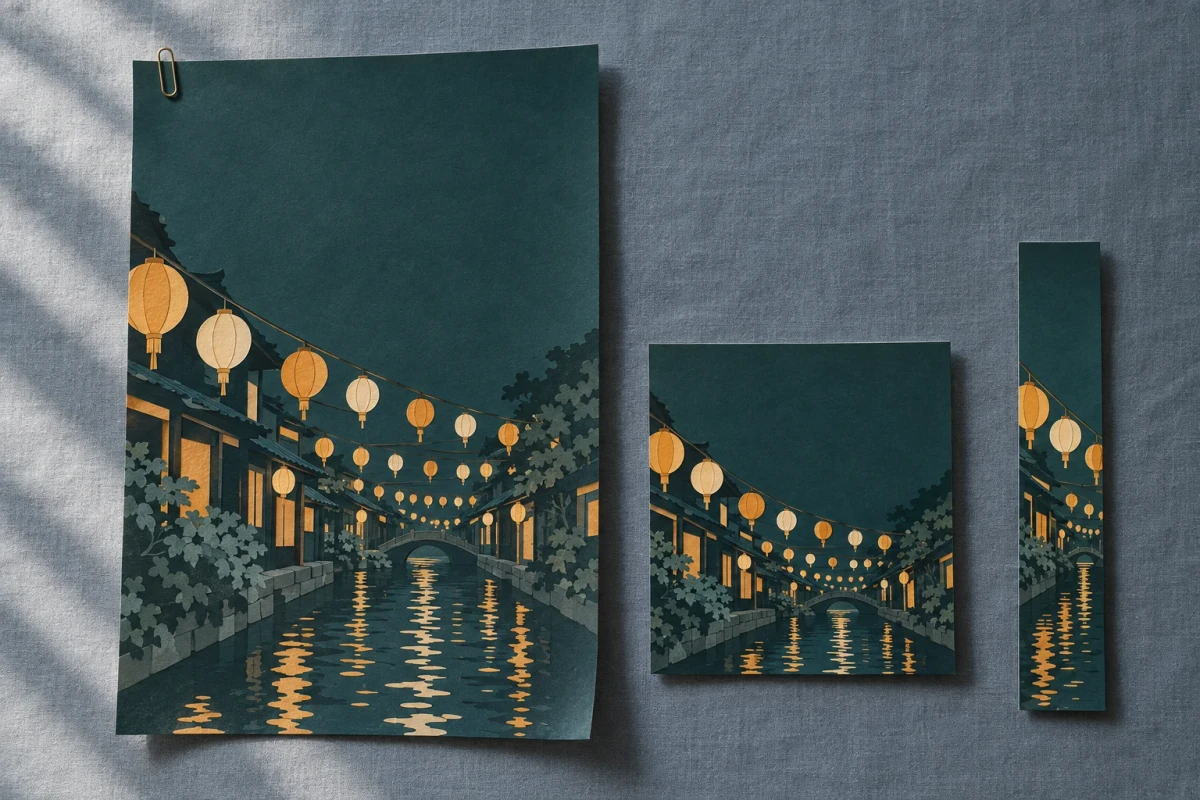
What the brief above is asking for: one direction, three formats, the same three colours, and a reserved band that survives the story crop. AI-generated concept illustration for this article; it is not a Dzine output, an Ottermind output, or a tested result.
Before generating anything, reply with a one-screen plan: the three formats and their pixel sizes, where the headline sits in each, which band stays clear for the address, and the three colours with their hex values. Wait for my go-ahead. If any of those cannot be guaranteed in this tool, name the one that cannot and stop.Apply this system to every format: headline in one bold grotesque, cream on the teal ground; second tier at half the headline size; margins at 6% of the short edge on all sides; the address in the reserved band, never over the illustration. If a format makes a rule impossible, keep the rule and tell me which one you bent instead of quietly dropping it.Two separate actions matter here. Use the lantern brief only fills the composer; nothing is sent. When you send, Ottermind stages the brief and any reference image you attached and continues in Studio, where you confirm the model and the displayed credits before generating. The reference is optional, and a colour swatch, an existing poster or a photo of the venue gives the brief something concrete to match.
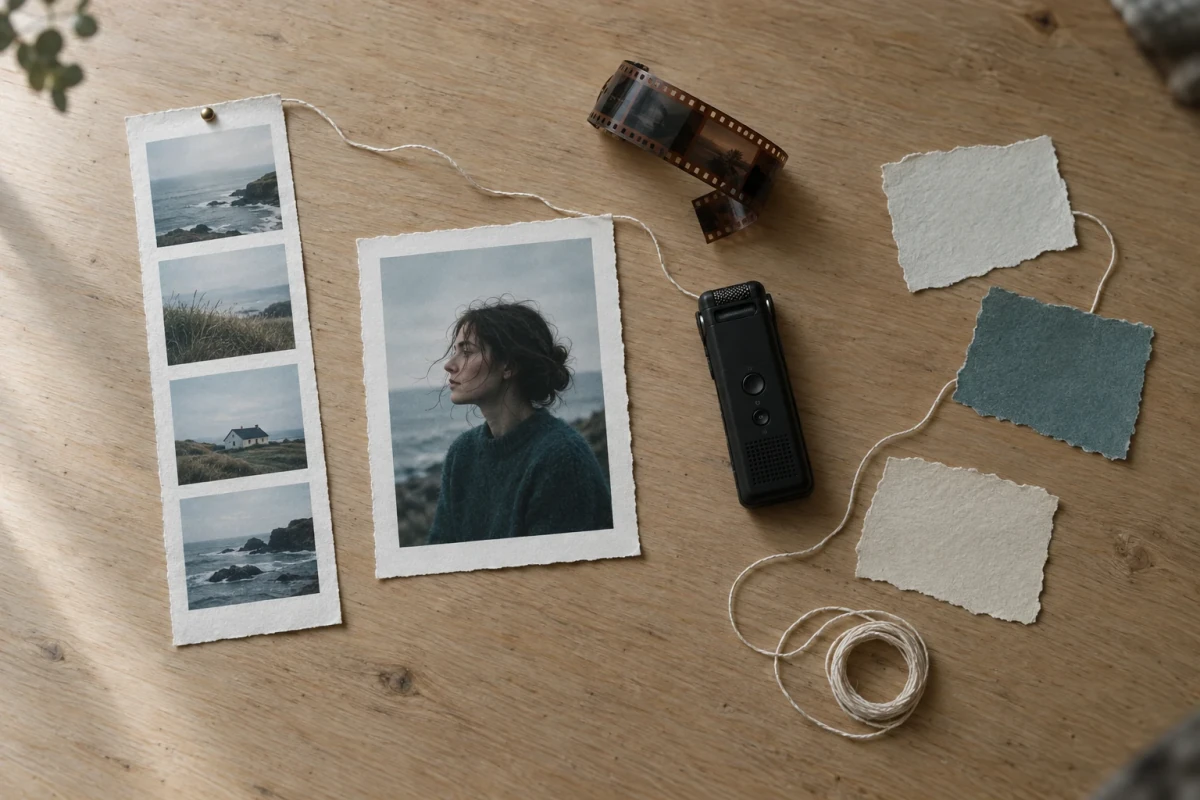
The reason a canvas appeals at all: the still, the strip, the film and the audio are one job, and the thread is the part people forget to pay for. AI-generated concept illustration for this article, not a Dzine screenshot.
What this review cannot tell you
Listing the gaps is more useful than pretending they do not exist.
- Output quality and consistency. No generation was run. Whether a character stays on model across five shots, or whether the canvas holds a look between two models, is exactly the thing to test with the free credits.
- Speed. The FAQ says generation time depends on parameters and method and does not quote a figure. We have no observed timing to add.
- Watermarks. Nothing in the public material states whether downloaded files carry one. Check the export you receive.
- The fair-use threshold behind "unlimited images". The policy is linked from the pricing page but the threshold is not published. Assume it exists and confirm it before you build a pipeline on it.
- Chain of title and infringement detection. Advertised on the homepage; not observable without an account and not independently verifiable here.
- API pricing. Dzine publishes an API page and pipeline documentation, but no public price list was found, so we make no claim about API cost.
- Refunds, plan changes and annual commitments. Not reviewed.
Questions readers actually ask
Is Dzine free to try? Yes — 100 credits on sign-up, valid for 12 months, usable for image and video. The two conditions are that free-tier images can appear in the public community feed and that commercial use is limited to paid plans.
Can I use Dzine output commercially? According to the FAQ, paid plans may use generated content commercially "to the extent permitted by applicable law", and free-tier users may not. That is the vendor's permission, not a clearance: rights in a face, a logo, a building or a reference you supplied are still your problem.
How many images do I get for $8.99? The card says about 500 of the cheapest GPT Image 2.5 setting for 1,000 credits, which is 2 credits each — the bottom of the 2–214 range. Real briefs, at real resolutions, with references, land further up that range, so treat 500 as a ceiling rather than an expectation.
Is Dzine the same job as Lovart or Kira? Not quite. Dzine sells breadth plus a shared canvas and team controls; Lovart sells a design agent on an infinite canvas; Kira sells fast model choice for photo and video edits. We reviewed each on its own terms: Lovart, Kira Art and Kaze. If your question is which model to pick rather than which product, the Image 2.5 Flare versus Sunburst comparison is the more direct read.
Does the free tier let me keep the work private? No. Private generation is a subscription feature; free-tier images are public and can be selected for the community feed.
Related reading
- Design Agent: what an AI design agent does, and where it stops — the workflow Dzine's canvas is competing with.
- Poster ideas and briefs — the hierarchy decisions behind the lantern brief above.
- Chibi style and anime profile pictures — two style clusters where consistency across a set is the whole problem.
- Best AI video generators — the video side of the suite, compared separately.
