Kaze AI Review: Chat Edit, Credits, and What to Check
Kaze's chat editor works by describing the change you want on an image you already have. If that is the job in front of you, write the edit as a brief here and continue in Ottermind Studio, where the model and the credits are shown before anything is generated.
Optional
This is Ottermind's composer. It does not open Kaze, call Kaze's models or spend Kaze credits.
November 6, 2026 · 10 min read
Kaze AI is a browser and mobile AI media app built around editing with a conversation instead of a settings panel. Its own page title calls it an "AI Image & Video Generator with Chat Edit," and the product backs that up with a chat editor, a session-based agent workspace, and a catalog of several dozen single-task pages: watermark removal, photo restoration, outfit and face swaps, headshots, lip sync, dubbing, and short-video formats.
That breadth is the appeal and the problem. The official pages answer the important buying questions — which surface does my task, what does a plan include, what happens to unused credits — but they answer them in three places, and those three do not fully agree. The pricing page sells a four-credit free trial; the homepage FAQ says the free version needs "no account or payment"; the Terms of Use say an account is required to generate anything and that free-plan output may carry a watermark.
If the job in front of you is "clean up this photo and give me a usable product image," you can write that edit in the composer above and continue in Ottermind Studio. Below is what Kaze documents, what it leaves open, and the checks worth running on your own asset before you subscribe.
How this review was prepared: Kaze's own pages were read on November 6, 2026: the homepage, the pricing page in both its monthly and annual views plus its credit-pack tab, the Chat Edit page, the Kaze Agent page, All tools, the API page, and the Terms of Use, last updated September 9, 2026. Several of those pages fill their cards with client-side scripts, so every figure below comes from the rendered page, not from static HTML. This is a documentation review. We did not create a Kaze account, buy credits, or generate an image or video, so we assign no rating and report no output quality, queue time or per-tool credit cost. The cover background and the two concept illustrations were generated with GPT Image 2.5 Flare for this article, and the cover's typographic lockup is Ottermind's own layout; the composer screenshot is a real capture of the public page. No Kaze interface, output or benchmark is fabricated anywhere on this page.
What Kaze AI actually is
Three surfaces share one account, and they ask for different things.
| Surface | What the page shows | The right entry when |
|---|---|---|
| Create | One composer with tabs for Agent, Image, Video, Motion Control, and Enhance & Upscale | You already know whether you want a new image, a new clip, or a repair |
| Kaze Agent | A session workspace with reusable skills (outfit swap, dance video, short drama, unboxing, product review, ASMR), a gallery, and history | You are producing a set of related assets or a repeat video format |
| All tools | Dozens of single-task pages grouped by intent: E-commerce & Product, Outfit & Fashion, Body & Face Edit, Art Style, Photo Enhance & Edit, AI Video | You know the exact operation and do not want to brief an agent |
The model names on the plan cards are the second thing to understand. Kaze lists Seedance 2.5, Seedance 2.0, MiniMax H3, Nano Banana 2 & Pro, Kling 3.0 Pro, Seedream 5.0 and GPT Image 2.5 — third-party models that Kaze routes to. A plan buys access to that list; it does not tell you how any one of them behaves on your file, and the "50% OFF" tags on those rows are promotional pricing, not a permanent rate card.
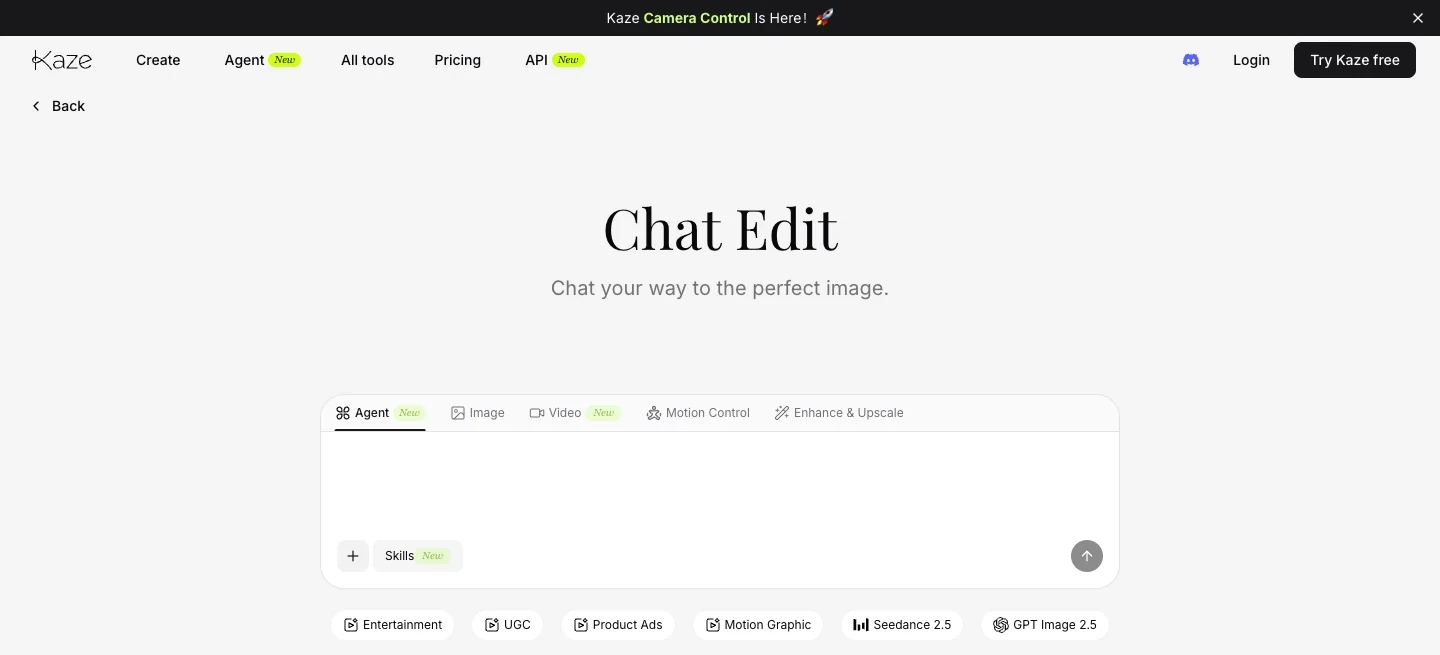
Real capture of Kaze's public Chat Edit page in a desktop browser on November 6, 2026. One composer carries the surfaces described above: Agent, Image, Video, Motion Control, Enhance & Upscale, with the Seedance 2.5 and GPT Image 2.5 model chips underneath. The editor itself opens behind an account, and no generation was run for this article.
The agent page is the one place where Kaze states a mechanism rather than a feature list: it describes an assistant that "learns your style, remembers your preferences" and runs batch generation for content consistency. That is a product claim, not something we tested. Keep it in the same category as the "10× Creativity. 100× Efficiency" banner on the same page.
Chat Edit is the part the product is named after
The Chat Edit page describes one loop: upload any image, tell it what to do in plain language, and each instruction builds on the last. The page's own examples are ordinary jobs — "remove background," "make it cyberpunk style" — and the results are saved into My Projects, where the page says you can revisit past versions and start again from where you stopped.
A second reference-driven path sits next to it. Inspo Copy takes an uploaded reference image and applies "its vibe" to your own photo. Between Chat Edit and Inspo Copy, Kaze covers the two things most people actually want from an AI editor: change this picture according to an instruction, and make this picture look like that one.
Two limits are worth knowing before you build a habit on it:
- The chain is the record. The page promises that each edit builds on the last and that projects are revisitable, but it does not state how many intermediate versions are kept or whether a removed step can be undone later. If a revision matters, export it.
- Editing assumes an input. Chat Edit starts from a photo you upload, so the quality ceiling is set by your source file. This is the opposite of prompting a model from scratch, and it is why the free tier's small credit allowance goes further here than on video.
The catalog is the product — and its audience is narrower than the page count
All tools is the honest summary of what Kaze is optimized for. Read the category names rather than the tool count: E-commerce & Product, Outfit & Fashion, Body & Face Edit, Art Style, Photo Enhance & Edit, AI Video.

One account, several output shapes: a product still, a portrait, a four-frame storyboard and a material reference. AI-generated concept illustration for this article, drawn from the categories Kaze's All tools page publishes; it is not a Kaze screenshot or a Kaze output.
A large share of the catalog is body and fashion modification — Body Editor, Fat Filter, Fat to Fit, Muscle Generator, Skin Color Changer, Breast Expansion, AI Clothing Remover, bikini and lingerie try-on. If you are producing brand or product photography, most of that is noise, and a few of those pages are the kind of tool a client or a legal reviewer will ask you to justify. The useful subset for commercial image work is smaller and more conventional: watermark and background removal, image expand, upscale, photo restoration, product photography, clothes changes on a model, and the video formats.
That distinction also sets a boundary the Terms make explicit. Uploads must be yours to use, and the terms prohibit deepfakes or misrepresentations of a person without their consent. Tools that put a stranger's face or body into a scene are exactly where that clause matters.
What the plans cost
Prices are shown per month and change when you switch the billing toggle. They are the figures on the pricing page, read on November 6, 2026, in US dollars before tax.
| Plan | Billed monthly | Billed yearly (per month) | Credits per month |
|---|---|---|---|
| Pro | $9.9 | $4.95 | 120 |
| Pro+ | $19.9 | $9.95 | 300 |
| Max | $59.9 | $29.95 | 1,000 |
| Ultra | $179.9 | $89.95 | 2,700 |
The annual view advertises the saving against twelve monthly payments: $59.40 on Pro, $119.40 on Pro+, $359.40 on Max, and $1,079.40 on Ultra. The page does not show a separate second-year renewal rate, so the number to confirm at checkout is the amount that will actually charge when the first term ends — the monthly column above is the honest comparison until that is confirmed.
Two details sit outside the table. Every paid tier also shows a matching block of "Extra Agent Credits" under a limited offer, and the site banner describes it as one month of bonus agent credits rather than a permanent doubling. Ultra also exposes a credit selector with 2,700, 4,500, 9,000 and 18,000 options; our capture showed the amounts but not prices for the larger tiers, so those are unverified.
Credit packs are sold separately, in tiers from 40 credits at the base rate up through 120, 250, 500, 1,000, 5,000 and 10,000, with advertised savings from 33% to 76%. The example the page shows is 120 credits at $0.33 per credit for $39.90. The pricing FAQ then says add-on credits are "only available to active subscribers," which sits awkwardly beside a tab labelled "Pay as You Go." If you are not already subscribed, confirm which rule applies to your account before paying for a pack.
What one credit actually buys
The plan cards publish their own estimates, and they are the most useful cost signal on the page because they show how uneven the catalog is.
| Included operation | Pro | Pro+ | Max | Ultra |
|---|---|---|---|---|
| Image generation | 120 | 300 | 1,000 | 2,700 |
| Image edit | 120 | 300 | 1,000 | 2,700 |
| Watermark removal | 120 | 300 | 1,000 | 2,700 |
| Background removal | 120 | 300 | 1,000 | 2,700 |
| Image expand | 40 | 100 | 333 | 900 |
| Image upscale | 30 | 75 | 250 | 675 |
| Photo restoration | 30 | 75 | 250 | 675 |
| Inspo Copy | 15 | 37 | 125 | 337 |
| Video generation | 20 | 50 | 166 | 450 |
Read the last row against the first. On Pro, 120 credits are estimated as 120 image generations but only 20 videos; on Max, 1,000 credits become 166 videos. Video is the operation that eats a plan, and it is also the operation where the model choice, duration and resolution set the real price. These are vendor "up to" figures, not a quote for your project, and the page does not publish a per-tool credit table — so the only reliable method is to run one representative job after signing up and watch the balance move.
Credit rules that decide the real cost
The pricing FAQ is more consequential than the plan cards, because it governs what happens to money you have already spent.
- Subscription credits reset every billing cycle. They do not roll over. The FAQ's phrasing is direct: credits "reset at the end of each billing cycle."
- Add-on credits are the flexible kind. They are valid for 60 days from purchase, are used only after your subscription credits, and are not extended or reset by cancelling and resubscribing.
- Cancelling stops renewals, not access. The plan stays live until the end of the paid period and the credits remain usable until then. There is no immediate cut-off.
- Resubscribing inside a cycle does not issue a second allowance. It re-enables auto-renewal; the next refill arrives on the normal renewal date.
- Lifetime credits still exist for accounts that hold them. They never expire and are used last, after monthly and add-on credits.
- Legacy plans cannot be restored. Accounts that predate the current system were mapped to equivalent monthly allowances, and the FAQ states that once a legacy plan is cancelled it cannot be recovered — only the current Pro, Pro+ and Max plans are available afterwards.
The Terms of Use add the clauses that decide whether the spend is safe: prices are in US dollars and exclude tax, subscriptions renew automatically unless cancelled, purchases are non-refundable except where the law requires it, no pro-rated refunds are given for the current period, prices may change, and the credits needed to generate an output "may change during the duration of a subscription."
The free tier, and the claims that disagree
The pricing page offers a $0 tier described as "Try Free — 4 Credits," with four credits described as a "fixed amount," access to "Nano Banana, Seedance & 10+ models," and full generation history. Four credits is the real free budget.
Around that, three other statements pull in different directions:
- The homepage FAQ says the free version works "with no account or payment required."
- Many tool cards on All tools repeat "100% free, no signup required."
- The Terms of Use say an account is required to access content generation, and that output generated under free plans may include a visible Kaze watermark.
The account requirement and the four-credit allowance are consistent with each other and with the Terms. The "no signup" line is a marketing claim on tool pages that the pricing page and the terms do not support, and the watermark clause means a free-tier file is not the same deliverable as a paid one. Plan accordingly: treat the free tier as a four-credit trial of the workflow, not as a production allowance, and check whether the export you get carries a mark before you build a client deliverable on it.
Rights, watermarks, and what you are agreeing to
The Terms are unusually explicit on ownership, and most of what matters fits in a paragraph.
Ownership. Kaze "makes no claims of ownership or copyright in AI-generated Output," and commercial use is permitted at all subscription levels, subject to the terms.
Watermarks. Output from free plans may carry a Kaze watermark or attribution. Removing, cropping or obscuring it is a material breach. Paid plans that expressly exclude watermarks are exempt.
Your uploads. You must own them or hold the rights, and the terms prohibit deepfakes or misrepresentation of a person without consent. The service is 18+.
The licence you grant. By uploading, you grant Kaze a worldwide, perpetual, royalty-free, sublicensable licence to operate the service, moderate content, and improve or train its models. The terms also state that prompts, reference images and outputs may be shared with third-party model partners, while your name, email and credentials are not.
Retention. Content from registered users is stored "permanently" until you delete it or close the account; unregistered creations are not stored; deletions are final.
Liability. The cap is the greater of $100 or the amount you paid in the previous twelve months, disputes go to binding arbitration with a 30-day opt-out, and the service carries no warranty that output is original or non-infringing.
None of that is unusual for a consumer AI product. It does mean two things for commercial work: a generated file is a starting point that still needs a similarity and rights check before publication, and the watermark rule makes the plan tier part of the legal question, not just the budget question.
Five checks before you pay
The plan table is the last step, not the first. Run these against a real asset from your own backlog.
- Which surface does the job need? A single named operation — remove this watermark, expand this frame, swap this outfit — belongs on a tool page. A set of related assets or a repeat video format belongs in the agent. Prompts and iteration belong in Chat Edit.
- Is your work product-led or people-led? The catalog skews hard toward fashion, body editing and creator video. If you need clean product photography and nothing else, you are paying for a much larger surface than you will use.
- How much of your month is video? Video consumes credits roughly six times faster than image work in the vendor's own estimates. A plan that looks generous for stills can be thin for clips.
- Do you need the watermark gone, and is your plan the one that removes it? The free tier's mark is a terms-level constraint, not a cosmetic annoyance.
- Will you keep the work inside the account? Projects, history and permanent storage are convenient, but subscription credits expire each cycle, add-on credits expire after 60 days, and tools can cost more credits later in the same subscription. Export finished assets early.
Try the same edit in Ottermind
If the task is "turn this phone photo into something I can put on a product page," you can run that without opening Kaze. The brief below is the one loaded into the composer at the top of this page: keep what makes the object itself — the glaze, the throwing rings, the slight lean — and change only what a catalog image needs.

The brief below, illustrated: the same mug as a phone snapshot and as a catalog still, with the notes and reference swatch that would sit beside them. AI-generated concept illustration for this article; it is not a Kaze or Ottermind output, and no model was run to produce either print.
Clean up this phone snapshot of a hand-thrown stoneware mug into a catalog image. Keep the glaze mottling, the throwing rings and the slight lean exactly as they are; swap the kitchen counter for a warm off-white seamless sweep; light it with one soft window from the left and add a single short contact shadow; remove the crumbs and the price sticker; frame it 4:5 with even margins so it sits inside a shop grid.Two actions matter here, and they are separate. Use the mug brief above only fills the composer and scrolls to it; nothing is sent. When you send, Ottermind stages the brief and any reference image you attached and continues in Studio, where the model and the credits are shown before generation. The attachment is optional, but a phone photo of the actual mug is what makes this an edit instead of a guess.
Where each task continues:
| Your task | Where to continue | Why that destination |
|---|---|---|
| Clean a photo into a catalog or listing image | AI Image Generator | Prompt plus a reference image, then review before you commit |
| Retouch a portrait without changing the person | Photo Retouching | Skin, light and cleanup work that stays close to the original |
| Put a consistent look across a set of images | Image Effects | Applies a treatment across several files instead of one at a time |
| Turn the finished still into a short clip | Image to Video | Same picture, described motion, one continuous step |
None of those links open Kaze, call its models, or spend its credits. They are a separate product for the adjacent step, and the honest comparison is about workflow shape rather than quality: Kaze sells a very wide catalog of single-purpose tools plus an agent, billed in credits that reset monthly; Ottermind sells a brief-to-Studio path where the model and the credits appear before anything runs. Ottermind does not promise a free tier, unlimited output, a fixed generation time, a fixed credit cost, or a vector master.
Where this review stops
The official pages establish the surfaces, the model names, the plan prices, the credit rules, the watermark policy and the ownership terms. They do not establish how good any of it is on a specific photo. We have not generated comparisons, timed a queue, or checked whether a watermark-free export matches what the plan card implies, so this review assigns no rating.
Three limits are worth stating plainly. First, the per-tool credit costs are not published as a table on the pages we read; the "up to" figures are plan-level estimates, and the terms reserve the right to change tool costs during a subscription. Second, the annual prices shown are first-term rates with no displayed renewal rate, so year two is unconfirmed. Third, the free-tier conflict above is not a footnote: the difference between a four-credit trial and a no-signup free editor is the difference between testing a workflow and relying on one.
A reasonable verdict is conditional. Kaze is worth the subscription if your work sits in its strengths — social and creator video, outfit and portrait editing, product shots, and a catalog of single-purpose fixes you would otherwise stitch together from separate sites — and if you will actually iterate in Chat Edit rather than one-shot generate. If you need one clean product image at a predictable cost, a focused image generator is a shorter path.
Kaze AI questions worth answering
Is Kaze AI free?
Partly. The pricing page offers four credits at $0, described as a fixed amount, which is enough to see how the editor behaves. The homepage and several tool pages claim the free version needs "no account or payment," but the Terms of Use require an account to generate and warn that free-plan output may carry a watermark. Treat the free tier as a trial.
Can I use Kaze AI images commercially?
The Terms permit commercial use of output at all subscription levels and state that Kaze claims no ownership or copyright in it. That is a licensing statement, not a clearance: nothing in the service checks whether your result resembles an existing image, and the terms disclaim any warranty of originality or non-infringement.
Does Kaze AI have an API?
Yes, with separate billing. The API page prices every endpoint per output rather than in credits — a Starter tier at $0, an Enterprise tier at $500 per month with "up to 55% OFF" and priority support, and per-call rates such as seedance-2.5 from $0.22 per second, seedance-2.0 from $0.14 per second, and watermark removal or image expansion at $0.10 per image. API balance is separate from a consumer subscription.
Can I use Kaze AI inside Ottermind?
No. The two products are separate. This page offers an Ottermind composer and a matching brief so you can run an adjacent task, and Kaze's own tools stay on Kaze's site.
Which plan should a first project start on?
The smallest tier that clears your video volume, not the smallest price. Image work is cheap in the plan's own estimates; video is where 120 credits turn into 20 generations. Start on Pro or Pro+, run one real job of each type you need, and only then decide whether the monthly credit count — which resets and does not roll over — matches your production rhythm.
