Prompt Guidance
Clay Animation: The Craft, the Look, and Seven Prompts
Clay animation is stop-motion with a figure you can deform. The composer below is already filled with the material brief this page starts with — broad dull highlights, one fingerprint, one seam — so you can read it, change it, or send it.
Optional
JPG / PNG / WebP
This is Ottermind's composer, not a stop-motion rig. The prompt is filled in already; sending is a separate action and continues in Studio.
November 16, 2026 · 12 min read
Clay animation — also written claymation or plasticine animation — is stop-motion performed with a figure you can deform. A puppet is sculpted, usually around a wire skeleton called an armature, placed on a miniature set, photographed once, nudged by hand a few millimetres, and photographed again. At 24 frames per second, shot on "twos" so each pose is exposed for two frames, that is twelve separate hand movements for every second of screen time.
The look you recognise is a by-product of that schedule, not a filter over a 3D render: matte surfaces, fingerprints, a seam where two lumps of clay were pressed together, dust you can see on the set, and a camera that never glides quite as smoothly as a machine. Most people who type "clay animation" into an AI tool are not ordering that schedule. They order the look, and they get something else — a glossy render with plastic shading, a subject that morphs between shots, and motion that interpolates instead of stepping. The prompt almost always names a material. It almost never names the production the material belongs to.
That gap is the whole job of this page. Below: what the craft actually consists of, five checks that separate a clay clip from a clay filter, seven prompts that each control one variable, and an explicit statement of what an AI workflow cannot deliver — because a client who asked for stop-motion will not accept a rendered imitation, however good the fingerprints look.
How this guide was prepared: Definitions, frame counts and studio practice on this page come from the Wikipedia articles on Claymation and Will Vinton, checked on November 16, 2026: the two-frame exposure convention, the 21,600 and 64,800 stop figures for 30- and 90-minute films, plasticine's 1897 origin and non-drying behaviour, the shift of feature productions to silicone and resin, Vinton's Foamation process, and the fact that Aardman's Flushed Away is a CGI replication of claymation rather than a clay production. Those are encyclopedia-level secondary sources, not primary interviews. The Ottermind product descriptions come from Ottermind's own tool pages, read the same day. No generation was run in Ottermind for this article, so nothing here is presented as a tested output; where a claim depends on an untested run, it says so. The cover and the three photographs are AI-generated illustrations made for this article with an image model, labelled as such where they appear. The frame-cadence diagram was drawn for this article from the stated arithmetic, not generated.
What the four words actually name
Four terms get used interchangeably in search results and mean different things. Getting them straight costs one paragraph and prevents most of the disappointment that follows.
| Phrase | What it names | What it does not name |
|---|---|---|
| Clay animation / claymation | A production method: stop-motion with a deformable figure | Any particular surface, colour or level of polish |
| Plasticine animation | The same method, named for the material — oil-based modelling clay that does not dry out | A material you can necessarily buy today under that name in every market |
| Clay look / clay texture | A surface result: matte, slightly dusty, fingerprint-bearing, non-specular | How many frames it took, or whether a camera ever touched a puppet |
| CGI clay | A computer-rendered imitation of the above | A clay production |
The distinction has a public precedent worth knowing. Aardman's Flushed Away (2006) is described as a CGI replication of claymation — a film built to read as clay while being made in a computer. Audiences accepted it because the look survived. That is exactly the point: the look can be separated from the craft, so "audiences accept it" proves nothing about which one you have.
Two further terms are useful when you are planning a shot. A hot set is the set currently being filmed, where the puppet is parked in its exact next position and nobody may touch anything; humidity on a long day can deform a puppet or shift a set, so scenes are usually shot in a day or less. Foamation is Will Vinton's name for a foam-rubber process that replaced clay on series work, because polymer clay's maintenance demands hit their limits on long productions. Neither term matters to a viewer. Both explain why clay footage carries small imperfections that are extremely hard to invent on purpose.
Five checks that separate a clay clip from a clay filter
Do not judge a result by whether the surface looks like clay. Judge it by the five properties below, each of which you can measure on a paused frame without any special software.
| Check | How to measure it | Passing | Failing |
|---|---|---|---|
| Material read | Look at the brightest point of the subject. Is there a sharp, round specular highlight? | Highlights are broad and dull; the surface scatters light | A hard white hotspot and a smooth falloff: that is a 3D render with a clay colour |
| Hand-touch evidence | Look for one fingerprint, one tool gouge, one seam, one dust fleck on a surface the camera can see | At least one accidental mark is visible at normal size | A perfectly uniform surface, or "clay texture" that repeats like wallpaper |
| Scale read | Compare depth of field with the size of the object. Watch how fast the background falls out of focus | The set reads as a tabletop: shallow focus, close lens, miniatures slightly out of scale | Everything sharp from front to back — the set reads as a room, so the figure reads as a giant |
| Cadence | Scrub one second frame by frame and count how many distinct poses you pass through | Around 12 changes in 24 frames; identical frames in pairs | A new position on every frame — smooth interpolation, not animation |
| Continuity | Compare the first and last shot of the same character: same seams, same wear, same light direction | The figure looks photographed in one session | The face, the colour or the light shifts between shots |
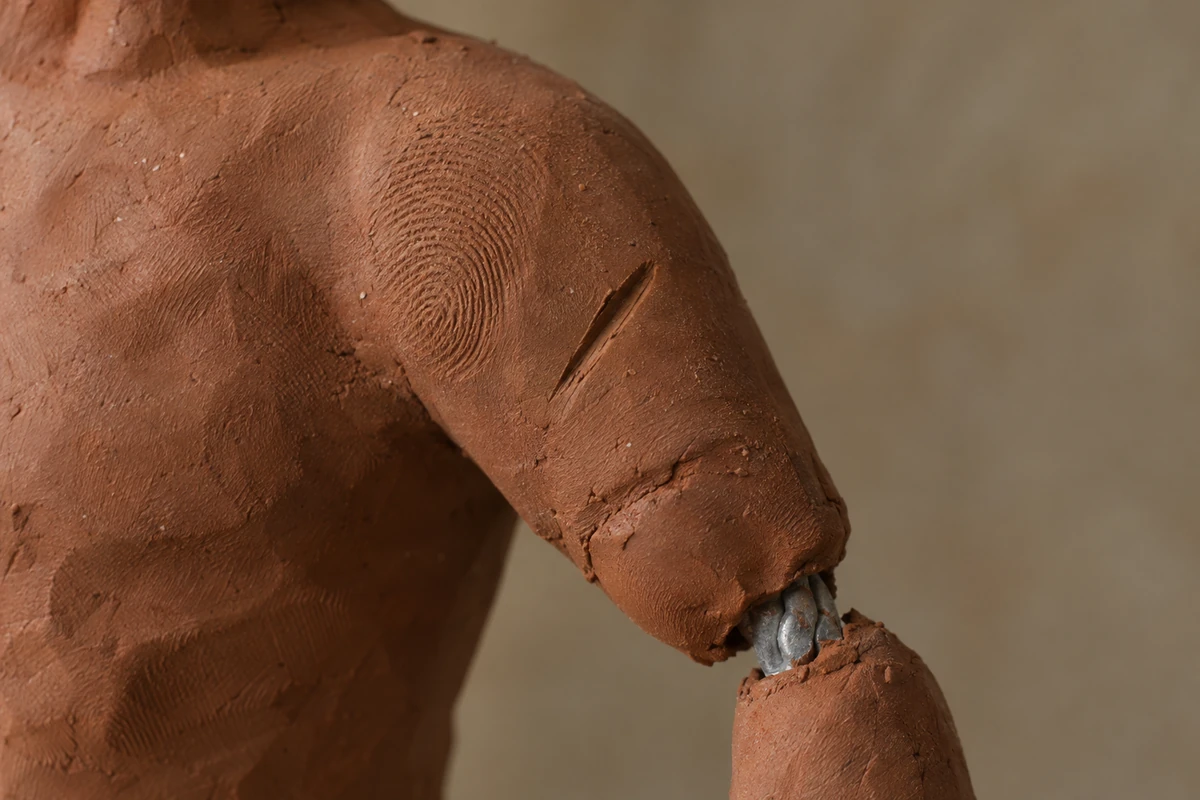
The material check, magnified. A dull highlight, a fingerprint, a seam and one visible piece of armature are the four things that say "this object was handled". AI image illustration made for this article; it is an example of the target surface, not a frame from a clay production.
The material check is the one people skip. A clay surface is matte because plasticine is soft and dusty; it scatters light instead of reflecting it in a point. Ask a model for "clay texture" and you often get a colour, not a reflectance. The four tests that follow — hand marks, scale, cadence, continuity — are what a viewer's eye is actually using when it decides the shot is real, even if they would never say so.
Where AI stops being craft
This is the part that decides whether the workflow is usable for your project, so it deserves plain language.
Clay texture is achievable. Stop-motion is not. An image or video model can produce a figure that reads as plasticine, with fingerprints, soft highlights, a miniature set and dust. What it cannot do is perform the production: there is no armature under the surface, no puppet was repositioned between exposures, no hot set exists to be disturbed, and no frame was touched by a hand. If your deliverable is "a clip that looks handmade", you are inside the achievable half. If your deliverable is "a stop-motion film" — for a festival, a broadcaster, a client who has commissioned the physical craft — a generated clip is a different artefact and calling it stop-motion is a false claim about how it was made.
Cadence is partly controllable and partly not. Frame stepping is measurable: export, count distinct poses in one second, and you have your answer. Whether a given model will honour a request for twelve changes a second is not something this article can promise, because no generation was run to test it. Treat "shot on twos" as a direction that makes stepping more likely, verify it frame by frame, and expect to fix it in the edit if the model smooths it out. That is an honest description of an untested instruction, not a feature claim.
Consistency degrades with shot count. A physical production gets continuity for free: the same puppet appears in shot 12 as in shot 1, minus wear. A generated production has to be talked into it, shot by shot, and long clips drift. Plan for short shots and explicit identity descriptions rather than one long take, and read the result the way an editor reads dailies — see human-in-the-loop review for the mechanics of reviewing generated output instead of accepting it.
The seams are the tell, in both directions. A real clay shot shows a join line where an arm was pressed on, a thumbprint on a haunch, a hair of dust. Those are your best evidence that a shot was photographed, and they are also the cheapest thing to imitate. If you need to know which one you are looking at, ask for the production record — call sheets, set photographs, the puppets — not a better look at the surface.
Seven prompts, one variable each
Each prompt below changes one property from the checks table and leaves the others alone, so the result tells you which instruction worked. They assume an image-to-video flow with a reference still, which is the arrangement with the most control: the reference fixes the look, the prompt fixes the movement. Replace the subject, keep the structure.
1. Material: matte, dusty, handled
Controls: the reflectance of the surface, which is what makes "clay" read as clay rather than as painted plastic.
The character in the reference image is modelled from plasticine: matte, slightly dusty, and uneven in a way a hand produces. Keep the highlights broad and dull — no sharp white specular hotspot anywhere on the body. Add one fingerprint pressed into the haunch, a shallow gouge from a sculpting tool on the shoulder, a visible seam where the arm was joined to the torso, and a little dust in the creases. The colour stays flat and chalky, with no gloss and no metallic sheen.Check the brightest pixel on the subject. If it is a small hard white point, the reflectance clause lost; the model gave you a clay colour on a plastic material. Re-run with the specular sentence first in the prompt rather than last.
2. Scale: a miniature, not a room
Controls: the depth cues that tell a viewer the set is 40 centimetres wide.
Photograph this as a tabletop miniature set rather than a full-size room. Use a close lens with shallow depth of field so the background falls out of focus within a short distance. The set is built at model scale: the pavement slabs are a few centimetres across, the doorways are shorter than the character's hand span suggests, and the walls are visibly thin where the set ends. Add one ordinary object at the edge of frame — a real pencil or a coil of clay — that is clearly out of scale with the set.Depth of field is the cheapest scale cue there is and the one AI gets wrong most often, because full sharpness reads as a big room. If everything is crisp from the figure's nose to the back wall, the miniature clause was ignored.
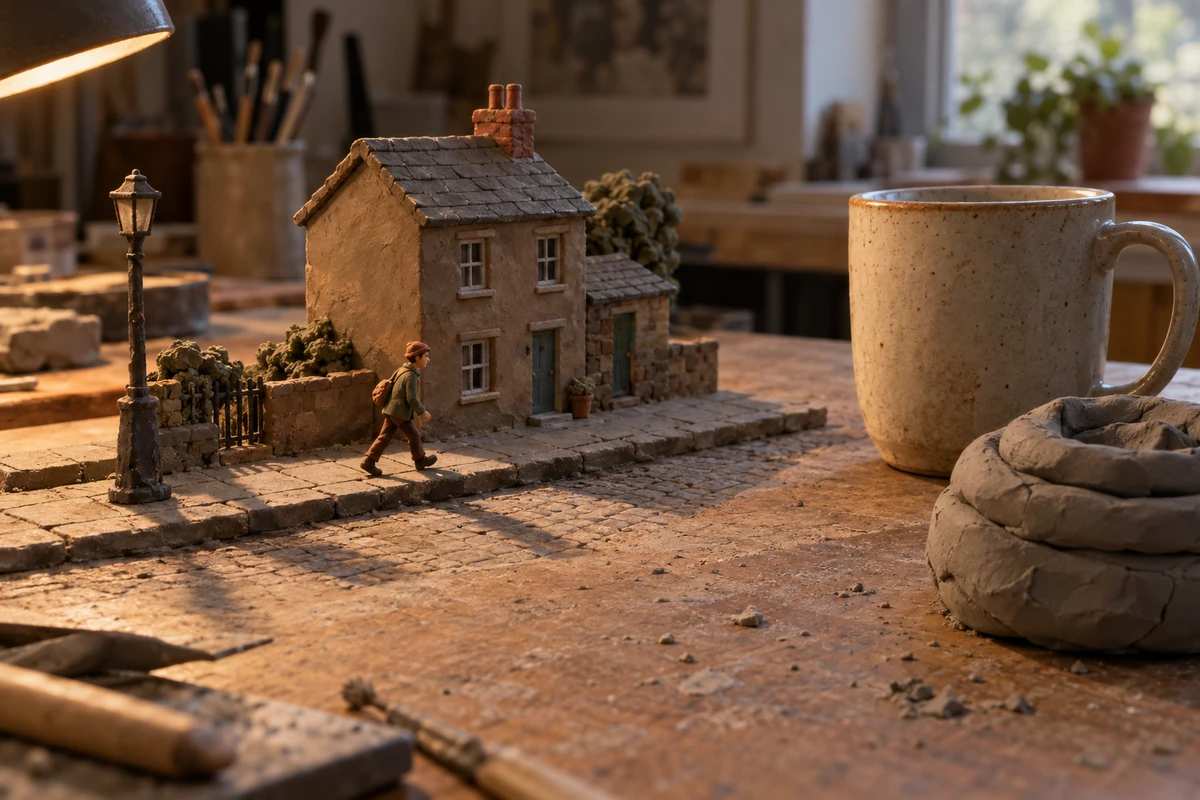
Scale read, stated as a physical comparison. The mug and the clay coil are the ruler: they are ordinary objects, and they are enormous next to the set. AI image illustration made for this article, showing the depth cue to ask for; not a photograph of a real production.
3. Cadence: on twos
Controls: how many distinct poses appear per second, which is what a viewer reads as stop-motion.
Animate this as stop-motion shot on twos: the figure holds each pose for two frames at 24 frames per second, so the motion advances in twelve visible steps per second rather than flowing continuously. Between poses the body is repositioned, not interpolated — a slightly different angle each time, with the same tiny mismatch a hand introduces. No motion blur, no smooth easing, no in-between frames.Count the steps. Export a second of footage, step through it, and count how many frames show a new position. Twelve or close to twelve means the instruction landed; twenty-four means you got interpolation with a stutter filter, which reads as a mistake rather than as animation.
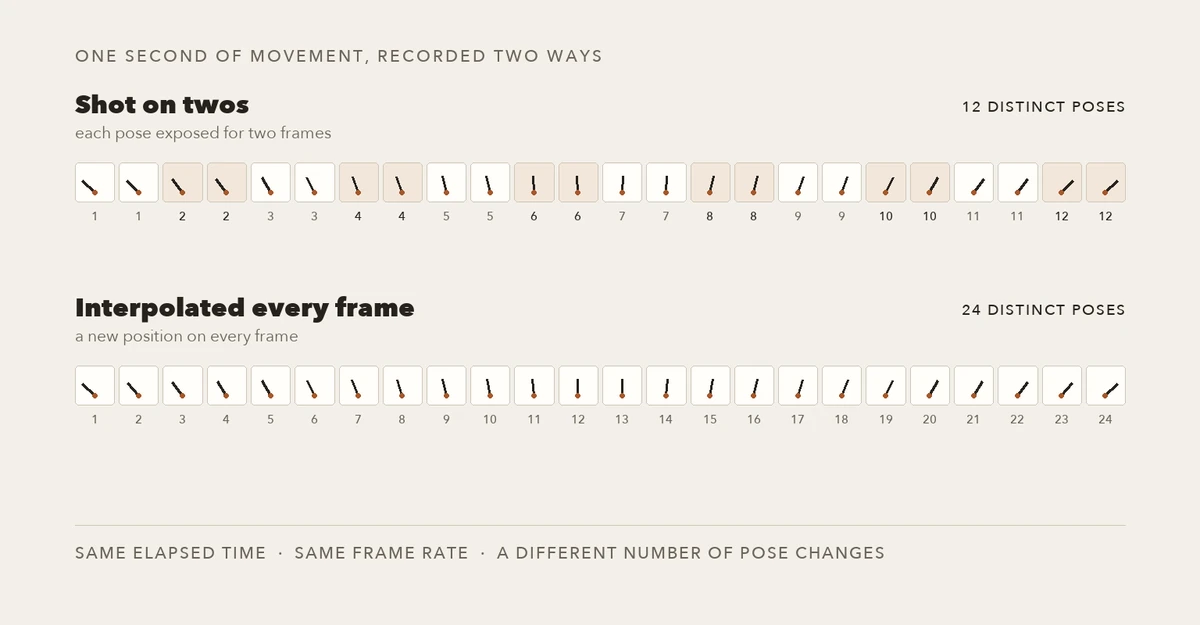
The two cadences, drawn from the arithmetic rather than generated: twelve poses exposed twice each, versus twenty-four interpolated positions. Only the top row is the stop-motion schedule. Diagram made for this article; the drawings are illustrative, and the frame counts are the convention described above.
4. Weight: contact and squash
Controls: whether the figure looks like it has mass, which decides whether the clip reads as animation or as a dragged image.
Animate a single hop. Before the figure leaves the ground, the legs compress and the body squashes slightly, and the feet stay planted on the set until the push-off frame. In the air the body stretches and the arms trail. On landing the feet contact first, the body squashes again and settles over two or three poses. Nothing slides: the feet do not drift while they are on the ground, and the shadow stays under the figure.Watch the feet, not the body. Sliding contact is the most common tell that a model animated a silhouette instead of a character with weight, and it is the failure that a squash-and-stretch sentence fixes most often.
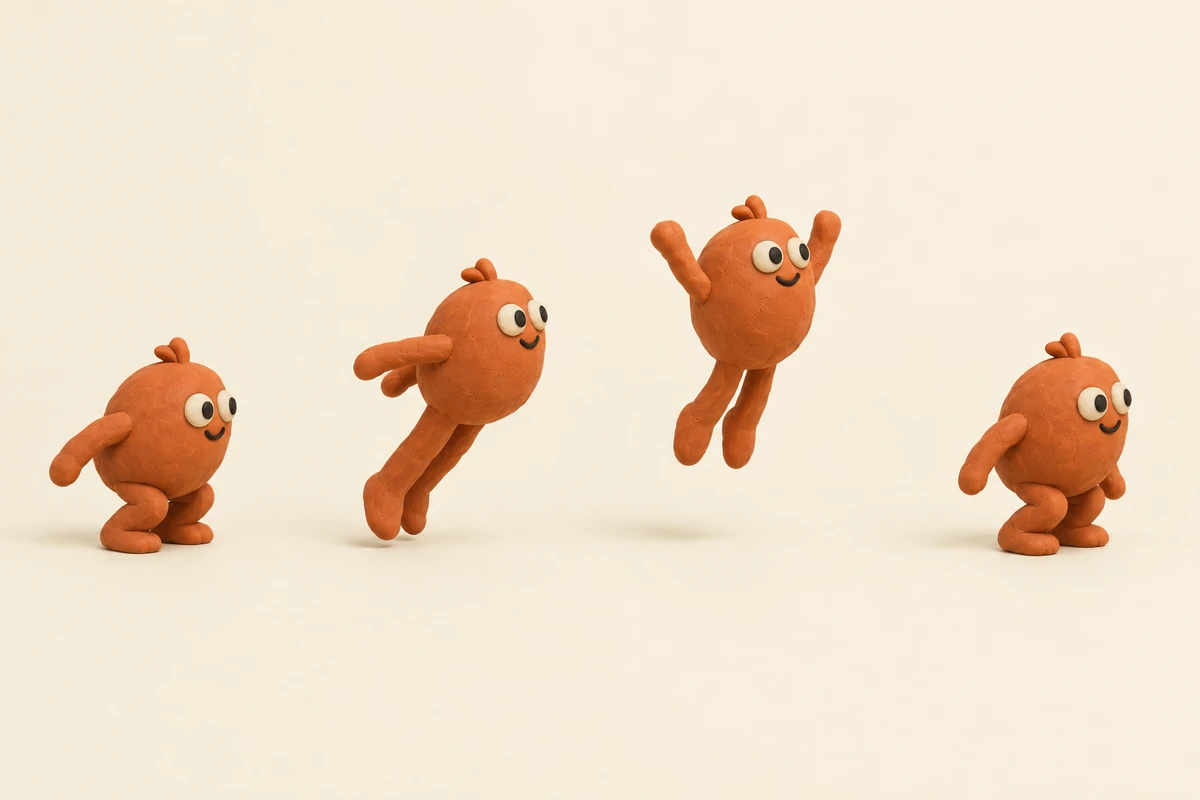
One action, four poses: the keys an animator would set before any in-between exists. If you cannot name the poses in your clip, you cannot judge the animation — only the texture. AI image illustration made for this article; it shows the pose logic to describe, not a tested generation.
5. Continuity: identity, written down
Controls: whether the same character survives from shot to shot.
Keep the character identical to the reference: same body proportions, same flat terracotta colour, same seam across the left shoulder, same chipped ear, same dust pattern on the chest. The set behind it is unchanged — same wall texture, same three props in the same positions, same light from the upper left. Do not restyle the character, do not add detail to the face, and do not move anything in the background.Write the identity down once, as a list you can paste into every shot, rather than re-describing the character from memory each time. Continuity failures are usually a specification failure: two prompts that each sound reasonable and describe two slightly different figures. Longer sequences need a stricter version of this — the same problem appears in character consistency across clips.
6. Camera: locked off, with a reason
Controls: how much of the frame is allowed to move, which decides how much the model has to invent.
Keep the camera locked off on a tripod at tabletop height, framed the way the reference is framed. No push-in, no parallax, no handheld drift. If the camera moves at all, it moves in one discrete step between poses — as if the rig were nudged by hand between exposures — never in a continuous glide.A locked-off camera is a production choice, not a limitation: on a real set, moving the camera means moving the rig and re-lighting, which is why so much clay work is shot from one position. If you want a camera move, budget it as its own shot, and see dutch angle for what a deliberate tilt does to a frame when it is chosen rather than drifted into.
7. The anti-render list
Controls: the failure the model defaults to when nothing else is specified.
No glossy plastic, no wet or rubbery sheen, no chrome, no glass reflections on the figure. No morphing between shapes, no dissolving edges, no liquid transitions. No smooth 60 fps motion, no motion blur, no depth-of-field ramp. No text, no lettering, no logos, no added props. If a choice would make the shot look more expensive and less handmade, choose the handmade version.Negative lists are blunt instruments and worth one line at the end, not five lines at the start. The last sentence does more work than the list: it gives the model a rule for the cases you did not enumerate.
Try prompt 1 in Ottermind. The composer at the top of this page is pre-filled with the material brief. The button below refills it if you have edited it, and sending is a separate action that continues in Studio.
The shot plan behind those prompts
The prompts only work inside a plan. This is the order that keeps a clip judgeable.
- One action, three seconds, one camera. Write the action as a sentence with a start and an end ("the fox hops once, lands, settles"). A clay shot is expensive per second; a generated one drifts per second. Three seconds is enough to read a style and short enough to check.
- Build the first frame as a still. Prompts 1 and 2 belong here. The still is the reference the video step will animate, so fix the material, the scale and the light before any motion exists.
- Animate the still with a cadence, a weight rule and a negative list. Prompts 3, 4, 5 and 7. Do not restate the whole look; the reference already carries it, and repeating it invites the model to redraw the character.
- Count poses before you judge quality. Twelve steps per second, or a decision that you are making a clay-look clip rather than a stop-motion clip.
- Review against the reference, not against your memory of it. Put the still and the first frame of the clip side by side; the drift is visible in seconds and invisible in isolation.
If you are building more than one shot, this becomes a small editorial loop — generate, compare against the reference, change one clause, regenerate. That loop is reviewing generated work more than it is prompting.
Failures that keep coming back
| What you see | What actually happened | The clause that fixes it |
|---|---|---|
| The figure looks like painted plastic | Reflectance was never specified; the model gave a clay colour with a hard highlight | "Broad dull highlights, no sharp specular hotspot" |
| Textures repeat like wallpaper | The model imitated a texture map instead of a hand | One named mark — a fingerprint on the haunch, a gouge on the shoulder — not "clay texture" |
| The set reads as a full-size room | Everything is sharp; no miniature depth cue | "Close lens, shallow depth of field, background falls off quickly" |
| Motion looks like a slowed video | Interpolation, not stepping | "Holds each pose for two frames; repositioned, not interpolated" |
| Feet slide during a step | Silhouette animation: no contact constraint | "Feet stay planted until the push-off frame" |
| The character changes between shots | Two descriptions of two slightly different figures | A written identity list pasted into every shot, not a fresh description |
| Edges melt or drift | The clip is too long for the model to hold | Shorter shots, fewer moving elements, one action per generation |
Two of these are worth more attention than the others. Melting edges and identity drift are both length problems wearing a style costume: the longer the clip, the more frames the model has to invent without a reference. The fix is editorial, not lexical — cut the shot, or cut the element that keeps changing.
Where this fits in Ottermind
Two entry points cover the workflow above, and neither one is a stop-motion rig.
Image Effects is the still-image half: take a permitted photo, name one intended change, and keep the subject and framing intact. That is where a clay treatment belongs — one direction at a time, so you can see whether the surface reads as matte before you add anything else.
Image to Video is the motion half: attach the still as a reference and describe subject movement, environmental motion, camera behaviour and pace. It is designed for exactly the arrangement this article recommends — a fixed reference frame plus written direction — and it returns takes you review and refine rather than a single guaranteed output.
What it will not give you: a frame-accurate twelve-poses-per-second guarantee, a physical armature, per-frame hand repositioning, or a production record that would let you call the result stop-motion. Duration, resolution and how many takes you can run depend on your account and the model you select, and those limits are visible in Studio rather than promised here. No generation was run in Ottermind to test the prompts on this page, so treat them as well-founded directions, not as verified recipes.
Related reading
- Tweening: keyframes, spacing, and in-between frames — the frame-spacing arithmetic that "on twos" is a special case of.
- Morphing: how to build an A-to-B transform that holds together — the transition you do not want between two clay poses.
- Character consistency across clips — the same identity-drift problem, from a different workflow.
- Dutch angle: the tilt, the degrees, and the prompt that holds it — when a camera choice is worth a shot of its own.
- Image-to-video prompts: what each clause controls — the wider set of motion clauses these seven prompts are drawn from.
- What ChatGPT finishes and what needs a renderer — why a still and a clip are different deliverables.
- Human in the loop: reviewing generated work — how to run the compare-and-regenerate loop without burning an afternoon.
