Prompt Guidance
ChatGPT Caricature: What Changes, What Breaks, and Six Prompts That Hold
ChatGPT can turn a photo into a caricature in one message. What you cannot choose in that message is how far the face gets pushed — so put the exaggeration in numbers and check the likeness before you post it.
Optional
JPG / PNG / WebP
This is Ottermind's composer. Filling the brief and sending it are separate actions, and no image is generated until you continue in Studio.
November 14, 2026 · 11 min read
Yes, ChatGPT can turn a photo into a caricature, and it takes one message. OpenAI's help centre states that image creation and editing are part of ChatGPT on all tiers, that you can upload an existing image and describe the change you want, and that generation can take a few minutes (Images in ChatGPT, checked November 14, 2026). Nothing about the task is hidden or paid-only in the way the search results imply.
The sticking point is control. A caricature is two decisions — keep the person recognizable, exaggerate what makes them them — and the prompt interface gives you a text box for both. Ask for "a caricature" and the model picks the level for you: usually a polite cartoon that flatters nobody, occasionally a big-headed drawing that has stopped being the person. The users who got a good result during the February 2026 wave of workplace caricatures were not using a secret prompt. They were checking the face.
How this guide was prepared: Official pages checked November 14, 2026: OpenAI's Images in ChatGPT and usage limits articles, and Wikipedia's Caricature entry (revision 1385434321). The figures are our own renders: one photo of a fictional subject — generated for this article, not a real person — was drawn at four exaggeration levels and five failure variants with OpenAI's gpt-image-2.5-flare model through the API on November 14, 2026, using the prompts quoted below. We used the API, not the ChatGPT app, so that every frame took the same reference photo; the prompts are written for ChatGPT and work the same way when a photo is attached. One prompt in this test was refused by the safety system, which we report where it happened. Captions, labels and crops on the figures are editorial. The composer image is a real screenshot of this page. Nothing below is a claim about how the model works internally, and no generated image is presented as a paid customer result.
What a caricature is, and what a filter is not
A caricature is a portrait that keeps the person identifiable while exaggerating the features that make them distinctive. Wikipedia's definition puts it as an image showing a subject's features "in a simplified or exaggerated way", and notes the word comes from the Italian caricare, to load — a caricature is an "overloaded portrait" (Caricature, checked November 14, 2026). The same entry points out that caricatures can flatter or wound, which is the part most prompt guides skip.
That definition gives you a test for every result you get back. A style filter — cartoon, anime, watercolour — changes the rendering and leaves the proportions alone. A caricature changes the proportions and leaves the rendering as a choice you make separately. The two get mixed constantly, including by tools that advertise a "caricature generator" and ship a cartoon filter with a slider.
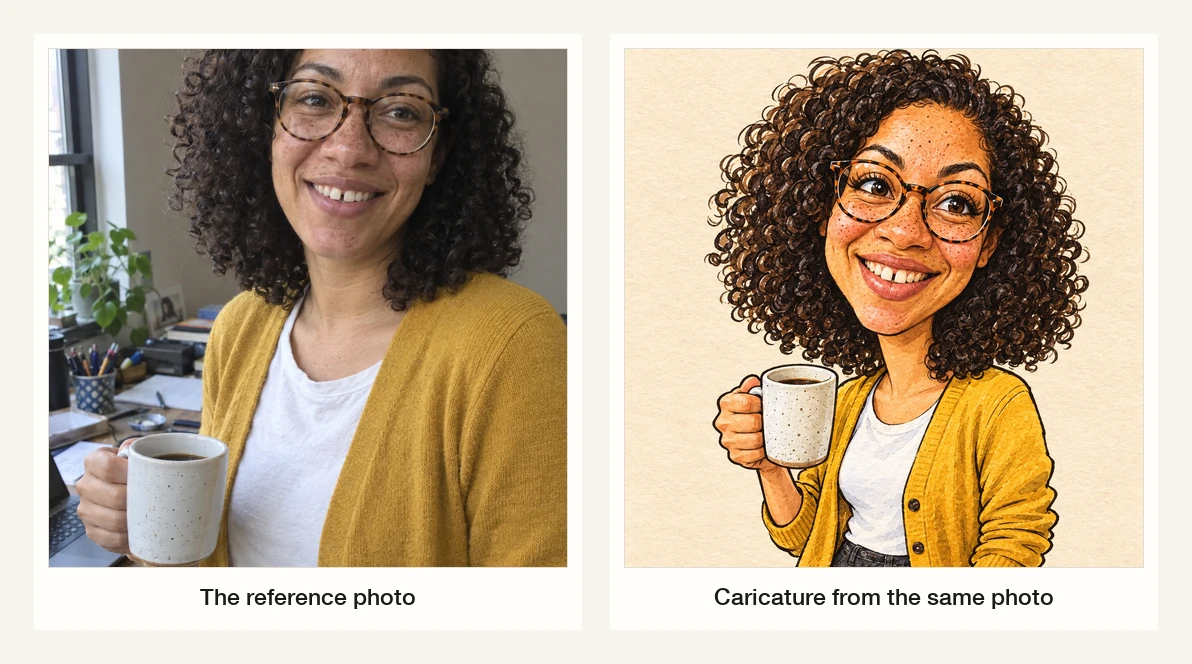
Left: the reference photo, a generated stand-in for a real client photo. Right: the same face at the classic level. Nothing was recoloured into a cartoon; the head, eyes and smile were enlarged and the rest was kept, including the glasses, the freckles, the gap in the teeth and the cardigan. Rendered with gpt-image-2.5-flare for this article, November 14, 2026. Labels added by us.
What ChatGPT actually does with the photo
Three details from OpenAI's documentation decide how you should write the brief.
It edits what it is given. After the first image you can select part of the frame and describe a change, or skip the selection and describe the edit in the conversation. OpenAI adds that highlights are not always precise and edits may extend beyond the area you selected, so a request to "widen the smile" can also move the glasses. Re-read the whole face after every edit, not just the part you aimed at.
It keeps the aspect ratio under your control. The current app exposes an aspect-ratio picker, so a square avatar and a 16:9 card come from the same draw rather than a crop afterwards.
Your limits are account-level, not model-level. OpenAI publishes no single number that applies to everyone; plan allowances are shown in the account, and from December 2026 the company says Plus, Pro and Business allowances will be measured in tokens shared with Codex (usage limits, checked November 14, 2026). Plan a batch of eight or ten attempts rather than fifty, and check the usage indicator before you start.
What the interface does not give you is a dial for exaggeration. That has to come from the sentence, and the sentence works better with numbers than with adjectives.
The exaggeration ladder: pick a level, not an adjective
"Make it funnier" is not an instruction a model can calibrate. "Head one and a half times life size, eyes enlarged, smile widened, neck slimmed" is. We rendered the same photo at four levels to see what each one buys.
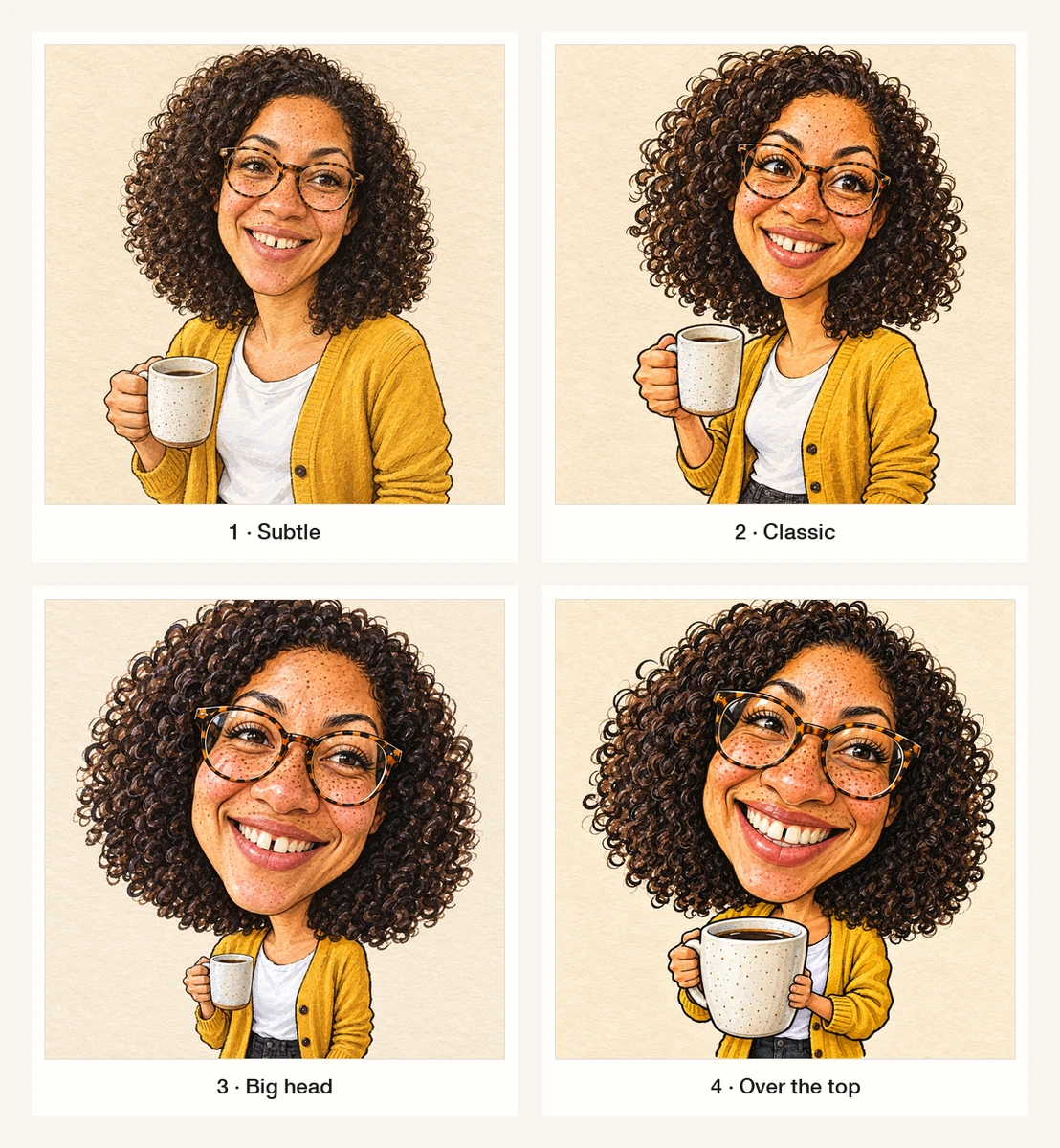
Four renders from one reference photo, one number changed each time. The subject is a generated stand-in, not a real person. Rendered with gpt-image-2.5-flare for this article, November 14, 2026; the level names are ours.
| Level | What changes | Where it works | Where it fails |
|---|---|---|---|
| 1 · Subtle | Head about 1.2×, everything else near-measured | Profile pictures, workplace posts, a gift for someone cautious | Reads as an illustrated portrait; nobody calls it a caricature |
| 2 · Classic | Head about 1.5×, eyes and smile enlarged, neck and shoulders reduced | The default for cards, invitations and social posts | Still polite; not the viral "big head" look people expect |
| 3 · Big head | Head about 2.5× on a compact body | The trend look; party invites, team pages | Props start to shrink or disappear; hands get fewer options |
| 4 · Over the top | Head about 3×, tiny hands, maximum grin | Thumbnails, posters, a joke between friends | Dignity and likeness both drop; usually the wrong choice for work |
Two observations from the ladder are worth keeping. First, the requested multiplier is a direction, not a measurement: level 3 and level 4 came back closer together than the numbers suggest. Second, and more useful, the likeness survived all four levels — because the reference photo was strong and the prompt spent its words describing the face. When we removed the photo and asked for "a caricature of me", the model invented someone else entirely. The photo does the work; the adjectives do not.
Six prompts, one variable each
Each box changes one thing. Keep the rest fixed or you will not know which instruction did the job.
1. The classic fairground level
The control prompt. It names the medium, the level, the proportions, and — critically — the features that must not move.
Use the attached photo as the only reference. Draw the person as a fairground caricature on textured off-white paper: warm black ink line work, flat watercolour washes, visible paper grain. Classic level: head about one and a half times life size, eyes enlarged, smile widened, neck slimmer, shoulders narrower. Keep the hair shape and texture, glasses frames, eyebrows, nose, teeth and clothing exactly as photographed. Waist-up, three-quarter view, plain paper background. No text, no border, no signature.This changes: the drawing style and the exaggeration level together. If the result is too tame, raise the head multiplier to 2.5 before changing anything else.
2. The profile-safe version
For a LinkedIn photo or a colleague's leaving card, the joke has to survive being seen by the person's manager. This brief keeps the proportions nearly honest and makes the medium do the work.
Use the attached photo. Draw an illustrated portrait with the lightest possible caricature: keep the real proportions, enlarge only the eyes by about ten percent and widen the smile slightly, so it reads as a hand-drawn portrait rather than a joke. Loose ink line, two-tone watercolour wash, warm paper. Head and shoulders, square crop, calm neutral background, no text.This changes: how much the face is pushed. Everything else — medium, crop, background — stays as in prompt 1.
3. The gift version, with a name
A plaque turns a drawing into an object. Short lettering is now reliable enough to try, but you must read every word afterwards.
Use the attached photo. Draw a big-head caricature for a birthday gift: head about two and a half times life size on a compact body, both hands around a large coffee mug, standing, feet visible, ink and watercolour on warm paper. Below the figure add a hand-lettered ribbon banner with the name "DANA" in capitals, and the words "THANK YOU 2026" in small hand lettering. Spell both exactly as written and add no other lettering.This changes: the composition and the lettering. It is also the prompt most likely to need a second pass, so check the spelling at full size.
4. Two people in one drawing
Group drawings fail in a specific way: the second face becomes a generic face. Name both people's anchors and ask for the same level on each.
Use the attached photo of two people. Draw one caricature of both of them together, standing side by side. Exaggerate each face at the same classic level, using each person's own most distinctive feature — the one that makes them recognizable — and invent nothing: match each person's hairstyle, glasses, facial hair and clothing to the photo. Keep both at the same scale, and keep the real height difference. Ink and watercolour on warm paper, plain background, no text.This changes: how the model handles more than one subject. If one face drifts, split the job: draw each person separately and combine them later.
5. Full body, at work
The February wave was mostly people asking for themselves at their desks. A full-body frame gives the model more to invent, so pin the scene down.
Use the attached photo. Draw a full-body caricature of this person standing beside a cluttered office desk: classic big-head proportions, head about twice life size, one hand resting on a coffee mug, a laptop and a notebook on the desk. Keep the real outfit, hairstyle and glasses from the photo. Warm office with a window and a plant behind them, loose ink and watercolour, no lettering, no logos on the laptop or the mug.This changes: the scene. Props and background are where invented detail appears; the "no logos, no lettering" clause removes most of it.
6. The repair pass
The most common next step is not a new drawing but a smaller correction. Say what stays.
Keep this drawing exactly as it is and change one thing: make the head about fifteen percent smaller relative to the body. Keep the eyes, smile, hair, glasses and clothing untouched, keep the same paper texture, line weight and colours, and do not redraw the background. Add no text.This changes: one proportion. This is the prompt to use inside ChatGPT's editor, where you can also select the head and ask for the change on that region alone.
The button above fills this page's composer with prompt 1. Filling and sending are separate: nothing is generated until you continue in Studio.
The forty-second likeness check
Run this before you send the drawing to anyone. It takes less time than generating a replacement.
1. Silhouette. Squint, or look at the image from two metres away. Hair shape, head outline, shoulders, glasses: does the black shape read as this person? If the silhouette is generic, more detail will not save it.
2. Anchor count. List the features that identify the person: hairline, glasses, beard, freckles, a gap in the teeth, earrings, a scar, a particular jaw. Count how many survived the drawing. Three or more is usually enough; one is a stranger with the right clothes.
3. The right feature is biggest. Look at which feature the drawing pushed hardest. If it is the one you would name first when describing the person, the caricature is working. If the nose grew while the eyes — the thing everyone notices — stayed average, the model exaggerated a template, not a person.
4. Hand it over. The only test that counts is the subject's own reaction, and it is also the permission step. Ask before posting; a caricature that exaggerates a feature someone is sensitive about is a different conversation from a flattering one.
Where it goes wrong
Four failures cover almost every bad result we produced or found in circulation. Three of them are in the strip below.
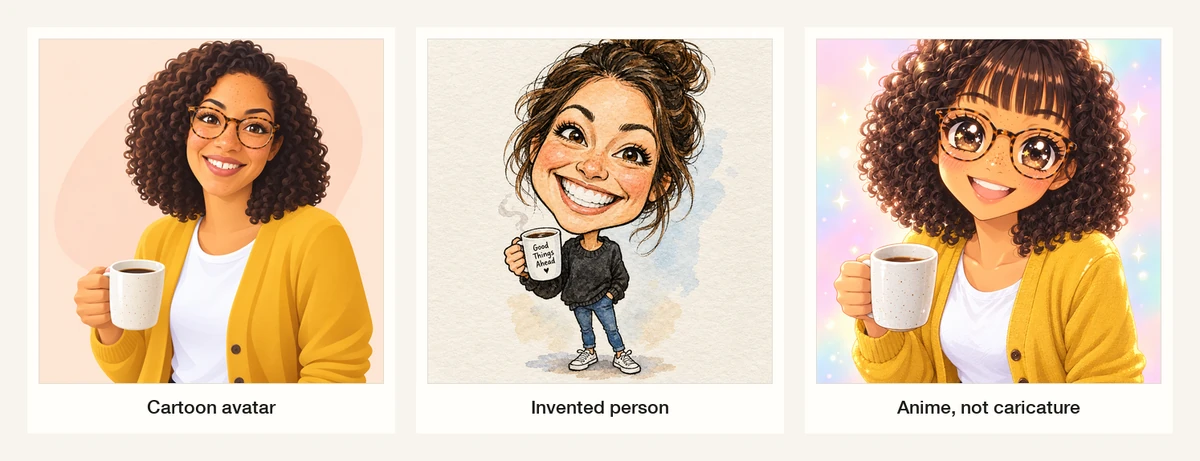
Left: a stylised avatar with no exaggeration. Middle: what "a caricature of me" returned when no photo was attached — a stranger, plus a mug slogan nobody asked for. Right: style leakage; the brief asked for a caricature and got an anime character. Rendered with gpt-image-2.5-flare for this article, November 14, 2026.
| What you see | Why it happened | What to change |
|---|---|---|
| A smooth cartoon avatar | The prompt described a style and never a proportion | Add the head multiplier and name two features to enlarge |
| A different person | No photo attached, or the photo was a group shot where the subject is small | Attach a clear single-subject photo and describe that face |
| The prompt overrode the photo | The description named someone else — different hair, no glasses — so the model followed the words | Keep the description consistent with the photo; describe, do not replace |
| Anime, chibi or a 3D render | Style words competed and the stronger one won | Name one medium only, and add "no anime, no cel shading, no 3D render" |
| A request refused outright | The safety system blocked the prompt before generation; we hit this asking for a harsh, mocking caricature | Ask for a flattering exaggeration of a feature, not a cruel one — and respect the refusal |
The refusal is worth naming because it is the one boundary people do not expect from a drawing tool. When we asked for a caricature that mocked the subject's teeth and nose, the request came back as moderation_blocked at the input stage: no image, no charge, one error. That is a policy decision, not a bug, and the practical consequence is that the "roast your friend" version of this trend is harder to produce than the flattering one.
Lettering, names, and dates
Modern image models render short text far better than they did a year ago. The gift prompt above came back with both lines spelled correctly on the first attempt — "DANA" in the banner, "THANK YOU 2026" below it — and the no-photo failure added an unrequested "Good Things Ahead" slogan to a mug. Both facts point the same way: text is possible, not guaranteed, and never trustworthy without reading it.
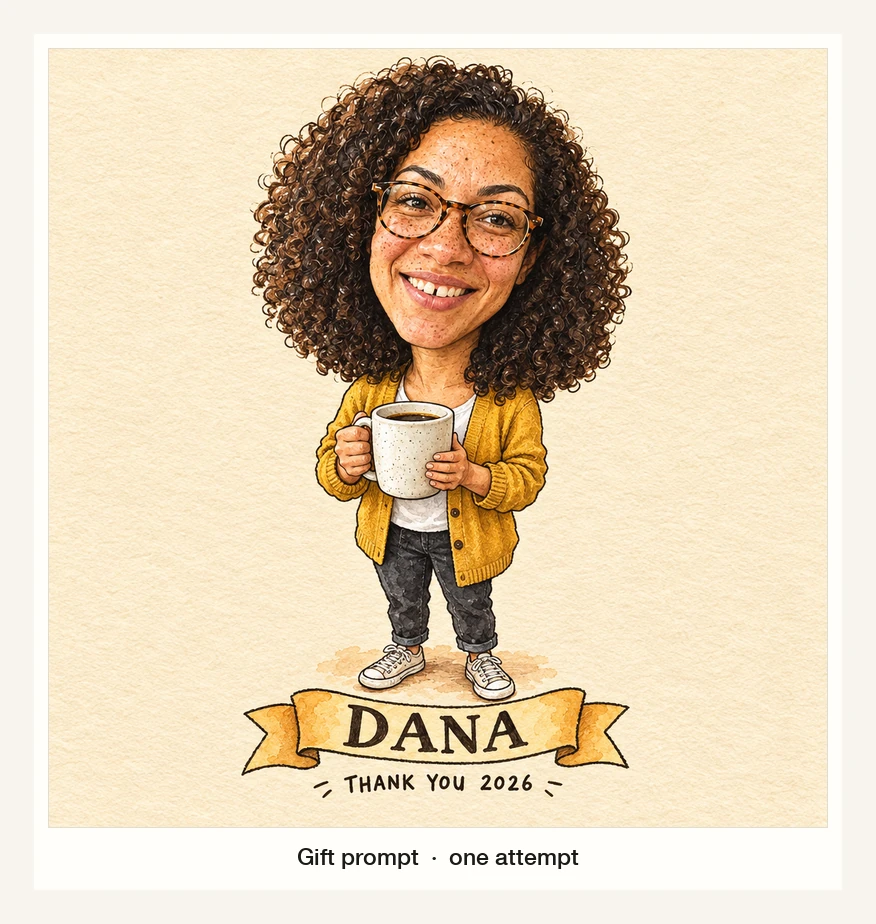
The gift prompt, one attempt. The banner spelling held, the full body and the mug did not drift, and neither line needed a repair pass — the same model put an unrequested slogan on a mug when no photo was attached. Rendered with gpt-image-2.5-flare for this article, November 14, 2026.
Rules that hold: keep lettering to a name and at most one short line; put the exact spelling in quotes; say "add no other lettering"; and zoom to 100% to check every letter. For anything printed — a card, a mug, a poster — assume you will need one more pass, and budget for it.
Consent, colleagues, and what a caricature does not license
The trend's appeal is that the drawings were of colleagues, teachers and friends. That is also where the practical problems start.
- Ask the person. A caricature picks one feature and enlarges it. What reads as affectionate to you can read as a comment on someone's nose, teeth or weight. Get a yes before it goes on a team page or a public account.
- Watch the workplace details. A caricature of a colleague at their desk can carry a screen, a whiteboard, a client name or a badge. The prompt above asks for no logos and no lettering; still check the background.
- A drawing is not a licence. Using a photo of a person who has not agreed, or a recognisable character or brand, is a rights question that a generation does not resolve. OpenAI's terms govern your use of what you generate in ChatGPT; Ottermind's terms govern the Studio workflow. Neither transfers a likeness right or clears a photograph you did not own.
- Keep the source with the result. If the image will be printed or sold, keep the photo, the prompt and the date together, so you can prove what the drawing was based on and regenerate it later.
These are review questions, not legal advice. For a paid commission or a published piece, confirm usage with whoever owns the photograph.
Doing it in Ottermind
The composer at the top of this page is the real request surface: one brief field, one optional attachment for the photo, and a send action that continues into Studio. There is no exaggeration slider here either, which is why the number belongs in the sentence.
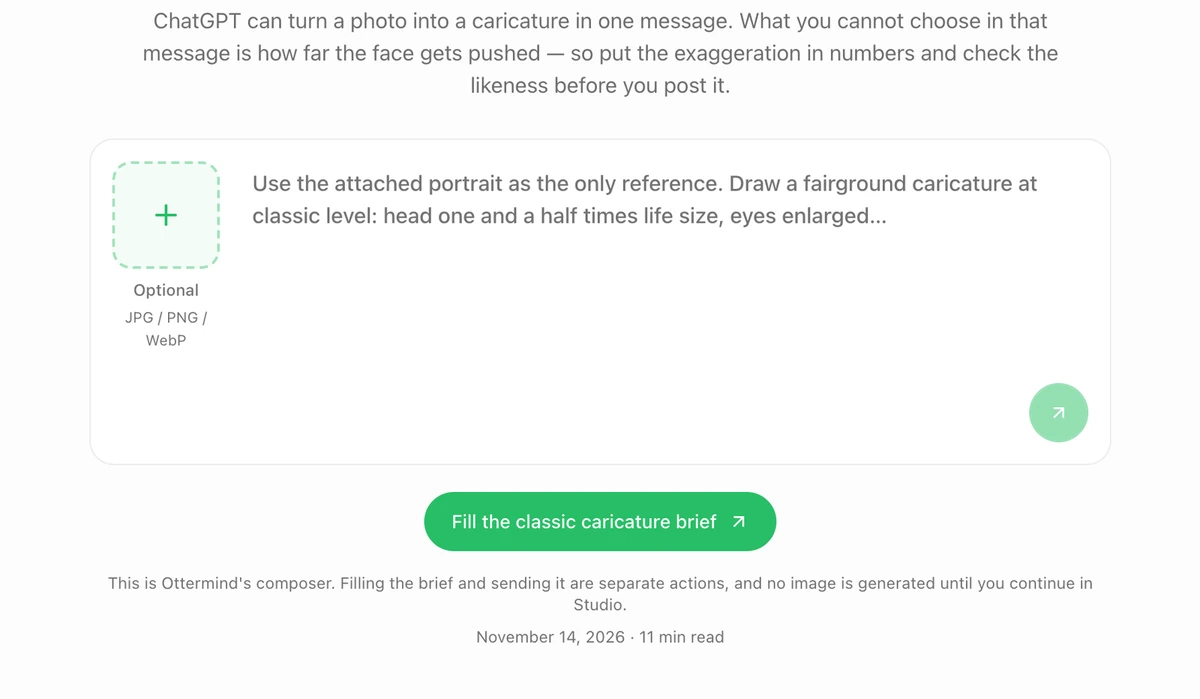
The composer on this page. The attachment slot takes the portrait, the field takes any of the six prompts, and the green button only fills the brief — sending is a separate action that continues in Studio. Real screenshot, November 14, 2026.
Two entries cover the usual starting points, and one covers the blank-page case:
- AI Art Generator from Image is the photo-first route: upload the portrait, describe the art style and the details that must remain recognisable, then compare directions. It fits prompts 1 to 5, where the photo is the reference.
- Unrestricted AI Image Generator is for the longer brief — the full-body desk scene with props, lighting and a wardrobe description. Its own page frames it as keeping a detailed creative brief specific rather than flattening it into a generic image.
- AI Image Generator is the general entry when there is no photo yet: start from a written brief, then add the portrait once you have one.
None of that guarantees a particular output size, a fixed generation time, a fixed cost, or a likeness that survives every edit. What it shortens is the distance between "I know the level I want" and "I can see whether I got it" — and the check above is what turns that loop into a usable drawing.
Related reading
- ChatGPT image prompts for the general structure of a visual brief, if the caricature is your first attempt at directing an image model.
- Editing images in ChatGPT for the selection-tool workflow behind the repair pass in prompt 6.
- Chibi style if the anime-style failure above is actually the look you want — the difference between a style and a caricature is the point of that guide too.
- GPT Image 2.5 Flare vs Sunburst when you are choosing a model for a batch rather than one drawing.
- Poster ideas if the drawing is going onto a printed card or a wall.
Questions people ask
Can ChatGPT make a caricature from a photo?
Yes. Attach a photo and describe the drawing; OpenAI's help centre documents image creation and editing across tiers, including uploading an existing image and describing changes. Whether the result is a caricature or a cartoon depends on your brief, not on a hidden mode.
Does it need a paid plan?
OpenAI states that ChatGPT Images is available on all tiers; what differs is how many images your plan allows and how quickly the allowance resets. Check the usage indicator in your account rather than relying on numbers from an article.
Why does mine look like a cartoon instead of a caricature?
Because the prompt described a style and never a proportion. A caricature needs at least one explicit exaggeration — a head multiplier, a widened smile, enlarged eyes — plus a list of features to keep. Style words alone produce a filter.
Can I make one without a photo?
You can, but the model then invents the person. That is fine for a demonstration or a mascot and useless for a gift: the drawing will not resemble anyone in particular.
A caricature from ChatGPT is one prompt and one check. Pick the level before you generate — 1.5× for a card, 2.5× for the joke — put the features that must not change into the same sentence, and look at the silhouette before you send it to the person it is supposed to be.
