Prompt Guidance
Perchance AI Story Generator: How to Use It, and Where the Text Stops
The Perchance page writes in paragraphs. Under this line is the scene brief this guide starts with, already typed in, so you can read it, change the lighthouse for your own scene, or carry it into Studio.
This is Ottermind's composer, not a Perchance screen. The brief is filled in already; sending is a separate action and continues in Studio.
November 17, 2026 · 11 min read
The Perchance AI story generator is a free browser page that writes a paragraph at a time into an editable box. You type an idea, press begin story, read a paragraph or two, then press continue story for the next beat. There is no account, no credit counter and no manuscript export.
That design is the whole product — and the whole limitation. It is genuinely good at "give me the next 80 words in this scene". It is not a story engine that holds a plot, a cast and a 3,000-word arc by itself, because nothing in the page stores a plan. What it stores is your text, paragraph by paragraph, in the order you generated it.
If you came here to write something in the next five minutes, the shortest route is: paste a five-line scene brief, press begin story, then judge the first paragraph before you press anything else. The rest of this page explains why that order matters, which controls change the result, and where the text has to hand off to something else.
How this guide was prepared: The Perchance generator was opened and run in a desktop browser on November 17, 2026: one generation completed, the page controls were inspected one by one, and four later attempts stalled on the page's loading state. Prices and quotas do not apply — the page has none — but the interface, the controls and the output described below were observed directly rather than taken from a review or a search snippet. Perchance changes this page from time to time, so treat specific labels as a snapshot of that date. The cover and the two desk photographs are AI-generated illustrations made for this article; the two interface images are real screenshots of the generator. No Ottermind generation was run for this article, and nothing here is presented as a measured benchmark of story quality.
What the Perchance AI story generator is
It is a single page at perchance.org/ai-story-generator, built on Perchance's own generator platform and its ai-text-plugin. The page describes itself as free, unlimited and usable without sign-up, and nothing in our session contradicted that: no account wall appeared, no credits were mentioned, and the story box accepted text immediately after the page loaded.
Two practical details are worth knowing before you type:
- A bot check sits in front of the page. Our first load passed a Cloudflare verification automatically; later loads in the same automated browser were slower to clear. On a normal desktop browser this is a few seconds of waiting, not a task.
- Your stories live in the browser, not on a server. The page says so in its own notes and offers export for exactly that reason. Clearing site data, or switching machines, loses the drafts unless you exported them.
It is also not the only thing on the domain with a similar name. Perchance hosts many community generators, and pages that promise an "enhanced", "advanced" or "revamped" story generator are usually describing a different generator or a different prompt, not a paid tier of this one. The URL above is the one this guide is about.
The first three minutes
- Open the page and ignore everything except the big text box. It is labelled as an optional overview, and it accepts anything from three keywords to a full brief. This box is the only input that shapes the first generation.
- Write a scene brief, not a premise. "A story about loss" gives the model nothing to stage. The first prompt in the next section is a template for the version that works.
- Press begin story once, then stop. Read what arrives. The first paragraph tells you whether the genre, the tense and the point of view landed. If they did not, edit the text in the box directly, or start a new story with a corrected brief — continuing a wrong opening only makes it longer.
- Use the next-beat field for direction, not for conversation. "What should happen next?" accepts a sentence. That sentence is the cheapest control on the page.
- Choose the paragraph count before you continue. The selector defaults to 2 and offers 1, 2, 3, 4, 5 and "no limit". This is the nearest thing the page has to a length control.
- Export when the draft is worth keeping. The export button writes a file to your device, or a temporary link that the page says lasts three days. Do not rely on browser storage as a backup.
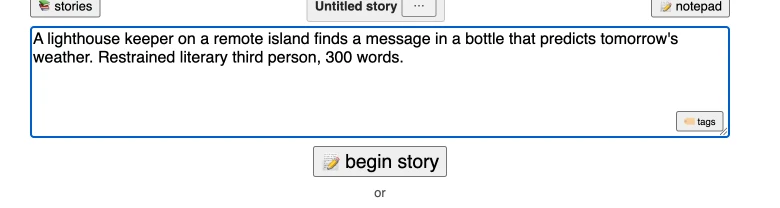
The whole first step: one optional overview box, one button. This is a real screenshot from November 17, 2026, with the scene brief used later in this article typed in. Nothing else on the page has to be configured before the first generation.
Every control on the page
There are more controls than the two-button first screen suggests, and each one does something specific. These are the visible ones in the standard editor, checked on the same date.
| Control | What it actually does | When to use it |
|---|---|---|
| Story overview box | Seeds the first generation; stays at the top and can be edited later | Once per story, before the first paragraph |
| Begin story | Starts generation from the overview | The first press only |
| Story box | The editable manuscript; every generated paragraph lands here | Fix a bad sentence before continuing |
| What should happen next? | An optional instruction for the next pass | The cheapest way to steer a beat |
| Continue story | Generates the next batch of paragraphs | After you have read and approved the last one |
| Paragraphs selector | 1, 2, 3, 4, 5, or no limit per pass | Keep passes small; large batches are harder to correct |
| Copy story (no summaries) | Copies the manuscript without the memory paragraphs | When you paste the draft into another editor |
| Save story / Load | Saves or reloads a draft in browser storage | Before closing the tab, and between sessions |
| Share | Produces a shareable view of the story | Showing a draft, not archiving it |
| Export | Default format or a zip of folders; download or a three-day temporary URL | Once a draft is worth keeping |
| Thumbs up / down | Rates a generated paragraph | Optional signal; it does not rewrite anything |
| Generate images | A separate image plugin with its own guidance field, mode and batch size | Illustrating a scene, not part of the text pass |
| Background music and theme | Presentation options for reading the story | Reading aloud or sharing |
| Full editor | Widens the same controls, including image settings | When you want the whole panel in view |
Two of these deserve a warning. The paragraph selector is not a word-count control, which is explained below. And generate images is a different workflow bolted onto the page — it produces standalone images, not an illustrated page layout.
Why it writes paragraphs, not chapters
The generator has no plot memory that you can inspect. What it has is the text in the story box, plus summary paragraphs the page inserts as the story grows. The page's own note asks you to edit those summaries if they are wrong but not to move or delete them, because they carry context forward.
That mechanism explains the behaviour people complain about:
- The story drifts when the summary drifts. A summary that drops a character's injury, or promotes a throwaway detail into a plot point, becomes the truth for every later paragraph.
- The model follows the last text most strongly. This is why editing a sentence in the box is more effective than writing a long instruction about the same sentence.
- Continuity has to be repeated, not remembered. If the kitchen window is on the left, saying so again in the next-beat field costs one line and saves a rewrite.
The practical consequence: treat the box as the source of truth and the summary as a cache. Read the summary paragraphs when you scroll back, and correct them before you continue.
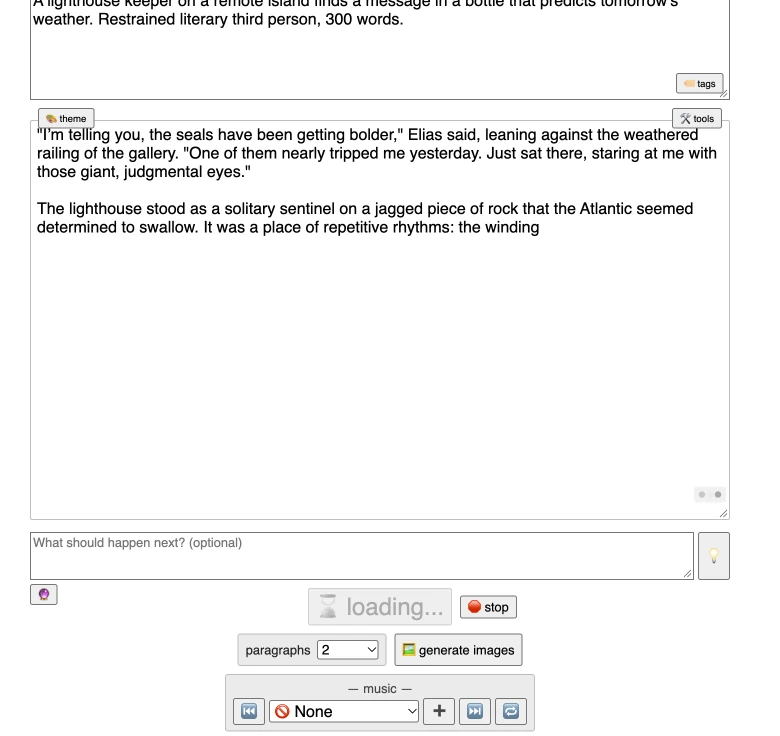
A real captured pass: two paragraphs, a next-beat field below them, the paragraph selector at 2, and the loading state still running. Note where the second paragraph stops — mid-sentence, at "the winding". The capture is the honest state of a streaming generator, not a finished draft.
Seven prompts built for a paragraph engine
Each prompt below is written for a tool that generates one short block at a time. They are not variations of the same idea: each one fixes a different failure — staging, opening, continuity, direction, dialogue, pressure, and ending.
1. The scene brief
Fixes: a premise with nothing to stage.
Genre: quiet literary fiction, present tense, third person.
Setting: a lighthouse on a North Atlantic rock, October.
Character: Elias, the keeper, sixty-three, meticulous, recently widowed.
Scene: he finds a bottle on the rocks with a note that has predicted the weather correctly for three days.
Constraint: no dialogue, two short paragraphs.
Five labelled lines beat a paragraph of prose because each line maps to a decision the model would otherwise invent. Replace the contents; keep the labels.
2. The opening rule
Fixes: the first paragraph starting with dialogue or with weather.
Open with a physical action Elias is taking in the room, in one sentence. Do not open with dialogue, with the weather, or with a statement about the island. Let the bottle be noticed in the second paragraph, not the first.Our captured run opened with dialogue even though the brief said "restrained literary third person" — a reminder that the opening is the least stable part of a generated pass. Naming what not to do helps more than naming the mood.
3. The continuity card
Fixes: details that quietly change between passes.
Keep these fixed for the rest of the story: Elias is sixty-three; the light is still working; the note is handwritten in pencil; the weather has been wrong for three days and right today; no other person is on the island. Do not introduce new named characters. Do not change the time of day.Paste this into the next-beat field before a big continue. It is a list of things that may not move, which is easier for the engine to honour than a request to "stay consistent".
4. The next-beat sentence
Fixes: a pass that repeats the beat you already have.
Next: he carries the bottle inside, sets it on the kitchen table, and compares the note against the barometer. He does not yet decide what it means. End the pass before he acts on it.One sentence, one change, one stopping point. "End the pass before he acts" is what keeps a two-paragraph generation from resolving the scene you wanted to keep.
5. The dialogue pass
Fixes: a scene that needs speech but has none — or the reverse.
Rewrite the last two paragraphs as a short exchange between Elias and a coastguard officer on the radio. Keep both voices plain and clipped. Four exchanges maximum. Do not add narration between the lines beyond what is needed to place them.Because the text box is editable, you can also do this by hand: replace the paragraph, then continue. Deleting is a legitimate writing tool here.
6. The pressure pass
Fixes: a draft that keeps restating the situation.
Add one new pressure without resolving the scene: the barometer begins to fall while the note predicts calm. Show it through what Elias does with his hands, not through his thoughts. Stop after one paragraph.Escalation prompts work better when they name a concrete physical contradiction. "Make it more tense" tends to produce atmosphere; a falling barometer produces a decision.
7. The ending rule
Fixes: endings that summarise the theme or moralise.
End the story on a physical image in the room. No summary of what it meant, no reflection on grief, no final line of dialogue. Stop within one paragraph of the image.The stop condition matters more than the prose instruction: without one, the engine keeps writing until it reaches a natural conclusion you did not choose.
The button fills the first prompt into the composer at the top of this page. It only fills — nothing is sent until you continue in Studio, which is the point at which you would replace the lighthouse with your own scene.
Why the prompts are cards rather than paragraphs: a card holds one decision, and this generator does best when the instruction is one decision wide. The cards here are blank on purpose — the five lines of prompt 1 are the content that belongs on them. AI-generated illustration for this article, not a screenshot.
What length actually looks like
The paragraph selector is the only length control, and it counts blocks, not words. In the run we captured, the default of 2 produced two paragraphs of about 70 words in total — roughly a third of the 300 words the brief asked for — and the pass was still streaming when the screenshot was taken.
| Passes at 2 paragraphs | Paragraphs | Approximate words at the observed rate |
|---|---|---|
| 1 | 2 | 70 |
| 5 | 10 | 350 |
| 10 | 20 | 700 |
| 15 | 30 | 1,050 |
That table is arithmetic from one captured pass, not a benchmark: a sample of one is a sample of one, and longer paragraphs are entirely possible. Use it for planning, then measure your own output after ten paragraphs and adjust.
Two rules follow from how the page behaves:
- Do not ask for a word count. The engine works in paragraphs, and the request in our brief was not honoured. Ask for a number of paragraphs and a place to stop.
- Keep passes small when the draft is still moving. A five-paragraph batch that goes wrong costs five paragraphs of reading and deletion; a two-paragraph batch costs two.
What went wrong in our test
The failures below are the ones a first-time user is most likely to meet. The first row is from our own captured run.
| What you see | Why it happens | What to change |
|---|---|---|
| The opening ignores the requested style and starts with dialogue | The first paragraph is generated from a loose reading of the brief | Name the opening action and name what not to do (prompt 2) |
| The story ends mid-sentence and the page still says loading | Text streams in as it is generated | Read the box for the real state; do not keep pressing continue |
| A 300-word request produced about 70 words | There is no word-count control | Set paragraphs per pass and count passes instead |
| A character's detail changes after several continues | The summary paragraph drifted or dropped it | Correct the summary, then paste the continuity card |
| The next pass repeats the previous beat | The next-beat field was empty | Give one concrete next action with a stopping point |
| Loading runs for a minute or more with no text | Generation did not start, or the page's verification did not clear | Stop, reload, and try once more; treat it as variable |
| The story box shows an older draft | Drafts are stored in the browser and reload by session | Use save and load deliberately; export anything you care about |
| Generated images do not appear in the story | Image generation is a separate plugin, not an inline step | Use the image panel for standalone illustrations |
One honest note about the timing: our completed run returned its first text in about 40 seconds. Four later attempts in the same automated browser sat on the loading state for 60 to 120 seconds without producing text, and one session showed a bot-verification notice. We cannot separate the site's load from our test browser's verification, so we are not reporting a generation-time figure as a product characteristic. If the page stalls for you, reload once and retry; do not conclude that the generator is broken.
Where the text stops
The page is a text tool, and the boundaries are worth stating plainly because the search results around this keyword blur them.
It does not lay out an illustrated story. There is an image plugin on the page, and it can make standalone images. It does not place those images into pages, keep a character sheet, or export a picture-book spread. Pages that promise "Perchance with images, voice and video" are usually describing their own product as an alternative, not a feature of this generator.
It does not hold a structure you can edit. There is no outline view, no chapter list, no scene table. Long drafts are a single box of text with memory paragraphs inside it. If the plot needs restructuring, you are doing that by hand or in another tool.
It does not export a manuscript file. The export is a device download or a temporary link. There is no DOCX, no EPUB, no Scrivener project.
Its "free and unlimited" claim is the page's own. We saw no paywall, credits or account wall in the session, and the page states there are no daily restrictions. We did not test it for days, and we cannot promise the claim survives the next version. Check the page itself before you build a workflow that depends on it.
Rights and privacy are your check, not the tool's. The page keeps drafts in browser storage, which is convenient and not a backup. If you are writing about real people or adapting someone else's material, the usual permissions still apply, and nothing here is legal advice.
A working order
- Decide the scene, not the novel. Write down one room, one character, one thing that changes. If you cannot state the change, the generator will invent one for you.
- Write the five-line brief from prompt 1 and generate exactly two paragraphs.
- Reject the opening if it is wrong. Edit it in the box; do not continue on top of it.
- Continue in small passes, each with a next-beat sentence and, before big turns, the continuity card.
- Export at the end of a session, and copy the text without summaries into your real editor before structural work begins.
If the draft is destined for something visual — a picture book, a story reel, a narrated short — stop adding paragraphs once the scenes are distinct. That is the moment the text stops being the deliverable.
The handoff this page cannot make for you: a finished text on the left, the first visual decisions on the right. The text tool stops at the left page. AI-generated illustration for this article; the story page and sketches are staged props, not a real project file.
Running this inside Ottermind
Ottermind's AI story generator is a different kind of entry, and it is the one to use when the words are only half the job. It starts from a theme, character and genre, then produces a draft, a character sheet and a scene plan for review; after that you choose which moments become a cover and illustrations, and revise the words or the artwork page by page.
That is not a replacement for a free text page, and it should not be described as one. It is account and plan based, it is aimed at illustrated stories, and it asks you to review before generating pictures. The honest split is:
| Step | Where it happens |
|---|---|
| Fast free drafting, one scene at a time | The Perchance page |
| Keeping a cast, a scene plan and page layout | Ottermind's story workflow |
| Deciding which moments deserve an illustration | You, after reading the draft |
| Character art and scene images | Ottermind, in the same task |
| Structuring or rewriting a finished manuscript | Your writing tool of choice |
If you already have a draft you like, the useful next action is to bring its scene list — not the whole manuscript — into the story generator and let the visual work start from there. For standalone character or scene images outside a story project, AI image generation is the more direct entry.
Related reading
The prompt habits that make this page work are the same ones covered in the prompt engineering guide and the Ottermind prompt library: name the decision, not the mood. If your draft is heading toward pictures, storyboard template explains how to turn scenes into frames, and animatics covers timing them. For a character look that stays consistent across those frames, chibi style and anime profile pictures show how a visual direction is described and repeated. If the finished story is meant for a narrated short, faceless reels covers the production side that the text never touches.
Perchance AI story generator questions
Is the Perchance AI story generator really free and unlimited?
The page states that it is free, unlimited and usable without sign-up, and our session found no account wall, credits or daily limit. That is the page's claim and our single-session observation, not a guarantee: check the page before depending on it, and export anything you would not want to lose.
Do I need an account?
No. The generator opened and produced text without one. A Perchance account exists for the wider site, but it was not required in our test. The trade-off is that drafts live in browser storage rather than an account.
Why does it stop in the middle of a sentence?
Because the text streams into the box as it is generated. The mid-sentence stop in our screenshot was a pass still in progress, not a completed paragraph. Wait for the loading state to clear before you judge or continue.
Can it write a whole novel?
It can keep adding paragraphs for a long time, and it inserts summary paragraphs to carry context. It cannot hold a plot structure, a cast sheet or chapters you can rearrange. Treat a long draft as a pile of scenes that you will restructure elsewhere.
Can it illustrate the story?
The page has an image generation panel, but it makes standalone images with their own settings. It does not place illustrations into pages or keep a character consistent across a picture book. That sequence belongs to a different workflow.
What is the difference between this and an "enhanced" Perchance story generator?
Pages using "enhanced", "advanced" or "revamped" are usually describing other community generators, different prompts or a competitor's product. They are not a paid tier of this page. Check the URL before you compare features.
