Prompt Guidance
Animatics: Storyboard Timing You Can Hear
An animatic is a storyboard timed against sound. Below the composer sits the locked-panel prompt this page starts with — already typed in, so you can read it, edit it, or send it.
Optional
JPG / PNG / WebP
This is Ottermind's composer, not an editing timeline. The prompt is filled in already; sending is a separate action and continues in Studio.
November 16, 2026 · 11 min read
An animatic is your storyboard played at the length the finished piece will actually run, with sound underneath it. The panels stay still or move only enough to suggest camera and action; the cut, the pauses and the sound carry the sequence. Wikipedia's definition is the one the industry still uses: a sequence of still images, usually taken from a storyboard, displayed in sync with rough dialogue or a rough soundtrack. Nothing about it has to look good. It has to be long enough, short enough, and land where the sound lands.
The usual mistake at this stage is order, not taste. People animate the panels first — one clip per panel, each one dressed and polished — and only then drop the clips into a timeline and discover the sequence is twenty seconds too long, or that the shot they spent an hour making has nothing to do because the line it was built for got cut. The other mistake is subtler: a generated clip that moves well reads as "done" in a review, so the room starts discussing the look of the shot instead of whether the shot should exist. An animatic is a timing instrument. Everything you add that makes it look finished makes it a worse timing instrument.
How this guide was prepared: Sources were checked on November 16, 2026: Wikipedia's Storyboard article (the Animatics and Photomatic sections, including the rip-o-matic and the note that storyboards are often animated with simple zooms and pans in editing software), Wikipedia's Leica reel article (story reels assembled after voice recording), and StudioBinder's animatic guide by Brent Dunham, published March 5, 2025 (definition, the storyboard-versus-animatic distinction, and the Aladdin alternate ending that reached the animatic stage before being cut). The description of Ottermind's image-to-video flow comes from Ottermind's own tool page. The timing table, the cut-rate arithmetic and the worksheet are derived from how you measure a sequence, not from a published standard. No generation was run in Ottermind to produce this article, and no output is presented as a tested result. The cover and the storyboard figures are AI-generated illustrations; the timeline figure was drawn from the article's own numbers.
What an animatic is, against the four things it gets confused with
The distinction matters because each of these documents settles a different decision, and judging one by the other's standard is how a review goes wrong.
| Document | What it settles | What it must not be judged on |
|---|---|---|
| Storyboard | Framing, staging and the order of shots, panel by panel | Timing. A board has no duration until someone assigns one |
| Animatic | Duration, cut rhythm, and whether the sequence reads with sound | Finish. It is meant to look provisional |
| Motion test | Whether one specific movement works — a walk cycle, a lift, a turn | The sequence. A clean motion test can still sit in a badly timed scene |
| Previsualization | Camera, staging and the physical feasibility of a shot, usually for live action or visual effects | Character performance |
| Finished animation | Everything above, plus performance, weight and rendered craft | Nothing — this is the deliverable |
Two industry habits are worth knowing before you plan. In animation, the animatic usually arrives late enough that the voices already exist: a Leica reel — the older Disney-side name for the same object — is assembled after the voice actors have been recorded, from the recorded dialogue plus a selection of sound effects. And in advertising, the animatic is a cheap test commercial; its cousin, the rip-o-matic, is cut from existing films, TV or ads to imitate the look of the spot being pitched. Both habits point the same way: the animatic is built around sound that already exists or is cheap to make, not around animation that does not exist yet.
StudioBinder's guide puts the reason for the stage bluntly — in animation you are "shooting" and "editing" at the same time, so the timing decisions cannot wait for the edit bay the way they can in live action. Their example is Aladdin's alternate ending, which was cut at the animatic stage rather than after animation. Wikipedia makes the same economic argument from the other side: a few minutes of screen time in traditional animation is months of work, and every scene edited out after animation is written off.
That is the whole case for the stage. An animatic exists so that a decision worth a month of drawing can be made in an afternoon with a pencil, a timeline and a scratch track.
The four numbers that make a sequence reviewable
An animatic that cannot be measured cannot be argued with. "It feels slow" ends a review; "shot four holds for nine seconds and carries one line" gives someone something to cut. These four numbers take a few minutes to pull off any assembled sequence, and each one tells you a different thing.
| Number | How you measure it | What a working sequence looks like | The failure it explains |
|---|---|---|---|
| Shot length | Duration of each clip in the timeline, in seconds | Each shot's length matches what carries it — a line, an action, a look | Every shot at the same length: the sequence is a slideshow with sound |
| Cut rate | Number of cuts divided by runtime, times sixty | A rate you chose for the format — an explainer and a chase are not the same instrument | A rate nobody decided: churn at one end, dead air at the other |
| End hold | Frames at the head and tail of each shot that are identical to their neighbour | At least a few frames of stillness at each end, so the cut has somewhere to land | Motion already underway on the first frame, or running through the last: a visible pop at the join |
| Sync anchors | Sound events inside a shot — a line ending, a door, a hit — and the frame they land on | Every shot that matters has at least one anchor, and the picture meets it | Action landing after the line it answers, which reads as a late, amateur cut |
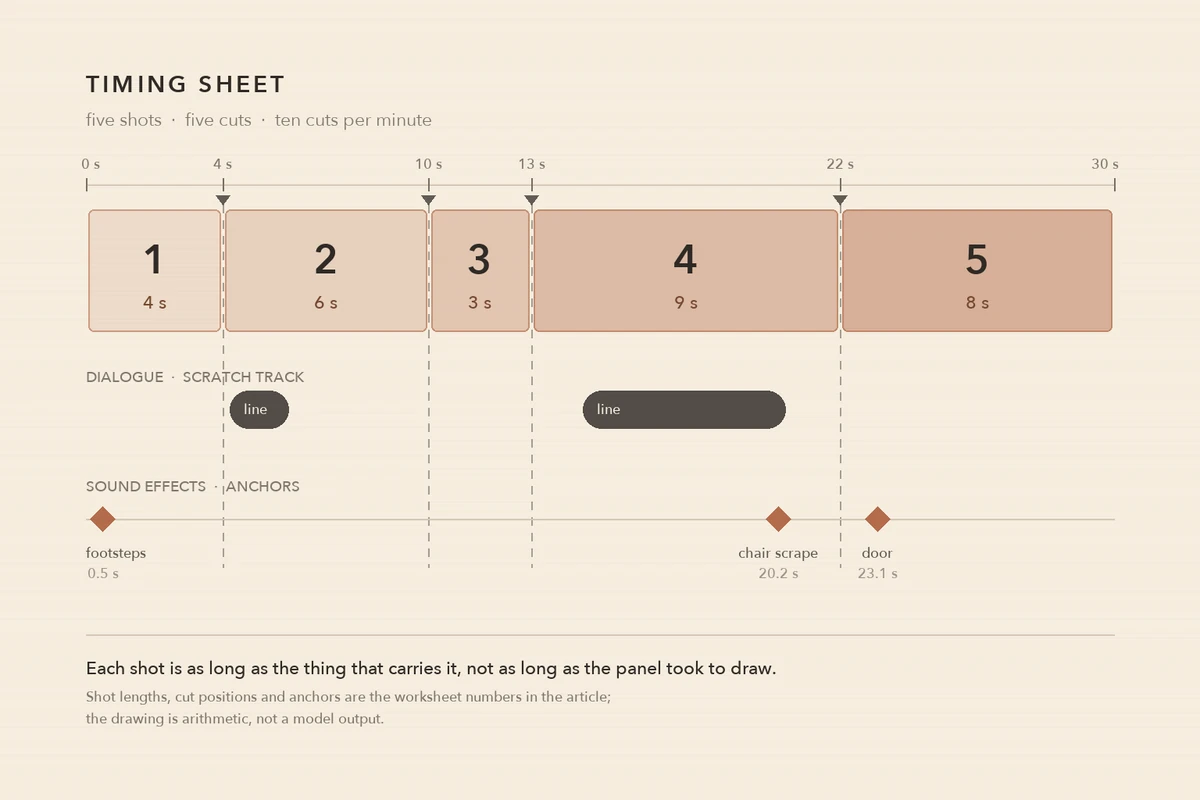
The same five shots, cut positions and anchors that appear in the worksheet below, drawn once so the four numbers have a shape. The dialogue bars show where a line is speaking; the diamonds are the anchors a cut can land on. Drawn from the article's own arithmetic with no model involved: it is a diagram of decisions, not a frame from a generation.
Shot length is the one people skip, because it feels like a creative decision rather than a measurement. It is both. Assign a length to each panel before you render anything, write the number down, and then check what you actually assembled against the number. The gap between the two is where the rework lives.
Cut rate is the easiest reality check on the whole sequence. A 30-second animatic with five shots is running at 10 cuts per minute; a 90-second product explainer at 20 cuts per minute is a different animal from the same runtime at 8. Neither is wrong. A rate you did not choose is wrong, because it usually means the panels were dropped in at whatever length they were drawn.
End hold and sync anchors are what make the sequence editable rather than merely watchable. If the first and last frames of a shot are already in motion, every cut will pop, and the fix is not in the edit — it is in the shot.
Seven prompts, one variable each
The prompts below are written for one panel plus written direction, which is the arrangement Ottermind's Image to Video flow uses: your reference supplies the first state and the look, your words supply the motion, the camera and the destination. Each prompt changes a single property from the table above. Replace the subject; keep the structural sentence.
Before any of them: the baseline animatic needs no generated motion at all. Wikipedia notes that storyboards are often animated with simple zooms and pans in editing software, and that is still the cheapest way to test a cut. Generate motion only when the motion itself is the question you are asking the room.
1. The locked panel
Controls: camera drift, i.e. whether the panel stays the frame you drew.
Use the attached storyboard panel as the entire frame. The camera is locked on a tripod: no push, no pan, no zoom, no parallax, no handheld drift. Only the smoke from the chimney moves, drifting slowly to the left. Everything else — the rooftops, the window frames, the drawn line weight — stays exactly as drawn. The shot holds for four seconds and ends on the same framing it started with.Compare the first and last frame. If the framing shifted by even a few pixels, the camera clause lost to the model's default of adding movement, and every cut in your sequence will drift with it.
2. Declared length
Controls: shot duration, i.e. the number you will write in the worksheet.
This is a four-second shot at 24 frames per second. At the one-second mark the character lifts the box; by the three-second mark it is on the shelf; from three seconds to four nothing moves except the character's breathing. Do not add any action after the box is on the shelf.Count the clip's actual length and find the frame where the action lands. If the model finishes at two seconds and keeps improvising, the action clause is too vague — say what stops, and when.
3. A push-in from one panel
Controls: emphasis. It buys you a closer framing without a second drawing.
Start on the full attached panel. Push in slowly toward the character's hands until they fill about a third of the frame, arriving at that framing at the end of the three-second shot. Keep the drawing's line weight, paper texture and colour unchanged as the frame scales. No new objects enter the frame.Check whether the drawing is still a drawing. If the push re-renders the panel as a photograph, the "keep line weight" clause was ignored — and the correct answer is a still push in your editor, which costs nothing and cannot drift.
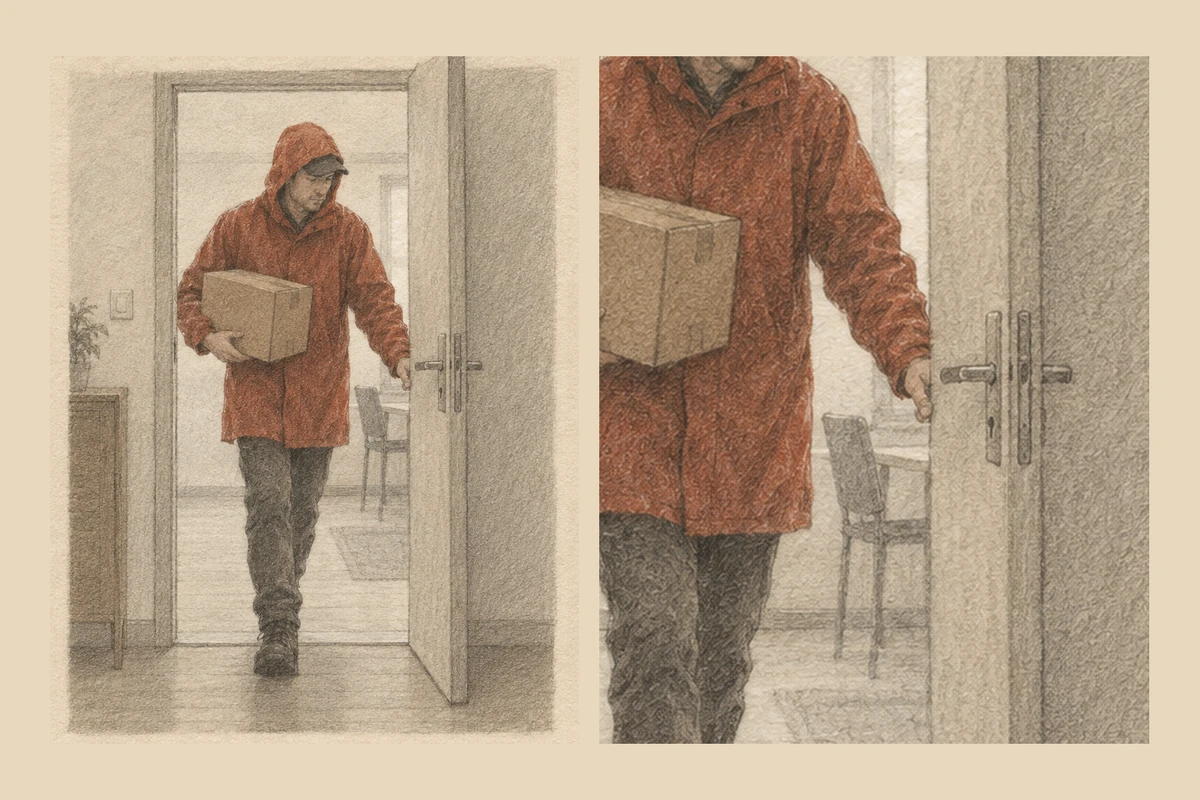
A push that does not redraw anything: the left panel is the drawing, and the right is that same drawing cropped and scaled up on the hands and the door handle — no second generation, no new line weight. This is the one camera move an editor can do without a model, and it should be your default until the motion itself is the question. Concept artwork generated for this article with an image model; the two framings are one image, not two takes.
4. One cast, described in the same words
Controls: identity drift across a sequence, which is the failure that makes an animatic unusable.
The same character as the reference: a tall courier in a rust-red raincoat, dark trousers, canvas satchel on the left hip, short black hair, no hat. Keep his face, the coat colour and the satchel on the same side in every panel. Same room, same window light from the left, same muted palette. Only his walking direction changes.Check the satchel side, the coat colour and the hairline — three cheap tells. If any of them changed, the description was not the problem; the description changing word to word between prompts was. Paste the cast description into every prompt in the sequence, unchanged.
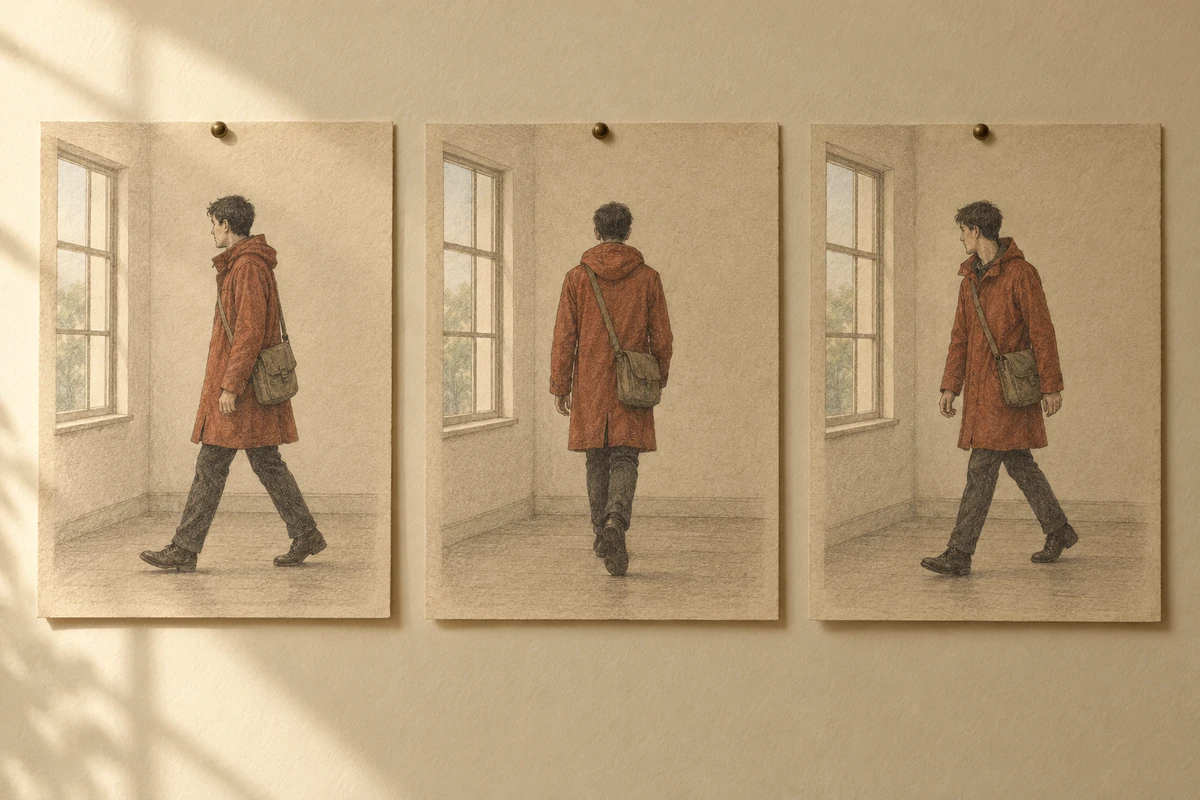
Three panels, one cast, one room. The satchel side and the coat colour are the two details a viewer uses to decide whether these are the same scene or three different ones. Concept artwork generated for this article with an image model; it shows the consistency a prompt has to state, not a tested multi-shot generation.
5. Motion budget
Controls: deformation, i.e. how much of the panel the model is allowed to reinvent.
Only the rain outside the window and the steam from the cup move. The table, the cup, the two chairs and the paper on the table stay completely still — same shapes, same positions, same shadows. Do not add or remove any object. Do not redraw the lettering on the poster behind him.Name what must not change instead of asking for consistency. A list of protected objects is checkable; "keep it consistent" is a hope.
6. A sync anchor
Controls: where the action lands relative to the line, which is the whole point of putting sound under the panels.
The door closes exactly as the last word of the line is spoken. The character enters at the start of the shot, crosses to the desk, and the door swings shut at the end of the fourth second — not before, not after. Hold the closed door for the final half second.Play it with the waveform visible and mark the frame where the door meets the frame. If the door lands a beat after the line, the shot will feel late no matter how good the drawing is.
7. Cut-ready handles
Controls: your editorial headroom, i.e. whether the next shot can overlap this one.
End the shot on a still frame: from the moment the character settles, hold the pose without movement for the last half second, with the camera locked. Do not fade out, do not drift, and do not start a new action at the end.Compare the last six frames. If they are identical, you can overlap the cut, trim in either direction, and re-time the sequence without re-rendering.
The button fills the first prompt into the composer at the top of this page. It fills only: nothing is sent, and nothing is generated until you continue in Studio. That separation matters here more than usual, because the reference in these prompts is a placeholder — your panel has to be the one that goes in.
The timing pass, written out
We do not have a downloadable animatic template, and this page will not pretend to. What the template sellers are actually selling is a grid; the useful part is the arithmetic you put in it. Here is the same thing as text, with numbers that add up.
| Shot | Panel | Length (s) | What carries the shot | Cut in / out | Sound anchor |
|---|---|---|---|---|---|
| 1 | Wide of the street, courier enters left | 4 | The walk into frame | Straight cut in; cut on his first step out of frame | Footsteps start at 0.5 s |
| 2 | Doorway, close on hands | 6 | The line: "I'm not taking it back" | Cut on the end of "back" | Line ends at 5.6 s |
| 3 | Interior, the box on the shelf | 3 | The look between them | Cut in early, over the previous line | Silence; the hold is the point |
| 4 | Two-shot, argument | 9 | The argument's turn | Cut on the chair scrape | Chair scrape at 7.2 s |
| 5 | Wide, door closed | 8 | The aftermath | Held; fade is a separate decision | Door shuts at 1.1 s |
| Total | 30 | 5 cuts → 10 cuts/min |
Three rules make the worksheet do its job.
The length belongs to what carries the shot, not to how good the panel is. Shot 3 is three seconds because the look is the whole beat; shot 4 is nine because the argument has to turn. If you cannot name what carries a shot, that is the finding — not a formatting problem.
Cut on the sound event, not on the picture beat. The picture in an animatic is provisional by design; the sound is what the finished piece will actually have. Put the anchor in the row and check the frame it lands on.
Write the totals. Thirty seconds and five cuts is a statement someone can disagree with. A pile of panels is not.
Where AI helps at this stage, and where it stops
Image-to-video is genuinely useful here for three things: motion the board could not show (a camera move that needs weight, a door that has to swing on a line), coverage variants of the same panel so the room can compare framings, and a dressed version of a sequence for a pitch where the client cannot read pencil panels. Ottermind's Image to Video flow carries the reference and the motion direction into Studio, and its AI video generator covers the case where there is no panel yet and the scene has to be described from scratch.
It stops at four places, and each one is worth saying out loud in a review.
It does not decide the timing. The model will happily give you four seconds whether or not the line needs six. Shot length is your decision, written down before the render and checked after it.
It gives you the look of movement, not performed timing. A hand-drawn animatic can show an animator's timing on an expression — the pause before a reaction, the extra two frames on a turn. A generated clip interpolates an action you described. It can be beautiful and still carry no performance, because nobody performed it.
It is not frame-exact. Treat a take as a take. Stretching a generated clip in the timeline to fit a slot changes the speed of the action, which changes the performance — the one thing you were testing. Regenerate to length, or trim, rather than retime.
It can make the sequence look finished enough to skip the review. This is the expensive one. A polished clip invites "that looks great" when the useful note was "that shot is two seconds too long". Review muted first, then sound-only, then both.
Two more boundaries belong to the production, not the tool. A rip-o-matic is built from existing films, TV or ads, and a scratch track is usually a temp piece of music; neither is cleared for anything beyond the room it is shown in. And an animatic is not the finished animation, however good the generated frames look — the craft of the finished piece is drawing, performance and rendering, and none of those happen at this stage.
Where this page is uncertain, it says so: the four numbers are measurement definitions, not industry standards, and no claim is made here about how closely an Ottermind take matches a director's intent beyond the instructions you write. That has not been benchmarked for this article.
What goes wrong, and the instruction that fixes it
| What you see in review | What is actually happening | The instruction that fixes it |
|---|---|---|
| Every shot lasts about the same | Panels were dropped in at their drawn length; nobody assigned duration | Assign a length per shot from the worksheet before rendering |
| The whole sequence drifts sideways | No locked-camera clause, or it was buried after the subject description | Put "camera locked on a tripod" first, then describe what moves |
| The character changes between panels | The cast description was rewritten each time | Paste one fixed cast sentence into every prompt in the sequence |
| The cut feels late | The action lands after the sound it answers | Name the anchor and the second it must land on; mark the frame |
| Cuts pop at the join | No end hold; motion already running on the first and last frame | Ask for a still head and tail; compare first and last frames before cutting |
| A push-in turns the drawing into a photo | The model re-rendered the panel instead of scaling it | Keep line weight and paper texture in the prompt, or push in the editor |
| The room praises the look and nobody cuts | The animatic is too finished to be judged | Review muted, then sound-only, then with both |
| The clip is the wrong length and gets stretched | The slot was decided after the render | Generate to the slot length, or trim the take; never retime it |
Start with the panel that carries the line
Take one panel — the one with the line on it — and give it a length before you give it motion. Write the number down. Then render a single take at that length with the locked-panel prompt, put it under the scratch audio, and watch it once with the sound off and once with the picture off. If the shot survives both, the timing is doing its job and the motion is decoration. If it only works with both, you have learned something about the shot, which is the point of the stage.
When you need a cleaner panel before you can use it as a reference, generate one with AI image generation first. If the motion between two poses is the specific problem, tweening covers spacing, arcs and holds in more detail than fits here. The image-to-video prompting tutorial covers the motion vocabulary these prompts assume, and Seedance video cases shows how multi-shot sequences are assembled once the timing is agreed.
If you would rather automate the repetitive pass — the same locked-panel render, forty times — what an AI agent is explains the kind of workflow that hands that loop to a system instead of a person. It is a different article for a reason: the animatic decisions stay yours.
Animatics questions worth answering
Is an animatic just a storyboard in a video file?
No — a storyboard has no duration until someone assigns one, and the animatic's whole content is those assignments. The panels can be identical to the board and the animatic can still be wrong, because the cut rhythm, the holds and the sound are decisions the board never had to make.
How long should an animatic be?
Exactly as long as the finished piece, to the second. That is the point of the stage: a 30-second slot has to be filled by a 30-second animatic, or the difference gets discovered later at ten times the cost. For a longer film, do it sequence by sequence rather than trying to hold the whole thing at once.
Do I need sound before I can make one?
You need something to time against. In animation that is usually the recorded voice plus a few sound effects, which is what a Leica reel is assembled from; in advertising it can be a scratch track. A silent animatic can still test cuts, but it cannot test whether a cut lands, because landing is a relationship between picture and sound.
Can AI turn my storyboard into an animatic?
It can turn each panel into a moving shot, and that is a real shortcut for camera moves and environmental motion. It will not assign your durations, order your cuts, or tell you which panel is redundant. Expect to assemble and time the sequence yourself — the model supplies takes, not decisions.
What is the difference between an animatic and previz?
Previz is about the camera and the physical staging of a shot, usually for live action or visual effects, and it often happens in 3D. An animatic is about duration and rhythm, and it is usually drawn. A live-action project can need both; a two-minute explainer usually needs only the second.
Is a rip-o-matic the same thing?
It is a variation used in advertising: an animatic cut from existing films, TV or ads to imitate the look of the spot being pitched. The timing logic is the same, the rights situation is not — it is a pitch device, not a deliverable.
