Prompt Guidance
Storyboard Template: Panels, Fields, and Filling Them With AI
A storyboard template is a form you fill with decisions. Under this line sits the style-lock prompt the article starts with, already typed in, so you can read it, edit it, or carry it into Studio.
Optional
JPG / PNG / WebP
This is Ottermind's composer, not a storyboard app. The prompt is filled in already; sending is a separate action and continues in Studio.
November 16, 2026 · 11 min read
A storyboard template is a form you fill with decisions, not a grid you print and draw into. The panels are the least important part of it. What makes a board usable is the line under each panel that says which shot it is, what changes between this frame and the last one, where the camera stands, and how long the shot runs.
The usual mistake is to treat the download as the work. A six-panel PDF gets filled with six handsome sketches and then fails on set, because no panel states a shot size or a duration, and the cut was decided by whoever drew last. The second mistake arrived with image models: six gorgeous generated stills that look like the finished film and tell a camera operator nothing about how to shoot it.
This page is not a template download, and it does not pretend to be one. What follows is the field specification behind the grid, the arithmetic for choosing panel count and aspect ratio, and six prompts for filling frames — with the continuity failures that come with them named in advance.
How this guide was prepared: Published pages were checked on November 16, 2026: Wikipedia's article on storyboards (for the definition, the Disney origin of the form, and the definition of an animatic), Boords' storyboard template library (for sheet formats, panel counts and its aspect-ratio guidance), and Ottermind's own image-to-video and AI video generator pages. Panel and shot-count figures below are arithmetic from a stated average shot length, not an industry benchmark. This is a working guide, not a measured test: no generation was run in Ottermind for this article, and no output is presented as a verified result. The cover and the two figures are AI-generated illustrations; the composer image is a real screenshot of this page. Character continuity across separate generations is described as a risk, not a guarantee.
What the download pages actually give you
The first page of results for this query is a shelf of grids. Boords publishes blank templates as PDFs in A4 and A3, with 4, 6, 8 and 12 panels, in portrait and landscape (checked November 16, 2026). Canva, Figma, Miro and a long tail of template libraries offer the same idea as editable boards. StudioBinder pairs its downloads with a storyboard creator.
| What you get | What it solves | What it leaves to you |
|---|---|---|
| Printable PDF grids | A correct page size, even gutters, caption strips under each frame | Panel count, aspect ratio, and every field's contents |
| Editable online boards | Moving panels, sharing a link, collecting comments | The same decisions, plus a subscription |
| Template libraries | Many layouts to choose between | Knowing which layout fits your runtime |
A grid is genuinely useful — it saves an hour of ruling lines. It is not the part of storyboarding that changes a shoot. The decisions are: how many panels, at what proportions, carrying which fields, in what order. Those are what the rest of this page specifies.
The five fields that make a panel usable
A panel without these is a mood board. Fill them in words before you draw anything, and the drawing becomes verification rather than invention.
| Field | What it must contain | What breaks when it is empty |
|---|---|---|
| Shot number | Panel number plus the scene and shot it matches in the shooting script | Pickups and reshoots cannot be traced back to the board |
| Frame | A drawing or generated still at the final aspect ratio, with the subject placed where it will sit on screen | "Wide shot" stays a phrase; the operator invents the composition |
| Action | What changes from the previous panel to this one: the start state, the end state, and who moves | Two panels look identical and nobody knows why there is a cut |
| Camera | Shot size, camera height, angle, movement, and the feel of the lens | Coverage gets improvised on the day, usually at the wrong height |
| Audio and duration | The line of dialogue or voiceover, the sound cue, and the shot length in seconds | The scene cannot be timed, so no animatic and no honest schedule |
Two more are worth a column if your project needs them: the transition at the outgoing edge of the panel, and a note for anything the frame cannot show — a VFX element, a lighting change, a costume continuity warning.
The order of the fields matters less than their completeness, with one exception. Duration has to be written down before the frames are generated, because it decides how many panels you need, and panel count decides how much detail each frame can hold.
How many panels your runtime actually needs
Count cuts, not seconds. A board has one panel per cut, and the number of cuts follows from how long your shots are. If your shots average four seconds, the arithmetic is straightforward — substitute your own average, measured from the last edit you finished.
| Runtime | Shots at a 4-second average | 6-panel sheets | 12-panel sheets |
|---|---|---|---|
| 30 seconds | 8 | 1.3 | 0.7 |
| 60 seconds | 15 | 2.5 | 1.3 |
| 2 minutes | 30 | 5 | 2.5 |
| 3 minutes | 45 | 7.5 | 3.8 |
Round up, then add a sheet. Boards grow once the client sees them, and a half-empty sheet is cheaper than a reprint. Boords' own guidance for choosing between formats is close to this: four panels for a quick overview, six as the standard working page, and eight to twelve when a sequence needs detail (checked November 16, 2026).
Two rules keep a board from inflating:
- Merge panels that stage the same thing. If two frames differ only in the character's expression mid-sentence, they are one shot with a note, not two cuts.
- Move arrows into the camera field. A drawn arrow is how a board explains a pan or a push; a separate panel for the middle of the move is how a board doubles in length without adding coverage.
Aspect ratio is the other half of that decision, and it is a delivery format rather than a style. Boords' guidance is explicit that the board should match the final output: 16:9 as the common widescreen default for video and presentations, 2.39:1 for cinematic work, 9:16 for vertical social, and 1:1 for square posts (checked November 16, 2026).
| Frame shape | Ratio | What it changes in the drawing |
|---|---|---|
| 16:9 | 1.78:1 | The default for most online video; subjects need to sit clear of the lower third where captions usually land |
| 2.39:1 | 2.39:1 | Much less vertical room; close-ups crop faces tighter and ceilings disappear |
| 9:16 | 0.56:1 | Height becomes the axis; two-person staging has to stack rather than sit side by side |
| 1:1 | 1:1 | Almost no safe space at the edges; the composition has to be centred and simple |
A 16:9 board for a 9:16 film is not a formatting slip. Every frame in it shows a composition you cannot deliver, and the vertical version has to be re-boarded rather than cropped.
The board, the frame, and the animatic are three different things
Keep the words apart, because each one fails differently.
The template is the page: panels, gutters, caption strips. The board is the set of decisions the page carries. A frame is one drawing or generated still inside a panel. The form is older than any template: Wikipedia dates the modern storyboarding process to Walt Disney Productions in the early 1930s, where a sequence was worked out as separate drawings pinned up on a board (checked November 16, 2026). An animatic is the board played back: Wikipedia describes it as a sequence of still images, usually taken from a storyboard, displayed in sync with rough dialogue or a rough soundtrack, so the production can test timing and camera positioning before committing to full animation (checked November 16, 2026).
That last definition is the one worth taping to the monitor. An animatic is a timing test, not an animation. Stills held for the right number of seconds already tell you whether the cut works. If your sequence only reads once the motion is rendered, the timing was never decided — it was discovered.
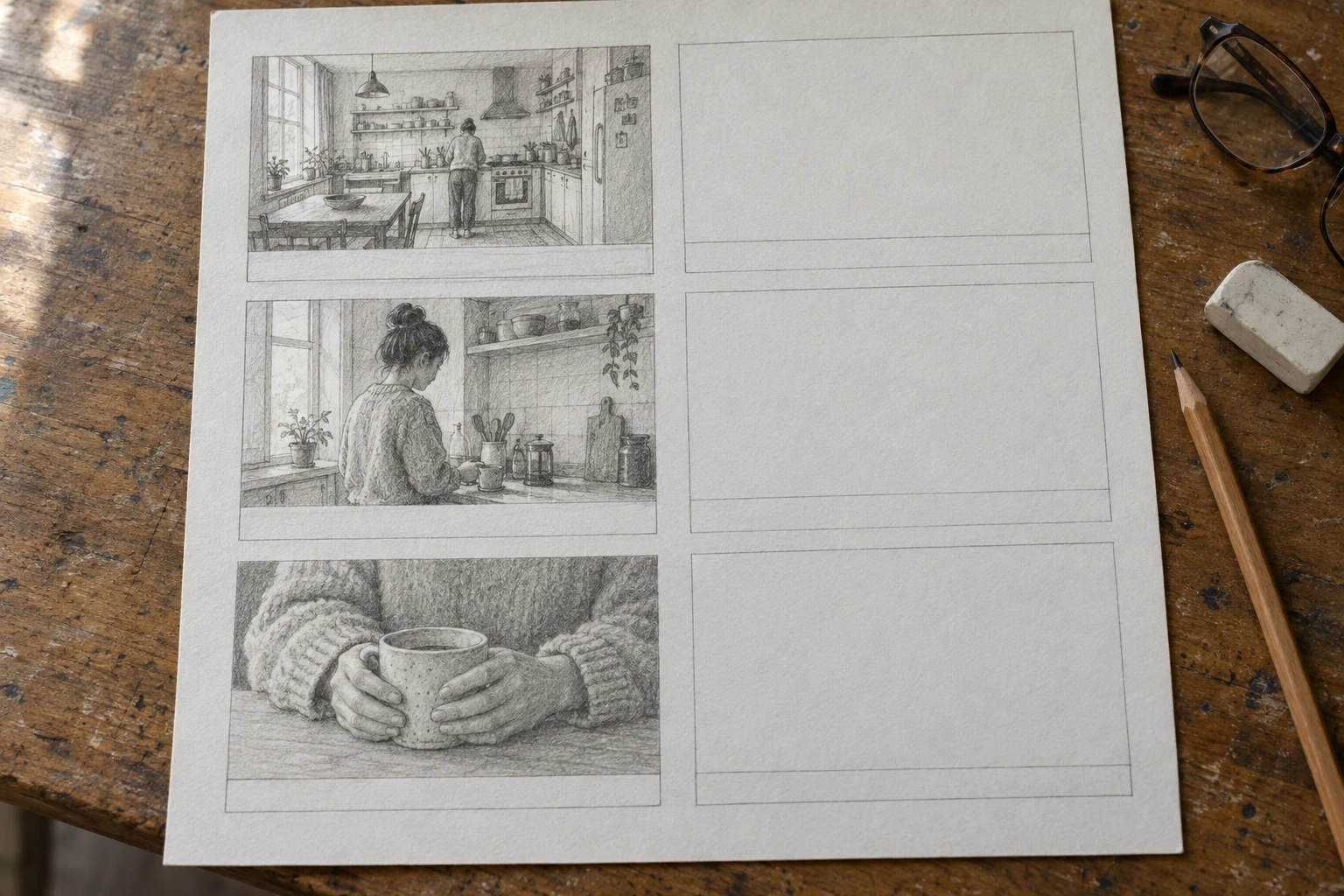
A sheet doing the job the download cannot do on its own: three frames carry staged decisions, three are still empty because those beats were not settled yet. An empty panel is information — it tells you which part of the sequence you have not decided. Concept artwork generated for this article with an image model; it is an illustration of a half-filled board, not a scan of a real production document.
Filling frames when nobody on the team draws
Three routes exist, and they are not interchangeable.
Draw rough. A rough thumbnail that states the shot size and the subject's position beats a careful illustration that states neither. This is still the fastest route when the person writing the board is also the person who will be on set.
Generate one frame at a time. Slower per frame, easier to correct. Best when each panel is a different setup — a product insert, a title card, a cutaway — because nothing has to stay consistent between them.
Generate a batch as one sheet. One prompt, one image, six panels in a grid. This is the only AI route that gives you a plausible chance of the same room, the same wardrobe and the same light across the whole sequence, because all six frames are drawn in the same pass. It is also the route that most often produces six variations of the same wide shot, since nothing in a loose prompt forces the camera to move.
The consistency problem is the real boundary here. Most image models keep no memory of your previous generation, and none has a model of your set. Across separate generations the face, the jumper, the window light and the position of the counter all drift, and the drift is not a defect you can prompt away — it is the normal behaviour of a system that redraws the scene each time. Expect to fix continuity by hand, or to keep continuity simple enough that drift does not matter.
Six prompts, one variable each
Each prompt below is written for an image model that takes a text brief and, optionally, a reference image. Every one changes a single property so the result tells you which instruction did the work. Replace the subject; keep the structural sentences.
1. Style lock
Controls: the medium and finish, which is what makes a frame read as a board rather than as a poster.
Generate one storyboard frame, not a finished still. A woman in her thirties with dark hair in a low bun walks into a small kitchen with a window on the left. Draw it as a loose graphite storyboard sketch on off-white paper: visible construction lines, directional hatching for shadow, one warm grey wash, no full colour rendering. Compose it inside a 16:9 frame with a thin hand-ruled border. Keep everything inside that border, and put no lettering, numbers or captions anywhere in the image.A board frame is allowed to look unfinished. If the result is glossy and resolved, the model answered a different brief — ask for the sketch again and name the paper, the pencil and the hatching explicitly.
2. Shot ladder
Controls: framing, by giving one beat three distances instead of three unrelated images.
Same subject, same room, same moment, three separate images at three shot sizes. Wide: the whole kitchen, the woman small at the far counter, the window on the left. Medium: from the waist up as she reaches for a mug on the shelf. Close: her hands and the mug only, the shelf edge visible at the top of frame. Keep the light coming from the window on the left in all three, keep her olive jumper and dark bun identical, and keep the counter and shelf in the same position. Do not change the layout of the room between images.Put the three frames side by side. If the window has moved to the right in one of them, the model treated "same room" as a mood rather than a floor plan, and every later panel inherits the error.
3. Contact sheet
Controls: how many frames one generation covers, and whether they share a world.
One image containing a 2 by 3 grid of six sequential frames from the same shot sequence, separated by thin white gutters, each frame 16:9. Same woman: thirties, dark hair in a low bun, olive green jumper. Same small kitchen: cream tiled wall, window on the left, wooden counter. Frame 1, wide, she enters from the right. Frame 2, medium wide, she stops at the counter. Frame 3, medium, she reaches for a white mug. Frame 4, close-up, her hands lift the mug. Frame 5, medium, she turns towards the window. Frame 6, wide from behind her at the sink. Identical light direction, identical wardrobe and identical room layout in every frame. Photographic frames, no text, no numbers, no captions anywhere.Six frames in one pass is the cheapest consistency you will get from an image model. It is still not a guarantee: expect one panel in the grid to be the odd one out, and plan to regenerate or repair it.
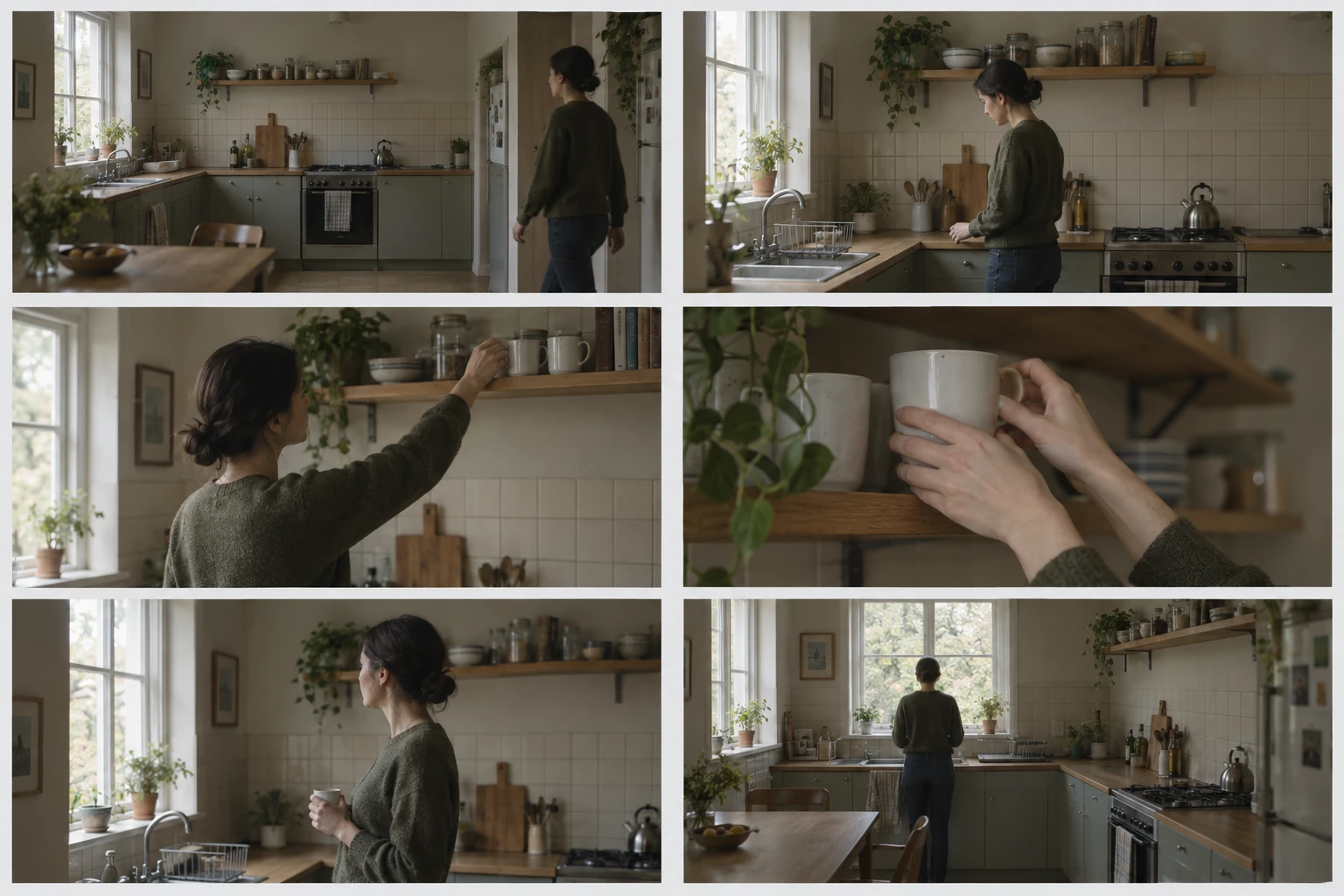
What a batch has to prove before it is worth keeping: one room, one wardrobe, one light direction, six different distances. The sequence above is the target, not a verified model output — concept artwork generated for this article. Check the same three things on your own batch, then check them again at thumbnail size.
4. Continuity block
Controls: which pixels are allowed to change, stated as a list instead of a hope.
Use the attached frame as the fixed reference for this panel. Keep fixed: the woman's face and hair, her olive jumper, the white mug, the cream tiles, the window position on the left, and the direction of the light and the shadow under the counter. Change only this: she is now seated at the counter rather than standing, and the mug is on the counter in front of her. Do not restyle the image, do not change the framing beyond what the new pose requires, and add nothing that is not named.This is the prompt that fixes most "the character changed clothes between panels" complaints, because it turns a vague wish into a list of things that must not move. It reduces drift; it does not remove it.
5. Room for the annotations
Controls: where the empty space goes, which decides whether you can write on the frame at all.
Compose each frame so the subject sits in the lower right two thirds of a 16:9 frame, with the upper left third kept as quiet, empty background — a plain wall or out-of-focus space. Keep all important action out of that left third, and keep the subject's face clear of the frame edge. No lettering, no arrows, no labels in the image.Notes belong in the caption strip, not painted into the frame. If the composition fills every corner, you will end up writing notes across the subject's face and shrinking the panel to make room.
6. Frame to motion
Controls: the movement, and whether the board's look is meant to survive into the shot.
Animate the attached storyboard frame as a single continuous shot of about four seconds. The camera pushes in slowly and stops on the medium framing; the woman lifts the mug and sets it down again. Keep her position in the room and the light direction exactly as drawn. Do not cut, do not add a second angle, and do not introduce new objects. If the style has to change to make the motion work, keep the composition of the drawn frame.Expect the video model to relight and restyle a sketch, because most image-to-video systems are trained on photographs. That makes this a staging check rather than a finish: you are testing whether the move works, not producing the final shot. Whether a given model preserves a drawn look is worth a single short test with your own frame rather than a guess from a demo reel — that behaviour is unverified here.
The button fills the first prompt into the composer at the top of this page. It only fills. Nothing is sent and nothing is generated until you continue in Studio, which matters when the subject in a prompt is a placeholder you still have to replace with your own scene.
What goes wrong
| What you see | What is happening | What to change |
|---|---|---|
| Every panel looks like a different film | The style sentence was rewritten for each generation, so the model re-decided the medium each time | Reuse the same style block verbatim across panels |
| The jumper, hair or window moves between panels | No continuity list, and the model redraws the scene from scratch each time | Name wardrobe, light direction and fixed objects; generate as few passes as possible |
| Six frames, all the same wide shot | "Six frames" was asked for without saying how the camera moves | Give every frame its own distance and subject action in the prompt |
| Hands and faces are soft or melted at panel size | Too much detail was requested for a small panel | Fewer elements per frame, bigger shapes, and accept a rougher draw |
| The grid, numbers or captions appear inside the image | The prompt asked for "a storyboard template" instead of a frame | Ask for one frame per image and rule the grid in your layout tool |
| The frame is beautiful and nobody can shoot it | No camera height, lens or screen direction was recorded | Put those in the caption strip; a frame cannot carry them all |
| The sequence reads right to left | The model followed a reading direction you did not state | Say "left to right, top to bottom" for left-to-right deliveries |
| The animated clip no longer looks like the board | Image-to-video relit the sketch into photographic footage | Treat the clip as a timing test and keep the board frames as the reference |
Two failures are worth checking before you blame the model. A panel that looks wrong at full size is often fine at the size it will be seen; a panel that looks right at full size often collapses when printed six-up. Judge at both.
Where the generated frame stops
Style is not craft, and this is the point where a storyboard page can mislead you.
A generated frame is not a drawing. It can demonstrate composition, light and staging, and it can do it faster than most people can sketch. It does not carry the decisions a board exists to carry: which lens, from what height, with what eyeline, cutting where. Those still have to be written down by someone who has decided them.
A texture is not a process. A frame that imitates clay, felt or pencil does not reproduce stop-motion, needle-felt or hand-drawn animation; those are production methods with their own timing, materials and continuity discipline. Buying the look is not buying the craft, and an AI "storyboard look" is a style reference, not evidence that the shot has been designed.
An animatic is not an animation. Stills with scratch audio at the right durations already test the edit. Rendered motion does not make a bad cut good; it makes it expensive to change.
Three things this page cannot promise, and you should test before planning around them:
- Character continuity across separate generations. The drift is real. A three-panel test with your own subject is the only way to know how much your workflow tolerates.
- Correct lettering. Shot numbers, dialogue lines and titles generated inside an image are frequently malformed. Keep wording in the caption strip and the editor.
- A drawn look surviving into video. Some models keep the line quality; most relight towards photography. Check one shot before assuming.
Rights are a separate practical check. Faces, private locations, brands and other people's artwork need permission before a generated frame goes in front of a client, and a generated frame of a real person is not a substitute for a release. None of this is legal advice, and this page gives none.
A working order
1. Write the shot list first. One line per cut: what the audience learns, and what changes. If two lines say the same thing, you have one shot.
2. Fix runtime, aspect and panel count using the arithmetic above. Do this before generating anything, because it sets the frame's proportions.
3. Fill the five fields in words. Shot number, action, camera, audio, duration. The drawing verifies the description; it does not replace it.
4. Generate for staging, not beauty. Test the room, the wardrobe and the light direction with two or three frames. Reject any batch that moves the window.
5. Cut an animatic and watch it once. Stills at the right durations will show you which panels are padding. Only then animate the shots that survive.
If the board is for a client, send the animatic rather than the individual frames. A still invites opinions about taste; a timed sequence invites opinions about the cut, which is the decision you need.
Running this inside Ottermind
The composer at the top of this page is Ottermind's own input, not a mock. It carries a prompt and an optional reference frame into Studio, where you can iterate on the look before committing to a sequence. Start with the style lock, then change one variable per pass so you can tell which instruction changed the frame.
When a board is finished and you want to test motion, Ottermind's image-to-video tool takes a frame plus a written direction and carries both into Studio; that is the step from panel to timing test. The AI video generator page covers the wider shot-level workflow for when the sequence matters more than the individual frame.
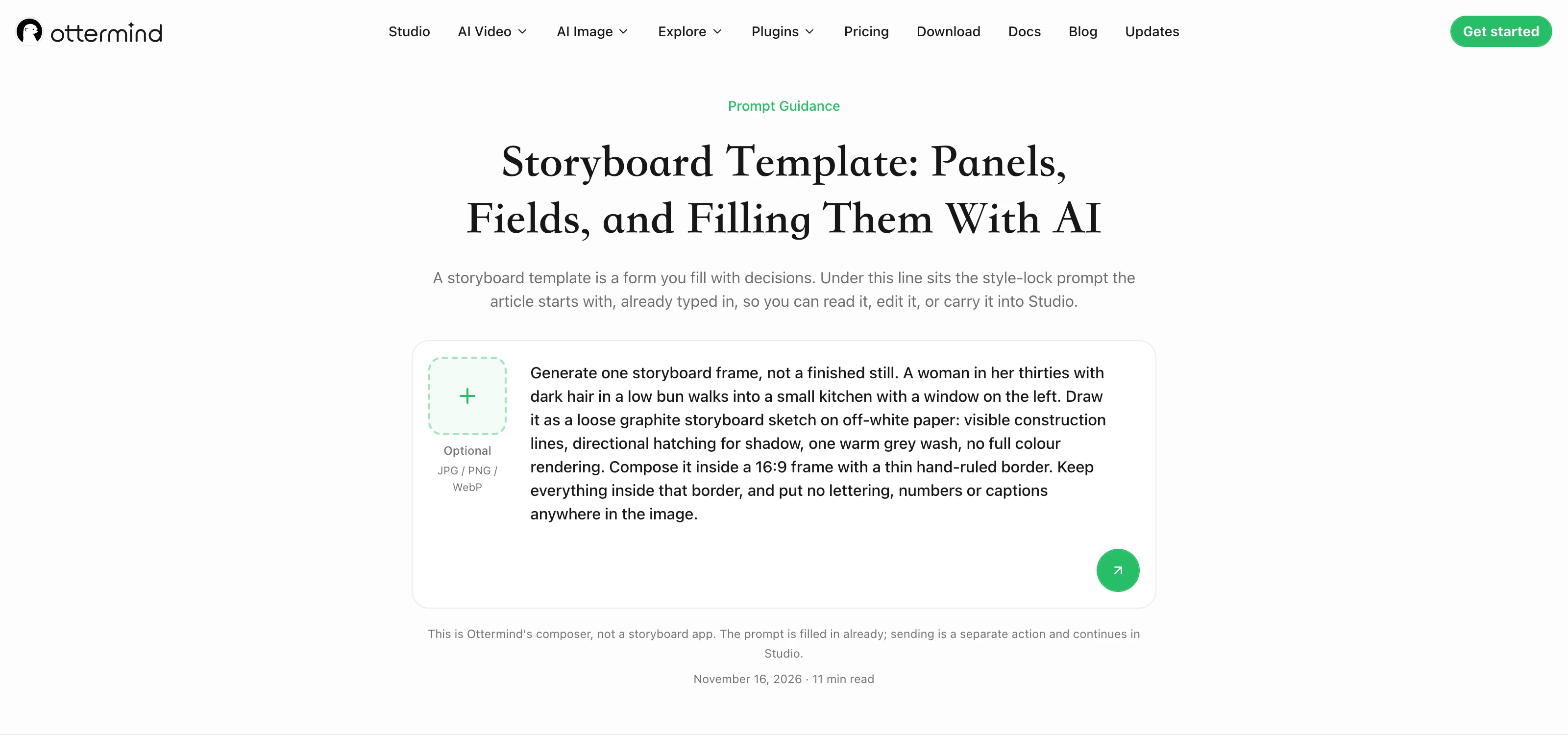
The composer on this page with the first prompt staged. This is request preparation, not a generated board: the text is filled in and nothing has been sent, which is exactly the state you want when you are still deciding whether the prompt describes your scene.
Related reading
The motion vocabulary this page assumes is covered in the image-to-video prompting tutorial, and tweening explains what has to happen between two frames once the board is set. If your sequence is built from several shots, Seedance video cases shows how multi-shot pieces are assembled. For choosing the model that renders the frames, the AI video generator comparison covers what differs between them, and faceless short-form workflows shows a board working under a much tighter runtime.
Storyboard template questions
Is a storyboard template the same as a shot list?
No. A shot list is a written inventory of shots; a board adds the frame — the composition — and the staging notes that a list cannot hold. They belong together: the shot numbers on the board should match the numbers on the list, or the two documents will drift apart during production.
How many panels do I need for a 30-second video?
At a four-second average shot length, 30 seconds is about eight cuts, which is one and a bit six-panel sheets. Round up and add a sheet, because boards grow. The average is yours to measure; a fast-cut edit can triple the count without changing the runtime.
Can AI fill a storyboard template for me?
It can generate frames that carry composition and staging, and it can produce a whole sequence as one contact sheet, which is the most reliable way to keep a room and a wardrobe consistent. It cannot decide the cut, choose the lens or guarantee continuity across separate generations. Treat generated frames as staging drafts that you verify panel by panel.
What is the difference between a storyboard and an animatic?
An animatic is the board played back as stills in sync with rough dialogue or a soundtrack, timed to the intended durations. Wikipedia describes it as the stage where timing, camera positioning and screenplay problems get worked out before full animation is committed to (checked November 16, 2026). A storyboard is the design of the sequence; an animatic is that design tested against time.
Do I need a 2.39:1 board if I deliver 16:9?
No, and using one creates work. Board at the ratio you will deliver, because panel proportions decide how much of a room you can show and where a close-up crops. A widescreen board for a vertical delivery is the first mismatch to check in any downloaded pack, because landscape is the usual default.
