Say it. It’s done.
One AI agent for images, video, decks, sites and data.
Image
Images that
stop the scroll.
Ads, posters, product shots and brand visuals — from one line of text or a photo you already have.


Edit in plain words
Pro retouching without the pro tools.
Video
Video,
directed by you.
Turn a script, a product photo or a rough idea into a cinematic clip — then cut it on a real timeline.




AI Canvas
An infinite canvas
the agent builds.
Describe the project and the agent lays out the whole board — images, video, voice-over — picks a model for every node and runs them together. Each task gets its own canvas; open as many as you need.
Launch campaign for Berry Fizz — bold, summery, Gen Z.
On it: two key visuals, a 15s video and a voice-over, all linked.
Canvas updated · 4 added · 3 linked



Built by the agent
Say what you want. It plans the board, writes every prompt and wires the steps.
Every format, one board
Text, image, video, audio and smart edits sit side by side as nodes.
Branches run together
Generate many versions at once, compare them and keep the best.
Boards that remember
Save characters, scenes and props to your asset library and reuse them on any canvas.
Slides · Sites · Data
From rough notes
to finished work.
Hand over notes, a brief or a spreadsheet. Get back a deck you can present, a site you can publish, or a dashboard you can share.
You ask
Turn my notes into a 10-slide pitch for our indie magazine — bold, editorial, investor-ready.
- notes.md
- brand-kit.pdf
- Designed slide by slide, one idea per page
- Edit any slide by asking — or by hand
- Export to PPTX or PDF, or share a link
 Export PPTX
And the rest
of your work, too.
Not a chatbot. It plans the steps, uses real tools and hands you work you can ship.
Meetings, handled
Live transcript, instant notes and action items — with real-time translation.
Podemos lanzar la beta el jueves.
We can launch the beta on Thursday.
- Ship beta — Thursday
- Send recap to partners
Plugged into your stack
Connect your apps through skills and MCP — or let it work on your own computer.
- Cloud files
- Spreadsheets
- Code repos
- Calendar
- Your computer
AI Recording Card
Every conversation,
in your pocket.
A 3 mm card that records the room. Ottermind turns it into a transcript, a translation and a summary.
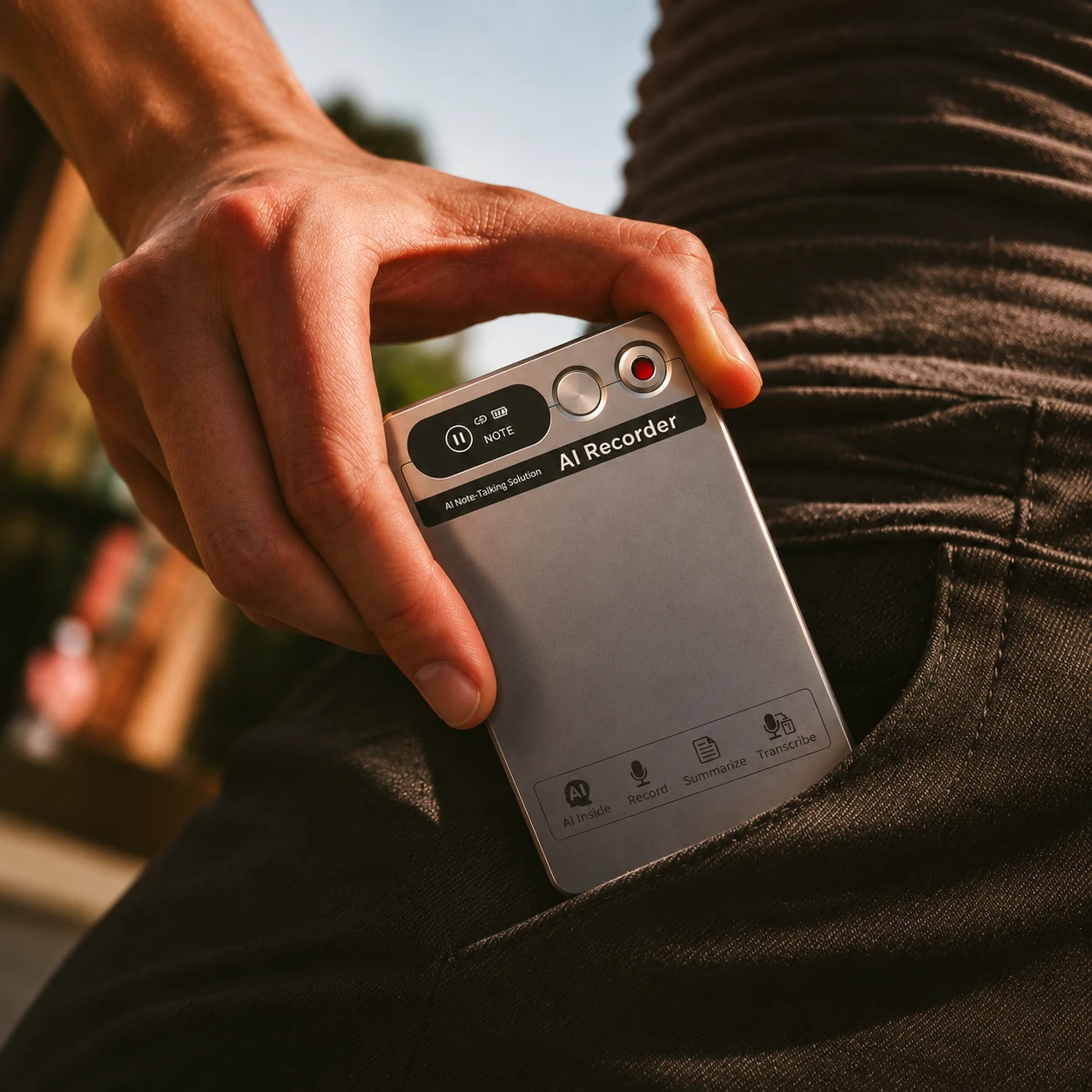
3 mm
Thin
32 g
Light
36 h
Of recording
Live transcription
Every word, readable as it’s spoken.
Real-time translation
Follow any conversation across languages.
AI summaries
Key points, decisions and next steps — without the replay.
Start from
something great.
Pick a template and its prompt lands in the box above, ready to send.
12+
Top models, auto-picked
Claude, GPT, Gemini, Nano Banana, Seedance and more — one subscription.
11
Languages
Work in yours. The interface follows.
3
Web, desktop, mobile
Start on your phone, finish on your laptop.
Models and tools Ottermind works with


Frequently asked questions
01What is Ottermind?
Ottermind is an AI agent workspace built for real work. It understands your context, connects your tools, and turns your thoughts, files, and workflows into finished work.
02How is Ottermind different from ChatGPT?
Standard AI models chat with you; Ottermind works for you. Instead of just answering questions, Ottermind retains project memory, orchestrates agents, operates your tools, and carries tasks across steps toward a finished result.
03What can I use Ottermind for?
Ottermind handles high-value tasks across your workflow. You can use it to build websites and apps, create decks and visuals, distill long meetings and documents, or grow campaigns and outreach.
04Does Ottermind learn from how I work?
Yes. Ottermind adapts as you work, learning from your preferences, recurring patterns, decisions, and feedback so future tasks can start with more context.
05Is my data private and secure?
Yes. You control what is connected, remembered, and used by agents. Ottermind keeps clear boundaries across local files, cloud tasks, connected tools, project memory, and model usage.
06What happens if something goes wrong?
Ottermind is built for resilience. If an agent hits an error, it can inspect logs, adjust its approach, and try to recover. Agent work remains visible, and critical actions require your approval.
What will you
make today?
Free to start · Web · macOS · Windows · iOS · Android