Product Guide
Komiko AI Review: Anime Art, Characters, Zaps and Limits
Komiko AI is an anime-first creation suite: a prompt turns into anime art, that art becomes an original character, and the approved image can be animated into a short clip. It also covers comics, character chat, and text to speech under one login and one Zap balance. It fits fan artists, webtoon and manga hobbyists, and small teams producing anime-style social clips.
It jams on two things. Everything sits behind an account, and every attempt is metered: the live composer showed 15 Zaps for one 3:4 image and 200 Zaps for one default video run on November 17, 2026. Iterating a character design is therefore a cost decision, not a free sketching session.
If your task is only the still-image step — an existing portrait restyled as anime, or a character designed from a written brief — that step also works outside Komiko: convert a photo to anime art in Ottermind, or generate an AI character and carry the brief into Studio. Animation, comic pages, and character chat are different jobs; this page does not pretend to replace them.
How this review was prepared: Official Komiko pages — home, AI Art Generator, AI Animation Generator, OC Maker, pricing, terms, and privacy policy — plus the live interface were checked on November 17, 2026. Because generation requires an account, we did not create one and did not produce a Komiko image or clip; output quality, resolution, speed, and watermark behavior are unverified here. The screenshot in this article is a real capture of the signed-out interface. The cover and the three explanatory illustrations are AI-generated (Image 2.5) and are labeled as concept art, not Komiko output. Ottermind publishes this article and offers the two still-image tools linked above; neither tool animates, voices, or role-plays.
What Komiko AI actually is
Komiko runs at komiko.ai, which forwards to komiko.app, and the privacy policy names Entropia Inc. as the operator. The homepage positions it as an "all-in-one AI anime studio" rather than one generator: AI image, AI video, one-tap effects, OC Maker, AI Comic, character chat, text to speech, and an agent mode.
Two consequences follow from reading the product instead of the marketing.
First, it is a model aggregator with an anime-native shell. The footer names image models (Gemini, GPT-4o, NoobAI XL, Nano Banana 2, Qwen Image Edit) and video models (Kling 3.0, Veo 3.1, Wan 3.0, Seedance, Hailuo, Vidu Q2, and others). So "Komiko Anime" is a preset inside their interface, not a single in-house model. When an output disappoints, the useful next question is which model and style combination produced it.
Second, an account is not optional. The terms of service state that an account "is required to access all the AI tools" listed there, and that users must be 18 or older. Any review that promises an anonymous quick test is describing a different product.
What Komiko is not is equally worth stating: it is a generation and remix environment for anime-style media, not a production animation pipeline. In-betweening, layer splitting, and frame interpolation exist as assisting tools, but timing, acting, and shot design remain your work.
Which Komiko tool matches your task
Pick by input before comparing model names. This table reflects what each tool's own screen and documentation describe.
| Your input and goal | Komiko route | What the screen actually asks for |
|---|---|---|
| A written idea → anime still | AI Art Generator | Prompt up to 5,000 characters, a style preset, aspect ratio, image count |
| A photo → anime version of it | Image Playground / photo-to-anime | An uploaded photo plus a style |
| A character from a brief, with a face reference | OC Maker | Appearance fields, optional reference images, then "Finalize design" |
| A story idea → manga page | AI Comic / Comics Canvas | A premise, then page layout work on a canvas |
| An approved still → moving clip | AI Animation Generator | An image of at least 320px, a motion prompt up to 2,000 characters, a video model |
| Existing footage → restyled footage | Video to Video | A source clip plus a style direction |
| Line art → colored panel | Line Art Colorization, Sketch Simplification | A drawing |
| A character to talk to | Character Chat | A character from the catalog, or your own |
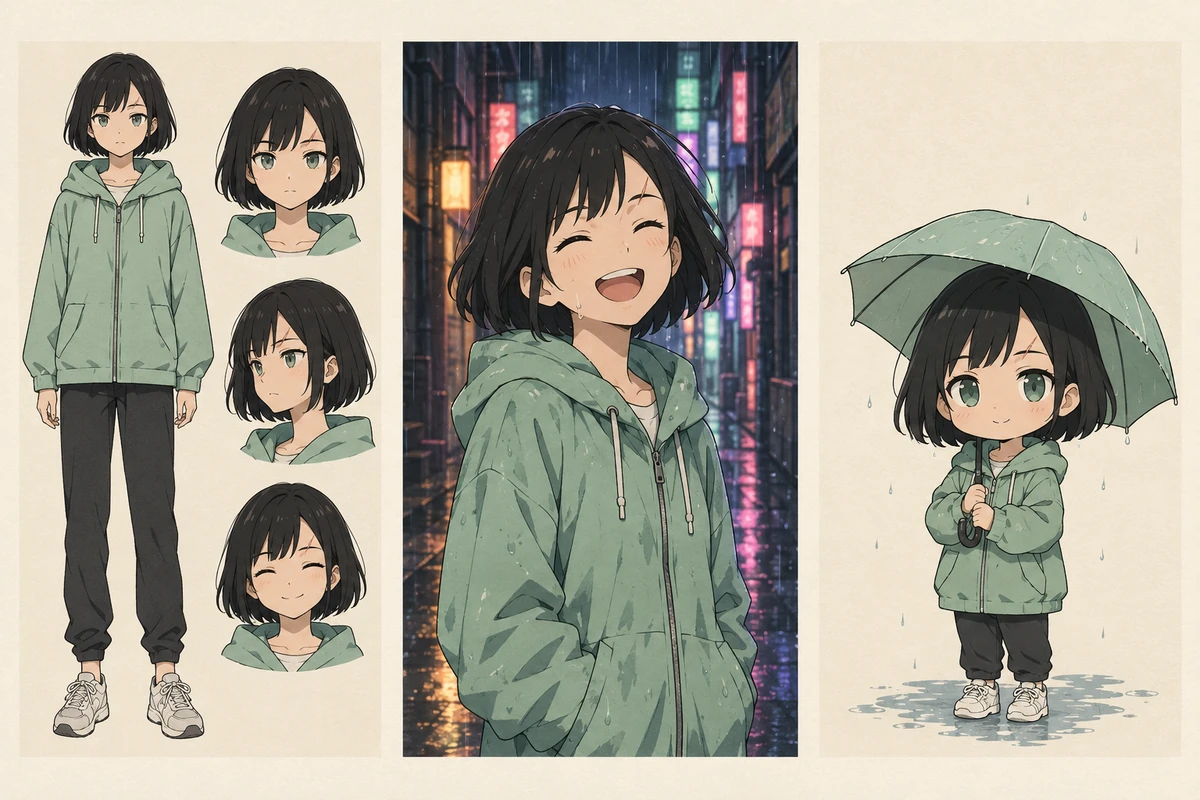
Three outputs from one character brief. This is the consistency question to test on any anime suite: the reference sheet, the scene, and the chibi variant should be recognizably the same person. AI-generated concept illustration; not a Komiko output sample.
The character route is where Komiko differs from a plain image generator. OC Maker accepts up to nine reference images at 25MB each, 50MB total, and then splits the result into appearance attributes plus a backstory. That structure is useful — it gives you a reusable description — but a reusable description is not the same as a guaranteed identical face in the next scene. Treat consistency as something you verify, not something you buy.
What a first session actually looks like
The signed-out interface is fully inspectable, which makes the first-session boundary concrete. On the AI Art Generator page we typed a prompt, then pressed the generate button.
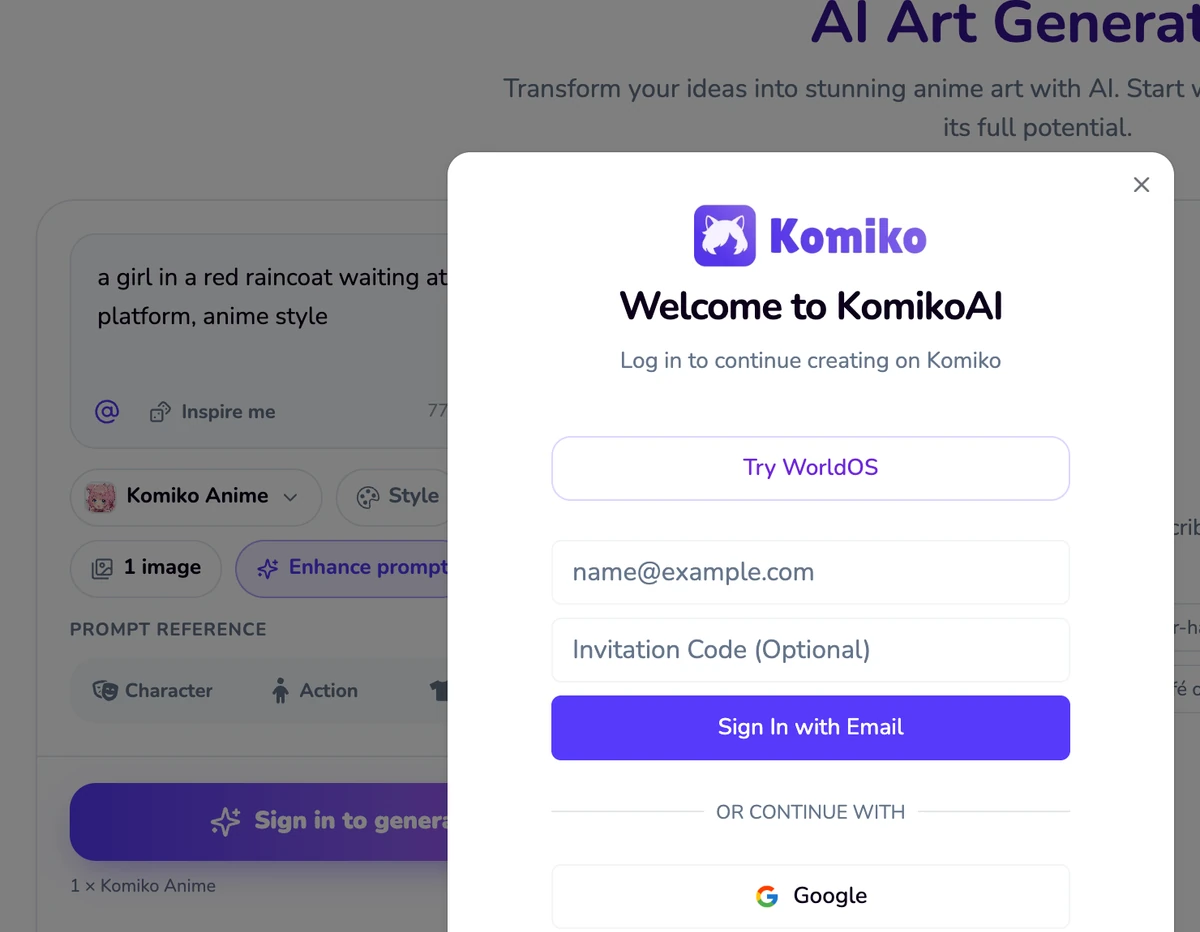
Real screenshot, November 17, 2026, desktop at 1600px. A prompt was entered and the generate button was pressed; Komiko answered with "Welcome to KomikoAI — Log in to continue creating on Komiko", with email sign-in, Google sign-in, and an optional invitation code field. No anonymous generation was offered.
Observed in that session:
- The composer accepts a long prompt (5,000-character counter), a style selector ("Komiko Anime" by default), aspect ratio (3:4 shown), image count (1 shown), "Enhance prompt", a negative prompt, and four reference tabs: Character, Action, Outfit, Scene.
- The button label combines the action and the price: "Sign in to generate · 15", with "1 × Komiko Anime" underneath.
- Clicking it opens the login dialog. There is no guest mode, no queue position, and no preview render.
This is where Komiko's own copy drifts. The image generator page title reads "(Free, Unlimited)", and the animation page FAQ says you can "test out the AI Animation Generator … for free, without having to sign up to any subscription." Read charitably, that means free Zaps after you create an account — which the pricing page confirms with 500 Zaps for new users. It does not mean anonymous, and nothing on the pricing page supports "unlimited" in the everyday sense. Budget for a login wall on your first attempt.
Zaps: the numbers that decide the budget
Komiko sells "Zaps" as prepaid credits. These are the displayed terms on November 17, 2026, on monthly billing; the site lists an annual option with "Save 17%".
| Plan | Price | Included Zaps | Daily Zaps | Advertised capacity | Parallel video jobs |
|---|---|---|---|---|---|
| Free | $0 | 500 on signup | 80 | Not stated | Not stated |
| Starter | $9.99/mo | 5,000/month | 100 | Up to 800 images or 40 videos | 3 |
| Plus | $19.99/mo | 15,000/month | 120 | Up to 1,860 images or 93 videos | 5 |
| Premium | $49.99/mo | 50,000/month | 160 | Up to 5,480 images or 274 videos | 10 |
Rules that matter more than the headline prices, from the same pricing page and the terms:
- Daily Zaps are spent first and expire at midnight in your local time. Subscription Zaps refresh each billing cycle and do not roll over.
- Failed generations are not charged, according to the pricing FAQ.
- All purchases are final and non-refundable except where law requires otherwise (terms §3.5).
- Upgrades between paid plans are not supported at the time of checking; only free-to-paid upgrades.
- "No watermark" is listed as a Starter benefit and above, which implies the free tier is watermarked. The pricing page does not state that explicitly, so we mark the free-plan watermark as unconfirmed.
Then there is the arithmetic worth doing yourself. Starter advertises "up to 800 images" from 5,000 Zaps — about 6.25 Zaps per image. The composer displayed 15 Zaps for one 3:4 image with the default style. The gap is plausible (cheaper models, batch settings, or promotional rates), but it means the honest planning number is the one in the composer, not the one in the feature list. At 15 Zaps per image, the implied cost is roughly 3¢ on Starter, 2¢ on Plus, 1.5¢ on Premium; a 200-Zap video run is roughly 40¢, 27¢, or 20¢ respectively. That is our division of the displayed prices, not a quote from Komiko.
Where Komiko gets stuck
The trial is not free of commitment. You cannot judge output quality before registering. For a creator comparing four anime suites, that is four accounts before the first useful comparison.
Iteration is where the bill grows. A character sheet is not one generation; it is a handful. At 15 Zaps per image, a ten-image exploration on the Free tier consumes most of the 500 signup Zaps. Decide your attempt budget before you start, not after.
The catalog leans hard toward anime and adult-adjacent pages. The footer and tool index include NSFW variants and named franchise styles ("Studio Ghibli", "Naruto", "Pokémon"). For an individual fan artist this is unremarkable. For a brand or school account, it is a content-policy question to settle before anyone uploads a client asset, and the terms set the floor at 18+.
There is no documented public API. The terms ask you not to access the service "via any means other than the KomikoAI website or our software application" and invite an email if you want API access. If your plan was to script batch generations, plan around that.
Rights are split in a way that deserves reading. Terms §4.1 says Komiko makes "no claim to ownership" of your generated content and that you may use it for any lawful purpose. A separate clause in the same section grants Komiko a licence to use, reproduce, and display your content to provide and improve the service. Neither clause is unusual — but neither is a clearance. Style names, character likenesses, and upstream model terms are separate questions, and "the model is named after a famous studio" is not a licence to imitate it commercially.
Still unverified in this review: output resolution, real generation times, whether a paid plan removes every watermark, whether video length limits are per model, and how consistent characters actually stay across scenes. Those are exactly the things an account-only trial is needed to test.
The split workflow: still art here, motion there
The useful way to evaluate Komiko is as the second half of an anime workflow, not as a replacement for every step.
| Step | Where it happens | Why |
|---|---|---|
| Turn a portrait into anime art | Ottermind photo-to-anime converter | A still-image task with a clear input and output |
| Design a character from a written brief | Ottermind AI character generator | Prompt plus optional reference, carried into Studio |
| Refine expression, framing, or lighting | Ottermind Studio | Conversational revision instead of a fresh prompt each time |
| Animate the approved still | Komiko AI Animation Generator | We do not provide image-to-video on this page |
| Comic pages, voiced lines, character chat | Komiko | Entirely outside this article's tools |
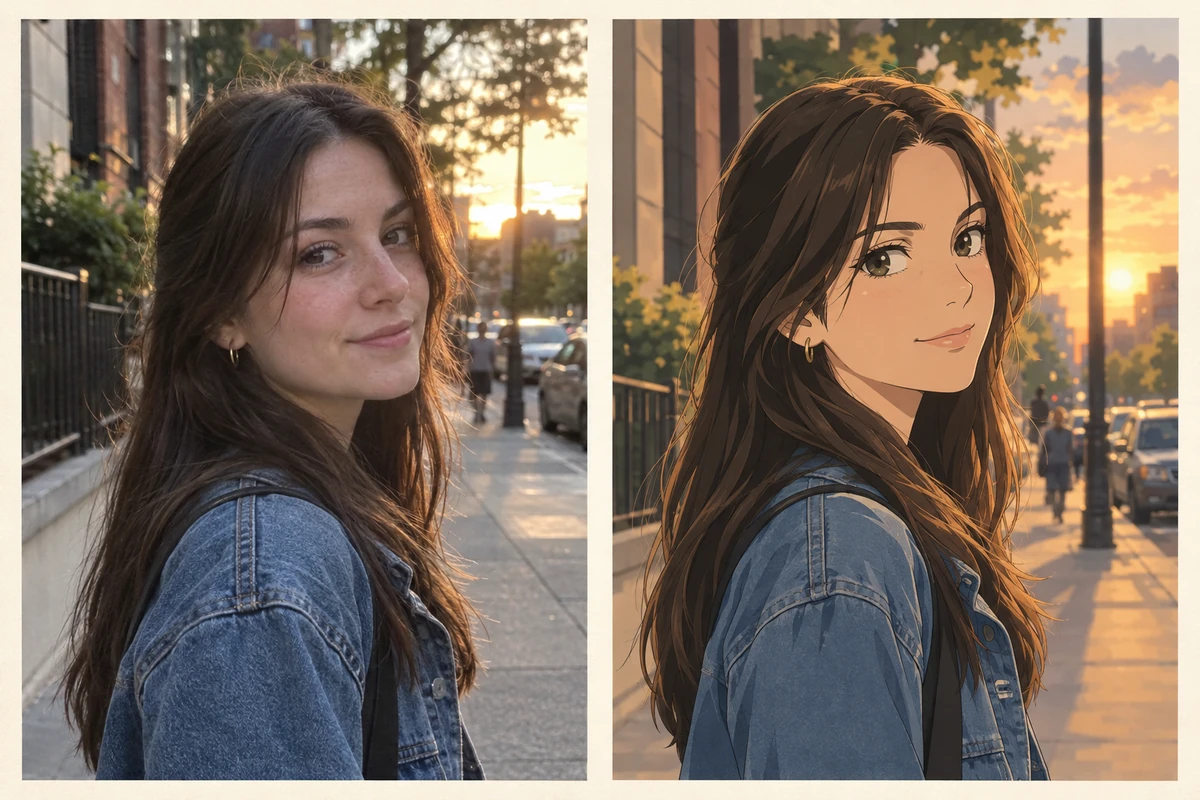
The still-image step, isolated: the left panel imitates an everyday portrait, the right shows the anime restyle a converter aims for. AI-generated concept illustration with a consistent invented likeness; neither panel is Komiko output.
If your deliverable is a finished still — a profile picture, a character sheet, a moodboard frame — Komiko's animation and chat tools are irrelevant to your budget, and the still step is where the decision should stop. If your deliverable moves, Komiko is doing work this article's tools do not do, and its Zap cost is the price of that work.
Three prompts you can reuse
These are written for an anime-style still and a short motion test. Use them in Komiko, in Ottermind, or anywhere else; the point is the shape of the brief, not the vendor.
Character brief: 17-year-old girl, short black bob with blunt bangs, mint-green hooded jacket over a grey tee, small silver hoop earring, calm half-smile, seated by a train window, late-afternoon sun from the left.Five anchors — age and style, hair, outfit, expression, light — are enough to keep a character recognizable and few enough to survive a second generation.
Anime key visual, single character, waist-up, 3:4. Keep the bob, mint hoodie and hoop earring from the brief. Soft backlight through the window, warm dust in the air, muted palette, clean ink linework, cel shading.The second block repeats the anchors deliberately. Copying them into every prompt is cheaper than discovering a different character halfway through a set.
She turns her head from the window toward the camera, hair lifts slightly, then she smiles. Camera static, no zoom, 4 seconds.For motion, one action plus one camera instruction is a testable unit. If the head turn and the smile both fail, you cannot tell which instruction the model ignored.
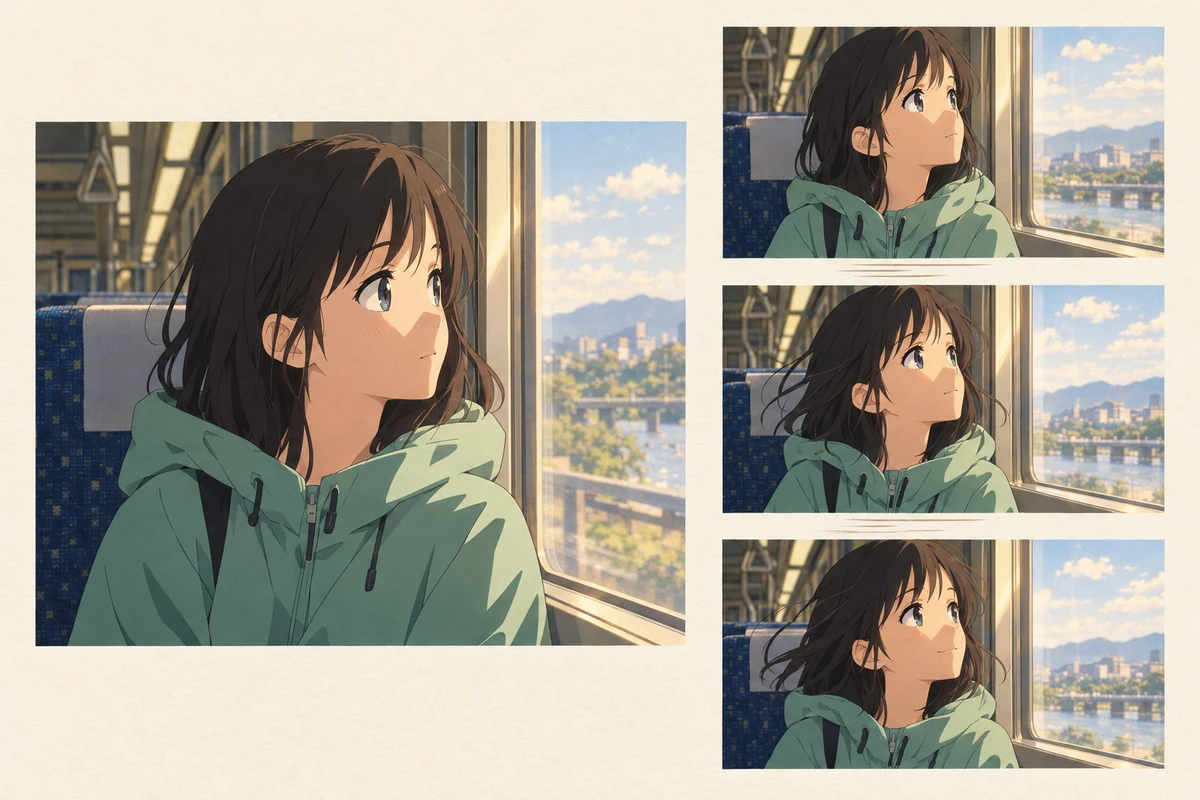
The animation step as a sequence: one approved still, then the same shot in small increments. Judge the clip against these frames — did the face hold, did the light direction stay, did anything outside the instruction move? AI-generated concept illustration; not a render from any video model.
Alternatives worth comparing before you pay
The query "komiko ai" is mostly answered by product pages that want to sell you a different generator, so read them as competitors rather than as neutral reviews. Two patterns are visible:
- Pollo AI's Komiko page follows the model-page pattern: a brand keyword, a short explanation, and its own video generator as the next step. Useful if what you actually want is a menu of video models rather than anime-native tooling.
- Media.io's Komiko comparison page follows the review-with-a-tool CTA pattern: feature overview, scenarios, then a "how to animate with our tool" section. Useful for a second opinion on features, less useful as a price audit.
Compare three things across them and Komiko itself: cost per accepted output (not per generation), what you must hand over before the first test (account, email, payment), and what the export actually is (still, clip, layered file). A page that cannot answer the second question is selling rather than reviewing.
If your work is photoreal product or portrait retouching, none of these four is the right starting point, and an anime suite is the wrong category regardless of price.
Komiko AI questions worth answering
Is Komiko AI free? There is a free tier: 500 Zaps for new accounts and 80 claimable Daily Zaps, per the pricing page checked on November 17, 2026. It is not unlimited, and it is not anonymous — the terms require an account for every AI tool.
How much does one image or clip cost? The composer displayed 15 Zaps for one 3:4 image with the Komiko Anime style and 200 Zaps for the default Komiko Video run. Both figures move with model, ratio, count, and quality settings, so read the number on the button before pressing it.
Can I use Komiko output commercially? The terms say Komiko claims no ownership of generated content and that you may use it for any lawful purpose, while also granting Komiko a licence to use that content to run and improve the service. That is a starting point, not a clearance: franchise-style presets, character likenesses, and upstream model terms are your own diligence.
Does Komiko AI have an API? None is documented publicly. The terms restrict access to the website and the app and invite an email for API interest, so treat automation as unavailable until Komiko says otherwise.
Is komiko.ai the same as komiko.app? Yes — komiko.ai forwards to komiko.app, which is where the tools, pricing, and terms live.
Where this review stops
Komiko is a reasonable fit if you are anime-native, want art, character design, and short motion in one account, and can live with per-attempt Zaps and a login wall. It is a poor fit if you need anonymous trials, team automation, predictable per-deliverable pricing, or work outside anime styling.
We have not generated a single image or clip in Komiko, so this review assigns no quality score and makes no claim about resolution, speed, or consistency. What it does establish is checkable: the tool routes, the 15- and 200-Zap displays, the plan table, the sign-in requirement, and the split between what you can finish as a still and what you have to pay a video model to attempt. Test those on your own brief before committing a project — and if the brief is a character, start with the still step and keep the brief text; it is the cheapest asset you will produce all day.
If you want the rules behind these prompts rather than a verdict on the tool: the chibi style guide covers proportion and head counts, the anime profile picture guide covers face crops and circle-safe framing, and animatics covers planning motion before you generate a frame of it.
