Technical Guide
GPT-6 API Guide: Astra Pricing, Context, Tools, and Migration
Use gpt-6-astra in the OpenAI Responses API to build with GPT-6. The model supports text and image input, text output, function calling, Structured Outputs, streaming, and OpenAI-hosted tools. It has a 1,050,000-token context window, a 128,000-token maximum output, and Standard pricing of $10 per million input tokens and $50 per million output tokens.
Do not start a production migration by changing only the model string. GPT-6 adds async tool calling, mid-turn steering, and in-conversation reasoning updates. Those features affect session state, pending calls, cancellation, observability, and cost. Start with a frozen evaluation set and a small routed rollout.
Sources: model page; model guidance; Responses API migration guide; announcement; safety overview; Artificial Analysis; hands-on API cost and effort tests; production-derived coding test. Reviewed September 7, 2026.
Quick reference
| Setting | Current value |
|---|---|
| Model ID | gpt-6-astra |
| Recommended API | Responses API |
| Context window | 1,050,000 tokens |
| Maximum output | 128,000 tokens |
| Knowledge cutoff | April 30, 2026 |
| Reasoning effort | low, medium, high, xhigh, max |
| Text | Input and output |
| Images | Input only |
| Audio and video modalities | Not supported directly |
| Function calling | Supported |
| Structured Outputs | Supported |
| Fine-tuning | Not supported |
| API Free tier | Not supported |
What third-party API tests found
The clearest early lesson is that model configuration matters as much as the model name.
Artificial Analysis tested Astra max through OpenAI's first-party API. In its current snapshot, Astra scored 55 on the Intelligence Index, produced 64.3 output tokens per second, cost $2.57 per index task, and had a roughly 355-second time to first token at maximum effort. Max is an intentionally expensive setting, but these measurements show why an API integration must expose effort, latency, and cost rather than hiding them behind one gpt-6-astra label.
ComputingForGeeks confirmed the advertised token rates with a live request, then ran the same debugging problem across effort levels and models. In its model comparison, Astra used 3,525 reasoning tokens, took 75.5 seconds, and cost about $0.194. Sol took 39.3 seconds and cost about $0.048. Both reached the same diagnosis; Astra added a caveat and stronger confirmation steps.
The reviewer also reported that moving from low to max effort on the same Astra question increased cost by almost 10 times and latency by about eight times. Low already found the three causes; higher effort bought a more thorough plan and eventually hit the reviewer's 6,000-token output cap. This is one test, but it supports a conservative default: start at medium, raise effort only for a measured reason, and cap output.
The production-derived coding test points to the opposite side of the ledger. Astra avoided a cross-component state bug that a cheaper model shipped despite a green suite. A narrowly metered API call can be more expensive while the complete accepted task is cheaper after review and repair. Your evaluation needs both numbers.
The model page also lists web search, file search, image generation, code interpreter, hosted shell, apply patch, skills, computer use, MCP, and tool search as supported Responses API tools. A supported tool is not automatically enabled, authorized, or appropriate for your application.
What a creator demo does not establish about the API
Matt Shumer's account says his largest experiments depended on coordinated sessions and substantial token use; long runs could plateau. An integration should therefore measure progress toward acceptance as well as elapsed time. A process still generating output may have stopped improving the deliverable.
Claire Vo's episode notes highlight browser QA alongside implementation. For an API application, the corresponding question is whether the runtime can inspect the finished artifact. Give a code task behavioral acceptance checks and a document task source checks; a model-only text response cannot reproduce a tool-rich demonstration.
These accounts inform test design. They do not validate API parameters, billing behavior, or a general completion rate.
Minimal Responses API request
Use the official OpenAI SDK version recommended by the current quickstart. A minimal JavaScript request follows this shape:
import OpenAI from "openai";

const client = new OpenAI();

const response = await client.responses.create({
  model: "gpt-6-astra",
  reasoning: { effort: "medium" },
  input: [
    {
      role: "developer",
      content: "Return a concise, source-grounded decision brief.",
    },
    {
      role: "user",
      content: "Compare the attached proposals against the approval criteria.",
    },
  ],
});

console.log(response.output_text);
Keep API keys in environment-managed secrets, never in prompts, source files, client-side code, or logs. Validate the actual response object instead of assuming that output_text is the only output: tool calls and structured items can also appear.
Choose reasoning effort deliberately
GPT-6 Astra does not support none. Begin at low or medium for evaluation, then raise effort only where quality improves enough to justify latency and cost. OpenAI's evaluation tables report maximum scores at any effort, so a headline benchmark does not promise the same result at your chosen setting.
Use a routing policy such as:
| Task signal | Starting effort |
|---|---|
| Short, bounded transformation | Low |
| Multi-source analysis with a clear rubric | Medium |
| Difficult planning, coding, or tool coordination | High |
| Rare, high-value problem after lower efforts fail | Xhigh or max |
Record effort with each run. Otherwise, a later regression may look like a model change when it is actually a configuration change. Set a maximum output budget too: hidden reasoning is billed as output, and a high-effort run can spend substantially more before the visible answer is complete.
Update reasoning during a conversation
OpenAI documents configuration_update input items for changing reasoning effort while retaining the cached prompt prefix. This is useful when an easy session reaches a difficult exception or when a complex phase ends and follow-up work becomes routine.
Your application should record the configuration timeline, not only the final setting. A run that changes from low to max has different expected latency and cost than one that stays at low.
Async tool calling
With an async function or custom tool, Astra can continue work that does not depend on the result while your application performs the call. When the result is ready, return it with the original call ID.
Async execution introduces normal distributed-systems problems:
- A result can arrive after the user cancels or changes the task.
- Two calls can finish out of order.
- A timeout can occur after an external write succeeded.
- Retrying a non-idempotent call can duplicate an action.
- The model can finish all independent work while a required call remains pending.
Persist a state machine with pending, completed, failed, cancelled, and expired outcomes. Use idempotency keys for writes, query the system of record before retrying, and reject late results from an obsolete task version.
Mid-turn steering
Over a WebSocket connection, an application can send additional user instructions while Astra is working. This makes long tasks easier to correct without restarting them, but it also requires versioned intent.
Store each steering event with a timestamp and mark which pending actions it invalidates. If the user changes a report's audience, drafting may continue. If the user changes the account or destination for an external action, pause until the new scope is validated and approved.
Structured output and tools
Use Structured Outputs when downstream code needs a schema. A schema validates shape, not truth. Check identifiers against allowed values, calculate totals independently, and verify cited sources before accepting the object.
Design narrow tools:
Prefer: create_draft_invoice(customer_id, line_items)
Avoid:  run_shell(command)

Prefer: search_approved_project_sources(query, project_id)
Avoid:  browse_any_url(url)
The application, not the prompt, must enforce identity, tenant scope, allowed arguments, budgets, and confirmation. Review AI agent architecture before exposing production systems.
Computer use
GPT-6 Astra is OpenAI's strongest reported computer-use model, but visual interfaces are nondeterministic and can change between observation and action. Treat clicks and keystrokes as proposed operations:
- Restrict the available application, account, and task scope.
- Capture the state used to make the decision.
- Preview consequential changes before execution.
- Require confirmation for send, delete, publish, purchase, or permission changes.
- Verify the resulting state through an independent read.
- Keep enough evidence to diagnose and reverse a failure.
The desktop AI agent guide explains where local computer access changes the risk model.
GPT-6 API pricing
OpenAI lists these GPT-6 Astra rates per one million text tokens:
| Meter | Standard rate |
|---|---|
| Input | $10.00 |
| Cached input | $1.00 |
| Cache writes | $12.50 |
| Output | $50.00 |
Prompts over 272,000 input tokens are billed at twice the input and cache rates and 1.5 times the output rate for the full request. Cache writes are 1.25 times uncached input. Batch and Flex are listed at 50% of Standard; Fast mode is twice the applicable price. Tool calls can add separate charges.
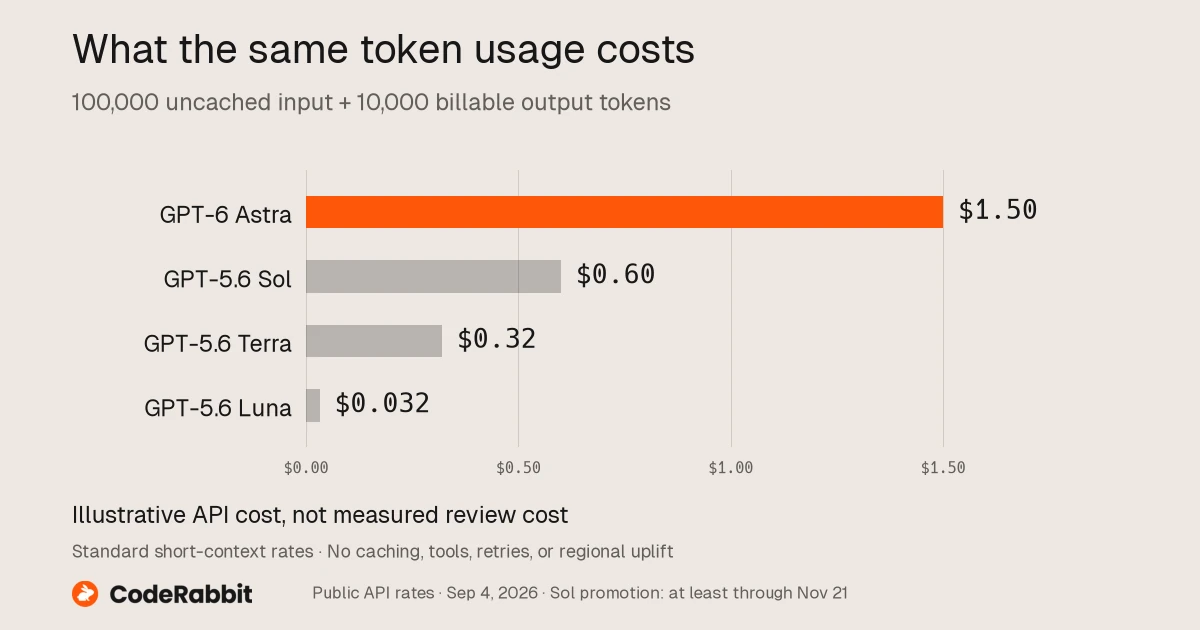
CodeRabbit cost illustration, using fixed token counts and September 4, 2026 rates. It is not a measured cost per completed task.
Cost example
A Standard request with 80,000 uncached input tokens and 8,000 output tokens costs approximately:
input:  80,000 / 1,000,000 x $10 = $0.80
output:  8,000 / 1,000,000 x $50 = $0.40
model subtotal: $1.20
That example excludes tools, cache writes, retries, and review. Above the long-prompt threshold, the listed multipliers change the calculation for the entire request.
Use prompt caching intentionally
Place stable instructions, schemas, and shared source material before frequently changing user content so requests can reuse a common prefix. Track cache-read and cache-write tokens separately. Do not keep irrelevant material in the prefix merely to increase the cache hit rate; it can still distract the model and complicate access control.
Version the cached prefix. When a policy, source, or schema changes, the run record should show exactly which version was used.
Rate limits and availability
The GPT-6 model page lists rate limits by usage tier and says the API Free tier is unsupported. Rate limits can increase with usage and spend. Design for 429 responses, queue backpressure, cancellation, and a deliberate fallback model. Never silently fall back on a safety-critical or schema-sensitive task without recording the model change and revalidating the output.
Zero Data Retention is supported for eligible API customers, according to the launch announcement. Eligibility, data residency, and safety processing are distinct requirements; confirm each one for your account and region.
OpenAI also warns that enhanced safeguards can stop legitimate work. One early Codex community report documented repeated ordinary repository tasks ending with a cyber-policy flag late in the run. Treat that as an anecdotal failure mode, not a measured rate: record policy stops, elapsed time lost, model configuration, and whether the fallback safely completed the task.
Migration checklist
- Freeze 20 to 50 representative tasks and expected results.
- Record the current model, prompts, tools, effort, latency, and accepted-task cost.
- Change only the model first to create a comparable baseline.
- Inspect new behavior before rewriting prompts.
- Test long context with missing, conflicting, and stale evidence.
- Test tool denial, timeout, duplicate result, and cancellation.
- Test prompt injection inside files and web content.
- Validate Structured Outputs beyond schema conformance.
- Add budget and stop conditions for every run.
- Route a small percentage of eligible tasks before expanding.
- Pin a model snapshot when reproducibility matters and a suitable snapshot is available.
- Keep a tested fallback and rollback path.
For a decision-level comparison, read GPT-6 vs GPT-5.6.
Production evaluation template
Workflow: [name and owner]
Model: gpt-6-astra
Reasoning effort: [low/medium/high/xhigh/max]
Prompt version: [ID]
Source set: [IDs, permissions, retrieval date]
Tools: [schemas, scopes, timeouts, idempotency]
Output contract: [schema and semantic checks]
Human gates: [actions that require confirmation]
Budgets: [tokens, tools, cost, time]
Failure behavior: [retry, fallback, stop, escalate]
Acceptance: [quality, safety, latency, cost thresholds]
Audit record: [inputs, calls, approvals, outputs, reviewer decision]
Ottermind can hold the evaluation brief, sources, test outputs, reviewer decisions, and final deliverable in one connected workspace. Begin with one bounded workflow and use the prompt engineering guide to make the task contract explicit before adding tools.
FAQ
What is the GPT-6 API model name?
Use gpt-6-astra in the OpenAI API.
Should I use Chat Completions or the Responses API?
The model page lists both endpoints, but OpenAI's GPT-6 guidance uses the Responses API and its newer workflow features depend on that interface. Prefer Responses for new tool-using applications.
Does GPT-6 support fine-tuning?
The current model page says fine-tuning is not supported.
Can GPT-6 process images?
Yes, the model page lists image input. It does not list direct image output as a modality, although image generation is available as a tool.
How much does a GPT-6 API request cost?
It depends on input, output, cache, long-prompt multipliers, processing mode, tools, and retries. Standard base rates are $10 per million input tokens and $50 per million output tokens as of September 7, 2026.
Can I send one million tokens in every request?
The context window is 1.05 million tokens, but capacity is not a recommendation. Very long prompts trigger different pricing above 272,000 input tokens and still require careful source selection and evaluation.
Is GPT-6 safe for autonomous tool use?
No model should receive unrestricted tools. Enforce least privilege, validate arguments, require confirmation for consequential actions, and audit observable behavior. Use the AI agent security checklist as a starting point.
