VEED Review 2026: Free Limits, Plan Prices, and Where the Edit Stops
VEED's free plan stops at a 10-minute, watermarked, 720p export. Once the edit is done, the job that is left is fitting the file where it has to go. State the ceiling and the details that must survive here, then continue in Ottermind Studio, where the model and the credits are shown before anything runs.
Optional
This is Ottermind's composer. It does not open VEED, call VEED's tools or spend VEED credits.
November 17, 2026 · 11 min read
VEED is a browser video editor with a subtitle engine and a generation layer bolted onto it: cut, caption, translate, dub, record, resize and export, all in a tab, sold per seat. It is the right tool when the job is editing — a timeline, burned-in captions, a translated cut for another market. It stops being the right tool at three specific points: when the free export cage gets in the way, when the footage is soft and there is no detail left to recover, and when what you need is not an edit at all but a first draft from a brief.
This review is written for the decision people actually arrive with: "should I pay for VEED, and which seat?" The numbers below come from VEED's own pricing page and its plan-comparison table, read on November 17, 2026, and they are reproduced as text rather than screenshots so you can check them against the live page. The article also marks the video work VEED leaves to you, because that boundary decides whether a subscription is the last purchase in your workflow or the wrong one.
If your clip is already cut and the only problem left is where the file has to fit, the delivery brief sits in the composer above and appears in full further down the page. Everything before that section is about the decision to subscribe at all.
How this review was prepared: VEED's public pages were read on November 17, 2026: the pricing page with its plan cards in both monthly and yearly views and its full feature-comparison table, the video editor, video compressor, video enhancer and video to text tool pages, the Terms of Use and the Terms of Sale. Prices, limits and credit rules appear here as text, not screenshots. This is a documentation review: no VEED account was created, no file was uploaded, no credit was spent and no export was compared with its source. Ottermind publishes this article and offers the delivery-brief workflow described near the end, so the comparison below is about workflow shape, not measured output quality.
What VEED is, according to its own pages
VEED presents itself on its home page as an "AI video creation platform" and on its editor page as a "Free Online Video Editor" that lets you "make pro videos in minutes with AI" — auto-cut filler words, add captions, clean audio, insert B-roll. Behind that framing is an ordinary timeline editor with a wide catalog attached: a video compressor, cutter, joiner, converter, screen and webcam recorder, teleprompter, subtitle generator, video translator, dubbing tool, AI avatars, voice cloning, text to speech, an image generator and image editor, plus an API.
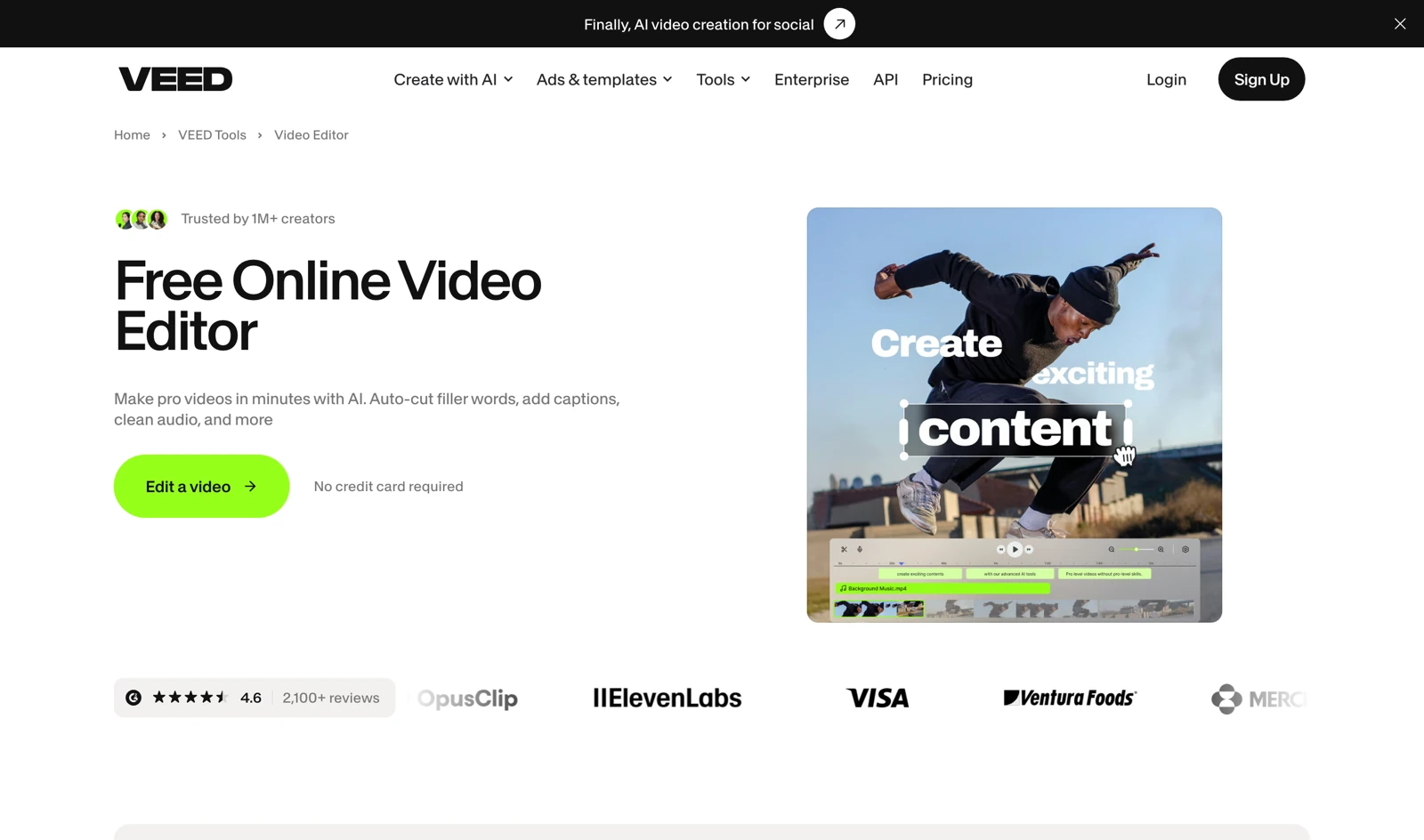
Real capture of VEED's public Video Editor page in a desktop browser on November 17, 2026. The "no credit card required" line is the free tier's entry point: you can open the editor and cut a clip without paying, and the export is where the limits appear.
The catalog matters for one reason. A browser editor that also hosts subtitles, translation and dubbing removes the export-and-re-upload step that used to sit between "subtitled" and "translated". If your job is a 60-second clip with captions, cut for three aspect ratios, that inside-one-tab shape is the product's real advantage — more than any single AI feature.
The free plan, in the numbers that decide it
VEED's pricing page does not sell the free plan; it lists the paid seats and lets the comparison table define what "free" means. Five rows do almost all of the deciding.
| Limit | Free | Creator | Pro | Studio |
|---|---|---|---|---|
| Watermark-free exports | No | Yes | Yes | Yes |
| Maximum export length | 10 minutes | Unlimited | Unlimited | Unlimited |
| Maximum export quality | 720p | 1080p | 4K | 4K |
| Upload size per file | 1 GB | Unlimited | Unlimited | Unlimited |
| Project storage | 2 GB | 5 GB | 50 GB | Unlimited |
| Auto subtitles | 10 minutes/month | Unlimited* | Unlimited* | Unlimited* |
| AI credits | None included | 500/month or 6,000/year | 2,500/month or 30,000/year | 15,000/month or 180,000/year |
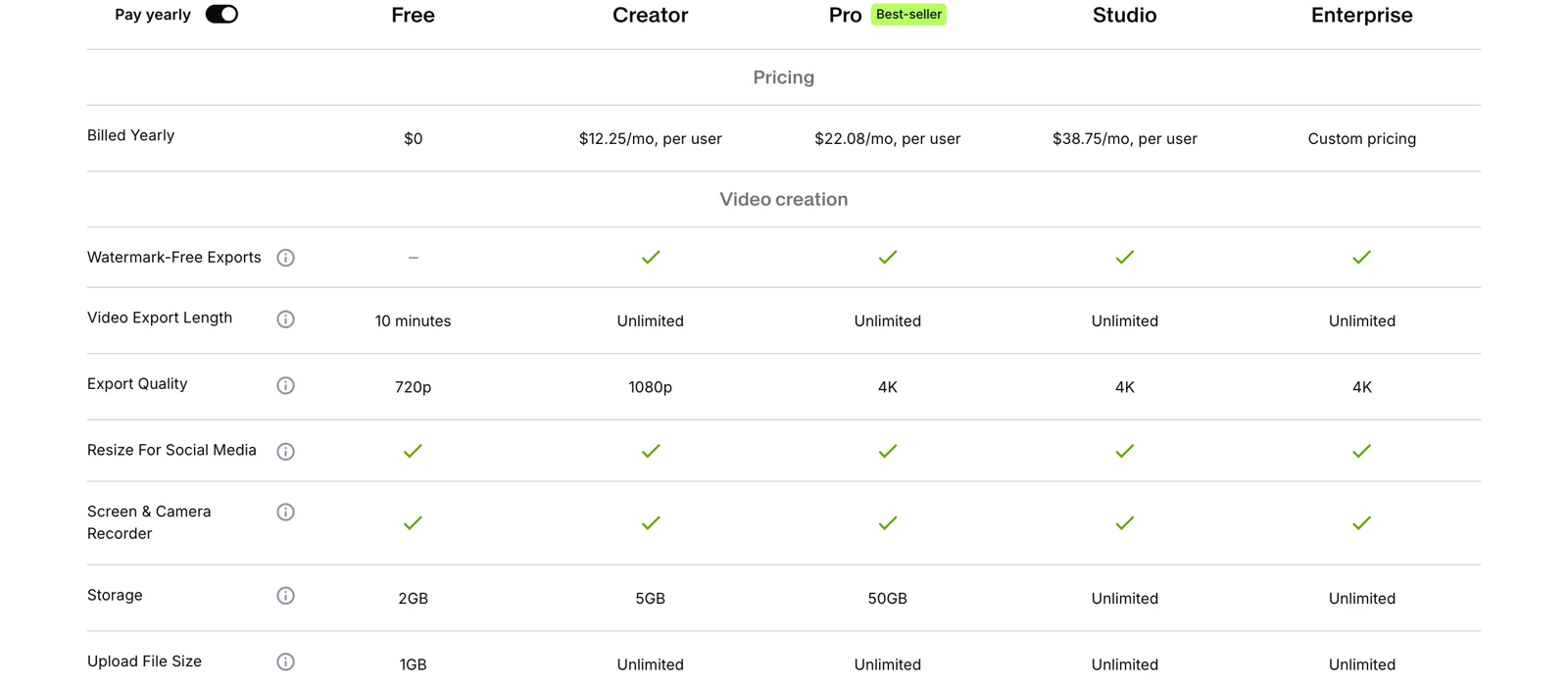
Real capture of VEED's own comparison table on the pricing page, cropped to the rows that separate free from paid, November 17, 2026. Read the Free column twice: 720p, ten minutes, watermarked, 2 GB of storage, 1 GB per upload.
The asterisk on "Unlimited*" is the fair-use clause the pricing FAQ spells out: all paid plans include unlimited subtitle generation "subject to a fair use limit of 50 hours per month". The free tier gets ten minutes of auto-subtitles a month, which is roughly one short-form video. If captions are why you came, you will spend the month deciding which clip deserves them.
Three details are easy to miss in that table.
The free plan is watermarked. VEED's own FAQ says the watermark "is shown in the corner of videos that are created on the free plan", and removal requires any paid plan. The Terms of Use go further and reserve the right to add provenance marking — visible or invisible — and forbid removing it.
Free AI features are trials, not allowances. The table marks most AI editing actions — B-roll, clean audio, filler-word removal, eye contact, background removal, auto-edits, clips, dubbing, voice clone — as "Try once". Image generation is capped at 50 images a month with credits, and subtitle translation runs on credits the free plan does not include.
Ten minutes is per project, and 2 GB is not much footage. A 4K phone clip burns through a gigabyte in well under ten minutes of screen time, so the storage row is the one that decides whether the free tier can hold a project across a week of evenings.
What a seat actually costs
The pricing page opens on the yearly view and rounds the monthly figures. The comparison table carries the unrounded ones, and they do not quite agree.
| Plan | Monthly billing | Yearly billing, per month | Yearly total | Credits |
|---|---|---|---|---|
| Free | $0 | $0 | $0 | None |
| Creator | $25 | $12.25 (card shows $12) | $147 | 500/month, 6,000/year |
| Pro | $45 | $22.08 (card shows $22) | $265 | 2,500/month, 30,000/year |
| Studio | $79 | $38.75 (card shows $39) | $465 | 15,000/month, 180,000/year |
| Enterprise | Custom | Custom | Custom | Custom |
Two things in that table change how you read the cards.
The price cards round; the table does not. The cards say $12, $22 and $39 per month billed yearly. The comparison table says $12.25, $22.08 and $38.75. The difference is the annual total divided by twelve — about $3 a year on Creator, about $1 on Pro, and in Studio's case the card rounds up. None of these is a trick, but if you are comparing VEED against another editor's "$12 vs $12", use the annual total.
Credits are listed as an annual total on yearly plans. "6,000 Credits · ~1,500 AI Videos" on the Creator card is the year's allowance, not a monthly one; the same plan billed monthly carries 500 credits a month. Credits do not carry over — the pricing FAQ is explicit that "your full allowance refreshes when your subscription renews" and unused credits are lost. On a yearly plan that means the allowance arrives once, up front, and you spend it across twelve months.
Prices are per seat: the FAQ says plans are "charged on a 'per seat' basis so the amount of the plan is multiplied by the number of editors in your workspace", billed when you invite someone. A three-person team on Pro yearly is therefore closer to $66 a month than $22.
The commercial terms are the part people skip. According to the Terms of Sale, a subscription renews automatically and must be cancelled at least two business days before the renewal date; VEED is "not obliged to offer refunds should you change your mind" after subscribing and using the service; a consumer's 14-day right applies only if the services have not been used at all. There is no free trial of the paid plans on the rendered pricing page — the visible FAQ offers a trial only to enterprise customers with three or more seats. A second answer stored in the same page's data describes a 7-day trial with a credit card, but it is not the one the page renders, so treat any trial as something to confirm at checkout rather than a fact.
Where the edit stops and the work moves
Three jobs fall outside what a VEED seat buys, and each one has a different shape.
1. The export cage is a door, not a wall. Ten minutes, 720p and a watermark are limits on the free export, not on the edit. If you are publishing, the cheapest fix is one month of Creator at $25, not a year at $147 — provided you finish the project inside that month. Nothing in the plan keeps a project hostage, but the 2 GB storage row means a long project may not survive a slow month on free.
2. VEED does not restore detail that was never recorded. This is not a gap in the product so much as a boundary it states itself. The video enhancer adjusts sharpness, contrast and exposure; its own FAQ answers "How do I convert HD video to 4K?" with "if you didn't film your video in 4K setting with a camera that has 4K capabilities, you cannot make your video quality 4K", and adds that a low-resolution clip "will not magically transform to an HD video". A 4K export setting on Pro changes the file's dimensions, not its detail. So if your problem is soft, blurry or blocky footage, the fix is a different kind of pass — and one that still cannot invent information, which is why it has to be judged frame by frame.
3. The brief-to-draft step is not the shape of an editor. VEED's AI entry points are inside the timeline: clean this audio, cut these silences, generate B-roll for this beat. That is excellent when you already know what the video is. When you have a paragraph and need a first cut to react to, the workflow is prompt-first, not timeline-first — a different product shape rather than a better one.
The division of labor, task by task
The honest way to describe VEED next to Ottermind is by task, because the two products overlap on exactly three of them and diverge on the rest.
| Your task | Where it belongs | Why |
|---|---|---|
| Cut, join, trim, resize, burn in captions | VEED | Timeline, subtitle track, multi-aspect export. Ottermind's composer is not an editor and does not try to be. |
| Translate or dub a finished cut | VEED | Minute-based translation and dubbing inside the same project. |
| Get a clean transcript out of a recording | VEED or Video Transcript Generator | VEED claims 99.9% accuracy across 125+ languages and puts the transcript beside the timeline; Ottermind's route is brief-first and returns text you can reuse. Use whichever matches where the text goes next. |
| Fit the finished export under a portal or email cap | Video Compressor | VEED's compressor is a slider with live size estimates, which is the right instrument when you want to explore. A ceiling plus "these details must survive" is the right instrument when you already know the target. |
| Make soft or low-resolution footage read more clearly | Video Upscaler | A dedicated pass rather than an adjustment layer. Neither product restores detail that is not in the frame; both are judged on faces, labels and caption text. |
| Turn a brief into a first draft to edit | Ottermind Studio | Prompt plus references, then iterate conversationally. The draft still has to be cut somewhere — that is VEED's job. |
The last row is the division in one sentence: generate or prepare the material on one side, cut and caption it on the other. VEED does not become a worse product because it does not do the first step, and Ottermind does not become a replacement for a timeline because it can produce a clip. Anyone selling you one as the other is describing a workflow they have not run.

The handoff this section is about, illustrated: frames leave the edit as files, and the envelopes are where the delivery constraints live. AI-generated concept illustration for this article; it is not a VEED screenshot, a VEED export or an Ottermind output, and no model was run on either product to produce it.
Try the same delivery brief in Ottermind
The brief below is the one loaded into the composer at the top of this page. It is written the way the problem actually arrives — after the edit, when the file is finished and the destination has a ceiling.
Take this 6-minute tutorial that was exported from VEED at 720p with burned-in subtitles and get it under 40 MB for our support portal. Keep the caption text and the cursor highlight readable, keep the voice-over natural, and avoid visible blocking in the screen-recording UI. If 40 MB cannot hold the captions, tell me what to give up before you export.Two actions stay separate here, and the difference matters. Use the delivery brief above only fills the composer and scrolls to it; nothing is sent, and no setting is chosen for you. When you send, Ottermind stages the brief and any reference frame you attached, and continues in Studio, where the model and the credits are shown before anything runs. A frame grab is optional, but attaching the frame with the caption text on it is what turns "make it smaller" into a brief something can actually check.
None of the Ottermind links above open VEED, call its tools or spend its credits. And the second column of the table is the honest one: if your task is trimming a clip, burning in subtitles, translating a voiceover or dubbing it into three languages, VEED's catalog is the more direct route, and this composer does not do that work.
Three checks before you pay
1. Is your job an edit or a repair? Editing — cut, caption, resize, translate, dub — is VEED's home turf, and the free tier will show you whether the timeline suits your hands. Repair — softness, blur, blockiness inherited from an earlier export — is not what the enhancer does, and a 4K seat will not add it. Decide which one you have before the plan decision, because they lead to different tools.
2. Which single number is blocking you? If it is ten minutes, one month of Creator at $25 covers the project. If it is the watermark, any paid seat removes it. If it is 4K, only Pro and up. If it is 1 GB per upload, every paid seat lifts it. Naming the number turns a subscription decision into a one-line requirement — and sometimes the requirement is "re-export at 1080p from the source", which costs nothing.
3. Will the credits outlive the month? Credits refresh on renewal and do not roll over, and the yearly plans arrive as one annual pool. For a team that uses AI features every week, that is fine. For someone buying a year to remove a watermark twice, it is a year of unused allowance — and cancellations inside the two-business-day window before renewal are the only ones the Terms of Sale accept.
Where this review stops
The official pages establish the plans, the free caps, the credit rules, the commercial terms and the shape of the catalog. They do not establish how VEED's captions look on a given accent, how fast a queue moves, or whether a 4K export from a paid seat is worth the bytes. We have not created an account, uploaded a file, spent a credit or compared an export with its source, so this review assigns no rating and reports no speed.
Three conflicts are worth carrying into your own check. First, the price cards round the yearly monthly-rate down to $12, $22 and $39 while the comparison table says $12.25, $22.08 and $38.75 — use the annual total. Second, the free plan's AI features read as "Try once" in the table while the marketing pages describe them as available features; the table is the more specific statement. Third, the rendered FAQ offers a trial only to enterprise customers, while a second trial answer sits unused in the same page's data. Confirm at checkout, not on the marketing page.
A reasonable verdict is conditional. For a one-off captioned cut, the free tier is a genuine trial and one $25 month is a fair price for a clean export. For a team publishing weekly in two languages, the Pro seat with dubbing and 4K is the version of the product that matches the work. For footage that is soft or for a delivery that has to hit a size ceiling, the tool you need is not a subscription to an editor — it is the pass described above, run on a frame you can inspect.
VEED questions worth answering
Is VEED free?
Yes, with four limits that decide most projects: a 10-minute export, 720p maximum quality, a watermark in the corner, and 2 GB of project storage — plus 1 GB per upload and 10 minutes of auto-subtitles a month. It is a usable free tier for evaluation and short clips, not a free delivery path.
Does VEED watermark free exports?
Yes. VEED's own FAQ says the watermark appears in the corner of videos created on the free plan and that removing it requires any paid plan. The Terms of Use also reserve the right to add provenance marking and prohibit removing or obscuring it.
How much does VEED cost?
Creator is $25 a month or $12.25 a month billed yearly ($147 a year); Pro is $45 a month or $22.08 yearly ($265); Studio is $79 a month or $38.75 yearly ($465). Prices are per seat, so a workspace with three editors pays three times the list price.
Do VEED credits roll over?
No. Credits refresh when the subscription renews and unused credits are lost. On yearly plans the credit figure on the card is the annual total — 6,000 on Creator, where the monthly plan carries 500 a month.
Can VEED upscale video?
Not in the sense most people mean. Its video enhancer adjusts sharpness, contrast and exposure, and its FAQ states plainly that footage shot below 4K cannot be turned into 4K, and that a low-resolution clip "will not magically transform to an HD video". A 4K export setting changes dimensions, not detail. If your footage is soft, a dedicated upscaler is the right pass, judged frame by frame.
Can I use VEED inside Ottermind?
No. The two products are separate. This page offers an Ottermind composer and a matching delivery brief for the step after the edit, and VEED's own tools stay on VEED's site.
Related reading: Clideo Review for the other browser editor whose free caps decide the purchase, and Best AI Video Generators for what to generate before the first cut.
