Raphael AI Review: What ‘Free Unlimited’ Actually Includes
Below: what Raphael AI's free path actually allows, where the account wall sits, and the output limits that decide your first test. If you already know the shot you want, the composer starts here.
Optional
Add a reference if you have one; the brief stays editable until you send it.
November 11, 2026 · 9 min read
Raphael AI is a free, browser-based image generator and photo editor built on the Nano Banana model family, and it does not sell credits. That combination is rare enough to be worth checking properly, because "free" and "unlimited" carry a lot of weight on the homepage while the same site's editor asks for an account before it will edit a single photo.
Two questions decide whether it fits your job. First, what the free path actually is: how far you get before a wall appears, and what the wall asks for. Second, what comes out the other side: the size of the file, the rights record behind it, and whether an edit keeps the details you cannot afford to lose. This review answers both from the product's own pages, read on November 11, 2026, plus one observed session in a clean browser profile.
If your next action is a first draft of an image you own, the composer above is the shorter path: describe the shot, add a reference if you have one, and the brief waits until you choose to send it. The rest of this page covers what Raphael AI documents, where its own copy disagrees with itself, and which checks are worth running before you build a workflow around it.
How this review was prepared: Raphael AI's public pages were read on November 11, 2026: the homepage, the AI Image Generator, the AI Photo Editor, the FAQ, the Terms and Conditions (last updated February 11, 2026), and the Privacy Policy. One session in a clean Chrome profile at 1440×900 checked the anonymous path: a prompt was entered, Generate was pressed, and the site returned a quota notice instead of an image. No account was created, no edit was run, and nothing was purchased — there is no paid tier on the public site to buy. Because no output was produced, this page makes no claim about image quality, generation speed, or success rate. The two screenshots are real captures of the public pages; the cover is a typographic layout, not a generated image.
What Raphael AI is now
The product is two tools behind one account system. The AI Image Generator turns text into an image; the AI Photo Editor takes an uploaded image and applies a described change. Both pages say they are "Powered by Nano Banana", and the homepage names Nano Banana 2 in its hero. Neither page publishes a model version selector, a token count, or a per-image price.
What the site does publish is an absence: there is no pricing page, no cart, no card field, and no credit balance anywhere in the public pages. The generator page states "Credit cost 0 — No credits required to generate and download images," and the homepage badges read "100% Free · Unlimited Generation · No Credit Card Required." As of the check date, Raphael AI reads as a genuinely free product rather than a freemium one with a hidden upgrade. If a plan is sold somewhere inside the signed-in app, it is not advertised publicly; we did not create an account, so we cannot rule that out.
That is the context for everything below. The interesting questions are not "is it good value" — at zero cost it plainly is — but "what does the free path permit," "what file do I get," and "what am I agreeing to when I upload."
The word "unlimited", against what a visitor can check
The homepage promises no limits. The generator page repeats it: "no daily cap, no credit system, and no generation lock." Then the same page says signing up gives "higher rate limits," which is a different sentence. Here is every load-bearing claim, where it appears, and what one session could confirm.
| Claim | Where it is written | What we could confirm on November 11, 2026 |
|---|---|---|
| "Unlimited Generation" | Homepage badge, generator page badges and FAQ | An anonymous request stopped at a quota notice before producing an image; the generator page separately promises "higher rate limits" to signed-in users |
| "No sign up needed" | Generator page: "No account required to start" | The composer accepts text and enables Generate without an account, but the first request surfaced a sign-in wall instead of a result |
| "100% Free" / "Credit cost 0" | Homepage, generator page | No pricing page, no checkout, no credit balance found anywhere on the public site |
| "No watermarks" | Generator and editor pages, both FAQs | Not verified: our session produced no output to inspect |
| "Commercial use allowed" | Both product pages; FAQ adds "subject to platform terms" | The terms place responsibility for inputs and outputs on the user and grant no explicit licence — see the rights section |
| "512 by 512" standard output | Generator FAQ | The FAQ states it; five aspect ratios are offered, so the number that matters is the file you download, not the ratio label |
The one claim a single session could falsify is the pairing of "no sign up" with "unlimited." In a clean browser profile the free path behaved like a trial window: the prompt stayed in the box, the site offered to save it, and the only way forward was to sign in or create an account. We cannot tell you how many anonymous generations a person gets, because the notice arrived on the first request from our network, which may reflect an IP-level counter rather than a personal allowance. What is documented is the signed-in path: an account is described as unlocking "unlimited generations, HD downloads," and history.
That is a smaller deception than it sounds. A free trial that produces usable images is still a generous product. But plan the session as a session: decide what you want, prepare your references, and download what you keep. Do not treat the account-free generator as a production queue.
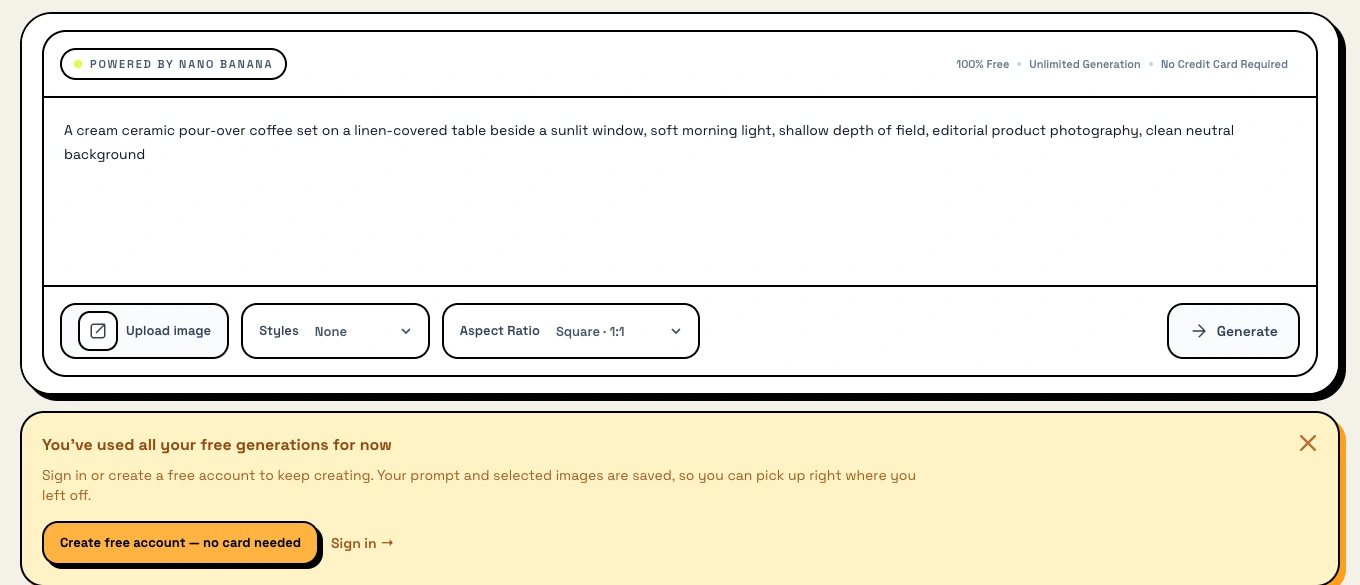
Real capture of the public generator on November 11, 2026, in a clean Chrome profile at 1440×900. The prompt was entered by hand, Generate was pressed once, and the quota notice appeared in place of a result. This is the exact moment the "no sign up" promise turns into a sign-up prompt.
What the generator actually exposes
Strip away the marketing and the generator is a conventional prompt box with three controls and a set of style presets.
- Styles. The page lists 24 curated looks — Raw Film, Neon Noir, Dreamcore, Baroque Gold, Blueprint, Wabi-Sabi, Superflat, Brutalist, and the rest — each described as injecting tuned keywords into your prompt. A style is therefore a prompt modifier, not a separate fine-tuned model, which is why the same prompt can drift when you change style.
- Aspect ratios. Square 1:1, Portrait 9:16, Landscape 16:9, Classic 4:3, and Ultrawide 21:9. The ratio is chosen before generation; there is no crop tool in the composer.
- Prompt length. The counter reads 0/2000, so a detailed brief fits comfortably. There is also a Prompt Generator and a Random Prompt button for people who do not want to write one.
- Templates. A use-case library of ready prompts for logos, social posts, YouTube thumbnails, marketing banners, product mockups, and blog illustrations. These copy text into the box; they are starting points, not layouts that guarantee a composition.
- Reference upload. The composer has an Upload image button, and the homepage claims support for up to four reference images. We did not get far enough to test how references combine.
The site's prompt guidance is better than most. It recommends a formula — subject, action, environment, lighting, style, output constraints — and shows its own weak and strong example side by side. That advice is worth following regardless of which tool you end up using, because a vague prompt fails the same way everywhere.
The editor is the half that needs an account
The photo editor is where the product becomes more than a toy, and it is also where the free path ends by design. The page states it plainly: "A free account is required for editing." The editor's own banner is more specific — "Sign in free to unlock AI image editing and unlimited generations, HD downloads."
What the editor accepts, per its page:
- Up to 4 images, 10 MB each, in PNG, JPG, JPEG, or WebP. One image is the primary; the others act as references for the edit.
- A 1,000-character edit instruction, shorter than the generator's 2,000 because an edit describes a change rather than a whole scene.
- 16 quick edit starters covering background swap, object replacement, text and label fixes, relighting, portrait retouch, detail enhancement, mood shifts, and style transfer.
- 8 publish goals that steer an edit toward social posts, ads, covers, posters, or product listings.
- An Edit Again loop, which feeds the result back in as the new input instead of making you re-upload.
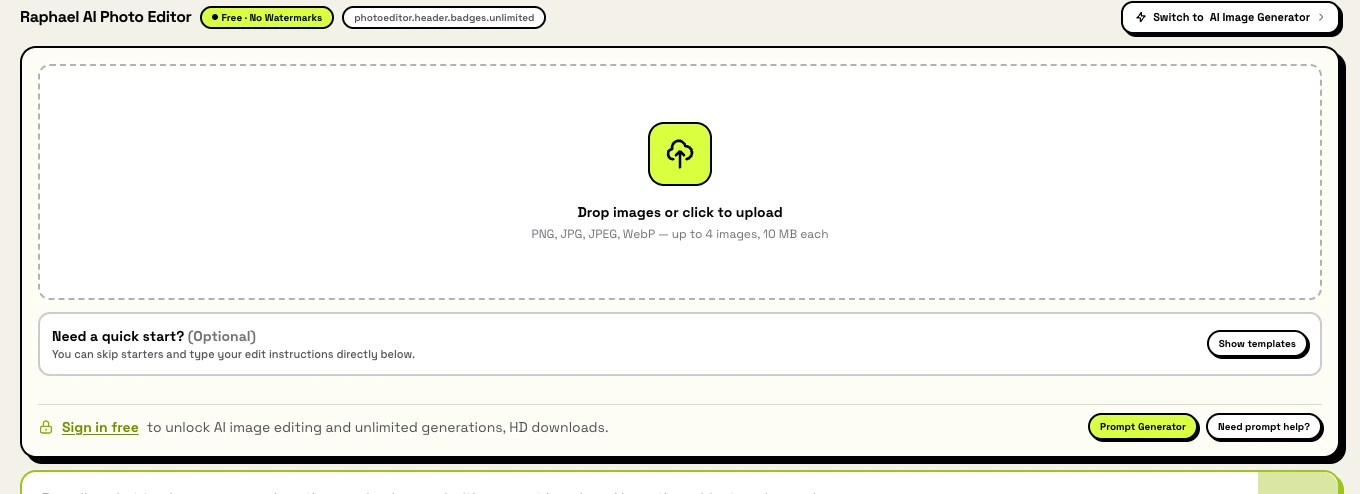
Real capture of the public photo editor on November 11, 2026. The upload rules and the sign-in requirement are both visible, and so is a small piece of unfinished copy: the second badge renders the literal string photoeditor.header.badges.unlimited instead of a label. It is cosmetic, but it tells you the product is shipping faster than its copy is being proofread — check interface promises against behaviour.
Two details in that capture are worth keeping. The editor promises "unlimited generations" only inside the signed-in sentence, which confirms the anonymous path is meant to be limited. And the upload limit is per file, not per project: four 10 MB images is the ceiling for one edit, so a batch of product photos becomes a batch of separate edits.
Output size is the limit that decides your use
This is the number to check before you plan anything: the generator FAQ states that "standard image generation outputs at 512 by 512 resolution." The same page markets high-quality output, and the editor promises "HD downloads" after sign-in, so there is clearly a larger path — but the published default is small.
Put that next to the jobs the homepage suggests:
| Job the site suggests | What 512 px means in practice |
|---|---|
| Social post or story | Below the 1080 px a feed typically wants; expect to upscale before publishing |
| Ad concept or mood board | Fine for review and direction, not for a final ad set |
| Product listing image | Usable as a comp; check edges and labels at 100% before it goes near a store |
| Print, poster, or flyer | 512 px is roughly 1.7 inches at 300 dpi; this is a concept, not a print file |
| Thumbnail or blog header | Workable if the crop is generous and the subject is central |
The homepage also advertises "AI Upscaling and Enhancement," which would change this arithmetic — except the site publishes no output size for it, so treat the upscale as unverified until you have run one yourself. The same caution applies to text: the editor lists text and label editing as a capability, and the prompt guide advises leaving text-safe space, which is an honest admission that generated lettering is fragile. Proofread every character before an image goes out.
If your job needs a specific pixel size, ask the tool for it in the prompt, then measure the downloaded file. A ratio selector is not a resolution guarantee.
Rights: what the terms say, and what they leave to you
The commercial-use question has a short answer and a long one.
The short answer is on both product pages: generated and edited images "can be used for commercial projects," subject to platform terms. For most freelancers and small teams that is the answer they need.
The long answer is in the Terms and Conditions, last updated February 11, 2026. They say you "remain responsible for the inputs you provide and for how outputs are used," that you must ensure your use complies with law and third-party rights, that features and limits may change, and that the service is provided "as available" without a guarantee of uninterrupted availability. What the document does not contain is an explicit ownership clause or a licence grant for outputs. That is not unusual for a free tool, but it means the marketing FAQ is doing work the legal text does not repeat. If a client needs a rights representation, ask support in writing rather than citing the FAQ.
Then there is the input side, which matters more for the work this tool is good at. The Privacy Policy says account data, prompts, uploaded and generated media, and usage signals may be processed, and that "different data categories may have different retention periods" — there is no published deletion window. It also lists improving "model quality" among the uses of data. Treat that as a reason not to upload anything confidential: unreleased product shots, client material under NDA, or images of people who have not agreed to be processed.
Practical rules that survive the ambiguity: keep your own copies of sources and outputs, write down what you generated and where it went, and make sure you hold the rights to every face, product, and logo in the input. No platform's terms transfer those rights to you.
Three tests before you rely on Raphael AI
You do not need a big trial. You need three small ones whose failure modes you can recognise.
- The output test. Produce one image you would actually publish, at the ratio you need, then open it at 100%. Move on when the file is large enough for its destination and the details you care about — faces, edges, lettering — survive the zoom. If 512 px is the ceiling you get, decide now whether an upscale step belongs in your workflow.
- The account test. Note exactly where the free path stops on your network, what the wall asks for, and whether the signed-in allowance covers a normal working session. Move on when the answer is a number you can plan around rather than a promise. We could not complete this test without creating an account, so treat it as yours to run.
- The input test. Take the edit you actually need — a background swap, a label fix, a relight — and check whether the subject survives it. Move on when the change landed and everything you did not ask to change stayed put. One good edit tells you more than ten random ones.
If two of the three fail, the tool is not the problem; the job is a different job.
Where Ottermind fits, and where it does not
Raphael AI and Ottermind are aimed at the same starting point — an idea plus a reference — and then diverge. Raphael AI's pitch is zero cost and zero setup; Ottermind's is a reviewable handoff, where the prompt, the references, and the task context travel into Studio and the result can be revised in conversation instead of restarted.
| Your next task | Raphael AI path | Ottermind starting point |
|---|---|---|
| Turn a written brief into a first image with reference control | Generator, 24 style presets, up to 4 references | Unrestricted AI image generator: describe the scene, attach what the result must respect, then review the draft in Studio |
| Restyle an existing photo into a new visual direction | Photo Editor, style transfer starter | AI art generator from image: keep the subject, change the treatment, compare before you commit |
| Fix one thing in a photo without rebuilding it | Photo Editor with a targeted instruction | AI photo editor: name the change and the details that must survive it, then check the result at full size |
The boundaries are different, and the difference is the point. Ottermind does not advertise unlimited free generation, and it does not pretend to. Account access, plan eligibility, credits, and the download options you get are set in Studio by your own account, so this page will not quote you a price, a credit cost, or a turnaround. What it offers instead is a place to carry the brief when a free anonymous session is no longer enough — a commercial job with a client, a set of variants that must stay consistent, or an edit you need to defend rather than just like.
The button above fills the composer with the brief this page recommends: subject, scene, light, style, and the constraints that must not move. Filling it and sending it are separate actions — you can edit the text first, and nothing reaches Studio until you press send.
Raphael AI FAQ
Is Raphael AI free?
Yes, on the public site as of November 11, 2026. There is no pricing page, no credit balance, and no card field anywhere in the pages we read; the generator states "Credit cost 0." The editor is free too, but requires a free account, and downloads of edited work are tied to that account.
Is it really unlimited?
Not in the anonymous path we tested. The generator's own copy says signed-in users get "higher rate limits," and our first anonymous request returned a quota notice instead of an image. We did not create an account, so the signed-in allowance is unverified. Treat "unlimited" as a description of the signed-in experience, not of the free trial.
Do I need an account to use it?
For the generator, no — the composer works and the Generate button enables without signing in, up to whatever quota your network gets. For the photo editor, yes: the page states a free account is required for editing, and the editor repeats it in its sign-in banner.
What resolution does Raphael AI output?
The generator FAQ states a standard output of 512 by 512 pixels, while the composer offers five aspect ratios and the editor mentions "HD downloads" after sign-in. The honest answer is that resolution depends on the path and the account, so measure the file you download rather than trusting the ratio label.
Are there watermarks?
Both product pages and both FAQs say downloads are exported without watermarks. We could not confirm it visually because our session produced no output. If a clean file matters to you, check your first download before planning around it.
Can I use the images commercially?
The FAQ says yes, "subject to platform terms." The terms themselves place responsibility for inputs and outputs on you, and do not include an explicit ownership or licence clause that we could find. For routine freelance or marketing work that is usually enough; for a client who needs a rights representation, get it in writing from support.
Can I edit my own photos?
Yes, in the photo editor: up to four images at 10 MB each in PNG, JPG, JPEG, or WebP, with a 1,000-character instruction, 16 quick starters, 8 publish goals, and an Edit Again loop. An account is required, and edited downloads are tied to it.
What is Raphael AI best for?
First drafts, concept variants, social and thumbnail visuals, and quick product-photo cleanup — work where a small file is a proposal rather than a deliverable. It is a weaker fit for print masters, tightly governed brand systems, or any job where you need a documented rights chain and a resolution guarantee before you start.
