Digen AI Review: Models, Meme Credits, and What to Verify
Digen puts several image and video models behind one credit unit it calls Meme. Below: which models their own pages describe as image to video, what the tiers actually publish about credits and duration, and what the terms let you do with a clip. If you already have the still you want to move, you can start that task on this page instead.
Optional
Nov 10, 2026 · 13 min read
Digen AI is a browser video studio that switches between named models and bills them in a unit it calls "Meme". Those two facts decide most of what a buyer needs to know, and neither of them is on the homepage headline. The same account can run a first-party Digen model or a licensed third-party one, the two draw on separate balances, and the duration and resolution you actually get are set by a chip inside the composer rather than by the plan name.
That matters for the query most people arrive with. If you searched for a way to move a still image, the useful question is not "is Digen good" — it is which model inside Digen accepts your image, what it debits, and what the terms let you do with the clip afterwards.
If your task is to animate a photo you already approve, you can start that job here instead: image to video in Ottermind takes the still plus a description of the motion. The Digen analysis below stands on its own, and the composer at the top of this article is Ottermind's, not Digen's.
How this review was prepared: Every product, price, limit and policy statement below was read on Digen's own site on November 10, 2026: the homepage and its composer, the subscription page, the individual model pages linked from its navigation (for example Real Motion 3.5, MiniMax H3 and Seedance 2.0), the Terms of Service last updated October 30, 2026, the Real Persons Policy last updated October 23, 2026, and the AI voice page. Digen's feature routes such as /image-to-video return a client-rendered shell ("Digen AI requires JavaScript") with no crawlable prose, so for those routes the only official statements we could quote are page titles, meta descriptions and the interface itself. This is a documentation-based assessment: we did not buy a plan, run a render, or measure queue times, and we assign no quality score. The cover pairs a generated still-life illustration with our series typography, and the two decorative figures inside the article are generated illustrations as well; neither is Digen output. The two Digen screenshots and the Ottermind composer capture are real captures, and each is labelled as such.
What Digen actually is
The product is easier to judge in four layers than as one feature list.
| Layer | What it gives you | Where we read it |
|---|---|---|
| The composer | One prompt field plus three chips: model, duration, resolution. Placeholder reads "Describe your video, or type @ to add a character…" | Homepage, captured November 10, 2026 |
| The model catalog | Video models including Real Motion 3.5, Seedance 2.0, MiniMax H3, Veo 3.1, Grok Video and Grok Video 1.5, Gemini Omni Flash, FLUX 3 Video, Lip Motion, Act Motion, plus image models (Nano Banana, Seedream 5.0 Lite, GPT Image 2.x, FLUX.2 [klein], Z-Image) | Footer model lists, plus a page per model |
| The billing unit | Two balances per tier: Meme and Pro Meme. Cheap and first-party runs debit Meme; named third-party models debit Pro Meme | Subscription |
| Access tiers | A free plan exists, plus Ultra, Ultra Pro and Ultra Max | Terms §4.1; subscription page |
The important consequence: "Digen" is not the name of a model, so a review of one Digen clip does not describe the next one. The catalog is the product. Someone who compares Digen against a single-model generator is comparing a storefront against a single brand.
One caveat about the official documentation. Digen's marketing routes for individual features are client-rendered — we fetched /image-to-video and /features and both returned a shell whose only text is "Digen AI requires JavaScript". So there is no official paragraph to quote about what image-to-video accepts. What is crawlable is the page title of each model page, and those titles are revealing: five of them describe themselves as image to video.
What the composer shows before you sign in
Before any of that, look at what a signed-out visitor sees. This is a real capture of Digen's homepage composer on November 10, 2026.

Actual Digen composer, captured November 10, 2026 at 1440 px. The three chips on the left are the real pricing controls — model, duration and resolution. The header of the same page showed 0 credits and an Upgrade button, so a new visitor signs up before anything renders.
Three things follow from that screenshot, and they are more useful than a features list.
The defaults are short and small. The composer loaded with 5 seconds and 720p, which is also the cheapest thing to bill. It is not necessarily the configuration your project needs.
Duration and resolution are per-run choices, not plan entitlements. The plan page lists "up to 15-second video generation" and "1080p video generation" as Ultra benefits, while the composer lets you pick a shorter, smaller run. Read the chips, not the tier name.
A signed-out visitor starts at zero credits. The header sits at 0 with an Upgrade prompt. The terms do say Digen offers free and paid plans (§4.1), and the site's own structured data advertises a $0 offer, but the free allowance figure is not printed on the pricing panel we could read. What that panel does print, on every paid tier, is a "+200 Meme" daily login bonus.
Which Digen model turns a still into a clip
This is the part a buyer usually gets wrong, because the catalog does not present one "image to video" button. It presents models, and the models are documented at different levels of detail.

Illustration, not a screenshot: one approved still on the left, a run of frames on the right. That gap between the still and the frames is where a model choice lives, and Digen makes you pick the model before it shows you what the run debits.
Reading the page titles of the model routes on November 10, 2026:
| Model page | Its own title says | Note |
|---|---|---|
| Real Motion 3.5 | "Free Real Motion 3.5 AI Generator – Image to Video" | Digen's own model family, several versions on the plan card |
| MiniMax H3 | "Free MiniMax H3 AI Generator – Image to Video" | Third-party model; gated to Pro Meme |
| FLUX 3 Video | "Free FLUX 3 Video AI Generator – Image to Video" | Third-party model |
| Grok Video 1.5 | "Free Grok Video 1.5 AI Generator – Image to Video" | Grok Video's own page says "Text & Image to Video" |
| Gemini Omni Flash | "Free Gemini Omni Flash AI Generator – Image to Video" | Third-party model |
| Seedance 2.0 | "Seedance AI Video Generator" | Marketed around a launch-partnership badge rather than an input type |
Those titles are marketing copy, not specifications. None of the pages we could read printed an input matrix — accepted image formats, maximum duration per model, whether audio is generated, or what a failed run costs. That absence is the single most important thing to know before you buy credits: the only reliable statement of what a given run will debit is the composer itself, after you select the model and the duration chip.
What the plan page does print is which balance each model draws, and that is a real constraint:
| Balance | Models listed on the Ultra card | What it means for a first job |
|---|---|---|
| Meme | Real Motion 3.5, 3.2, 3.1, 2.6; Lip Motion Gen-3; Act Motion Gen-2; Image Motion; Gen-Speech | The cheaper balance covers Digen's own motion models and the lip-sync family |
| Pro Meme | MiniMax H3, Gemini Omni Flash, Real Motion 3.5 Fast, Seedance 2.0 (and Mini/Fast), Veo 3.1, Grok Video, Grok Video 1.5, HappyHorse 1.0 | Named third-party models cost the scarcer balance |
Two practical notes hide in that table. First, "Real Motion 3.5" and "Real Motion 3.5 Fast" are listed against different balances, so the same family is not billed the same way — check the exact chip label before you run a batch. Second, the lip-sync model carries two version strings in the same product: the plan card says "Lip Motion Gen-3" while the composer chip we captured read "Lip Gen-3.1". Neither page explains the difference. If lip sync is the job, that is worth a support question rather than an assumption.
What a Meme buys, and where the published numbers disagree
The subscription page is unusually explicit about balances and unusually vague about per-run cost. Here is the monthly view as it rendered for us.
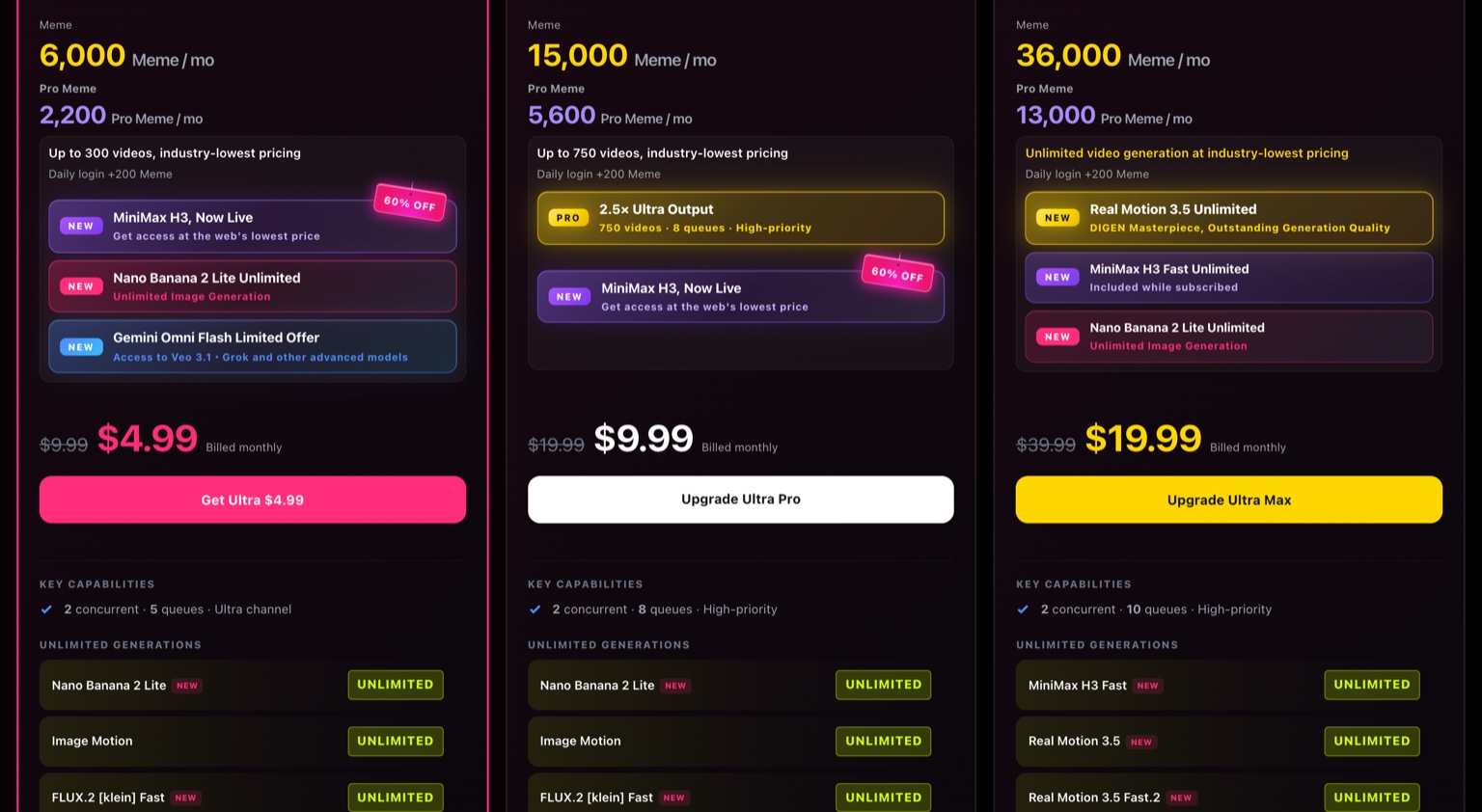
Actual Digen subscription page, captured November 10, 2026, with the monthly toggle selected. Prices shown are the ones the page served us (struck list price, then current price); Digen's terms say prices and features may change, and the annual toggle showed a lower per-month figure with a 40% badge.
| Tier | Meme / mo | Pro Meme / mo | Video claim on the card | Price shown, billed monthly | Concurrency / queues |
|---|---|---|---|---|---|
| Ultra | 6,000 | 2,200 | "Up to 300 videos" | $4.99 (list $9.99) | 2 concurrent · 5 queues |
| Ultra Pro | 15,000 | 5,600 | "Up to 750 videos" | $9.99 (list $19.99) | 2 concurrent · 8 queues |
| Ultra Max | 36,000 | 13,000 | "Unlimited video generation" | $19.99 (list $39.99) | 2 concurrent · 10 queues |
Every tier also lists "+200 Meme" for a daily login.

Illustration of the two-balance idea, not a screenshot: the large vessel is Meme, the small one is Pro Meme. The ratio matters more than the volume — on Ultra it is 6,000 to 2,200, so the named third-party models drain the smaller one first.
The arithmetic in that table is worth doing yourself, because it exposes what "up to 300 videos" actually assumes. 6,000 Meme divided by 300 videos is 20 Meme per clip, and 15,000 divided by 750 gives the same 20. So the headline video count only closes if each clip is cheap; the composer's own default of 5 seconds at 720p is the configuration that fits. A 1080p or longer run will not divide that way, and the page does not publish a per-model rate card. At the displayed Ultra price, 300 accepted clips works out to roughly two cents per clip; at the same price with 10-second 1080p runs it is a different number you will only learn from the composer.
The "unlimited" line needs the same reading. On the Ultra Max card, unlimited generation is attached to specific models (MiniMax H3 Fast, Real Motion 3.5, Real Motion 3.5 Fast.2 and others listed under "Unlimited Generations"), not to the whole catalog. Models on the Pro Meme list still draw Pro Meme.
Then there is duration, where the published numbers simply do not agree:
- The composer default was 5 seconds at 720p.
- The Ultra benefit list promises "up to 15-second video generation" and "1080p video generation".
- The same Ultra card also advertises "Up to 36s Seedance 2.0 · 480p", and the Ultra Pro card raises that to "Up to 93s Seedance 2.0 · 480p".
Those are different claims about different things — a platform maximum, a model maximum, and a resolution trade-off — but they are printed next to each other with no reconciliation. The honest reading is narrower: the long-clip claims are made for one model family and come with a 480p qualifier, and nothing on the page states the ceiling for the model you actually picked.
Who owns the clip, and who may appear in it
This is where Digen is more explicit than most tools in its price range, and also where the wording deserves a careful read.
Ownership and commercial use. The Terms of Service (§5.2, updated October 30, 2026) state that Digen does not claim ownership of your inputs or outputs, and does not restrict your commercial use of output "solely because it was generated on the Services". Notice the qualifier: the permission is about where the clip was made, not about whether the content itself is usable. Separately, the Ultra card lists "Commercial license" among platform benefits, which is worth asking about if you are buying specifically for client work — the terms already permit commercial use, so what the plan benefit adds is not explained on the page.
Storage is not an archive. §5.5 says generated videos may be retained for a limited period, giving "about 30 days from creation" for certain free or standard storage as an operational target, then deleted. Download what you keep, and keep the settings that produced it.
AI authorship must not be misrepresented. §2.5(f) prohibits presenting AI-generated output as solely human-generated "in a misleading way". For advertising and for anything that reads as documentary footage, that is a production constraint, not a footnote.
Real people are the sharpest limit. The Real Persons Policy (updated October 23, 2026) is blunt: you may depict yourself, or a contracted virtual human whose documented consent covers the specific use. The older "allowed public figures list" is explicitly revoked, unauthorized depictions of public figures are blocked, and sexual deepfakes are treated as a ban-level violation. It also says news, commentary or satire does not automatically authorize a person's likeness. The service is 18+, safe-for-work across the product, and not offered in mainland China.
Voice is a separate consent surface. Digen's voice page advertises designing a voice from text or cloning one from a sample. A cloned voice plus an animated still is exactly the combination the likeness policy regulates, so the consent record has to exist before the render, not after.
Music. We found no published statement about music rights for the audio Digen's music mode produces, and we did not test it. Treat that as unverified rather than permitted.
Refunds and jurisdiction. §13 offers a full refund only if claimed within 7 days, you have generated less than about 5 minutes of video, and you are not on an Enterprise plan. §14 states Estonian governing law in one clause and Hong Kong law and courts in the next; both are in the current document. If the account is for a company, that inconsistency is worth resolving in writing before an annual purchase.
None of this is legal advice, and none of it makes a Digen clip automatically safe to run as an ad. It tells you which questions to ask before the render, which is cheaper than asking them afterwards.
Five checks before you pay
1. Match the settings you need against a number that exists
Write down the duration and resolution your project needs, then select them in the composer and read the debit. Do not buy a tier on the strength of the "up to N videos" line, because that line assumes 20 Meme per clip.
2. Separate your two balances
A plan gives you Meme and Pro Meme. If the model you want (MiniMax H3, Seedance 2.0, Veo 3.1, Grok) sits on the Pro Meme list, its price is the Pro Meme allowance, not the headline figure.
3. Decide the likeness question before the upload
If the still contains a real person who is not you, or a face you cannot document consent for, no amount of prompt engineering fixes it. That is a policy boundary, and for paid work it is a contractual one too.
4. Plan the exit for files
Thirty days is an operational target, not a promise. Download accepted clips and keep a note of model, duration and resolution so a revision does not require guessing.
5. Confirm the benefit you are actually buying
Commercial license, watermark-free exports and 1080p all appear in the Ultra benefit list. If those are your reason for paying, get the plan-specific wording confirmed, because the general terms already permit commercial use and the plan page does not explain the difference.
Digen or Ottermind: choose by the next action
The two products overlap on one job — turning an approved still into motion — and diverge on everything around it. Digen's advantage is catalog breadth and named third-party models. Ottermind's advantage is a shorter path from a reference image to a reviewable take, with model, plan and credit details shown inside Studio for your own account.
| Your next action | Digen route | Ottermind starting point |
|---|---|---|
| Move one approved product still | Real Motion 3.5 or MiniMax H3 (both marketed as image to video) | Image to Video: attach the still, describe the motion and camera feel, review the take |
| Make a portrait speak a script | Lip Motion, plus the voice tools | AI Lip Sync Tool: portrait plus script, review the performance |
| Build the still before animating it | Image models (Nano Banana, GPT Image, Seedream 5.0 Lite) | AI Product Image Generator, then carry the approved image into the video brief |
| Compare several model families in one account | The catalog itself | No equivalent comparison claim on this page; Ottermind is the workflow entry here, not a model marketplace |
The honest boundary: Digen's model roster is wider than anything we should imply for Ottermind, and its Pro Meme tier unlocks third-party models we are not comparing feature for feature. What Ottermind offers on this page is the task — one reference image, one motion brief, a reviewable result — with plan and credit details visible in Studio before you generate. Model availability, resolution and cost for your account appear there, not in this article.
Try the same task in the composer above
The composer at the top of this article is a real Ottermind surface, not a mock-up: one attachment slot for the start frame on the left, the brief on the right, and a round arrow that hands the request to Studio.
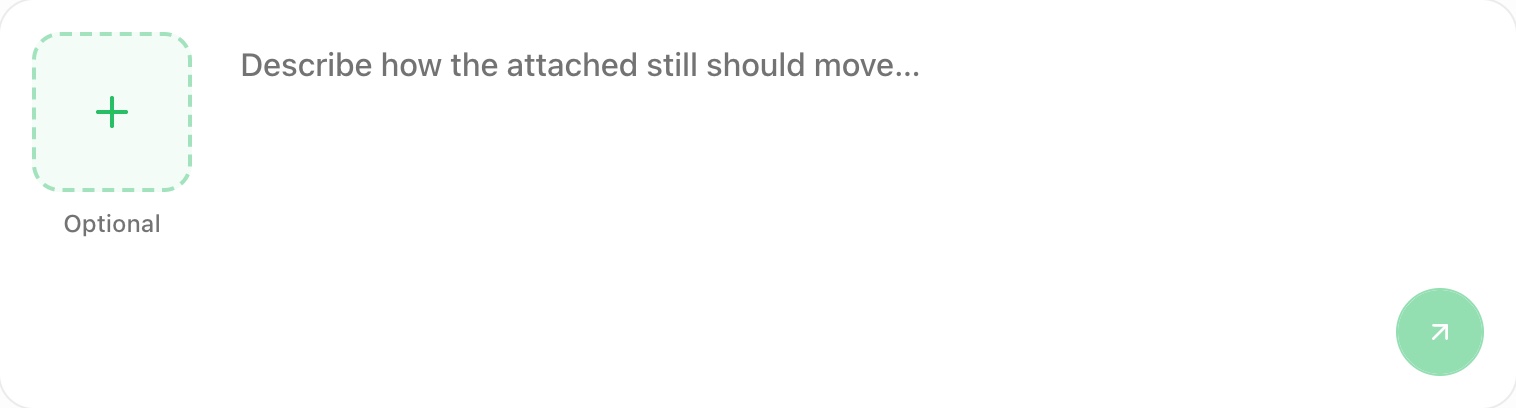
Actual Ottermind composer captured on November 10, 2026, with an empty field and no attachment: the tile reads Optional and the round arrow is inactive. This is the request-preparation state, not a generated result, and it is not Digen's interface.
Load the brief into that composer, then attach the still you already approve:
Animate this product photo as a five-second clip: a slow dolly-in from waist height, the fabric lifting as if a fan passes, window light sliding across the surface. Keep the label steady and legible, add no new objects and no text overlays, and end on the same framing as the start.The button only fills the field and moves your cursor there — we checked that clicking it changes the text and nothing else. Nothing is sent until you press the arrow, and the arrow stays inert while the field is empty and no image is attached. Sending hands the intent to Ottermind Studio rather than running anything from this page, and it never calls Digen or spends Digen Meme. In the local preview we used, Studio itself was not running, so the post-handoff screens are untested here.
What to check in the result: does the label stay readable, does the motion move the material rather than warp the product, and does the frame drift? If one detail fails, ask for that detail alone. The image-to-video prompting tutorial covers motion and shot language that transfers across models.
Digen FAQ
Is Digen AI free?
There is a free plan — the terms say Digen offers free and paid plans, and the site's structured data advertises a $0 offer — but a signed-out visitor starts at 0 credits, and the free allowance figure is not printed on the pricing panel we could read. The paid tiers shown on November 10, 2026 were Ultra, Ultra Pro and Ultra Max, each with a Meme and a Pro Meme monthly balance and a +200 Meme daily login bonus.
Which Digen model should I use for image to video?
Five of its model pages describe themselves that way: Real Motion 3.5, MiniMax H3, FLUX 3 Video, Grok Video 1.5 and Gemini Omni Flash. Real Motion is the one the plan card labels "DIGEN Masterpiece", and it draws Meme; the others draw Pro Meme. Because the model pages do not publish an input matrix, select the model in the composer and read what it asks for before committing a batch.
How many Meme does one video cost?
Digen does not publish a per-model rate card. The tier cards imply 20 Meme per clip: 6,000 Meme for "up to 300 videos" on Ultra, and 15,000 for "up to 750" on Ultra Pro. Any longer or higher-resolution run will cost more, and the composer is the only place that shows the real number.
Can I use Digen clips commercially?
The terms (§5.2) say Digen does not claim ownership of your outputs and does not restrict commercial use solely because the clip was made on the service, and the Ultra tier lists a "Commercial license" benefit. The same document restricts what the content may show — real people's likeness, misleading human-authorship claims, adult content — and those restrictions follow the clip into any campaign. Treat clearance for the subject, the music and the platform as separate work.
Does Digen do lip sync?
Yes, as a named model rather than a headline feature: "Lip Motion Gen-3" appears on the plan card and "Lip Gen-3.1" appeared on the composer chip we captured, and Act Motion and Gen-Speech sit alongside it. We did not run it, so we make no claim about how well it holds.
Where does this review stop?
At documentation. It establishes which models exist, how credits are structured, what the tiers publish, and what the terms and likeness policy say. It does not establish output quality, motion stability, queue time or whether a specific style survives a second generation. We did not buy a plan or run a render, so no score, no speed figure and no "better than" claim appears here.
Related reading: Dreamina's model catalog and credit structure, Vidu's image-to-video limits, and Viggle's motion routes.
