How To
AI Agent vs Chatbot vs Automation: Which One Should You Use?
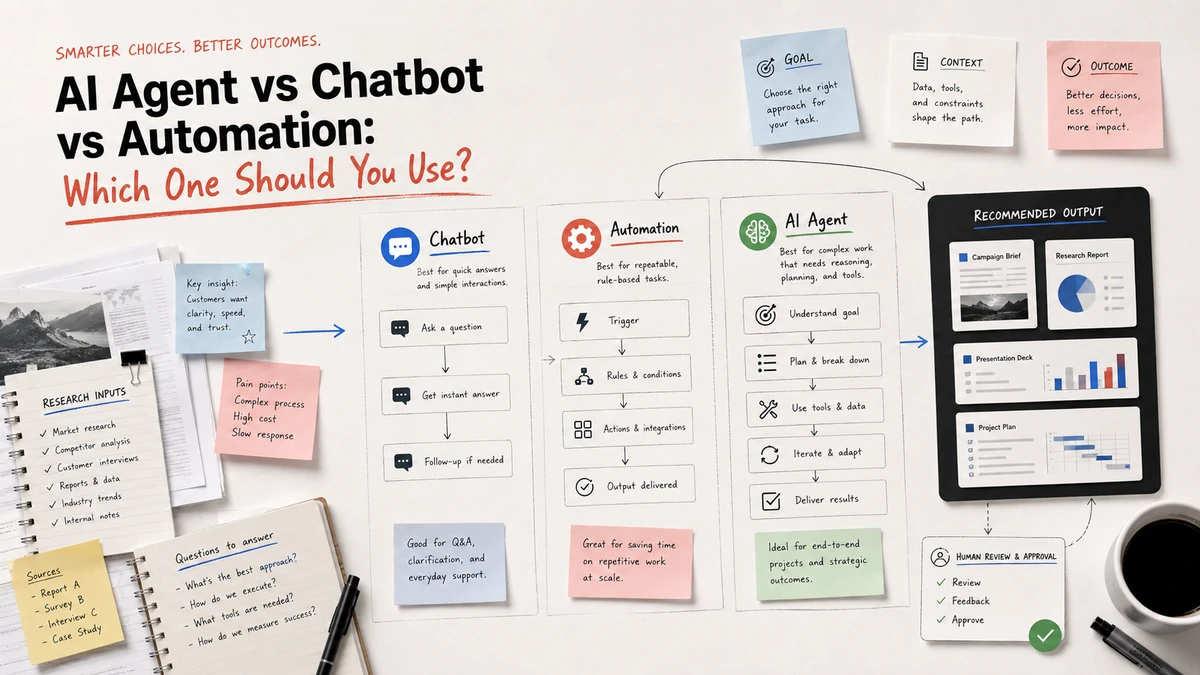
An AI agent is useful when a task has a goal, variable inputs, and several possible next steps. A chatbot is better when someone needs a conversational answer. Automation is the right fit when the same trigger should reliably run the same sequence. Many dependable systems combine all three: a chatbot collects or explains, automation controls the path, and an agent handles bounded decisions inside that path.
The practical question is not which label sounds most advanced. It is: what must happen after the first response, and who is accountable for the result?
Quick comparison
| Capability | Chatbot | Traditional automation | AI agent |
|---|---|---|---|
| Main job | Respond to a person | Move data or trigger actions | Pursue a goal across steps |
| Input shape | Conversation or known questions | Structured events and fields | Files, links, notes, goals, and imperfect context |
| Next step | Usually another message | Predetermined by rules | Selected within allowed tools and policies |
| Memory | Conversation or knowledge base | Stored fields and logs | Project context, task state, and reusable instructions |
| Best output | Answer, recommendation, or handoff | Updated record, notification, or routine action | Report, brief, deck, decision, or completed workflow |
| Main risk | Confident but incomplete answer | Brittle rules or bad data mapping | Wrong tool choice, overreach, or unreviewed judgment |
| Human role | Ask, clarify, and evaluate | Design, monitor, and handle exceptions | Set the goal, review evidence, and approve consequential results |
These are operating patterns, not mutually exclusive product categories. A support system may use a chatbot for the first conversation, an automation to route the ticket, and an agent to summarize the case for a human. An AI workspace may use an agent to create a deliverable while requiring a person to approve claims before publishing.
Definitions and product disclosure: IBM's overview of AI agents, Google Cloud's explanation of AI agents, and Zapier's automation guide provide category context. Ottermind is included as an example of a workspace for connected project deliverables; this article is not an independent benchmark.
What is a chatbot?
A chatbot is a conversational interface. It receives a message, finds or generates a response, asks a follow-up question, or routes the person to another channel. The conversation is the center of the experience.
Use a chatbot when the user primarily needs:
- An answer from a known set of information
- Help navigating a service or product
- A draft, explanation, summary, or set of options
- A quick handoff to a person or a fixed workflow
Chatbots are often the best first layer because they reduce friction. A visitor can describe a problem in natural language instead of learning a form or a process. The limitation is that a helpful reply is not the same as completed work. A chatbot may explain how to prepare a campaign brief, but it does not automatically gather the source files, build the brief, produce the landing page, and leave a reviewable handoff.
Where chatbots stop being enough
Treat the response as an intermediate result when the work requires multiple artifacts, external tools, or decisions that must remain consistent. A chat can produce a good paragraph and still fail the larger job if:
- The same context has to be re-entered for every output
- A researcher must inspect sources and preserve citations
- Several deliverables need to agree on audience, claims, and constraints
- Someone else needs to review what happened and continue the task
In those cases, keep the chatbot as the interface, but add a workflow or an agent behind it.
What is traditional automation?
Traditional automation follows an explicit recipe. A trigger starts the flow, conditions determine branches, and actions run in a known order. If a form is submitted, create a CRM record, send a confirmation, and notify an owner. If a file arrives, rename it, move it, and update a row.
Automation is the strongest choice when the process is:
- Frequent and repetitive
- Based on structured inputs
- Stable enough to describe as rules
- Easy to test with expected outputs
- Low risk when it runs without a person at every step
The advantage is predictability. You can inspect the trigger, inputs, permissions, and actions. The tradeoff is brittleness: a rule-based flow does not understand a new document layout or decide that an unfamiliar request needs a different path unless someone adds that logic.
When automation is the wrong abstraction
Do not force an open-ended project into a long chain of fixed rules. A workflow that tries to encode every possible research question or writing decision can become harder to maintain than the original task. Use automation for the stable edges of the process, then give an agent a bounded job where the inputs are variable.
For example, automation can create a project folder, assign an owner, and request approval. It should not silently decide which unsupported product claim belongs in a public campaign.
What is an AI agent?
An AI agent starts with an objective and uses context, tools, and intermediate results to decide what to do next. It may search sources, inspect a file, run a calculation, draft an artifact, critique the draft, or ask for clarification. The important distinction is limited decision-making inside a controlled environment, not unlimited autonomy.
An agent is a good fit when:
- Inputs arrive as mixed files, links, notes, or natural language
- The route depends on what the agent discovers
- Several related outputs should share context
- The work benefits from planning, tool use, and iteration
- A person can review evidence and approve the consequential steps
An agent should leave behind inspectable work: source notes, assumptions, intermediate artifacts, decisions, and a final deliverable. "The model said it was done" is not an audit trail.
The same task in three forms
Consider a small product team preparing a launch campaign from competitor links, interview notes, and product material.
Chatbot version
The marketer asks for campaign ideas. The chatbot returns positioning options, headlines, and a draft email. This is fast and useful for exploration, but the marketer must supply context again when requesting the landing page or deck. The conversation is the main artifact.
Automation version
When a launch brief is added to a folder, the workflow extracts defined fields, creates tasks, copies a template, and sends review reminders. This is reliable for coordination, but it cannot interpret an unfamiliar competitor page or choose a defensible positioning angle without extra rules.
Agent version
The marketer gives the agent the goal, source links, notes, product facts, audience, deadline, and acceptance criteria. The agent plans the work, researches the sources, identifies themes, drafts a campaign brief, proposes landing-page copy, and prepares a deck outline. A person checks the evidence, product claims, and strategic recommendation before the assets move forward.
The most useful production design combines them:
- A chatbot or form captures the brief.
- Automation creates the project, permissions, and review checkpoints.
- An agent performs the variable research and drafting.
- Automation routes approved artifacts to publishing or reporting systems.
- A person owns the final decision.
A decision framework you can reuse
Answer these five questions before choosing a tool.
1. Is the input predictable?
If the input is a fixed schema, start with automation. If people describe the request differently every time or attach varied files, consider a chatbot for intake and an agent for interpretation.
2. Is the next step known in advance?
Use automation when the path is stable. Use an agent when the next step depends on evidence, but define the tools it may use and the conditions that require escalation.
3. Is the result a response or a deliverable?
For an answer, explanation, or handoff, a chatbot may be enough. For a report, campaign package, presentation, code change, or other artifact, choose a workflow that preserves files, decisions, and review history.
4. What happens if it is wrong?
Low-cost mistakes can be sampled and corrected. Customer messages, financial actions, legal claims, permission changes, and public publishing need approval gates, narrow permissions, and a clear rollback path.
5. Will someone reuse the context?
If the work continues tomorrow or moves to another person, a disposable chat is a weak system of record. Prefer a workspace or project workflow where inputs, intermediate outputs, and accepted deliverables remain connected.
How Ottermind fits
Ottermind is designed for the middle ground between a blank chat and a fixed app automation. A user can provide a goal, source files, links, product context, constraints, and acceptance criteria; the agent can then organize research and turn it into connected deliverables such as a report, brief, landing-page copy, or presentation.
That does not remove human responsibility. Review the sources, unsupported claims, strategic recommendations, and anything that will be published or sent to customers. Use automation or a specialist system for high-volume CRM actions when those systems are the better operational fit.
For a broader product-category comparison, see our guide to best AI agent workspaces. For smaller teams choosing a concrete first use case, see AI agents for small businesses. If the work is specifically campaign planning and asset production, our best AI tools for marketing teams guide maps the specialist layers around the workflow.
Start with a bounded workflow
The safest first agent task has a clear owner, a reviewable output, reversible actions, and a small set of allowed tools. A launch-research package is a practical example:
- Inputs: competitor links, interview notes, product facts, audience, deadline, and exclusions.
- Planning: research questions, source list, output outline, and unresolved assumptions.
- Intermediate work: evidence table, audience themes, positioning options, and claim checks.
- Human review: approve the evidence and recommendation before public copy is finalized.
- Deliverables: campaign brief, landing-page draft, ad angles, and presentation outline.
- Handoff: retain the accepted outputs and create the next task from the same context.
Measure accepted deliverables and correction time, not only how quickly the first draft appeared. If the agent needs repeated rescue, narrow the goal, improve the inputs, or move that step back into a deterministic automation.
Bottom line
Choose a chatbot when conversation and quick answers are the job. Choose automation when a known trigger should run a known recipe. Choose an AI agent when a bounded goal requires variable inputs, tool use, and decisions across several steps. In real systems, the strongest design is usually a combination: conversational intake, deterministic controls, agentic work where judgment helps, and human approval where mistakes matter.
