
AI Fruit Story Generator
A fruit story starts as one written character, not a whole episode. Copy a prompt that fixes the fruit's face, its world and a single action, render the opening frame, then animate that frame into a clip the next episode can build on.
Three Fruit Story Prompts You Can Copy
Each prompt fixes one fruit character, its world and a single action, so the first frame lands close to the beat you had in mind before any motion is rendered.
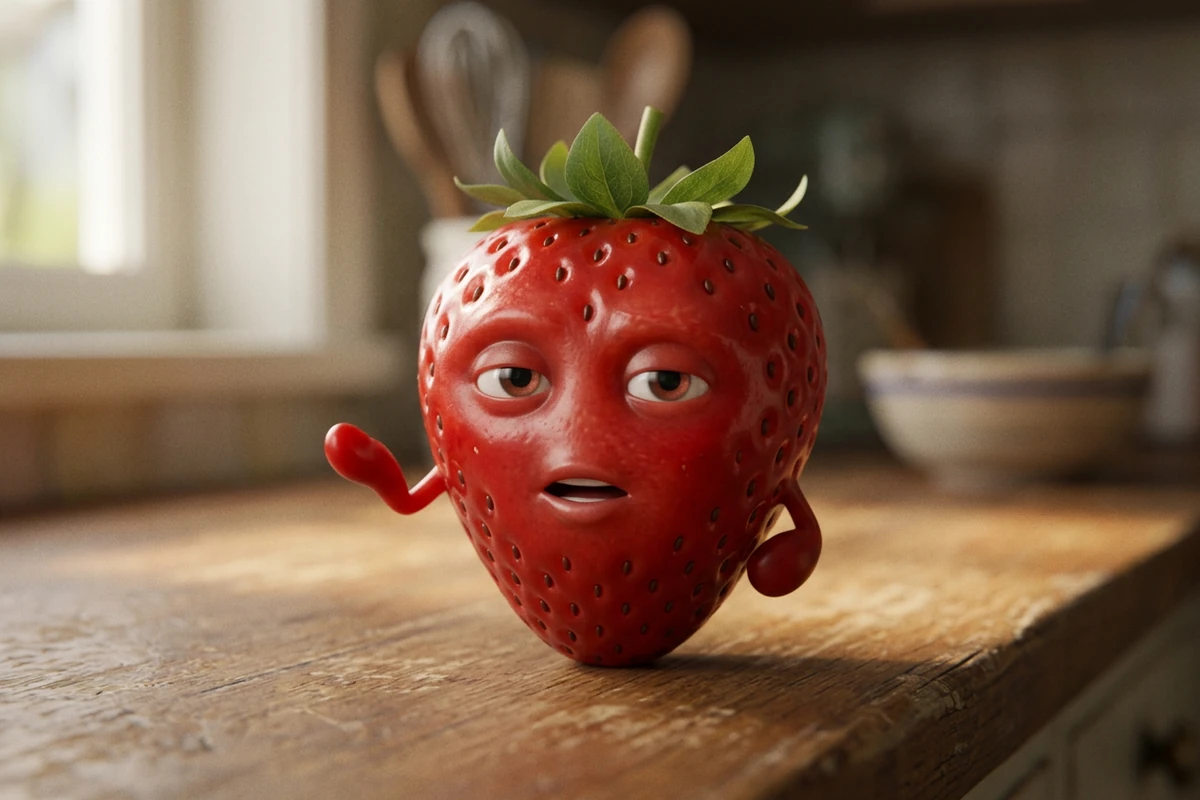
The solo talking beat
A single strawberry character with a face that is part of its own skin stands on a worn wooden kitchen counter in the late afternoon and turns to speak to the camera, mid-sentence, one small arm raised in a deadpan gesture. Green leafy crown, seeds catching the light, a soft mouth crease that deforms the surface as it talks. Warm window light from the left, a blurred kitchen behind, one ceramic bowl out of focus. Three-quarter close-up at eye level, shallow depth of field, calm cinematic 3D animated film look, family friendly. Keep the face, crown and seed pattern identical in every frame, hold the shot to this one action, and include no readable text, letters, numbers, logos, watermarks or signatures.
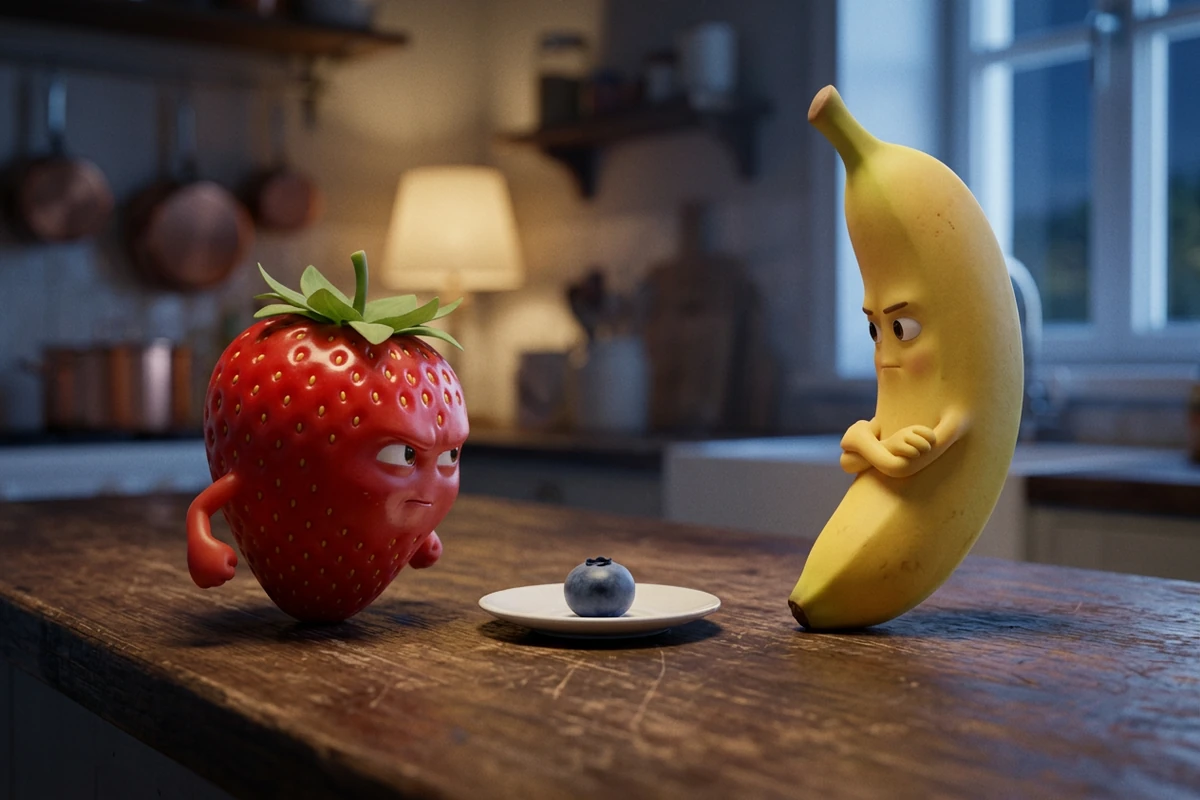
The two-fruit conflict beat
Two fruit characters face each other across a worn wooden counter at dusk: a glossy strawberry on the left leaning in mid-argument, a matte banana on the right turned slightly away with folded arms, one small blueberry on a saucer between them. Both faces are part of the fruit's own skin, lit by the same highlight and the same subsurface response as the rest of the surface. Cool evening light from the right, a warm practical glow behind on the left, softly blurred shelves in the background. Two-shot at counter height, shallow depth of field, cinematic 3D animated film look, family friendly. Lock both character designs and the counter so nothing about them changes mid-shot, and include no readable text, letters, numbers, logos, watermarks or signatures.
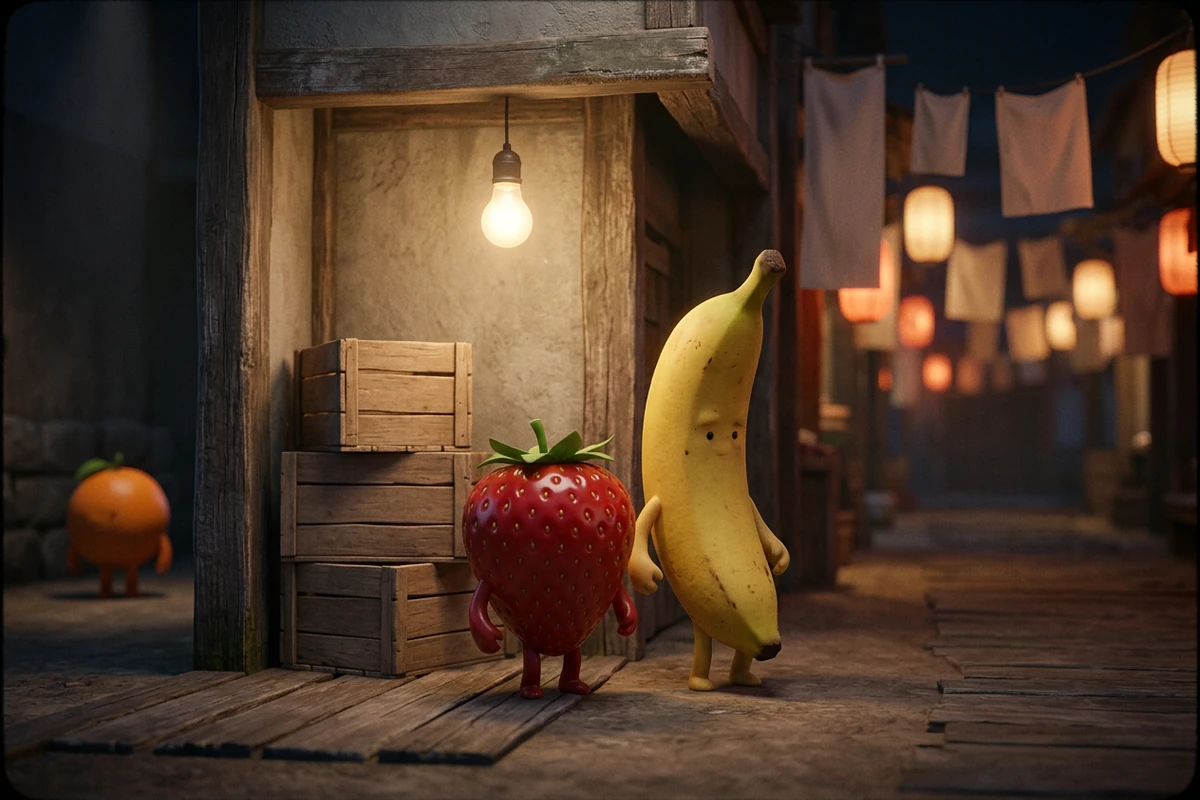
The returning cast episode beat
The same strawberry and banana characters return in a new place: the wooden doorway of a night market lane, a hanging bulb overhead, stacked crates beside them, one small orange character waiting further back on the left. The strawberry stands in front mid-explanation, the banana listening with a sceptical tilt. Keep both character designs, proportions, eye style and colours exactly as they are in the previous clips, and keep the doorway and its light unchanged for the whole shot. Medium shot, warm bulbs and deep shadows behind, cinematic 3D animated film look, family friendly, one action only, and no readable text, letters, numbers, logos, watermarks or signatures.
Why Most Fruit Story Prompts Fall Apart
The prompt is rarely the problem. A face that reads as a sticker, a character that changes by episode three, or a clip asked to carry a whole plot is what wastes the render.
The face has to grow out of the fruit
The difference between a fruit character and a photo with a smiley sticker on it is texture. Say that the mouth is a soft crease that deforms the fruit's own skin, that the eyes sit in the skin with the same highlight and subsurface response as the rest of the surface, and that one light source hits face and skin as a single object. That sentence is usually what stops the uncanny pasted-on look, and when a result still reads flat it is the face line to rewrite — not the camera, not the story.
Lock two sentences, vary only the third
Write a character sentence for the fruit and a world sentence for its surface, light and hour, then paste both unchanged into every prompt. Only the beat sentence changes. That is how a cast survives episode two: the strawberry keeps the same crown, seed pattern and mouth across a new location, because nothing in the description of it ever moved. Rebuilding the character each time is what makes a series look like unrelated videos. Image to Video carries an approved frame forward instead.
One action per clip, the story across clips
A four-to-six second beat holds one action with a visible ending: it leans in, it turns away, it notices the empty saucer. Put the story in the sequence instead — setup, conflict, reaction — and give each clip one of those beats. A prompt that asks for an argument, a reveal and a reaction in one take gives the model three problems to solve at once, which is where props drift and the ending disappears. Photo to Video AI Free keeps each rendered beat side by side.
How to Build a Fruit Story in Ottermind
Step 1: Write the character, then the world
Name the fruit, the face and the texture first, then the surface it stands on, the light and the hour. Keep both sentences in a note you can paste. AI Art Generator from Image renders the frame, and the two sentences are what every later episode will reuse.
Step 2: Approve the frame before you animate it
Look at the still for a few seconds. If the fruit's face reads as a sticker, or the banana no longer matches the strawberry's rendering, no camera move will rescue the clip. Take the frame you approved into Image to Video, and keep the motion line to what changes rather than what is already visible.
Step 3: Cut the episode into beats and change one line
Lay out setup, conflict and reaction as separate clips, each with one action. Render two or three versions of the same beat, compare them, then edit a single line — the beat, the light, then the camera — while the character and world sentences stay untouched.
Where a Fruit Story Prompt Actually Helps
These prompts earn their keep when the same cast has to come back for another episode, or when one absurd beat has to carry a single post.
A series with a returning cast
The strawberry and the banana come back every week. Because the character and world sentences never change, episode two costs one new beat sentence instead of a redesign, and the cast still reads as the same two characters before the plot starts.
One promo beat for a shop or juice bar
A stall, a market stand or a smoothie counter gets introduced by one fruit character with one clear action. Keep it to a single beat and the clip stays usable as a post rather than an episode. Image to Video turns the still you approved into that one beat.
A parody that is yours, not a clone
Write your own cast, names and premise instead of re-casting a series that is already running, and keep the beat out of the violent or suggestive register the format drifted into. Label the clip as AI-generated wherever a platform asks for it, and check the terms of the tool you use before you post commercially.
AI Fruit Story Generator FAQ
How do I keep the same fruit character across episodes?
Freeze the description and reuse the approved frame. Write one character sentence for the fruit — its shape, face, texture and colours — and one world sentence for the surface and light, then paste both into every prompt unchanged, so only the beat sentence moves. When a clip still drifts, rewrite the character sentence rather than the camera line, and start the next clip from a frame you already approved in Image to Video.
Do I need a dedicated AI fruit story generator?
No. The workflow is the same whether you are making one fruit meme or a full fruit drama series: write the scene, render an opening frame, then animate that frame. A general image and video workflow is enough as long as it lets you start from a reference frame and compare takes. Nothing here is specific to fruit; the general version of the same structure lives in How to Turn Images into Video with Ottermind: Motion and Camera Prompts.
Should I use text-to-video or image-to-video?
Decide by one question: does this character have to come back? A standalone beat can be invented from a text prompt, which is faster and looser. A recurring cast needs an approved opening frame first, because that frame carries the face and texture the animation has to preserve. In practice you use both: text prompts to find the beat, then Image to Video for the shots that have to match.
How long should one AI fruit video clip be?
Aim for four to six seconds with one action and a visible ending. Longer takes ask the model to resolve several things at once, which is where the fruit's face, the props and the ending start to drift. If a beat genuinely needs more time, split it into two clips and keep the character sentence identical across both.
Why does my fruit look like a photo with a face stuck on it?
Because the face was described as an addition rather than part of the surface. Ask for a mouth that is a soft crease deforming the fruit's own skin, eyes set into the skin, and one light source that hits face and peel as a single object. Rendered that way, the texture usually carries through the expression and the result stops reading as a sticker.
Why does the background change when the camera moves?
The place was never pinned down, so the model rebuilds it whenever the framing changes. Describe the surface, the objects and the light as one fixed sentence, then let the camera line move through it. If you already have a frame whose background you like, Photo to Video AI Free starts the motion from that background instead of inventing a new one.
Should the fruit talk, or just act?
Pick one before you render. A dialogue beat needs a close, stable framing, a short line and a mouth that reads clearly; an action beat can carry a wider shot and no lip movement at all. Mixing a long speech with a moving camera is the combination that breaks most often, which is why the prompts here keep spoken beats to a single sentence and the action beats silent.
Can I make a fruit drama series without copying the viral ones?
Yes, and it is the safer route. Invent your own cast, names and premise, avoid re-using another series' characters, sets or dialogue, keep the humour out of the violent or suggestive register, and label the clip as AI-generated where the platform requires it. A recurring cast with its own logic is what makes a series read as one show rather than a pile of clips; a copy of someone else's mostly inherits its takedown risk.
More Prompt Topics You Might Like
Run the Same Prompt on Another Video Model
Turn One Beat Into a Fruit Episode
Take the character and world sentences you have just written, keep them fixed, and render the next beat until the episode is one you would actually post.