Product Review
Zeely AI Review: Ad Creatives, Credits, and the 12% Meta Fee
Zeely sells ad creative and the campaign layer around it. Below: which tool matches the product photos you have, what the two plan ladders actually cost, and where the 12% Meta fee sits.
Optional
Attach one product photo here. Nothing is submitted until you press send, and prices, badges and offer text stay out of the generated image.
November 10, 2026 · 9 min read
Zeely AI is an ad creative platform tied to a campaign launcher, not a general-purpose image or video generator. Its About page calls it "the agentic AI platform for creating, launching and scaling paid ads," and the navigation splits the product into static ads, video ads, social-channel presets, and a set of marketing tools that includes an AI ad script generator and a Slack agent. That combination — the creative and the buying — is the thing to judge, because the creative alone is a crowded category and the buying layer is where costs and constraints actually appear.
Three questions decide whether it fits your next campaign. First, which asset you already have: a product URL, a folder of product photos, a script with an avatar, or a single image. Second, whether you want Zeely to run the ads as well as make them, because launching through its Meta route adds a service fee on top of your ad budget. Third, whether you accept the pre-landing page its campaigns create, which its terms describe as the click destination.
If your next step is only the creative, the composer above is the entry point: attach one product photo and describe the ad, then review the brief before anything is generated. The rest of this page separates what Zeely documents from what it markets, and lists the checks worth running before you subscribe.
How this review was prepared: Zeely's own pages were read on November 10, 2026: the homepage, the pricing page, the AI ad generator, static ads, UGC video ads, AI avatars, the Terms of Service (last updated October 20, 2026), the Permitted Use Policy, and the help-center articles on credits, the video-tool comparison, the Intro plan, the service fee, image-ad inputs, custom avatars, and image guidance. This is a documentation review. No Zeely account was created, no credits were bought, and no ad was generated or launched, so the page carries no quality score, no measured render time, and no performance claim. We could not capture Zeely's signed-in workspace from this environment, so no screenshot of its editor appears here. The pricing screenshot below is a real, unedited capture of its public pricing page taken on the check date, and every other figure is attributed to the page it came from. The second figure is a real capture of Ottermind's own tool page, not of Zeely. The cover and the two illustration figures were generated with GPT Image 2.5 Flare for this page, with the series typography added on top; they are illustrations, not Zeely screenshots, avatars or outputs.
What Zeely AI is now — and what it is not
The product has moved past the "AI sales-growth app" framing in older reviews. The current site calls itself an AI ad creative platform and sells four surfaces at once:
- Creative generation for image ads, video ads, UGC-style avatars, talking-head videos, image-to-video clips, and URL-to-video ads.
- Brand context through Brand DNA, which the help center describes as learning your product details, tone, and style so each new creative stays recognisable.
- Campaign launching: the About page says paid campaigns currently run on Meta Ads, with more channels coming, while the navigation also offers creative presets for TikTok, YouTube, LinkedIn, and Snapchat.
- Distribution and tooling around the work: a Slack agent, social posting, an inspiration board for references, and an ad-script generator.
It is not one model or one quality tier. The video stack alone lists five different tools with different durations, different sound behavior, and different inputs, and the help center's own comparison table warns that available models, durations, and credit costs may change. Treat "Zeely quality" as something you check per tool, not a property of the brand.
Two marketing numbers are worth filing as claims rather than facts: the About page says Zeely "now serves more than 2 million businesses and creators," and the UGC page says videos generate in three minutes and render in another twelve. We did not run either test, so this review does not repeat them as benchmarks.
Which Zeely tool matches the asset you have
Pick by input, not by the length of the menu. The limits below come from Zeely's help center on the check date, not from its landing-page copy.
| What you have | Zeely tool and the published limits to check first |
|---|---|
| A product page or a product URL | Static ads / image ads — select 2–10 references and get one creative per reference; output starts at 9:16 and you pick another ratio before regenerating |
| A product photo set and a script | Talking-head video — fixed 30 seconds, one avatar, and the product needs at least 7 images for the background |
| A script plus a chosen presenter | Video ad — 6–30 seconds, speech only; no music or background sound is added |
| One product image to animate | Animated image — 5–10 seconds with no speech; whether there is sound depends on the model you pick |
| A reference clip you want to recreate | Viral video — 12 seconds, one person, audio copied from the reference; the reference must be MP4 or MOV, 3–30 seconds, up to 100 MB, and there is no prompt field |
| A scene you want to describe from scratch | Playground — up to 30 seconds, any number of people, model-generated voices and sound |
| Your own face or a presenter you design | Custom avatars — a reference image plus name, age, style, and a prompt of up to 5,000 characters |

An AI-generated illustration of the static-ad brief in this article: one product, one prop, and empty space above for a headline. Made with GPT Image 2.5 for this page; it is not a Zeely output, and no real brand or price appears in it.
The video-tool table in the help center is the most useful page Zeely publishes, because it states the constraints its marketing pages leave out. Three of them change what you can deliver:
- You cannot upload your own voice anywhere in the suite. In Video ad you can adjust tone, emotion, and accent; in Talking-head the voice belongs to the avatar; in Playground the model invents the voices. If your campaign depends on a specific human read, this is a blocker rather than a preference.
- Talking-head music cannot be turned off. Background music is always added and, if you do not choose a track, Zeely picks one. You can swap tracks from its library but not remove them or supply your own.
- Viral video copies the audio of the reference. You can change the on-screen headline, not what the avatar says. Using a trending clip also means you are responsible for the rights to that clip — the terms put that responsibility on you.

An AI-generated illustration of the UGC frame the video tools produce: a presenter holding the product, vertical framing, ordinary daylight. This is not a Zeely avatar, not a real customer, and not a testimonial.
The image side has its own input rules, and they are ordinary craft advice rather than AI magic: show the whole product, keep one product per frame, use a clean neutral background, and remove text, logos, and other people from the source image because the model tends to carry every visible detail into the result. For your own face, the guide asks for two photos — one facing the camera and one in profile — to keep the face consistent across generations.
Credits: one balance, unpublished per-action prices
Zeely runs every AI action through a single credit balance. The help center is explicit that creating an image or video, turning an image into a video, regenerating, or making a variation all consume credits, and that a new result built on an old creative still counts as a separate generation.
| Rule | What Zeely states |
|---|---|
| Where credits come from | Plan credits with each subscription cycle, plus optional extra credits bought separately |
| Which credits are spent first | Plan credits; extra credits stay in the balance across renewals until plan credits run out |
| How you see a price | A ⚡ icon on the action button shows the credit cost before you generate |
| If a generation fails | Credits are automatically refunded for technical failures |
| If you cancel | Unused plan and extra credits expire at the end of the paid period |
| If you pause | Plan and extra credits stay in the account and return when the subscription resumes |
The gap worth naming is that Zeely does not publish a per-action credit table. The help center says costs vary by action and points you to the in-app indicator, while the pricing page only sells the size of the balance. That means you cannot compare a 2,500-credit plan against a competitor's monthly allowance on paper — you have to read the ⚡ figure inside the tool for the exact action you intend to run. Treat any third-party comparison that quotes a fixed "video = X credits" rate as unverified.
The terms add a separate limit that reads like a headline feature: some plans include an introductory Unlimited Period for designated models. Section 4.9 defines it narrowly. It ends at the earlier of the plan period or 300 generations, allows one active generation at a time, runs on a separate queue, and states that "unlimited" does not mean unlimited generations, processing speed, or parallel runs. Failed or timed-out generations do not count, and unused allowance does not carry over. If you are planning a batch, that is a queue, not a factory.
What the plans cost — and which ladder you are buying
There are two price ladders on the same product, and they are easy to confuse. The pricing page sells monthly subscriptions:
| Plan | Price shown (struck-through) | Credits per month |
|---|---|---|
| Starter | $29.95/month ($49.95) | 2,500 |
| Growth | $79.95/month ($149.95) | 10,000 |
| Plus | $49.95/month ($89.95) | 5,000 |
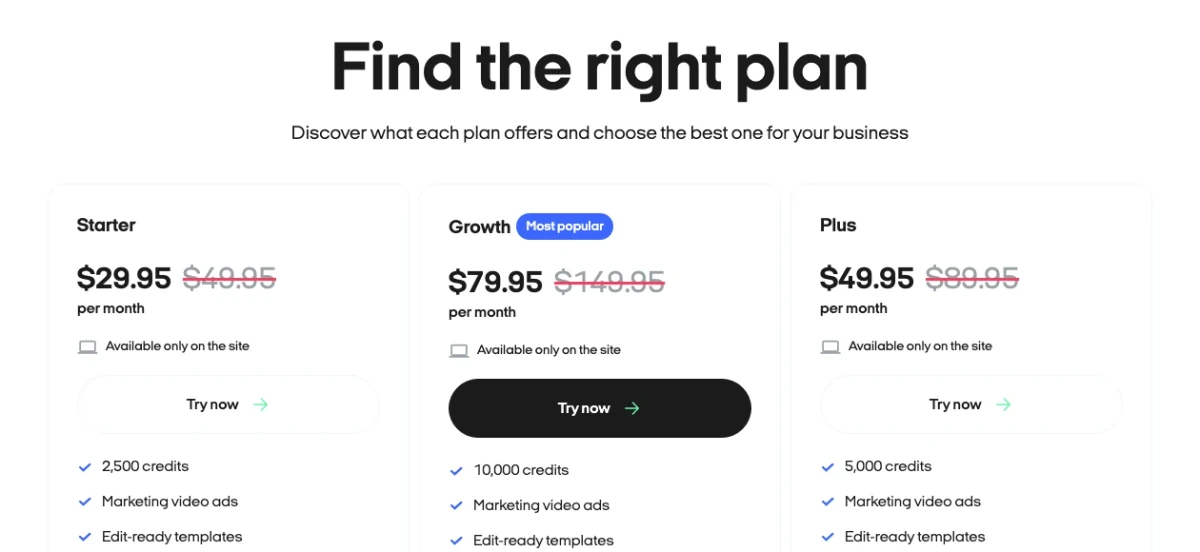
Real capture of Zeely's public pricing page on November 10, 2026, cropped to the price row; the full page also lists twelve feature rows per card, summarised below. Note the card order — Starter, Growth, Plus — and the line every card carries: "Available only on the site."
The feature split is the part most summaries miss, because the cards are not the same product at three credit volumes. Five capabilities are reserved for Growth: batch static ads, avatar customization, the AI image enhancer, early feature access, and priority support. Starter stops after marketing video ads, edit-ready templates, paid campaigns, and viral campaigns. Plus adds talking reels, prompt-to-ad, and brand-inspired remix, but still withholds the five Growth-only rows.
That changes the entry point for anyone whose reason to try Zeely is avatars. Custom avatar creation sits on the Growth card at $79.95/month, so a $29.95 Starter test will not tell you whether your own face or a designed presenter works — you would be testing the template path instead.
The help center separately documents short-term Intro plans, which it describes as paid plans for testing before a full subscription:
| Intro plan | Price | What happens at the end |
|---|---|---|
| 2 weeks | $19.95 | Account moves automatically to Growth at $79.95/month |
| 4 weeks | $29.95 | Same automatic move to Growth unless cancelled or changed |
| 8 weeks | $49.95 | Same automatic move to Growth unless cancelled or changed |
Both tables were read on November 10, 2026. Four details deserve a second look before you pay:
- The pricing page order is Starter, Growth, Plus. Growth carries the "Most popular" label and sits between the two cheaper cards, so a quick scan can make Plus look like the premium tier. Read the credit counts and the feature rows, not the position.
- The cheap card is not a smaller Growth. Starter includes 4 of the 12 feature rows; Plus includes 7; Growth includes all 12. Batch static ads, avatar customization, the AI image enhancer, early access, and priority support are Growth-only as displayed.
- Every card says "Available only on the site." That is consistent with the pricing FAQ, which says plans in the app and on the website may vary and that durations can be monthly, bi-monthly, quarterly, or weekly. If you compare a price you saw in the mobile app with this page, you may be comparing two different offers.
- The site's own copy disagrees with its cards. The FAQ on the pricing page says plans start at $19.99 per month, while the cards show $29.95 and the Intro ladder starts at $19.95. Confirm the duration and the renewal price on the checkout screen rather than on either page.
If you only want to test the creative workflow, the 2-week Intro plan is the smallest documented commitment, but it is a paid plan that converts to Growth by default. Cancelling is described as self-service in account settings; the refund route is a support request reviewed under a separate policy, with approved refunds returned to the original payment method in roughly 5–10 business days.
The 12% that is not in the plan price
The creative subscription is only half of Zeely's cost model. If you launch Meta campaigns through Zeely, the help center states a service fee of 12% of your ad spend, reduced to 6% with a Booster add-on. Your budget itself still goes to Meta; the fee is charged on top of it.
That fee is not the only thing that changes when Zeely runs the campaign. The terms describe the mechanics plainly, and they matter more than the percentage:
- Clicks land on a Zeely page, not your store. Section 4.14 says a pre-landing page is generated from your creative and product information, that ad clicks are directed there, and that — due to a technical limitation — campaign measurement shows visits to that page only, not visits to your store page. If your reporting depends on on-site conversion data, this is a structural difference, not a setting.
- Ad budgets are separate and generally non-refundable. Section 4.11 says launching requires an advertising budget apart from the subscription and that payments connected to campaigns are generally non-refundable to the extent the law allows.
- Two reviews sit between you and delivery. Help-center guidance says every ad passes Zeely's expert check and then Meta's review, and lists the usual rejection triggers: alcohol and tobacco, sensitive political content, unrealistic health or income claims, body-focused before-and-after imagery, and broken destination links.
- Results are explicitly not guaranteed. Section 4.15 states that Zeely does not guarantee any campaign will achieve specific results, generate sales, or produce revenue.
Add the fee to the subscription math and a test looks different from the sticker price. A $29.95 month plus $300 of Meta spend carries about $36 in service fees at 12%, or about $18 with Booster — before any creative credits are spent. Whether that is worth it depends on whether you value the launch automation, not on the creative quality alone.
Rights and consent: what the terms actually grant
This is the part a small brand should read before generating anything with a face in it.
- Commercial use is granted, within limits. Section 8.2 gives a limited, non-exclusive, non-transferable, revocable worldwide licence to use the services and content "including for commercial purposes," subject to compliance with the agreement. That is clearer than many competitors' terms, which stop at personal use — but it is a licence to use the service, not a warranty that a given output is free of third-party claims.
- Identifiable people need written consent. Section 6.3 requires that you hold written consent to use names, likenesses, and voices of identifiable individuals, and that your uploads do not infringe publicity, privacy, or copyright. Zeely's custom-avatar guide lets you build an avatar from a selfie; using a photo of someone else is your risk, not the platform's.
- The Permitted Use Policy is broad. It prohibits political campaigning and lobbying material, real-money gambling and payday lending, protected health information without a HIPAA agreement, IP infringement, impersonation, deceptive provenance claims, and content that endangers minors. Violations can end access.
- Platform policy still applies on top. Meta, TikTok, YouTube, and Google each review the ad independently. Zeely's own checklist already tells you which categories get rejected; passing Zeely's check is not approval.
This page does not give legal advice and cannot tell you whether a specific ad is clearable. The defensible position is narrow: keep the consent record for every face and voice, keep the licence for any reference clip, and get written confirmation from support if your use is regulated, political, health-related, or aimed at a platform with stricter rules than Meta.
Five checks before you subscribe
You do not need a large test to learn whether Zeely fits. You need a test whose failure modes you can recognise. Use a product and footage you have the right to publish.
- Does the tool accept your asset? Confirm the input, not just the output style. Talking-head needs at least seven product images; Viral video needs a 3–30 second MP4 or MOV under 100 MB. Move on when your material uploads and the tool's own limits match the length you need.
- Does the credit quote fit the plan? Open the action and read the ⚡ figure before generating. Move on when the quote for one finished creative, times the number of variants you actually need, sits inside the plan you were considering.
- Does the duration cover the placement? Video ad tops out at 30 seconds and Viral video at 12. Move on when the cut you would run is inside the cap without padding.
- Is the ad-spend route acceptable? Decide whether the 12% fee and the pre-landing page are worth the automation, or whether you would rather launch in Meta yourself. Move on when you can name which measurement you will trust for the campaign.
- Can you answer the consent question? Name every person whose face or voice appears, and the permission you hold. Move on when all of it is written down; if it is not, resolve it before generating.
Where Ottermind fits — and where it does not
Both products start from a product photo and a description. The difference is scope: Zeely carries the creative into a paid campaign it also runs, while Ottermind carries the brief into Studio for generation and revision, and leaves the media buying to you.
- Turn one product photo into a short ad. In Zeely: static ads with a reference, or Animated image for 5–10 seconds. In Ottermind: AI Product Video Ads — attach the product shot, describe the motion and the moment, review the take.
- Produce a clean product visual before the ad. In Zeely: static ads or image ads, one creative per reference. In Ottermind: AI Product Image Generator — keep the packaging and surface, change the setting and light.
- Put a presenter in the ad without a shoot. In Zeely: video ad or Talking-head, 6–30 seconds. In Ottermind: AI Influencer Generator — describe the person and the scene, then iterate in Studio.
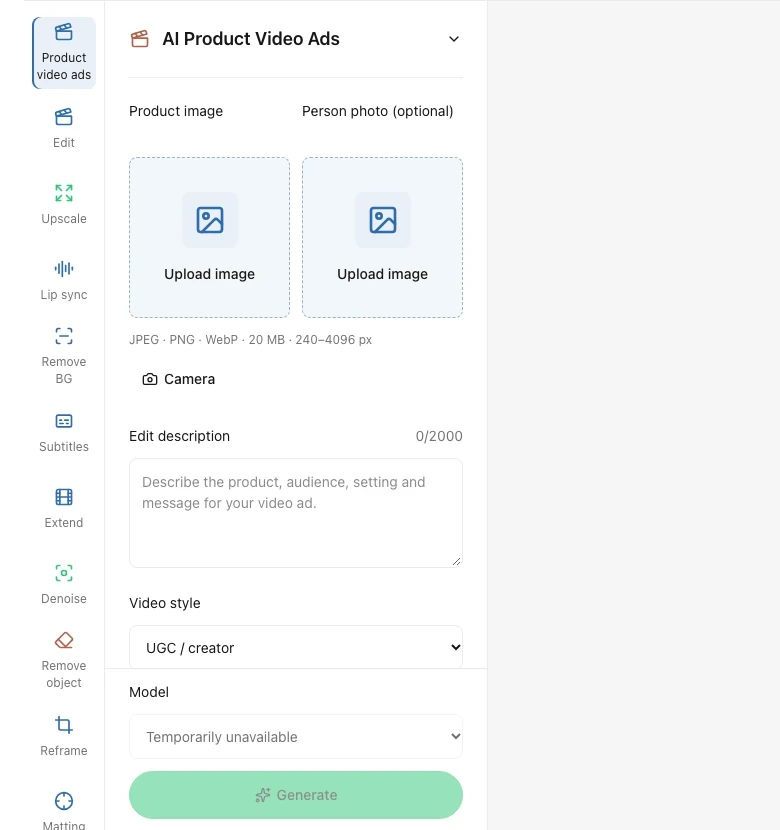
Real capture of Ottermind's own public tool page (/tools/ai-product-video-ads) in the local preview on November 10, 2026, cropped to the input panel: two upload slots, the description field that carries the brief, a style selector, the model selector, and the Generate control. The model selector read "Temporarily unavailable" at capture time, so this shows the input structure rather than a ready generation. It is not a Zeely interface and contains no Zeely output.
The boundaries are worth stating plainly. Zeely advertises 150+ avatars, 100+ performance-tested templates, a Slack agent, and Meta campaign management with its own service fee. Ottermind does not claim those. What it does offer is a shorter path from "here is my product photo" to a reviewed creative, without a campaign commitment, and with the same prompt and reference carried into Studio for the next revision.
If the deliverable is the campaign, not the creative, keep that step where the fee and the ad-account structure are documented — and read the pre-landing page rule first.
Create a static ad for the product in my attached photo. Place the product on a clean warm-white surface next to one prop that shows how it is used, lit by soft daylight from the left. Keep the packaging exactly as photographed, and do not invent labels, extra products, prices, or badges. Vertical 4:5 framing with the product centred and clear space above it for a headline.Zeely AI FAQ
Is Zeely AI free?
No free tier is documented on the pages we read. The cheapest entry is a paid 2-week Intro plan at $19.95, after which the account moves to Growth at $79.95/month unless you cancel or switch. The pricing page's FAQ mentions a $19.99 starting price, which does not match either the Intro ladder or the subscription cards; confirm on the checkout screen.
Does Zeely AI have a subscription?
Yes, and two kinds. Monthly plans (Starter, Plus, Growth) carry credits that refresh each cycle, and short-term Intro plans of 2, 4, or 8 weeks convert to Growth automatically. Credits are also sold separately as extra credits, which are spent after plan credits and survive a renewal.
How many credits does a video cost?
There is no published per-action table. Zeely's help center says costs vary by action and directs you to the ⚡ indicator on the action button, which shows the price before you generate. Any fixed per-video figure you see elsewhere should be treated as unverified for your account and model choice.
What is the 12% fee?
It is Zeely's service fee on ad spend for paid campaigns launched through its Meta route: 12% of the budget, or 6% with the Booster add-on. It is charged on top of your ad budget and separate from the subscription. Campaign budgets and fees are generally non-refundable.
Can I use Zeely ads for client work?
The terms grant a licence to use the services and content including for commercial purposes, subject to the agreement. That is not a warranty of clearance. You still need written consent for every identifiable person, rights to any reference clip or brand asset, and written confirmation from Zeely if the client's category is regulated or restricted by the ad platform.
Do Zeely campaigns send traffic to my store?
Not directly, according to its terms. Section 4.14 says campaigns create a pre-landing page generated from your creative and product information, that clicks go there, and that measurement covers visits to that page rather than your store page. Plan your analytics around that before you commit a budget.
Which Zeely video tool should I start with?
Start from the asset, not the format. One product photo with no speech is Animated image; a script and a presenter is Video ad (6–30 seconds) or Talking-head (a fixed 30 seconds with at least seven product images); a scene you want to build is Playground; a trending clip you want to mirror is Viral video at 12 seconds. Check the caps before you write a 45-second script.
Where this review stops
Zeely's own documentation establishes the plan prices, the credit rules, the video caps, the service fee, and the campaign mechanics described above. It does not establish whether a particular avatar reads as convincing for a particular audience, how long a render takes on the day you use it, or whether a campaign will return its spend. We did not buy credits or launch an ad, so this page assigns no score and reports no measured speed.
A defensible verdict is conditional. Zeely is worth a paid test when your asset already matches one of its documented input types, when the credit quote for one finished creative sits inside the smallest plan, and when you have decided in advance whether you want its campaign layer with the 12% fee and the pre-landing page. Start with the shortest Intro plan — or with Growth if your test depends on custom avatars, which the Starter card does not include — run the five checks on material you own, and confirm the renewal price, the credit quote, and the payment route before you commit a budget.
