Vidnoz AI Review: Avatars, Face Swap, and Credits
Vidnoz sells avatar minutes through credits. Plan one short avatar shot here, then compare its credit cost with Vidnoz's published rates before you subscribe.
Optional
Photo
2026-11-05 · 10 min read
Vidnoz AI is a browser studio for narrated avatar videos: choose a presenter, write or generate a script, and export a talking video. The same site also runs a separate line of free tools — face swap, talking photo, video translation, image to video — which is why two people who both say "I use Vidnoz" can be describing products with different interfaces and different credit balances.
Settle that split before you compare plans. Then do the arithmetic: Vidnoz sells credits, not minutes, and an expressive-avatar second costs four times as much as a generated-video second. A plan that looks generous in credits can still be a three-minute budget for the type of video you actually need.
Here to make one avatar clip, not to buy a subscription? Ottermind's Avatar Maker from Photo starts from a portrait and a spoken-script brief, then continues in Studio where your plan's models and credits apply. The rest of this page records what Vidnoz charges for the same job so you can compare the two like for like.
How this was checked: Official Vidnoz pages read on November 5, 2026: the AI video generator home, pricing and plan comparison, face swap tool, and terms of service. Prices, credits, and limits are quoted as displayed that day; the site was running a discount campaign during the check, so your checkout is the final number. This is a documentation-based assessment. No paid generation was submitted, no render was timed, and no output quality is scored. The face swap panel and the Ottermind composer are real screenshots of the live interfaces. The cover and the two interior photographs are AI-generated illustrations (GPT Image 2.5 Flare) and are captioned as illustrations, never as product captures or tested results.
What Vidnoz AI is, and what the name covers
The Vidnoz AI home page leads with avatar video: 1,900+ AI avatars, 2,660+ voices on paid plans, 3,200+ templates, expressive avatars with gestures, photo avatars built from a portrait, product avatars built from a product image, and one-click video translation. That is the core product, sold as the Vidnoz AI plan.
Alongside it, the site runs Vidnoz Gen, a separate workspace for image and video generation that lists third-party models (Veo, Sora, Kling, Seedance, Nano Banana and others) and sells its own credits, described on its pricing page as starting at $0.06 per credit. Its free tools — including face swap — open inside that Vidnoz Gen shell with a Vidnoz Gen credit counter.

AI-generated illustration for this article, not a Vidnoz screenshot. A presenter reading a printed script into a camera is the job an avatar studio automates: Vidnoz replaces the person and the setup with a chosen avatar and a generated voice, and leaves the script — and the review of what the avatar actually says — with you.
So before anything else, identify which balance you are about to spend. An avatar-video subscription and a Gen credit pack are not interchangeable, and the plan table on the Vidnoz AI pricing page does not describe the Gen credit rate.
Which Vidnoz surface handles your job
Judge the platform by the input you already have, not by the length of the feature list.
| What you have | The job | Vidnoz surface to inspect |
|---|---|---|
| A script and a choice of presenter | Narrated avatar video | Vidnoz AI studio avatars and templates |
| One portrait photo | Talking or expressive photo avatar | Photo avatar, plus portrait effects |
| A product shot | Product-led avatar video | Product Avatar |
| A face photo or a clip you have rights to | Face swap | Photo, Video, or Multiple Face Swap |
| A finished video in another language | Translation | One-click video translation |
| A text prompt, no presenter | Generated footage | Vidnoz Gen image-to-video or text-to-video |
Two of those rows behave differently in practice. Avatar video is a script-and-presenter workflow with an editor around it; generated footage is a prompt-to-clip workflow where the model, not the avatar library, sets the result. If your task is "a person says this on camera", the avatar studio is the right comparison. If your task is "show this thing moving", it is not.
Vidnoz AI face swap: what the free tool actually handles
The face swap tool is the reason many people search for Vidnoz in the first place, and it is the part most reviews describe loosely. Here is the actual working surface.
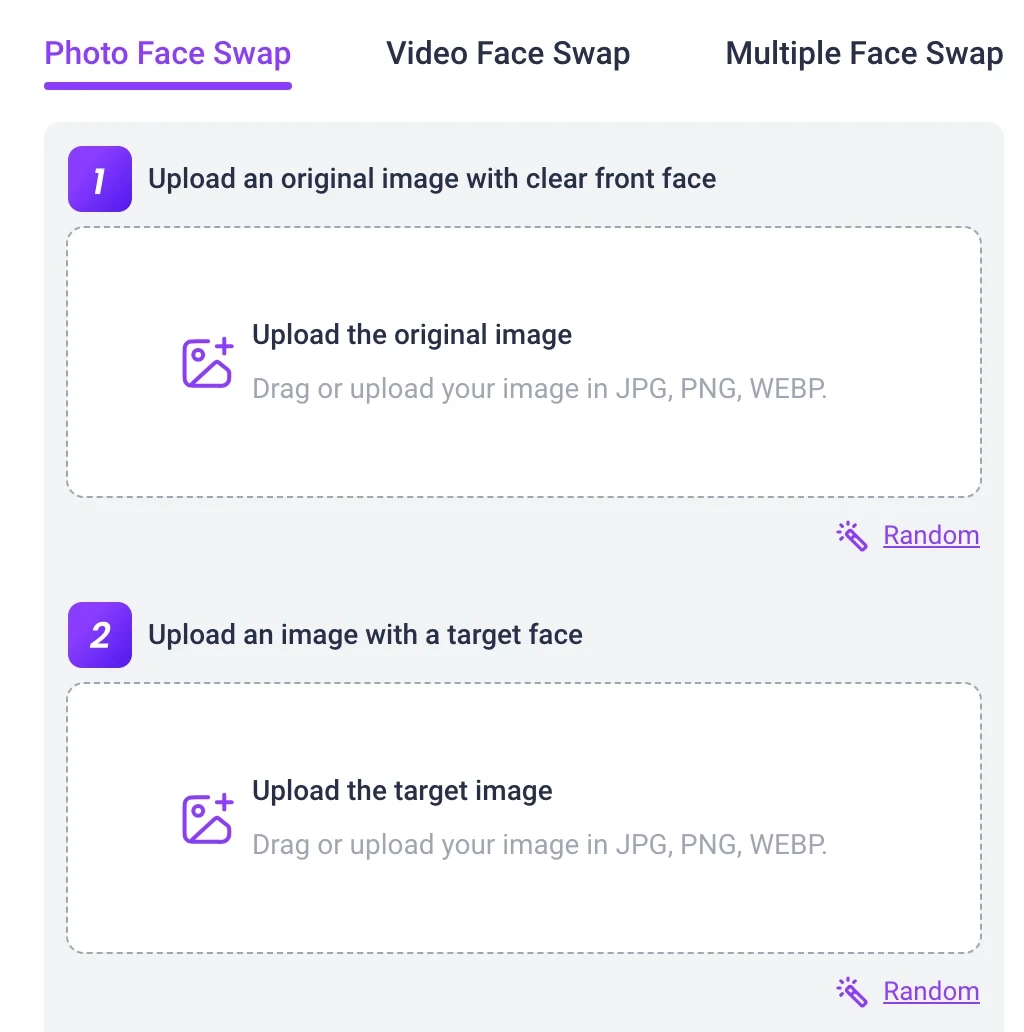
Real screenshot of vidnoz.com/face-swap.html, captured November 5, 2026 while signed out. The panel asks for an original image with a clear front face, then a target face; the format note in both slots reads JPG, PNG, WEBP.
- Three modes. Photo Face Swap, Video Face Swap, and Multiple Face Swap. Multiple mode asks for a group input and the target faces, and the page claims batch detection and blending.
- Photo inputs are JPG, PNG, or WEBP. Two images: the source and the face you want to wear.
- Video inputs are GIF, MP4, M4V, MOV, or WEBM, up to 100MB. The video route also takes the target as a still image.
- There is an HD toggle. The tooltip says to enable it for outputs above 1080p, which is the signal that the default export is not the high-resolution one.
- The page promises daily free usage and lists a 50-minute maximum video duration in its own comparison table. Treat both as vendor claims until you see them in your account; neither is a guarantee for the file you upload.
The rights question is not optional here. Vidnoz's own FAQ asks users not to swap faces using unauthorized images or videos, and the terms of service require you to warrant that you hold the rights and permissions for anything you upload. A face swap of a public figure, a client's testimonial footage, or a colleague's photo is a permissions problem before it is an editing problem.
The credit math most reviews skip
Vidnoz publishes a per-feature credit rate in the FAQ at the bottom of its pricing page. That table is the most useful thing on the site, and it is easy to miss because it sits below the plan cards.
| Feature | Credits | Minimum charge |
|---|---|---|
| Video generation | 0.5 per second | 1 credit |
| Expressive Avatar | 2 per second | 2 credits |
| Product Avatar | 2 per second | 2 credits |
| AI photo avatar | 2 per generation | — |
| Portrait effects | 2 per generation | — |
| AI image generator | 2 per generation | — |
| Product background | 10 per 5 seconds | 10 credits |
| AI script assistant | 2 per generation | — |
| Text to video, scene generation | 2 per scene | — |
| Text to video, animatic | 1 per second | — |
Now convert it to minutes, because that is the unit you actually deliver in. One minute of standard video generation is 60 seconds × 0.5 = 30 credits. One minute of expressive avatar is 60 × 2 = 120 credits. The Starter plan's 450 monthly credits therefore cover roughly 15 minutes of generated video, or about 3 minutes 45 seconds of expressive-avatar footage, before the daily free allowance the plan table also lists.
That single ratio explains most of the complaints about the service. Buyers read "450 credits" as a month of video and then discover that the avatar format they bought the tool for is the expensive one. It also means the four-times multiplier, not the headline credit count, is what you should compare against any competing plan.
These figures are our arithmetic from Vidnoz's published rates, not a quote for your project. Different avatars, resolutions, and modes can change the charge, and the daily allowance is not described feature by feature.
Plans, watermarks, and what changes when you pay
Vidnoz's plan comparison runs to four tiers and a dozen rows; these are the numbers that decide the purchase.
| Plan | Credits | What changes |
|---|---|---|
| Free | Daily only | 720p export, watermark stays, 3-minute videos |
| Starter | 450/mo +30/day | 1080p, watermark removable, 60-minute videos |
| Business | 900/mo +30/day | Same as Starter, plus seats and localisation |
| Enterprise | Custom | Custom volume and controls |
| Limit | Free | Starter and Business |
|---|---|---|
| Max video length | 3 minutes | 60 minutes |
| Characters per scene | 2,000 | 15,000 |
| Avatars / voices | 1,800+ / 890 | 1,900+ / 2,660+ |
| Photo avatars | Limited per day | 100/day, unlimited on Business |
| Voice clone | Not included | Paid add-on, one included on Business |
Three things follow from those tables. First, the free plan is a trial, not a production tier: watermark plus 720p plus a three-minute cap rules out client delivery. Second, the paid tiers are identical on video quality and differ on volume, seats, translation, brand kit, SSO, and analytics — the real Business upgrades are collaboration and localisation, not picture quality. Third, script length per scene jumps from 2,000 to 15,000 characters, which matters if you are producing training or explainer content rather than social clips.
One row deserves its own check. The licence line under the plans changes from "with Vidnoz watermark" on Free to full commercial licence on Starter and above; if a client will ask who owns the finished video, that is the row to point at.
Price. The pricing page describes paid plans as starting at $14.99/mo, and the cards were showing a 25% first-month discount plus a site-wide discount dialog during the check. The Business figure is drawn by script rather than static HTML, so it changes with the campaign and the billing term. Read the number in your own checkout; do not budget from a review screenshot, including this one.
Add-ons were listed at $299/year for Avatar Pro (from $598) and $9.99/month for Voice Clone (from $19.99). Credits do not roll over: unused subscription credits expire at the end of the billing period, purchased add-on credit packages expire at the end of the current cycle, and deleting a project does not restore spent credits. Refunds are limited: a 7-day money-back guarantee applies to annual subscriptions, and requests for a monthly subscription are not accepted. If you are testing the platform, that policy makes a monthly plan a commitment rather than a trial.
Rights, consent, and the clause people miss
Vidnoz's terms assign you the output and keep you responsible for the input. Two sentences in that document matter more for avatar and face-swap work than any plan detail.
The first is the warranty: you represent that you hold all rights, licences, and permissions needed to provide your input. The second is a restriction on what you may do with output about a person — Vidnoz's terms rule out using it for decisions that have a legal or material impact on that person, naming credit, education, employment, housing, insurance, legal, and medical decisions.
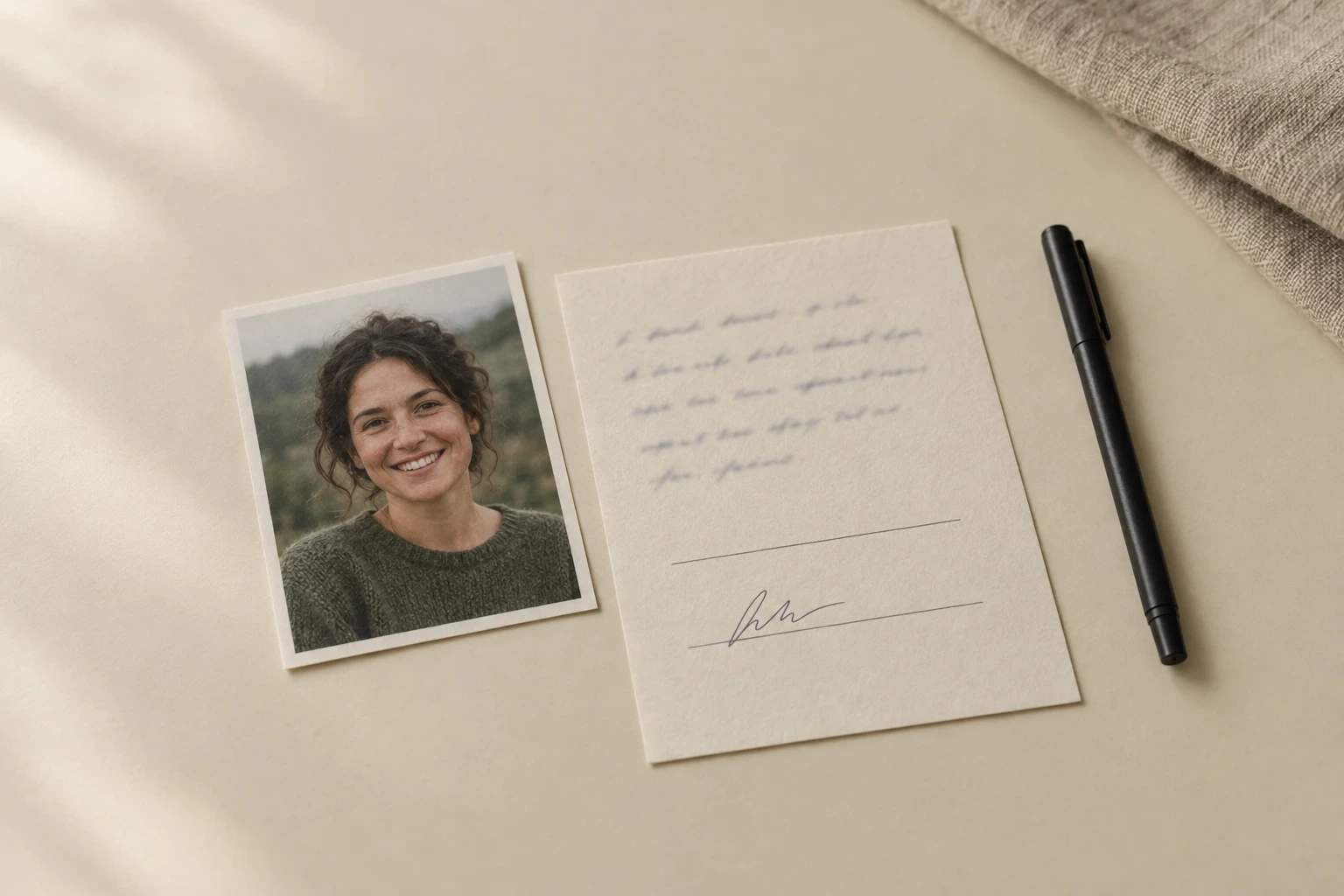
AI-generated illustration, not a product screenshot. A printed portrait beside a permission form: holding the file is not the same as holding the right to use the face in it, and the record beside the photo is what makes an avatar or face-swap project defensible later.
Read together, they mean an avatar or a face swap is fine as content and not fine as a substitute for a person's consent, identity verification, or testimony. For commercial work, keep the source permissions with the project, and confirm with the client who owns the likeness you have been given. Nothing in a subscription transfers those rights.
A 45-minute test that settles the decision
The feature list cannot tell you whether the avatar you pick will read well saying your actual script. One short, bounded test can.
Pick a single 30-second script — the real greeting, product name, and terminology your project uses, not a generic demo line. Run it twice at the same length: once in the avatar format you intend to buy, once in the cheapest format that could plausibly substitute. Log each attempt.
| Record | What to write down |
|---|---|
| Configuration | Avatar, voice, mode, resolution, scene count |
| Quoted charge | Credits shown before you submit |
| Actual usage | Balance before and after |
| Delivery check | Watermark, resolution, lip-sync on names, pronunciation of your product terms |
| Verdict | Keep or reject, with one concrete reason |
Two runs will tell you more than twenty. If the pronunciation of your product name fails, you have found a cost (re-recording, or the pronunciation dictionary) that the plan table does not show. If the credits consumed are far above the published rate for your configuration, stop and ask support how that task was charged before you buy a larger plan.
The pass condition should be written before you press generate: an accepted clip at a known credit cost. Counting attempts is not a result.
Where Vidnoz stops, and your next step
Vidnoz is a reasonable answer when you want a controlled presenter library and a template-driven editor, and you are willing to pay per avatar second. It is a poor answer when you need one clip, when the person on screen is a specific photo you already own, or when you need a face swap on footage you cannot upload to a third party.
| Your next task | Ottermind starting point |
|---|---|
| One avatar clip from a portrait and a script | Avatar Maker from Photo: attach the portrait, describe the delivery, continue in Studio |
| Swap a face in a clip you own | Video Face Swap: stage the clip and the reference face, then review in Studio |
| Clear an overlay from your own footage | Watermark Remover: remove a mark you are entitled to remove before reusing the clip |
Two boundaries are worth stating plainly. Ottermind's tools hand your brief and any attached reference image to Studio, where sign-in, plan eligibility, models, credits, and export options are decided by your account — this page cannot tell you what a generation will cost, because that is not fixed here. And watermark removal is for marks on material you own or are licensed to clean. Using it to strip Vidnoz's free-plan watermark is exactly what their paid plan sells, and their terms are the place to check before you try.
If you are still comparing credit-based avatar platforms, the A2E review walks through the same decision with a different pricing model.
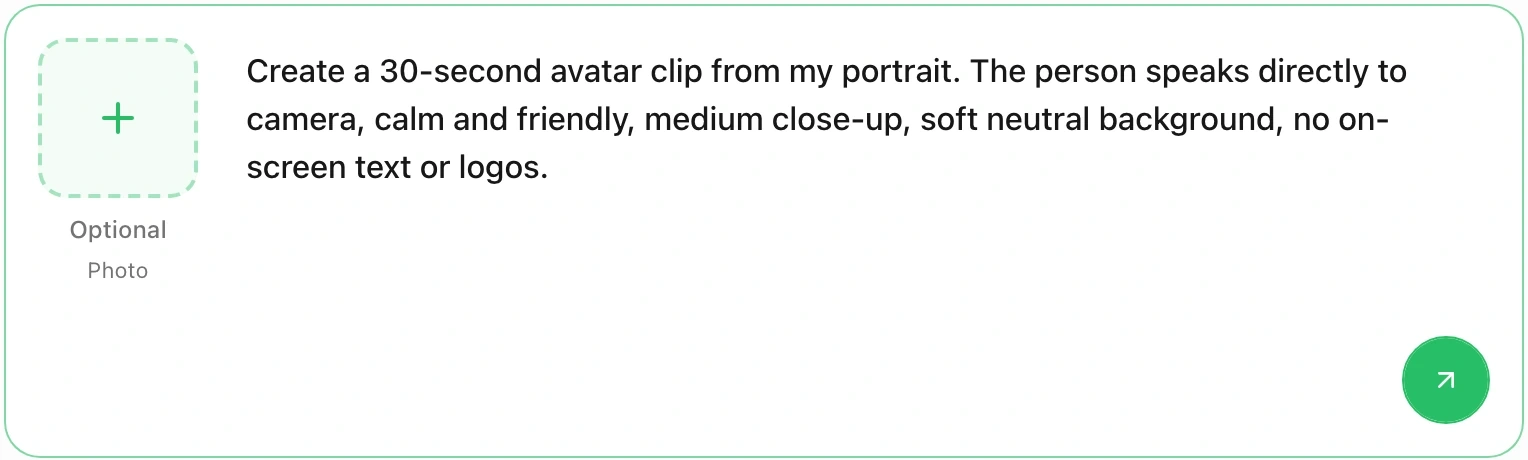
The composer at the top of this page is Ottermind's real input surface. The left tile takes an optional portrait in PNG, JPEG, or WebP; the field takes the spoken brief; the round arrow at the bottom right stages the request into Ottermind Studio. The screenshot shows request preparation, not a generated result.
Try the brief in the composer above
Use the same 30-second acceptance test you would run against Vidnoz: a real script, one portrait, and a written pass condition. Fill the composer with this brief first, then attach the photo you have the rights to use.
Create a 30-second avatar clip from my portrait. The person speaks directly to camera, calm and friendly, medium close-up, soft neutral background, no on-screen text or logos.The button fills the input and scrolls to it; it does not send. Sending is your own action, and the request goes to Ottermind Studio where the available model, the credit cost shown for that configuration, and the export options depend on your account. Review the first result against the same criteria you would apply to a Vidnoz take — pronunciation of your product terms, lip movement at the start and end of sentences, and whether the framing survives a 9:16 crop if you need one.
Vidnoz AI FAQ
Is Vidnoz AI free?
There is a free plan and a set of free tools with daily usage. Free avatar videos export at 720p with the Vidnoz watermark and are capped at three minutes, so the free tier is a way to test the workflow, not to deliver work. The face swap tool is free to use daily, but its HD output option and credit balance are separate from the avatar plan.
Is Vidnoz AI the same product as Vidnoz Gen?
No. Vidnoz AI is the avatar studio and its subscription; Vidnoz Gen is the image and video generation workspace with its own credits and third-party models. The free tools, face swap included, open inside the Vidnoz Gen shell. Check which balance a task draws from before you buy a top-up.
Does a paid plan remove the Vidnoz watermark?
Yes. The plan comparison marks watermark removal for Starter and above, together with the full commercial licence row. The free plan is the only tier listed as "with Vidnoz watermark". Confirm it on the export screen for the format you use.
Can I use Vidnoz output commercially?
The paid plans include a full commercial licence, and the terms assign you the output while placing responsibility for the input on you. Ownership is not the same as clearance: rights in a likeness, a photo, or a recording still have to come from the people involved, and their terms restrict using output about a person for decisions that affect that person.
What does 450 credits actually buy?
At Vidnoz's published rates, about 15 minutes of standard video generation or roughly 3 minutes 45 seconds of expressive-avatar video, before any daily allowance. Convert the rate for your chosen format before comparing plan sizes.
