Explainer
Meet Ottermind Skills: Give Your Agent a Method for the Job
A proposal, a process diagram, and a broken data file each call for a different way of working. Ottermind Skills give your agent reusable instructions and workflows for specific tasks. Choose a relevant skill, bind it to your agent, and bring the material you want to work on.
For work you repeat, a skill can carry the recurring method: what to examine, how to proceed, and what to check. Your task still supplies the current goal, context, and constraints.
How Skills work: Ottermind Skills documentation
Start with the job in front of you
Open the Skills directory and search for the work you need help with, such as documents, diagrams, or JSON. Read the description for required inputs, expected outputs, and any tools or services the skill depends on.
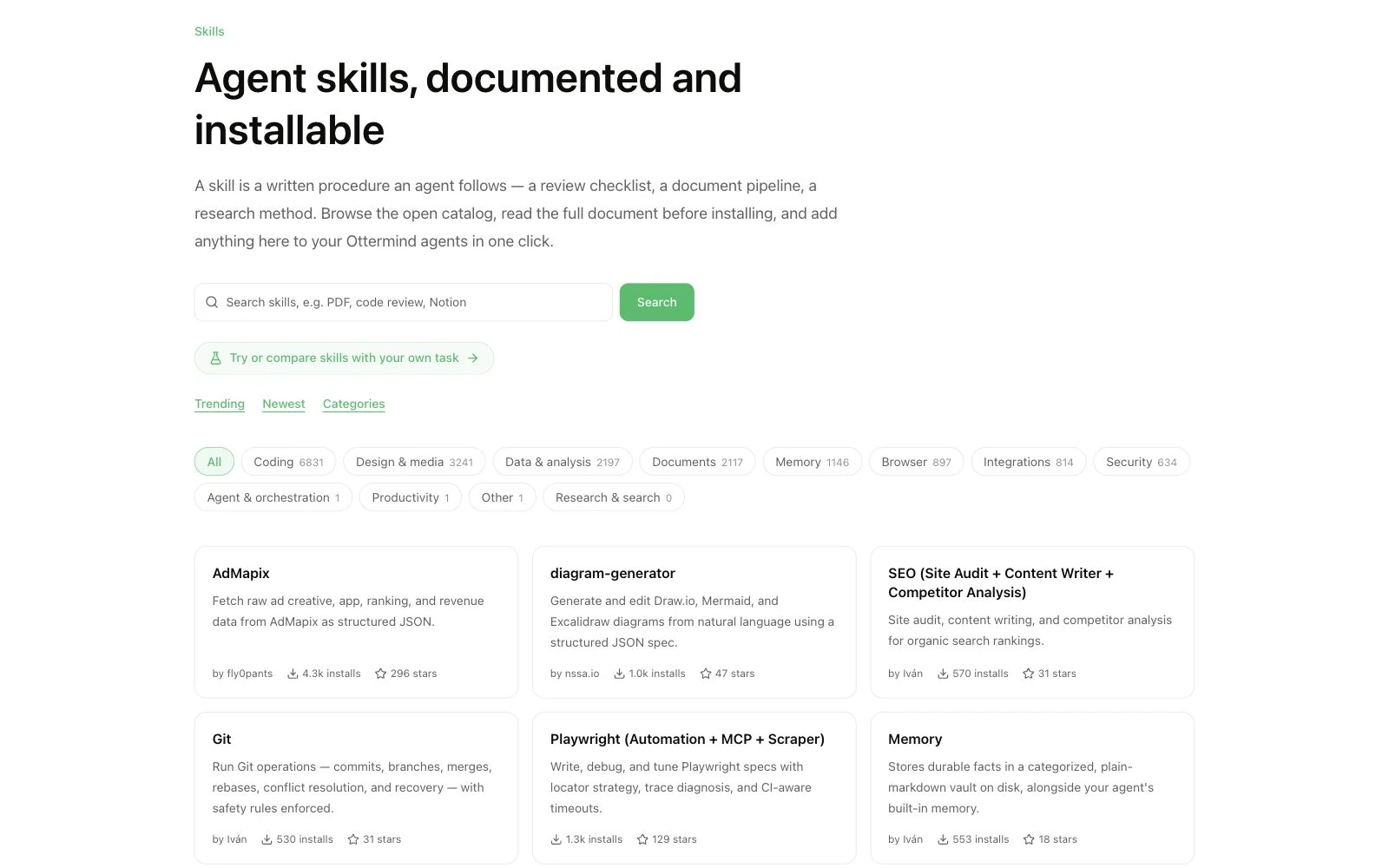
In Ottermind, open Skills, add the skill, make sure it is enabled, and bind it to the agent that will handle your task. That agent can then decide when a bound skill is relevant. Installation alone does not make a skill available to every agent.
The setup guide covers the available ways to add skills. If you need help describing the task itself, the prompt guide explains how to supply goals and context.
Here are three ways to begin. These are example task prompts, not recorded product tests; results depend on the selected skill, your material, and available tools.
Give a proposal a clear path to completion
You have background notes and a few ideas. Before drafting, you need to decide who will read the proposal, what decision they should make, and which details are still missing.
The doc-coauthoring skill organizes document collaboration around gathering context, refining the structure and sections, and testing the document from a reader's perspective. It is listed for proposals, specifications, and decision documents.
Document skill: doc-coauthoring listing
After installing and binding a suitable skill, try:
Help me write an internal proposal for a self-service product demo.
The reader is our product lead. The decision is whether to spend two
weeks building a prototype. I have attached the background notes.

First, identify missing information. Then work through the sections
with me. Once we have a draft, check it from the perspective of someone
reading it for the first time and flag gaps in the reasoning.
Aim for a document that makes the decision easier to discuss: why the work matters, what the prototype would involve, and what remains unresolved. Review those points before spending time polishing the opening paragraph.
Turn a written process into a diagram you can discuss
A process description often mixes steps, decisions, and exceptions. Even when the words are accurate, the path through them can be hard to follow.
The directory lists diagram-generator for creating and editing diagrams from natural language, with Draw.io, Mermaid, and Excalidraw among its stated formats. Check the skill's requirements for the format you want to use.
Diagram skill: Diagram-generator in the data and analysis directory
For a product-feedback workflow, start with:
Turn this process into a Mermaid flowchart:
A user submits feedback. Support checks whether the issue can be
reproduced. Reproducible issues go to Product for evaluation.
Other issues go back to the requester for more information.

Label the decisions, responsible roles, and end points clearly.
List any branches the description leaves undefined.
Use the first version to check the path. If duplicate reports should be combined before evaluation, ask for that change. Keep refining until the diagram reflects the process your team actually follows.
Give a data error a specific starting point
An import fails, and the message says the JSON is invalid. You still need to know where the problem is, what should change, and whether a proposed fix preserves the data's meaning.
The JSON skill describes troubleshooting methods for parsing, encoding, and field-contract problems. Its listing emphasizes locating the specific issue and explaining the change.
JSON skill: JSON skill details
Bring a small sample with sensitive values removed, along with the error:
This JSON sample fails to import. Here are the sample and the error.
Locate the failure, propose the smallest change, and explain each edit.
Preserve the meaning of the existing fields. If the sample does not
establish the cause, tell me what additional information is needed.
The useful deliverable is a change you can inspect, with a reason for each edit. Validate the result in the actual import tool before applying it to the full dataset.
Keep the skills that fit your work
Choose a task you expect to encounter again and try it with material you already understand. Look at whether the method fits, whether the output is easy to check, and which instructions you still need to provide.
You can change bindings or disable a skill as your work changes. For third-party skills, review the source and data-access requirements before use.
Ottermind brings these methods into the agent workspace where you carry out the task. Start with one useful addition: browse Skills and choose a method for your next job.
