Examples
AI Usage Policy Examples: 14 Rules Employees Can Actually Apply
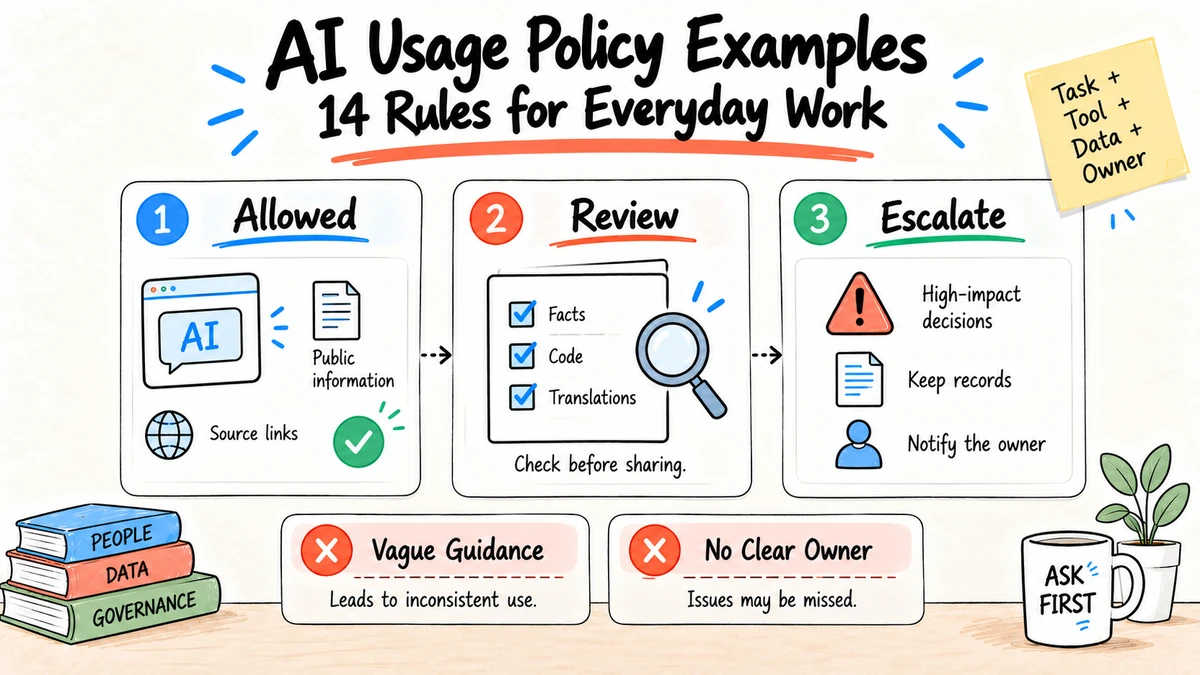
Good AI usage policy examples describe a real task, the allowed tool and data, the required review, and the point where a person must take responsibility. "Use AI responsibly" is not an instruction. The fourteen examples below show how to convert broad principles into rules people can follow during daily work.
Research and disclosure: These examples are informed by the NIST AI Risk Management Framework Core, the NIST Generative AI Profile, and publicly available workplace policy patterns reviewed in the September 4, 2026 Google US SERP. They are original examples, not legal advice or copied employer policies.
1. Drafting with public information
Allowed: Use an approved AI tool to outline or edit nonconfidential content based on public sources.
Required: The author verifies claims, opens cited sources, checks rights, and owns the final wording.
Not allowed: Publishing fabricated quotations, references, customer results, or statistics.
2. Research and synthesis
Allowed: Ask an approved tool to organize supplied sources and identify disagreements.
Required: Preserve a source list and label unsupported conclusions. Cite the underlying publication, not the AI response.
Not allowed: Treating generated text or a search summary as independent evidence.
3. Meeting notes
Allowed: Transcribe and summarize a meeting only when policy, participant notice, access, and retention requirements are satisfied.
Required: A meeting owner confirms decisions, action owners, dates, and disputed points before distribution.
Not allowed: Quietly turning an inferred action into an assigned commitment. The AI meeting notes guide provides a reviewable format.
4. Software and code
Allowed: Use an approved coding assistant with permitted repositories and licenses.
Required: Review, test, scan, and attribute code under the same standards as human-authored changes.
Not allowed: Sending secrets or restricted source code to an unapproved service, or merging code solely because it compiles.
5. Customer communication
Allowed: Draft a response from approved customer records and support guidance.
Required: A responsible person checks identity, account facts, promises, tone, and escalation rules before sending when the message has material impact.
Not allowed: Inventing account actions, refunds, policy exceptions, or legal commitments.
6. Confidential and personal data
Allowed: Process a named data class only in a tool explicitly approved for that class and purpose.
Required: Minimize fields, follow retention rules, and confirm vendor training and access settings.
Not allowed: Assuming a paid plan makes every type of confidential or personal data acceptable.
7. Employment decisions
Allowed: Use approved tools for low-risk administrative support, such as formatting a job description, after bias and accessibility review.
Required: Legal and HR owners approve any system that scores, recommends, ranks, or materially influences candidates or workers. A person remains accountable for the decision.
Not allowed: Using a general chatbot to screen resumes or infer protected characteristics.
8. Incidents and unexpected output
Required: Stop the affected workflow, preserve relevant records, report through the security or AI incident channel, and identify downstream recipients.
Not allowed: Deleting the trace or silently editing the output to avoid reporting.
9. Marketing and public claims
Allowed: Draft campaign variations from approved product facts, brand guidance, and licensed assets.
Required: The campaign owner verifies product capabilities, prices, customer proof, comparisons, disclosures, and asset rights before publication. Claims that can change need a dated source.
Not allowed: Inventing testimonials, implying measured performance without a study, or presenting synthetic people as real customers.
10. Data analysis and reporting
Allowed: Use an approved tool to clean, summarize, visualize, or explain a permitted dataset.
Required: Preserve the source data, transformation steps, units, filters, and assumptions. Reconcile important totals and have the report owner approve conclusions.
Not allowed: Uploading restricted records to an unapproved tool, removing inconvenient rows without disclosure, or treating a generated chart as evidence that the underlying calculation is correct.
11. Images, audio, and video
Allowed: Create synthetic media for approved creative work when training data, likeness, trademark, and platform requirements are satisfied.
Required: Label synthetic or materially altered media when policy, law, contract, or context requires it. Keep approvals for recognizable people, customer assets, and licensed inputs.
Not allowed: Impersonating a colleague or public figure, fabricating documentary evidence, removing a watermark, or creating deceptive media.
12. Translation and localization
Allowed: Draft translations of approved source material with an appropriate tool.
Required: A qualified reviewer checks meaning, locale, names, numbers, legal text, cultural context, and fixed URLs. The approved source remains the authority.
Not allowed: Publishing high-impact translated instructions without review or silently changing the product promise to make the copy sound natural.
13. Procurement and vendor evaluation
Allowed: Summarize public vendor documentation and organize responses to an approved questionnaire.
Required: Procurement and security owners verify contracts, data flows, subprocessors, retention, training use, service commitments, and exit terms in the original records.
Not allowed: Letting AI accept terms, choose a vendor, or represent a missing answer as a commitment.
14. Automated actions
Allowed: Prepare a reversible action or recommendation within the workflow's documented permissions.
Required: Use least privilege, scoped credentials, limits, logs, idempotency, and approval before consequential actions such as sending, purchasing, publishing, deleting, or changing a system of record.
Not allowed: Giving a general assistant broad standing access because one task occasionally needs an action.
Operating card template
Task:
Business owner:
Approved tool and version:
Allowed data classes:
Prohibited inputs:
Required sources:
Human review checks:
Actions the AI may take:
Actions requiring approval:
Records retained and duration:
Incident channel:
Next review date:
Three complete operating-card examples
Low risk: internal workshop outline
Task: Draft a workshop outline from public articles and the approved team brief.
Business owner: Learning lead.
Approved tool: Organization-managed writing workspace.
Allowed data: Public and internal data classified for general staff access.
Required review: Owner checks sources, agenda, claims, and accessibility.
AI may: Summarize, organize, draft, and suggest exercises.
AI may not: Invite attendees, publish materials, or invent participant feedback.
Record: Approved outline and source list for one year.
Escalation: Learning operations channel.
Moderate risk: customer renewal brief
Task: Prepare an internal renewal brief from approved account records.
Business owner: Account director.
Approved tool: Contracted workspace approved for customer confidential data.
Allowed data: Named CRM exports and approved support summaries.
Required review: Account director verifies facts, commitments, and open issues.
AI may: Organize evidence, identify missing fields, and draft the brief.
AI may not: Change CRM records, contact the customer, quote a price, or promise terms.
Record: Final brief, cited account records, reviewer, and date.
Escalation: Sales operations and privacy contacts.
High risk: candidate screening request
Task: Rank applicants from resumes.
Disposition: Not approved under the general acceptable-use path.
Reason: The task materially influences employment and may create discrimination,
accessibility, privacy, transparency, and records obligations.
Next step: Submit the documented use case to HR, legal, privacy, and security for
formal assessment; use the existing human-reviewed recruiting process meanwhile.
These examples show why the same verbs are not enough. "Summarize a file" can be low risk for a public workshop article and high risk for a medical accommodation record. The operating context determines the control.
How to write examples for your organization
Start with the ten AI tasks people already perform, not an imagined future architecture. Interview users, inspect actual data movement, and write one operating card for each task. Include a near miss: showing what looks similar but crosses a boundary teaches more than another abstract prohibition.
Then test each example with three questions:
- Can a new employee tell whether the use is allowed?
- Can a manager identify the required reviewer and record?
- Can security determine which data and systems are involved?
A manager decision tree
When an employee proposes a new use, the manager can ask:
- Is the tool on the approved register for this exact data class?
- Does the task affect employment, legal rights, safety, finances, customers, or public claims?
- Will the AI send, publish, purchase, delete, grant access, or change a record?
- Can a reviewer inspect the sources and correct the output before impact?
- Is there an owner, retained record, incident path, and way to stop the workflow?
If the first answer is no, stop and request tool review. If either the second or third answer is yes, route the use through the high-risk approval path. If evidence or ownership is missing, keep the output as a draft until the gap is resolved.
Rollout without policy theater
Launch the examples with short scenario exercises. Ask teams to classify a task, identify allowed data, select the reviewer, and explain what record remains. Include one ambiguous case so people practice escalating instead of guessing.
Track questions, near misses, unapproved-tool requests, and incidents. When the same question recurs, revise the example or approved-tool register. Do not respond to every edge case by adding another broad prohibition; clarify the decision rule and owner.
Review task cards when a tool changes its terms, adds integrations or action capabilities, changes data handling, or introduces a new model. A feature that turns drafting into automatic sending changes the risk even when the product name stays the same.
Example-writing checklist
[ ] The task is concrete enough that two managers classify it the same way.
[ ] Approved tools and data classes are named.
[ ] Allowed assistance is separated from final authority.
[ ] Required evidence and review are observable.
[ ] Prohibited behavior includes a realistic near miss.
[ ] Records, retention, and incident routing are stated.
[ ] Regional or role-specific differences are visible.
[ ] The example has an owner and next review date.
Keep examples consistent across departments
Use one central rule set, then add departmental cards for finance, HR, sales, marketing, engineering, support, and legal work. Local examples may be stricter because they handle different data or decisions, but they should not contradict the organization-wide policy.
When two departments share a workflow, name the handoff. For example, marketing may draft a public customer story, sales may confirm account facts, legal may review rights and claims, and the customer owner may obtain approval. The card should identify who can block publication and which source version everyone reviews.
Audit a sample of completed work against the card. Confirm that the approved tool was used, restricted inputs were absent, evidence and reviewers were recorded, and actions stayed within scope. Use findings to improve the example rather than treating every correction as misconduct.
Version-control the examples
Give every operating card an owner, version, effective date, and change history. Link it to the tool-register entry and underlying policy clauses. When a product gains an integration or autonomous action, review the affected cards before enabling the feature.
Archive old versions so an incident reviewer can tell which instruction governed a past task. Clearly label archived cards to prevent employees from following them. A wiki page without effective dates can quietly turn obsolete advice into current policy.
Respond to mistakes consistently
Separate good-faith error, unclear guidance, negligent behavior, and deliberate misuse. The response may include stopping the workflow, correcting an external record, notifying affected people, retraining, changing access, revising the example, or using existing conduct procedures. Do not improvise a new punishment framework inside the AI policy.
Ask five questions after a mistake:
- Was the applicable rule and approved alternative clear and reachable?
- Did the tool or interface make the unsafe path easier than the approved path?
- Which data, people, systems, and downstream decisions were affected?
- Which preventive or detective control should have worked?
- What correction, notification, evaluation, or monitoring change is required?
Preserve evidence proportionately. Relevant prompts, outputs, versions, tool actions, approvals, recipients, and corrections may be needed, but an incident does not justify collecting unrelated employee content.
Use incident findings to improve operating cards. If several people paste restricted logs because the approved debugging tool is slow, the organization has both a behavior problem and a workflow design problem.
Review examples with affected people
Policy, security, and legal teams know control requirements; employees know where work becomes ambiguous. Review draft examples with the people who perform the task and, where appropriate, those affected by its output.
Ask them to classify edge cases without hints. If experienced managers reach different answers, revise the card before training. Test whether the approved route is practical under real deadlines and whether escalation receives a timely response.
For HR, customer, or accessibility-sensitive workflows, include representatives who understand the recipient experience. A technically compliant rule can still create harm when it removes a human channel or forces someone to disclose personal information to proceed.
Use the companion AI policy template for organization-wide clauses, and the how to use AI for business guide to map policies into staged work.
FAQ
What belongs in an AI acceptable-use example?
Name the task, approved tool, permitted data, required review, prohibited behavior, accountable owner, retained record, and escalation path.
Are examples a substitute for a formal AI policy?
No. The policy defines organization-wide authority and principles. Examples translate those rules into decisions for specific work.
Should every AI output receive human review?
Review should match impact. Low-risk brainstorming may need ordinary author review. Employment, legal, financial, safety, public, and customer-impacting work requires explicit accountable review.
Can examples change faster than the main policy?
Yes. Keep task examples and the approved-tool register in controlled documents that can be updated as tools and workflows change, while preserving ownership and change history.
How many AI usage examples should a company publish?
Start with the ten to fifteen tasks employees perform most often and the highest-impact prohibited or approval-required cases. Add examples when recurring questions reveal a genuine gap.
Should policy examples name specific vendors?
Name approved tools in a separate register or operating card so changes do not require rewriting the core policy. Always pair the product name with permitted use and data scope.
What should happen when an employee is unsure?
Provide one reachable channel and a response owner. The policy should reward pausing and asking before restricted data is submitted or a consequential action occurs.
How should contractors and vendors use these examples?
Include applicable cards in onboarding and contracts, restrict access to approved systems, and state reporting duties. Do not assume an external worker follows the same tool register or data environment without explicit access and instruction.
Are personal AI accounts acceptable for work?
Only when the policy explicitly permits the account, use, and data. Managed accounts usually provide stronger identity, configuration, support, and offboarding controls; a paid personal account is not automatically approved.
What if the approved AI tool is unavailable?
Use the documented manual fallback or another explicitly approved tool. An outage does not authorize moving company data to a personal account or unreviewed service.
Should managers inspect employee AI prompts?
Access should follow a defined business, security, audit, or incident purpose with appropriate notice and permissions. Routine unrestricted surveillance creates privacy and trust problems and may capture sensitive content.
Bring an approved operating card and its source material into Ottermind to keep permissions, evidence, deliverables, and review criteria together for the task.
