How To
AI Employee Onboarding: A Safe Automation Workflow and Template
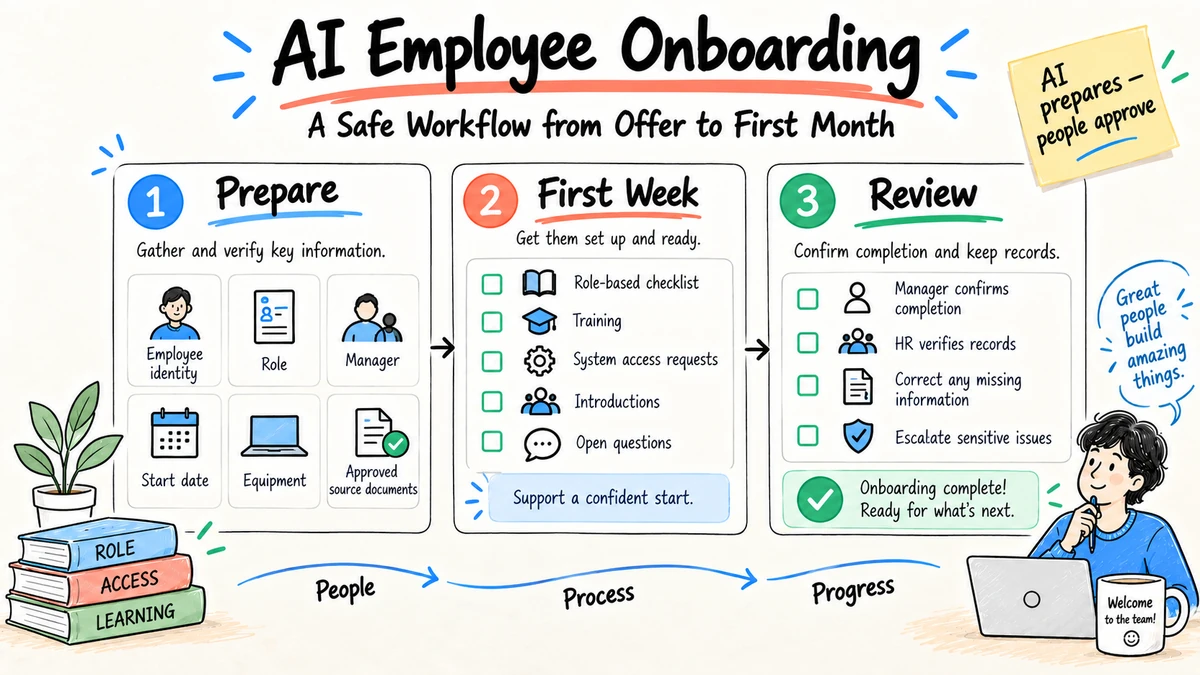
AI employee onboarding works best as a coordination layer: it can assemble a role-specific plan, explain approved policies, draft checklists, route requests, and summarize check-ins. HR, the manager, IT, security, and the employee still own access, employment records, commitments, and decisions. Automate preparation and routing before automating judgment.
Research and disclosure: This guide reflects IBM's onboarding automation overview, NIST AI risk guidance, and employment-risk materials from the U.S. Equal Employment Opportunity Commission, reviewed September 4, 2026. The workflow template is original editorial guidance, not legal advice or a measured Ottermind benchmark.
The onboarding workflow
| Stage | AI can assist | Human or system authority |
|---|---|---|
| Before start | Draft plan, collect approved role materials, flag missing inputs | HR confirms employment details; manager approves goals |
| Day one | Personalize agenda, explain where policies live, draft introductions | IT grants access; people deliver welcome and context |
| First week | Organize training, answer grounded questions, track open requests | Owners resolve exceptions and sensitive questions |
| First month | Summarize progress, surface blockers, prepare check-ins | Manager coaches and evaluates; employee corrects the record |
| 30/60/90 days | Compare goals with completed evidence, draft review notes | Manager and employee agree on expectations and next steps |
Step 1: Define the source pack
Use only approved and dated materials: job description, offer terms, team charter, role outcomes, employee handbook, regional policies, security training, system directory, and named contacts. Mark which document governs when sources conflict.
Do not place health information, identity documents, compensation details, background checks, or other restricted records into a general-purpose tool without explicit approval for that data and use.
Establish roles before generating the plan
| Role | Owns | Must not be delegated to AI |
|---|---|---|
| HR | Employment records, required policy, regional obligations | Employment terms and sensitive case decisions |
| Hiring manager | Role outcomes, priorities, feedback, relationships | Coaching, expectations, and performance judgment |
| IT and security | Identity, equipment, access, training evidence | Privilege approval and incident decisions |
| Onboarding coordinator | Schedule, task tracking, handoffs | Resolving policy or authority conflicts alone |
| Buddy or mentor | Informal context and connection | Formal HR guidance outside their role |
| Employee | Questions, corrections, learning, acknowledgment | Automatic acceptance of an inaccurate record |
| AI assistant | Drafting, organization, grounded retrieval, reminders | Granting access, changing records, or evaluating the employee |
One person may hold several roles in a small company, but each decision still needs an owner. The workflow should never infer authority from who happens to respond first.
Audit the source pack
For each document, capture title, owner, effective date, region, applicable roles, superseded version, sensitivity, and review date. Use a priority rule such as: signed employment terms, current regional policy, company-wide policy, department guidance, then informal notes.
Test conflicts deliberately. If the manager's checklist says equipment arrives on day one but IT policy requires five business days, the assistant should expose the conflict and owners, not select the friendlier promise.
Create a missing-source queue. Common gaps include team outcomes, system approvers, required training, travel rules, first-week availability, and the person responsible for workplace or accommodation questions.
Step 2: Create a role-based plan
Create a 30/60/90-day onboarding plan for [role] using only the attached
approved sources. Separate required compliance tasks, role learning,
relationships, first deliverables, and manager checkpoints.
For every requirement, cite the source and name an owner.
Mark missing dates, access, or policy conflicts as unresolved.
Do not infer employment terms, grant access, evaluate the employee,
or send messages.
The manager should replace activity goals such as "meet the team" with outcomes such as "map the five stakeholders who approve customer-facing changes."
Step 3: Automate requests with approval
Create structured requests for equipment, accounts, training, workspace membership, and introductions. The automation may prepare and route a request; the system owner must approve privileges. Use least privilege, expiration for temporary access, and an audit trail.
Each request should contain employee identifier, role, manager, start date, system, access level, business reason, approving owner, requested completion, and source rule. Avoid copying the complete personnel record into every ticket.
Use an idempotency key based on employee, system, role, and onboarding event. If a connector times out after creating an account, a retry should check the prior result rather than create a duplicate. Record partial completion so the coordinator sees that a laptop is ready while one data permission remains pending.
Never let the language model invent a permission from a similar title. Access should come from an approved role mapping or explicit system-owner decision.
Step 4: Ground the onboarding assistant
Answers should cite the effective policy or owner. When information is missing, personal, disputed, or region-specific, the assistant should escalate instead of improvising. Test questions about leave, benefits, expenses, security incidents, workplace concerns, and accommodations before launch.
Use response classes:
| Class | Assistant behavior |
|---|---|
| Direct grounded answer | Cite current applicable source and effective date |
| Guided process | Explain steps, owner, required form, and expected handoff |
| Personal record question | Authenticate and route to the authoritative system or owner |
| Sensitive workplace issue | Provide confidential human channel without unnecessary collection |
| Policy conflict | Show both sources, stop, and ask the named owners to resolve |
| Out of scope | State the boundary and offer the approved next contact |
Track whether escalations reach the correct owner and whether employees must repeat sensitive details. A technically correct handoff can still create a poor experience when context is lost or exposed too broadly.
Step 5: Design check-ins for correction
At each checkpoint, ask the employee what is unclear, which access is missing, which material is outdated, and which expectation conflicts with actual work. Let the employee correct summaries before they become part of a manager record.
End of day one
Confirm equipment, essential access, emergency and security information, first-week schedule, manager contact, and immediate blockers. Keep this check operational; it is not a performance evaluation.
End of week one
Review required training, role context, key relationships, open access, and the first useful deliverable. Ask which documentation was inaccurate or overwhelming.
Day 30
Compare actual work with the role plan. Update outdated assumptions, identify missing support, and agree on the next outcomes. Separate employee-provided corrections from AI-generated summaries.
Days 60 and 90
Review evidence against agreed outcomes, not chat activity or assistant usage. The manager gives coaching and makes judgments. The employee can comment on or correct the record before it is finalized.
Do not use sentiment inferred from private onboarding conversations as a hidden performance signal.
Step 6: Measure the workflow
Measure time to required access, completion of mandatory training, unresolved-request age, manager preparation time, employee clarity, corrections to AI summaries, and policy-answer escalation accuracy. Do not use engagement with the assistant as a proxy for successful onboarding.
Segment results by role, location, employment type, start cohort, and workflow version where appropriate and lawful. A good overall average can hide that remote employees or one region wait much longer for access.
Use a baseline from recent manual onboarding. Compare the same definition of "ready": sending a welcome email is not readiness if the employee cannot enter the systems needed for work.
Outcome measures:
- Time until essential access is usable
- Percentage of required tasks completed by owner and due date
- Employee-reported clarity at day 7 and day 30
- Manager preparation and follow-up time
- Correct policy-answer and escalation rate
- Number and age of unresolved exceptions
- Corrections to generated plans and summaries
- Access added, removed, or corrected after review
An onboarding control card
Role and location:
HR owner:
Manager:
Start date:
Approved source pack and effective dates:
Allowed AI tasks:
Restricted data:
Systems requested and approvers:
Mandatory training:
30/60/90 outcomes:
Escalation contacts:
Records retained:
Final review date:
Failure modes to test
- A policy has expired or conflicts with a regional version.
- The job title is similar to another role with different access.
- The start date changes after requests are created.
- A new employee asks a sensitive workplace or benefits question.
- A manager's notes conflict with the approved role outcomes.
- The assistant summarizes a concern that should remain restricted.
A worked onboarding example
Assume a customer-success manager starts in ten days. The approved source pack includes a job description, regional handbook, security training, customer escalation policy, team goals, system-access matrix, and manager calendar.
The assistant produces four linked artifacts:
- A pre-start checklist assigns equipment to IT, employment documents to HR, system approvals to named owners, and the first-week agenda to the manager.
- A 30/60/90 plan ties learning and deliverables to team goals, with every required item linked to a source.
- A question index lists the current policy owner for travel, expenses, security, benefits, and customer escalation.
- An exception report identifies that the job description references a CRM permission absent from the access matrix.
The manager approves outcomes and corrects the first deliverable. IT resolves the permission conflict rather than accepting the job description as authority. HR confirms the regional policy. The assistant may then issue reminders, but it cannot approve access or turn a missed task into a performance conclusion.
This is a successful workflow even though it surfaced an exception. Discovering the conflict before day one is more valuable than silently producing a complete-looking checklist.
Design for changes and no-shows
Start dates move, managers take leave, roles change, and candidates withdraw. Define cancellation and change events:
- revoke or pause pending access when the start is canceled;
- revalidate due dates when the start changes;
- require new approval when the role or location changes materially;
- transfer task ownership when a manager is unavailable;
- preserve only the records required by policy;
- notify relevant owners without broadcasting personal details.
Automation must be reversible. Test offboarding for a person who never starts as carefully as onboarding for someone who does.
Protect the employee experience
Tell employees what the assistant does, which sources it uses, which conversations become records, and how to reach a person. Avoid making the AI the only path to HR, accommodations, workplace concerns, or urgent help.
Keep tone practical and avoid simulated intimacy. A welcome message from a real manager carries accountability that an automated persona cannot replace. Use AI to prepare people for better conversations, not to remove those conversations.
Support language and accessibility needs with reviewed localized materials, captions, keyboard access, screen-reader testing, and alternative channels. Do not assume generated translation is sufficient for employment terms or mandatory policy.
Build a useful first-week agenda
Avoid filling the calendar with introductions that have no purpose. Organize the week around access, context, relationships, practice, and reflection.
| Day | Outcome | Evidence |
|---|---|---|
| Before start | Equipment, identity, schedule, and manager contact confirmed | Completed checklist and open exceptions |
| Day 1 | Employee can work safely and knows where to get help | Essential access and security orientation |
| Day 2 | Role outcomes and customer or internal context are clear | Reviewed role plan and questions |
| Day 3 | Key relationships have purpose and next steps | Stakeholder map owned by employee |
| Day 4 | Employee completes a small representative task | Reviewable artifact and feedback |
| Day 5 | Blockers and plan assumptions are corrected | Employee-approved week-one summary |
The AI can draft this agenda from availability and approved sources. The manager must protect focus time, explain trade-offs, and participate in the conversations that establish trust and expectations.
Design communications as drafts
Prepare distinct messages for the employee, manager, buddy, IT, and other task owners. Each should include only the information that recipient needs. Do not expose personal details in a broad onboarding announcement or copy a private accommodation request into task comments.
Use templates with fixed facts and explicit missing fields:
Audience:
Purpose:
Approved facts:
Required action and owner:
Due date:
Sensitive details excluded:
Source and effective date:
Send authority:
Keep generated messages in draft until the authorized sender checks names, dates, commitments, recipients, and tone. A reminder engine may send preapproved operational notices, but it should stop when the underlying task or start date changes.
Connect onboarding to offboarding
Every resource created during onboarding should have an owner and removal rule. Record equipment, accounts, group membership, temporary privileges, shared secrets, external vendor access, and recurring tasks in a form that supports later role change or departure.
At offboarding, the authoritative process decides preservation, transfer, revocation, communication, and deletion. AI may inventory known resources and draft a checklist; HR, the manager, IT, security, and records owners execute and verify consequential steps.
A well-designed onboarding workflow reduces offboarding risk because it can explain why access was granted and where knowledge or responsibilities reside.
Cost and capacity planning
Include coordinator time, manager preparation, HR and IT exceptions, integration maintenance, model or platform charges, evaluation, employee support, and incident handling. Compare cost per employee who reaches the defined readiness outcome, not cost per generated checklist.
Estimate peak cohorts. A workflow that handles five starts in a typical week may fail during an acquisition or graduate intake. Test queue age, rate limits, owner capacity, and manual fallback under expected peaks.
A phased rollout
Phase 1: Plan generation
Generate checklists and role plans from approved sources without sending messages or creating accounts. Review every output and collect source gaps.
Phase 2: Read-only assistant
Allow grounded policy and process questions for a small cohort. Review answers and escalations, especially regional and sensitive topics.
Phase 3: Request preparation
Create structured access and equipment requests for owner approval. Test duplicates, cancellations, identity mismatches, and unavailable systems.
Phase 4: Controlled reminders and updates
Automate reminders and approved status updates. Keep manager feedback, sensitive HR cases, access approval, and record changes under named authority.
Move phases only when the prior acceptance thresholds are met. A deadline is not evidence that the workflow is ready.
Onboarding launch checklist
[ ] Source owners, effective dates, and priority rules are recorded.
[ ] Restricted data is excluded or processed only in approved systems.
[ ] HR, manager, IT, security, coordinator, and employee roles are clear.
[ ] Access comes from approved mappings and named approvers.
[ ] Questions cite sources and route sensitive cases to people.
[ ] Employees can see and correct summaries about them.
[ ] Duplicate, cancellation, role-change, and no-show paths are tested.
[ ] The manual fallback remains available.
[ ] Measures compare with a consistent baseline.
[ ] Incident, stop, rollback, and offboarding procedures are tested.
The best AI tools for HR guide provides a selection scorecard. For note-taking consent and approval, see the AI meeting notes guide.
FAQ
Can AI fully automate employee onboarding?
It can automate preparation, reminders, routing, and grounded answers. People and authorized systems must retain control over employment terms, access, sensitive records, coaching, and evaluation.
What data should not go into an onboarding assistant?
Exclude any data the tool and workflow are not approved to process, especially credentials, identity documents, health information, background checks, compensation details, and sensitive employee relations records.
How do we keep onboarding answers current?
Use a controlled source list with owners and effective dates. Remove expired documents, define source priority, show citations, and route unresolved questions to the policy owner.
What is a good first onboarding task to automate?
Start with a role-specific checklist built from approved sources. It is useful, reversible, easy to review, and exposes missing ownership before access or employment decisions are automated.
Should an onboarding assistant answer benefits questions?
It may point to current approved information and the responsible contact. Personal eligibility, elections, disputes, and sensitive circumstances should go to the authoritative system or qualified HR owner.
Can onboarding conversations be used for performance management?
Do not silently repurpose assistance conversations for evaluation. Define purpose, notice, access, retention, and lawful use in advance, and keep employees able to correct relevant records.
What happens when the source documents conflict?
The assistant should show the conflict, stop the affected instruction, and route it to the named source owners. Once resolved, archive or mark the superseded material clearly.
Should the assistant send onboarding messages automatically?
Only for preapproved low-risk messages with verified recipients, facts, timing, and a cancellation rule. Personal, contractual, sensitive, or commitment-bearing communication should remain a reviewed draft.
How should onboarding work for remote employees?
Test equipment delivery, time zones, regional policy, identity verification, accessible communication, relationship-building, and alternative support explicitly. Do not merely convert office meetings into video calls.
Can onboarding automation support internal transfers?
Yes, but treat role, manager, location, and access changes as a distinct workflow. Remove privileges no longer needed and preserve employment terms and records under HR authority.
Create the source pack and control card in Ottermind, then generate a reviewable onboarding plan that HR and the hiring manager approve before the employee starts.
