Buyer's Guide
Best AI Tools for HR: A Workflow-Based Selection Guide
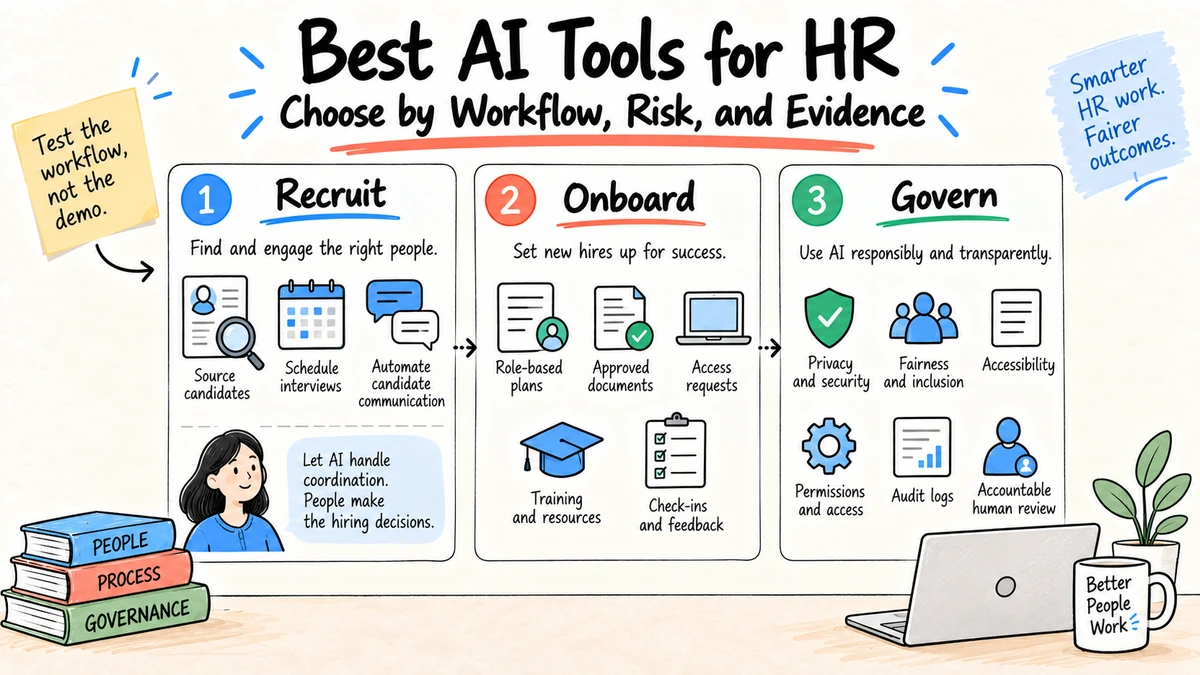
The best AI tool for HR depends on the workflow, the employee or candidate impact, and the system of record it must connect to. Do not buy a generic "HR copilot" before deciding whether you need recruiting support, onboarding coordination, employee service, learning content, workforce analysis, or cross-document project work.
Research and disclosure: This guide uses public information from Workday AI, Microsoft 365 Copilot, IBM AI for HR, EEOC resources on AI and employment, and vendor pages reviewed September 4, 2026. Ottermind is included for connected knowledge-work projects. We did not run a controlled HR benchmark; verify current capabilities, pricing, integrations, and legal requirements.
Shortlist by HR workflow
| Workflow | Tools to evaluate | Best fit to test |
|---|---|---|
| Core HR and workforce operations | Workday, SAP SuccessFactors, Oracle HCM | AI inside the existing HR system and permissions |
| Recruiting coordination | Greenhouse, LinkedIn Recruiter, Paradox | Sourcing, scheduling, communication, and recruiter review |
| Employee service | ServiceNow, Moveworks, Leena AI | Answers and requests grounded in approved policy content |
| Productivity and knowledge | Microsoft 365 Copilot, Google Workspace with Gemini | Drafting and synthesis inside the office suite |
| Learning and enablement | Degreed, Cornerstone, Sana | Content discovery, learning paths, and skill support |
| Cross-file HR deliverables | Ottermind | Research, policies, plans, presentations, and reviewable artifacts in one project |
This table is a starting set, not a ranking. A tool already connected to your HR information system may be more useful than a higher-scoring standalone product because identity, permissions, source freshness, and record updates determine whether the workflow holds together.
Seven buying criteria
Workflow fit
Write the current process from trigger to final record. Identify the delays, decisions, exceptions, and accountable owner. Buy only when the tool improves that path.
Data boundaries
List every data class the workflow touches: candidate materials, employment records, compensation, health information, performance notes, surveys, and public content. Confirm where data goes, how long it remains, who can access it, and whether it trains models.
Human decision rights
Document what AI may draft, recommend, rank, or execute. Employment decisions can create legal and human consequences. Keep accountable people at consequential decision points and make the basis for recommendations reviewable.
Grounding and freshness
Employee answers should use approved, current policies and preserve effective dates. Test conflicting documents, expired guidance, regional variations, and questions the system should escalate.
Integration and identity
Check single sign-on, role-based access, HRIS and ticketing integrations, audit logs, export, and revocation. A polished answer with the wrong permissions is a failed product.
Evaluation
Build a test set from common questions and known edge cases. Measure correct resolution, escalation, citation quality, correction time, and employee satisfaction, segmented by workflow and region.
Change and exit
Ask how prompts, models, connectors, and policies are versioned. Confirm that your data, logs, and workflow definitions can be exported if you change vendors.
Define requirements by workflow
Recruiting coordination
Separate administrative assistance from selection. Scheduling, interview-plan drafting, approved candidate communication, and recruiter note organization can reduce coordination work. Resume ranking, inferred traits, video analysis, and automated recommendations can influence employment decisions and need a much higher standard of legal, fairness, accessibility, explanation, and human review.
Ask whether the tool:
- preserves the original application and job criteria;
- shows which evidence produced a recommendation;
- supports accommodation and alternative processes;
- records recruiter corrections and final decisions;
- can be tested for differential outcomes across relevant groups;
- prevents unrelated personal data from influencing the result;
- separates communication drafts from authority to send or reject.
Do not accept "human in the loop" without defining what the person sees, what they can change, how much time they have, and whether automation bias is measured.
Employee service
An employee assistant should retrieve current policy, explain the applicable scope, and route unresolved questions. Test regional policies, conflicting effective dates, manager-only documents, leave and benefits questions, workplace concerns, and requests involving accommodations.
Require source citations and an owner for each knowledge domain. The system should say when it cannot answer and create a handoff with the employee's consent rather than repeatedly generating variants.
Onboarding and offboarding
Look for role-based plans, task ownership, identity integration, access approval, reminders, employee corrections, and verifiable completion. Offboarding deserves equal attention: account revocation, equipment, knowledge transfer, records, and privacy obligations can be more consequential than welcome messages.
The AI may prepare requests, but authoritative systems and named owners should grant or revoke access. Check idempotency so a retry cannot create duplicate accounts or tasks.
Learning and enablement
Evaluate whether recommendations map to approved role requirements and whether employees can understand why content was suggested. Test accessibility, language quality, source freshness, completion records, and the distinction between optional development and mandatory training.
Avoid interpreting course activity as proof of skill. Use assessments and work evidence appropriate to the role, with an appeal or correction path.
Workforce analysis
Define the decision before connecting data. Aggregated planning, turnover analysis, and skills inventories can be useful, but small groups, inferred attributes, and performance conclusions can create privacy and fairness risks.
Require data lineage, documented definitions, minimum group sizes, access controls, reproducible calculations, and review by people who understand both the data and workforce context.
HR content and project work
Policies, manager guides, research memos, communications, training decks, and implementation plans often cross files and formats. Test whether the workspace preserves sources, separates drafts from approved versions, carries corrections forward, and exports editable deliverables.
This is where a project workspace may complement, rather than replace, an HRIS or employee-service platform.
Compare systems by their place in the stack
| Category | Strength | Limitation to test |
|---|---|---|
| HR suite AI | Existing employee records, identity, and transaction context | Depth, transparency, regional rollout, and model controls |
| Recruiting specialist | Purpose-built recruiter and candidate workflow | Selection risk, data reuse, accessibility, and integration |
| Employee-service agent | Policy answers, request routing, and ticket deflection | Source governance, escalation, and sensitive-question handling |
| Office-suite assistant | Familiar drafting, meetings, email, and documents | Oversharing through permissions and weak task-specific controls |
| Learning platform AI | Content discovery and role-based learning | Recommendation basis, accessibility, and outcome measurement |
| General project workspace | Flexible research-to-deliverable work across formats | Not the authoritative employee record or transaction engine |
| Custom agent | Exact workflow and integration design | Engineering, evaluation, security, operation, and maintenance ownership |
Do not force one product across every row. A smaller set of connected tools with clear systems of record can be safer than a broad assistant that has poorly understood authority.
Build a representative evaluation set
Use real but appropriately redacted or synthetic cases. Include routine work and cases the system should refuse or escalate.
Employee service cases:
- Current travel reimbursement question with one governing policy
- Leave question whose answer varies by location
- Conflict between an old handbook and a new policy
- Workplace complaint that requires a confidential human channel
- Request from a user who lacks permission for the record

Recruiting coordination cases:
- Schedule an approved interview panel across time zones
- Draft a message without inventing compensation or status
- Candidate requests an accommodation
- Hiring criteria conflict with an unstructured manager note
- User asks the tool to infer age, health, or personality

HR project cases:
- Compare two policy versions with section citations
- Draft manager communication from the approved final policy
- Create a rollout deck without changing legal wording
- Surface missing owners and dates instead of inventing them
Label expected answer, required source, escalation, prohibited behavior, and reviewer. Evaluate the complete workflow, not isolated fluent responses.
Evaluate fairness and accessibility operationally
Fairness review is not one aggregate score. Define affected groups, relevant outcomes, sample limitations, error costs, and who can challenge a result. Compare false positives, false negatives, progression rates, and reviewer overrides where appropriate and legally permitted.
Accessibility testing should cover the candidate and employee experience, including keyboard use, screen readers, captions, language, time limits, alternative channels, and accommodation requests. An automated experience that works quickly for administrators can create barriers for the people subject to it.
Keep the alternative human process available while the tool is evaluated. Tell affected people how AI is involved when required and provide a reachable correction or contest route.
Run security and privacy due diligence
Map the data flow from every source to model, integration, log, evaluator, support system, and export. Review:
- identity, least privilege, administrator roles, and offboarding;
- data residency, subprocessors, encryption, retention, and deletion;
- tenant isolation and vendor support access;
- model training and service-improvement use;
- connectors that inherit overly broad document permissions;
- prompt injection through resumes, documents, and web content;
- audit logs for queries, records viewed, actions, and exports;
- incident notification and evidence preservation;
- disaster recovery and a manual fallback process.
Use synthetic sensitive fields to test redaction and permission enforcement. Never put real candidate or employee secrets into a trial that is not approved for them.
Model the business case honestly
Start with a baseline:
| Measure | Before pilot | During pilot |
|---|---|---|
| Eligible cases | Count | Count |
| Median completion time | Minutes | Minutes |
| Accepted without material correction | Percentage | Percentage |
| Correct escalation | Percentage | Percentage |
| Employee or candidate satisfaction | Consistent scale | Same scale |
| Administrator handling time | Hours | Hours |
| Material errors or reversals | Count | Count |
Add subscription, implementation, integration, change management, review, evaluation, security, support, and exit costs. Count time saved only when the downstream owner actually spends less time, not when the tool generates more drafts that require review.
Estimate ranges instead of one confident ROI number. Adoption, case mix, integration quality, and exception rate often determine value more than response speed.
A practical pilot scorecard
Workflow:
Current completion time and error rate:
Users and affected people:
Systems and data classes:
AI role:
Human decision owner:
Required integrations:
Representative test cases:
Fairness and accessibility checks:
Security and privacy approval:
Success threshold:
Rollback and exit plan:
Pilot one bounded workflow for four to six weeks. Compare accepted completions and correction time, not generated message volume. Include edge cases and people who will receive the output, not only system administrators.
A six-week pilot plan
Week 1: Baseline and governance
Document the manual workflow, data, owners, outcomes, exceptions, current measures, and alternative process. Complete legal, privacy, security, and worker-impact screening before connecting live records.
Week 2: Configuration and test cases
Connect the minimum required sources, set permissions, define escalation, and run the evaluation set. Fix source conflicts and access issues before inviting a broader group.
Weeks 3-4: Controlled use
Release to a small representative group. Sample outputs, collect employee or candidate feedback where applicable, record corrections, and hold weekly issue reviews. Keep consequential actions behind approval.
Week 5: Stress and failure testing
Test stale policies, identity errors, unavailable integrations, adversarial document content, model changes, high volume, and rollback. Verify that the manual path remains usable.
Week 6: Decision
Compare the pilot with the baseline, review affected-person feedback and incidents, estimate ongoing cost, and decide whether to adopt, narrow, extend, or stop. Record conditions and the next review date.
Procurement questions to ask every vendor
- Which exact HR decisions does the product influence, and how is that influence shown to reviewers?
- What customer data is used for training or service improvement, by default and by option?
- Which subprocessors, regions, and retention periods apply?
- How do role permissions map from the HR system and document sources?
- What evidence and version history are available for each answer or recommendation?
- How are accessibility, bias, and outcome differences evaluated?
- Can users correct information and challenge an outcome?
- Which actions can the tool execute, with which approval and duplicate protection?
- How are model, prompt, connector, and policy changes communicated and logged?
- Can data, logs, configuration, and workflow history be exported and deleted?
- Which current limitations affect our named use case?
- What support and incident response apply to production HR workflows?
Where general-purpose workspaces fit
An HR suite should remain the system of record for employee transactions. A connected workspace is useful when the task crosses files and formats: researching a policy, reconciling source documents, drafting an implementation plan, creating manager communications, and preparing a review deck from the same approved context.
Use the AI employee onboarding workflow for a concrete pilot. The AI policy template helps define approved tools, data, and reviews before rollout.
Red flags during a demo
- The demonstration uses only perfect, vendor-selected questions.
- Recommendations appear without source, criteria, or version information.
- The vendor describes human review but cannot show reviewer evidence or overrides.
- "Enterprise security" substitutes for answers about data flow and training use.
- Bias testing is presented as one permanent certification.
- The product needs broad administrator access for a narrow workflow.
- The tool cannot distinguish an approved policy from an outdated draft.
- Export covers final answers but not corrections, logs, or workflow history.
- ROI assumes every generated draft equals time saved.
Ask the vendor to run one difficult case live. A clear escalation can be a stronger result than a polished but unsupported answer.
Example decision: employee policy assistant
Suppose the problem is slow answers to routine travel, expense, and leave-process questions. The HRIS suite offers an embedded assistant, an employee-service vendor offers deeper request routing, and the office suite can search existing documents.
The team should not compare generic chat quality. It should test fifty representative questions across regions and roles, including outdated documents, missing permissions, personal eligibility, a workplace concern, and a policy conflict. Required outcomes are a correct cited answer, an appropriate personal-record handoff, or a safe escalation.
The HRIS assistant may benefit from authoritative identity and record context. The service specialist may offer stronger routing and case workflow. The office assistant may be easiest for employees but inherit messy document permissions. The decision depends on measured answers, escalation, access, employee experience, implementation cost, and exit, not which demo writes the friendliest response.
Record why the selected system is authoritative for each answer and what remains in the HRIS or case-management system. A search assistant should not become an accidental system of record.
Governance after launch
Assign monthly source review, quarterly outcome review, and event-driven reassessment. Source owners remove outdated documents; HR operations reviews unresolved questions; security reviews access and incidents; the business owner decides whether the workflow still meets its purpose.
Monitor overrides, complaints, corrections, and differences across relevant populations. A model or connector update should trigger the fixed evaluation set before broad release. Preserve a way to disable the AI feature without disabling the underlying HR service.
Publish a plain-language employee notice where appropriate: what the tool does, which information it uses, whether a person reviews decisions, how records are handled, and how to reach a human or request correction.
FAQ
What are the main uses of AI in HR?
Common uses include recruiting coordination, employee service, onboarding, learning, drafting, workforce analysis, and administrative support. The risk and required review vary substantially by use.
Can AI select candidates automatically?
Organizations should not treat automated ranking as a risk-free shortcut. Employment tools can create discrimination, accessibility, privacy, and transparency concerns. Obtain qualified legal review, validate the process, monitor outcomes, and keep accountable human decision-making.
Should HR buy a standalone AI tool or use its existing suite?
Start with workflow and integration requirements. Existing-suite AI may inherit useful identity and data controls; a specialist may perform one task better. Test both against the same cases and governance requirements.
How should HR measure an AI pilot?
Measure accepted task completion, correction time, escalation accuracy, service time, employee or candidate experience, and adverse outcomes. Activity counts alone do not prove value.
What is the safest first AI use case for HR?
A low-impact, source-bounded drafting or checklist task is usually easier to evaluate than candidate ranking or performance decisions. Choose a workflow with visible errors, a clear owner, and a manual fallback.
How many HR AI tools should a company use?
Use the smallest set that covers validated workflows with clear systems of record. More tools increase identity, data-flow, training, procurement, and offboarding work.
How often should HR AI tools be reevaluated?
Review on a fixed schedule and after material changes to the model, integration, data use, workflow, affected population, law, or incident history.
Should employees be told when HR uses AI?
Follow applicable legal, contractual, and organizational requirements. As an operating practice, explain material AI involvement, data use, human authority, and correction routes clearly enough for affected people to act.
Can HR use free AI tools for nonconfidential work?
Only when the organization's policy approves the tool, account, use, and data. Public input does not remove concerns about output accuracy, rights, records, or external communication.
Use Ottermind when an HR initiative must turn approved policies, research, and stakeholder input into connected documents and presentations without losing the source context.
