Prompt Guidance
AI Christmas Photo: What Makes One Look Real, and Eight Briefs That Hold Up
A Christmas photograph reads as real because of where the light comes from, not because of the faces. The eight briefs in this guide change one variable each — fill this one, check the shadow side, then adjust the next sentence.
Optional
JPG / PNG / WebP
This is Ottermind's composer. Filling the brief and sending are separate actions, and no image is generated until you continue in Studio.
November 13, 2026 · 12 min read
An AI Christmas photo usually fails in the lighting, not in the faces. The tree, the jumper and the mug are easy for a model. What it gets wrong is where the light comes from and how it falls off across a room — and that is the thing your eye checks first, before it can say what is wrong.
This page is for the person with a photograph to produce before the 25th: a card, a post, a picture of people who were not in the same room. It gives five checks that take about a minute each, eight briefs written so that each changes exactly one variable, and the fix for the failures that come up again and again.
How this guide was prepared: This is a workflow guide, not a review: "AI Christmas photo" names a task, and no single vendor owns it. The six photographs in the body and the cover's still-life background were generated with GPT Image 2.5 on November 13, 2026, from the briefs printed below, and none is retouched or presented as a real family; the cover's type was set over that artwork afterwards. Ottermind's AI Photo Editor, Image Effects and Photo Face Swap pages were read in the marketing checkout at origin/main 356305a2 on the same date; the composer's accepted file types, the handoff into Studio and the three entry points linked near the end come from that checkout. Search figures in the page brief (6,600 a month, KD 0, US English, DataForSEO, November 4, 2026) are reporting data, not a forecast for this page. No other vendor's product was tested, and no output here is a promised result.
What people mean by an AI Christmas photo
Two jobs share the name, and they fail in different places. The first is generating a scene that never happened: a family beside a tree, a cat asleep on a rug, a bakery window at dusk. That is a composition and lighting problem. The second is restyling a photograph you already own — the same people, the same room, holiday light. That is a likeness problem, and it is the harder one, because a face that changes by a few percent stops being the person.
Decide which job you have before you write anything. A brief for the first job describes a scene. A brief for the second one protects what must not move.
| What you need it for | What decides whether it works | Where it usually breaks |
|---|---|---|
| A card or a greeting for family | One face legible at the size of a thumbnail, warm, allowed to look at the camera | Eyes too sharp, skin too even, background too tidy to be a room |
| A group picture of people who were not together | Each person recognisable, nobody merged into a shoulder | Hands, occlusion, one face lit differently from the rest |
| A pet, a table or a room | Honest texture and a believable amount of mess | Plastic fur, a perfectly symmetrical tree, no dust anywhere |
| A shop, window or product | Interior light and street light at the same time | Reflected light missing, lettering turned to soup |
| A post or a story | One subject, one direction of light, a crop that keeps the head | The frame edge cutting a shoulder, corners crushed to black |
Five checks that separate a photograph from a render
You can run these on any finished image in about five minutes total, and each one has a pass and a fail you can see without tools.
| Check | What a photograph shows | What a render shows |
|---|---|---|
| Where the light comes from | One dominant direction; the shadow side of a face is clearly darker, and the falloff is gradual | Even light from the front; every face fully readable, no side in shadow |
| Two colour temperatures | Warm practicals meeting one cool source on a cheek, a wall or a windowsill | A single warm wash over everything, or a split with nothing in between |
| Catchlights | The same shape in both eyes, offset from the pupil, tracing back to the actual bulb or window | Two identical white dots, or none at all |
| Things overlapping | An arm in front of a torso, a chair pushed back, an elbow that leaves the frame because the room was small | Symmetrical spacing, nothing accidentally cropped, every object fully visible |
| Hands | One grip per object; fingers wrap and disappear behind what they hold | A hand melting into a sleeve, six fingers, a mug held through solid fingers |
Two more that matter for print. Grain and noise should be consistent across the whole frame; a clean centre with a noisy edge is a tell. And the background should be less interesting than the subject — if you can name three objects behind the family, the brief asked for too much room.
The same room, two briefs
The two photographs below come from briefs that differ in one respect: the first has a single light source, the second adds a window. Everything else — the people, the clothes, the room, the tree — stays the same kind of scene.
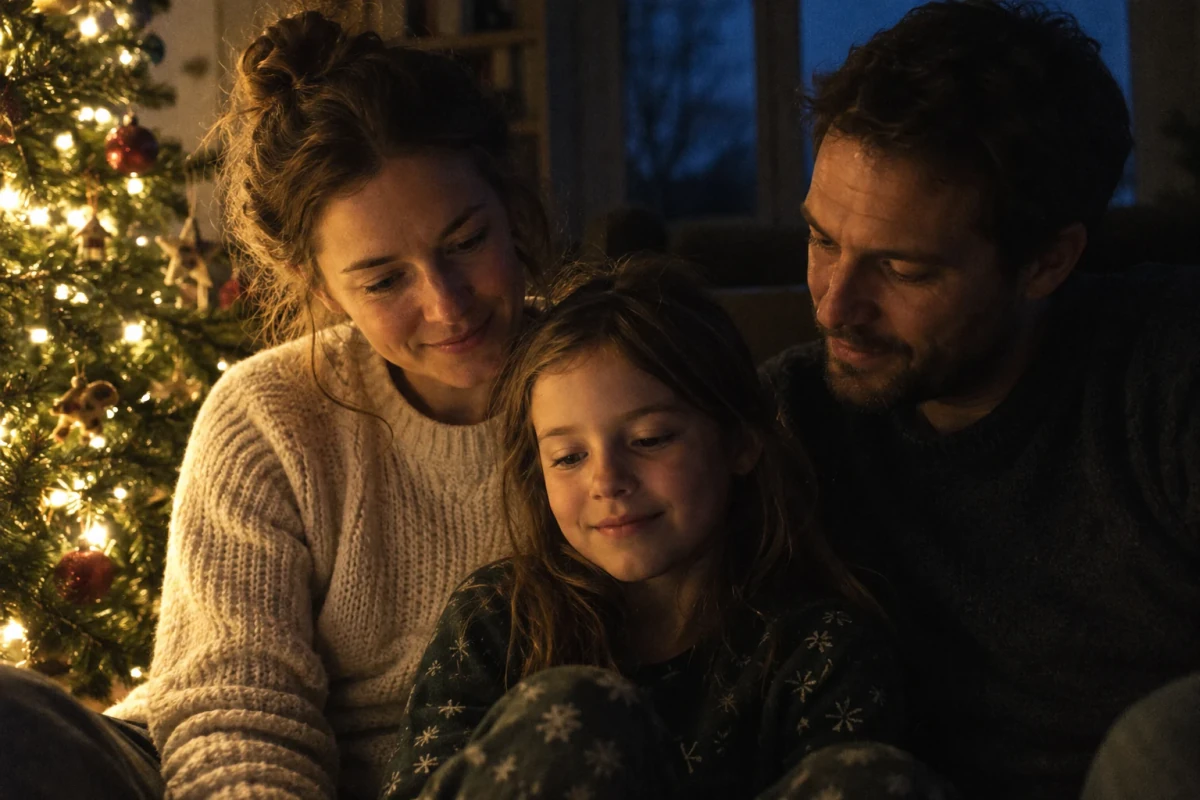
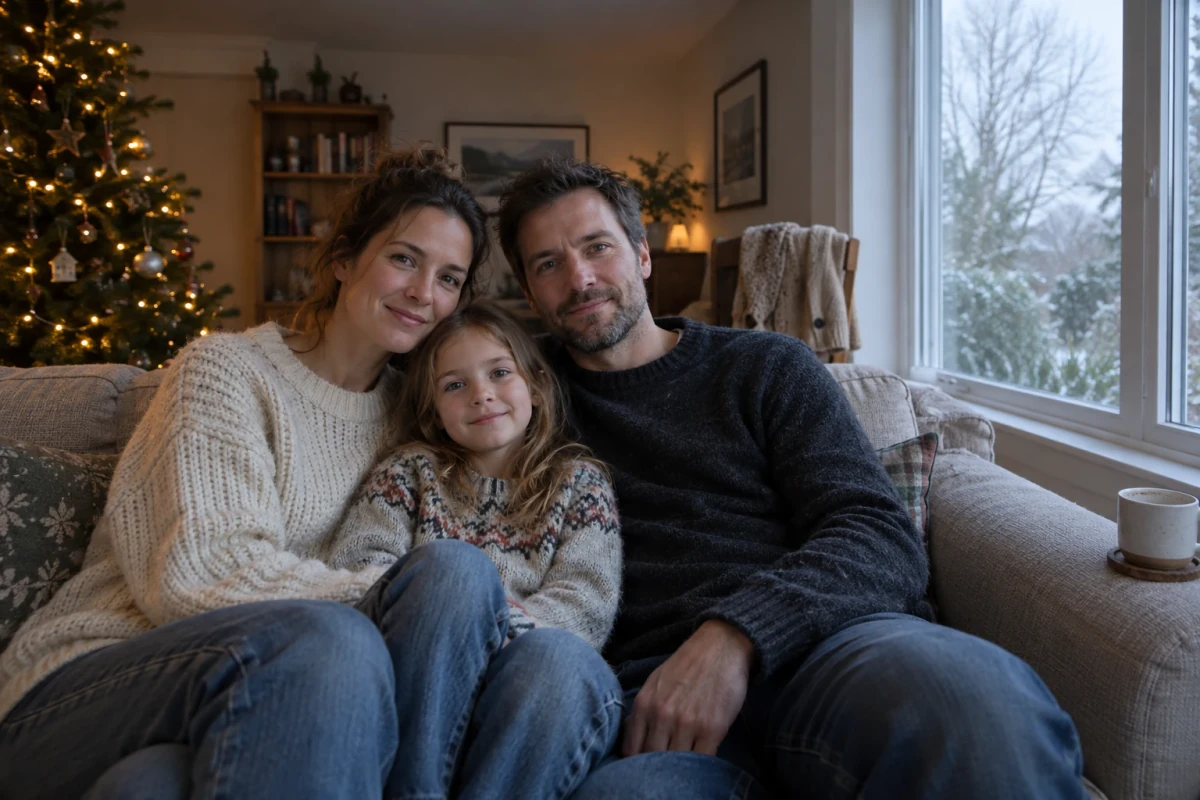
Left: brief 1, the tree lights as the only source. Right: brief 2, the same household with an overcast window added on the camera's right. Both are unedited returns from the prompts printed below, generated for this article; they are not photographs of a real family and not a screenshot of any product.
The left image passes the first check easily: you can point at the tree and say where the light is. It also shows the cost. The father, standing on the right of the frame, loses the far side of his face entirely, and at card size the group reads as one dark mass with three bright edges. The right image is the safer picture and the less convincing one, because the cool and warm sources meet without either winning — the exact mistake the brief was written to avoid.
That trade is the whole decision. A single source buys realism and costs legibility. Two sources buy legibility and, if you are careless, cost the illusion entirely. The useful middle is a daylight brief with the tree still switched on: most real Christmas photographs are made that way, at four in the afternoon, with the tree already lit.
Eight briefs, one variable each
Every block below is a natural-language brief. Ottermind's composer on this page takes words plus an optional image; there is no ratio menu or style slider to name, so numbers, sizes and formats have to be written into the sentence. Copy a block, then change one thing at a time and compare against the previous run rather than against your memory of it.
1. The light-source lock
Start here when you want the picture to feel like an evening. The brief removes every light except the tree, which forces the model to commit to a direction.
Candid photograph, 35mm, ISO 1600: a mother in a cream knit sweater, a father in a dark wool jumper and a child of about seven sitting on the floor beside a Christmas tree. The tree's warm white string lights are the only light in the room, three feet to their left, so the left side of each face is warm and the right side falls into soft shadow, and the window behind them stays dark blue and underexposed. Camera at the child's eye level, slight handheld tilt, visible fine grain, honest skin with pores and a few flyaway hairs, no retouching, no fill light, no text.What it controls: the direction and falloff of the light, and with them how much of each face survives. To shift it: move the phrase "three feet to their left" to the right, or change it to "behind them" for rim light and a much darker picture. Keep the "only light in the room" sentence, or the model will quietly add a ceiling lamp.
2. The daylight split
The version to use when the picture has to be readable on a card. It keeps two sources and names the temperature of each, which is what stops them from blending into one warm wash.
The same household in the same living room, in daylight: a mother in a cream knit sweater, a father in a dark wool jumper and their child of about seven, sitting together on the sofa. Overcast winter light comes from a large window on the camera's right, and the tree's warm lights are still switched on behind them on the left. The window side of each face is cool and a little brighter, the tree side is warm, and the two temperatures meet across the cheek. Wide 28mm view that includes the window frame on one side and the tree edge on the other, soft falloff at the corners, no flash and no reflector. Everyday clothes, a half-finished mug on the arm of the sofa, a cardigan over the back of a chair, no text.What it controls: the colour split and the amount of room you see. To shift it: replace "overcast" with "low winter sun" to get a hard patch of light on one wall and much deeper shadows; move the window to "camera left" and the tree to the right to flip the whole picture. Add "no overhead lamp" if a ceiling light keeps appearing.
3. The snapshot
The most convincing Christmas photographs are usually the worst-lit ones, because a flash is a light source you can point at. This brief asks for the flaws on purpose.
Photo taken by a guest at a family gathering with a phone, direct on-camera flash from about a metre and a half: flat frontal light, a hard shadow of each head on the wall behind, skin slightly shiny, small pupils. A little motion blur on one raised hand, crooked framing with too much ceiling, a paper hat on the child's head, a half-eaten plate in the bottom foreground, an elbow cut off by the frame edge. Phone JPEG look with mild noise reduction, no professional lighting, no text.What it controls: the camera's competence, which is a separate variable from the scene. To shift it: say "no flash, daylight from a window" for the same gathering in the afternoon, or "flash bounced off a white ceiling" for something between the two. Do not add "cinematic" — it cancels the awkwardness this brief is buying.
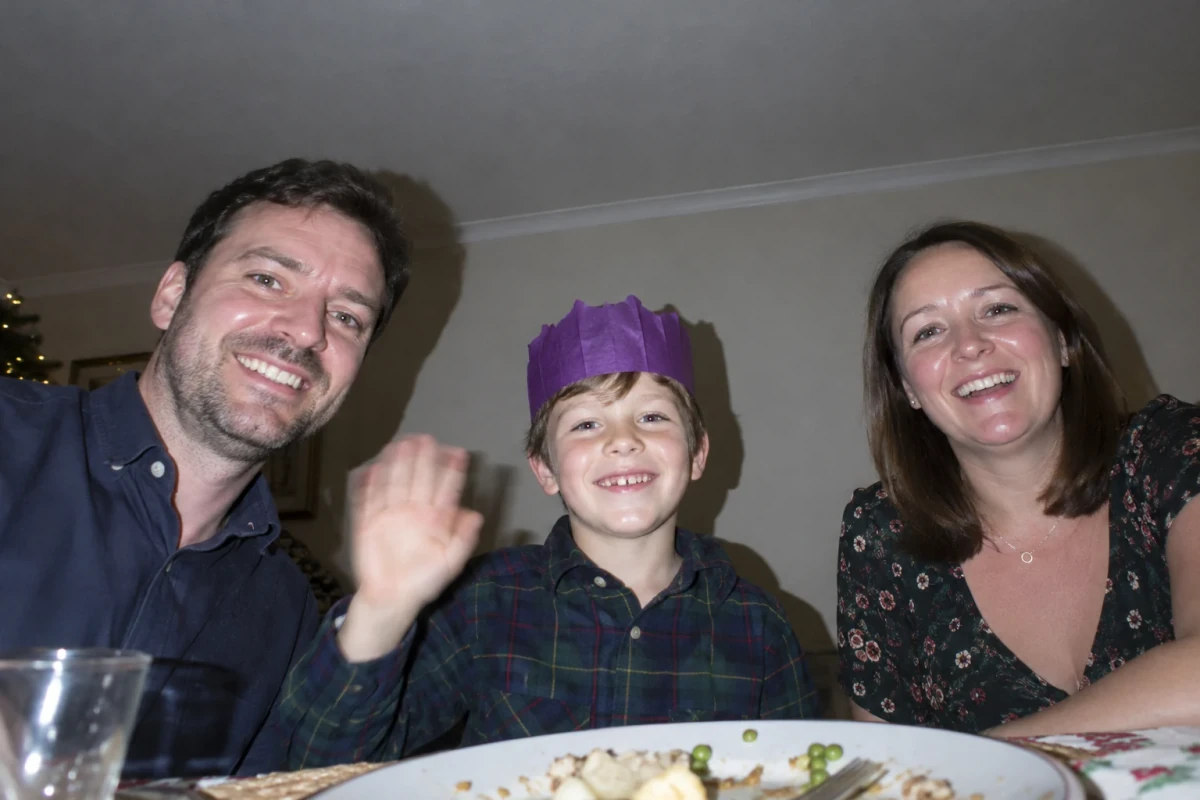
Brief 3, unedited. The hard shadow behind each head, the shine on the forehead and the ceiling left in the frame are the flaws that make it read as a real snapshot rather than a worse photograph. Generated for this article.
4. The group
Six people is where a generated picture stops being about light and starts being about geometry: who is in front of whom, and what each hand is doing.
Six people around a dining table photographed from standing height at the end of the table: two grandparents at the far end, two adults along one side, and an adult with a child on a booster seat along the other. Everyone is mid-conversation and nobody looks at the camera; every hand is doing one thing only, holding cutlery, a glass or a napkin. Candlelight from the table plus a warm pendant lamp above and slightly in front, so faces are lit from the front-top with soft shadows under the brow. Left in on purpose: a stained tablecloth, a breadboard, two wine glasses out of focus in the near foreground, one empty chair, no text.What it controls: the seating plan, the hands and the light on every face at once. To shift it: cut it to four people and give each one a named action — "pouring", "cutting", "reaching" — if you keep getting merged limbs. One person looking at the camera is a deliberate choice; add it only for the person you want it for.
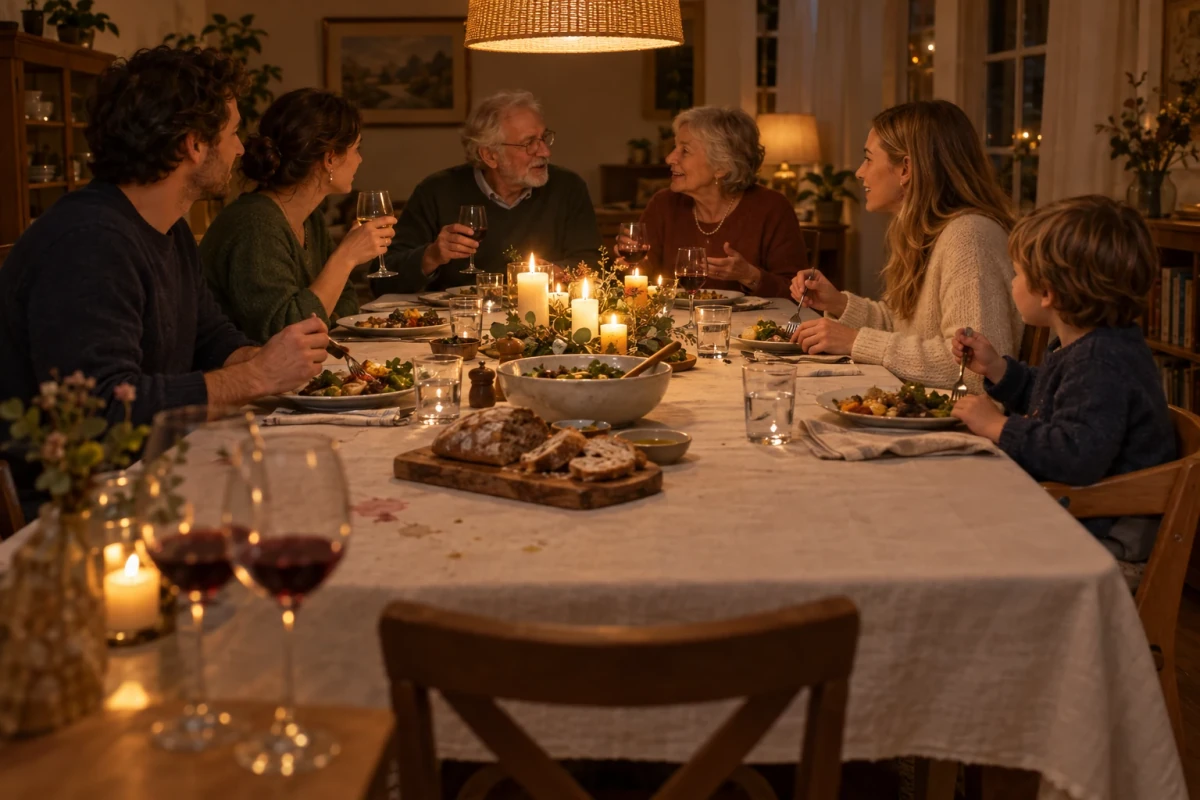
Brief 4, unedited. Six faces all lit by the same two sources, which is the check that matters here: nobody in this frame is brighter or cooler than the rest. The hands are the next thing to look at — the cutlery is held plausibly almost everywhere, and the fingers at the very left edge are where the detail starts to soften. Generated for this article.
5. The pet at eye level
Animals are where "cute" replaces observation. The brief fixes the camera height and the depth of field instead, and leaves the charm out of it.
A ginger tabby cat asleep under a Christmas tree, photographed from the floor at the cat's eye level with a 50mm lens at f/2: sharp on the whiskers and the near ear, the tree lights behind reduced to soft warm circles, half the frame filled by dark green branches. One glass bauble out of focus in the near foreground. No bow, no costume, no human hands, no text.What it controls: camera height and depth of field — the two things that make an animal look photographed rather than rendered. To shift it: raise the camera to standing height for a "found it asleep" view, or close the aperture with "f/5.6, everything from nose to tail sharp" for a picture that works small.
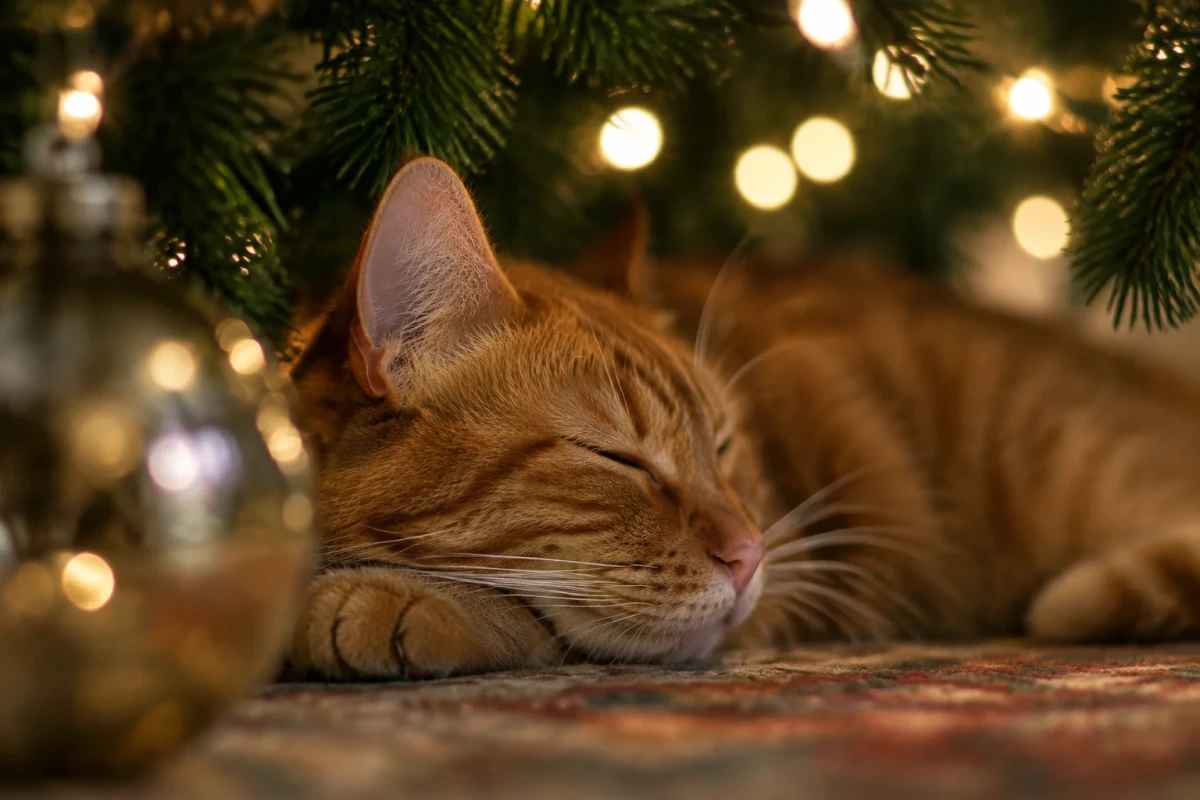
Brief 5, unedited. The camera is on the floor, so the tree is above the cat and the lights are behind it; the near bauble is out of focus because a 50mm lens at f/2 close to the subject does that. Generated for this article.
6. The card crop
Cards are not a 16:9 shape, and the crop is the last thing most people think about. This brief builds the margins in, so nothing important sits where the trim will land.
Portrait of a woman in her thirties standing beside a Christmas tree, three-quarter view, holding a stoneware mug against her chest with both hands tucked inside the long sleeves of a cream knit sweater, so the sleeves cover the hands and only the mug is visible. Warm lamp light from the left, cool evening light from a window behind her. Framed for a printed card: head and shoulders in the middle of the frame, generous empty space at the top and bottom, shoulders clear of both side edges, so a 4:5 crop keeps her whole. Soft film grain, natural skin, a slightly wrinkled knit sweater, no text, no border.What it controls: where the subject sits inside the frame, and therefore what survives a crop you make later. To shift it: change "4:5" to "5:7" for a taller card or "1:1" for a square post, and keep the margin sentence word for word. Hiding the hands in the sleeves is not decoration — the hands are the most reliable failure in a picture like this, and this is the cheapest way to remove them from the problem.
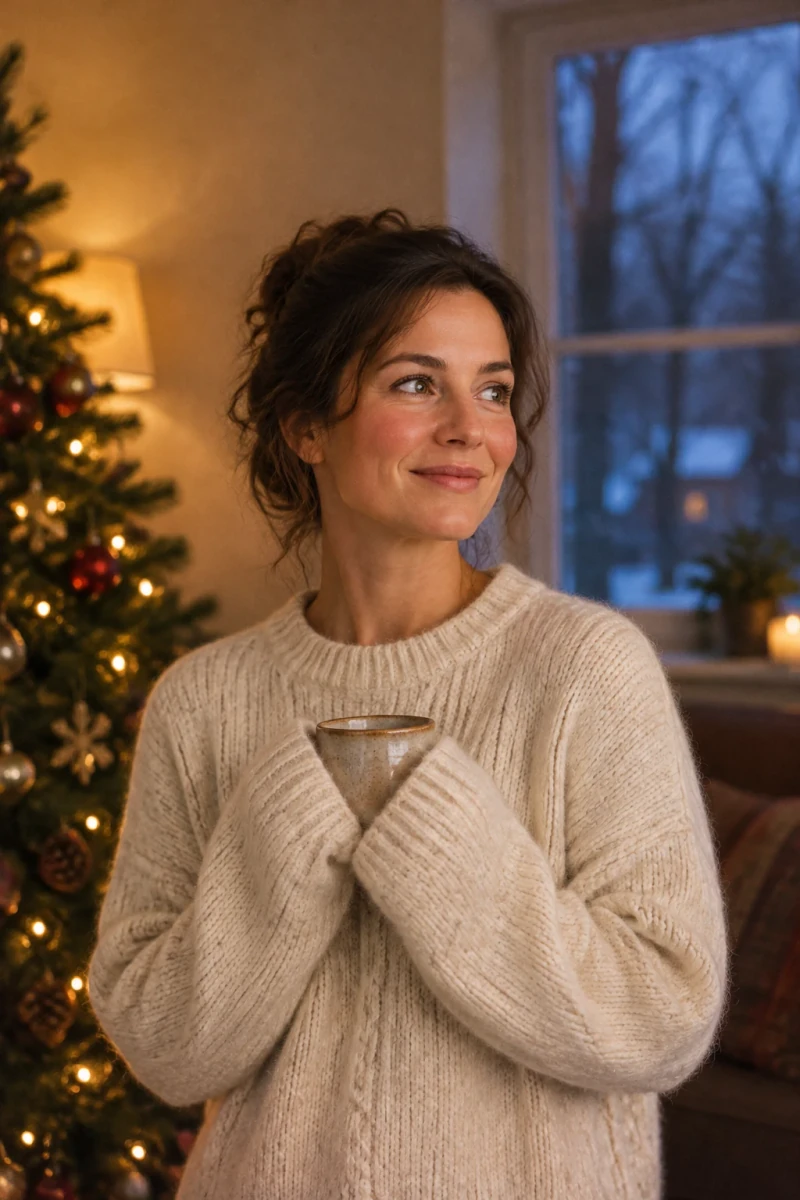
The return from brief 6, unedited. The margins at the top, the bottom and both sides are what let a 4:5 card crop keep the whole figure; the hands are inside the sleeves, which is why there are no fingers to count. Generated for this article with GPT Image 2.5.
7. The shop window
A business photograph has one job a family picture does not: it has to be plausible as a place you could walk into. That means reflected street light on the glass and interior light behind it, at the same time.
Small bakery window at dusk in winter: the interior lit warm from ceiling spots, two people inside slightly blurred by the glass, blank paper labels on the bread baskets with no writing on them, the street side cold blue from the sky, a few wet reflections on the glass. Photographed straight on at two metres with a 35mm lens, so the window frame is square in the frame and the interior reads through the reflections. No lettering on the glass, no logos, no text.What it controls: the two-sided light and the honesty of the glass. To shift it: change "dusk" to "morning" for a blue-grey street and warmer contrast, or add "a person's reflection in the glass" for the street-side point of view. Ask for blank labels on purpose: any lettering you request will come back misspelled.
8. Your own photograph, restyled
When the people are real, stop describing them. Attach the photograph instead and write a brief that protects what must not change. Ottermind's AI Photo Editor takes a PNG, JPEG or WebP reference and carries your brief into Studio, which is the route this brief is written for.
Use the attached photograph as the only reference for these people. Keep each face, hairline, hair colour, glasses and the shape of the nose and jaw unchanged, and keep their ages. Restage the scene in the same room with a Christmas tree behind them on the left and warm string lights as the main light, so the left side of each face is warmer and the right side falls into soft shadow. Keep the clothes they are wearing, keep the camera height and the crop, add gentle film grain. Do not add or remove anyone, do not change body shapes, do not add text.What it controls: how much of the original survives. To shift it: add one anchor per sentence — "keep the mole above her eyebrow", "keep his shirt collar open" — and accept that each anchor buys resemblance at the cost of some of the holiday restaging. Expect the backgrounds, hands and any small text to move even when the faces hold; compare against the source at 100% before you print anything.
What goes wrong, and the cheapest fix
These failures look like model quality problems. Most are specification problems, and the fix is a sentence rather than a new tool.
| What you see | What caused it | The cheapest fix |
|---|---|---|
| Skin like wax, no pores | "Beautiful", "glamorous" or "8K" pulled the renderer toward retouching | Name texture: pores, fine lines, a few flyaway hairs, no retouching |
| Light from everywhere, no shadow side | No source was named, so a ceiling fill was invented | State one source, its direction and its distance; say "the only light" |
| Warm wash over the whole frame | The two temperatures were described but never made to meet | Put the warm source on one side of the face and the cool one on the other |
| Six fingers, a hand inside a mug | Hands were left with nothing to do | Give each hand one object, or hide it: sleeves, pockets, a child's shoulder |
| Lettering on the jumper is nonsense | Text was requested from an image model | Remove text from the scene and set the wording in your layout tool |
| Everyone staring at the camera | "Family portrait" reads as a posed brief | Say "mid-conversation, nobody looks at the camera" |
| The tree looks like a diagram | No imperfect detail was named | Ask for one lopsided branch, a bare patch, a strand of lights that ends early |
| Two images of the same person who is not the same person | Each run is a separate generation | Restyle from a real photograph, or keep one accepted image as the reference |
The last row is the one that ruins a set. Consistency is not a setting on a brief; it comes from a reference image you keep and attach to every later run, plus the same sentences in the same order.
Starting from a photograph you already have
Three Ottermind entries fit the three versions of this task, and they are not interchangeable.
- AI Photo Editor — the entry to use for brief 8. You upload the photograph, describe the change, and keep the identity anchors in the brief. It is the right starting point whenever the people are real and the picture has to look like them.
- Image Effects — the look, not the scene. Use it to unify a set of photographs taken in different rooms: one grain, one contrast, one warm-cool balance across the whole card. Run it after the scene is right, not instead of fixing the light.
- Photo Face Swap — for the case where the scene already exists and only a face has to change, with the pose, outfit and background left alone. If what you want is a specific holiday scene with your face in it, describe that scene and swap the face in, rather than accepting a fixed clip from a seasonal app: you keep control of the light and the frame, and you are not limited to the one joke that app shipped with.
Two boundaries worth stating plainly. A swap is not a likeness guarantee — check the result against the source photo at full size, and treat every edit of a recognisable person as something to approve before sending. Rights in a face are separate from rights in an image. Ottermind's pages describe the workflow, not the permissions; getting one person's agreement to appear in a family card is a different question from a commercial use, and no tool settles it for you.
Questions that come up
Do I need a paid account to make one?
The composer on this page prepares the request; account, model access, credits and download options are handled in Ottermind Studio and depend on the account. Nothing here promises free generation, a fixed number of images, a fixed credit cost or a turnaround time.
Can I put my own family into a Christmas scene from one photograph?
Yes as a restyle, and expect it to be an approximation rather than a likeness guarantee. Faces drift, and the parts you did not name in the brief are the parts that move. Start from the sharpest photograph you have, ask for one change at a time, and compare each result with the source before going further.
Why does my picture look like a 3D render rather than a photograph?
Almost always the light. A render is evenly lit, and a photograph has a direction: one side of a face is two or three stops darker than the other, and the background falls off. Name one source, give it a side and a distance, and remove the others.
What size do I need for a printed card?
Work backwards from the print. A 300 dpi print needs 300 pixels per inch, so a 6 × 4 inch card needs about 1,800 × 1,200 pixels. The example photographs on this page are 1,200 pixels on the long edge, which is enough for a screen and not enough for a 6-inch print — generate the version you intend to print larger, and check it at the final size before you order.
Can I send a generated photograph as a real family card?
That is a judgement about the people receiving it, not about the tool. A restyle of a real photograph is still an edited image; the usual courtesy is to say so when the picture is going to relatives who might assume it was taken. For anyone whose face appears in it, ask first — including children, and including your own family.
Is there anything not worth asking for?
Lettering, logos, licensed characters and specific branded decorations. An image model will produce a plausible-looking version of all four and get the details wrong, and a plausible wrong version of a logo is worse than no logo. Generate the scene clean and put the words where they belong, in type.
