About this template
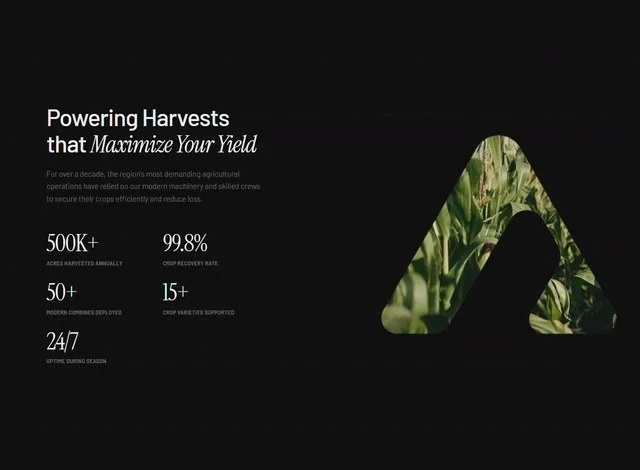
Arceage Stats was captured at 640x470 and kept as a specification rather than as a gallery image. The page's own headline reads “Maximize Your Yield”, and the composition is built around those exact words. Colour is limited to black #101010 underneath, set in Instrument Serif. The reference is built with React and Tailwind CSS, and the layout decisions are stated independently of it. Treat it as the brief for an AI or SaaS product features section that has to hold up under a rebuild, not just a first look.
Designed for
- Agencies pitching an AI or SaaS product features section who want a fixed 56px display size and 120px spacing steps quoted in the deck so the estimate still holds after the kickoff.
- People who brief a model on a features section will use the 7,826-character prompt as the starting point.
- Made for content leads rewriting a features section whose headline has to stay as long as Arceage Stats's.
What's included
- The spacing steps are quoted. Type and spacing are drawn from one list here: a fixed 56px display size and 120px spacing steps. The type and the layout share the same steps, so nothing drifts when one of them is substituted.
- Figures as typography. The figures are set as type rather than in a card: Instrument Serif at the display size with labels one step below. The figures sit on the same baseline as the copy around them, so the row reads as one object. Keep the figures to one line.
- Structure in one screen. The features section is built so the copy lands before anything else: the type carries the hierarchy, the 640x470 frame holds the composition, and the supporting values stay quiet. The page is one composition at 640x470, which is why it holds together when the copy changes.
- One scale for type and frame. Spacing is quoted the same way (a fixed 56px display size and 120px spacing steps), not as a scale that grows on its own.
Motion & interaction
The entrance is the signature
A typewriter pass is the whole gesture: nothing else on the page performs. The finished frame is the same composition the brief describes as a still, so the motion is additive.
Motion that stays out of the way
This one is delivered as a still composition at 640x470, so the hierarchy has to work without motion, and it does. Motion is treated as feedback rather than as decoration. Stillness is a valid choice.
What moves in Arceage Stats
Copy the pattern rather than the values: keep a typewriter pass and let your own brand set the durations. Nothing animates for its own sake in this features section.
Making the features section yours
Where a theme hands you components, this brief hands you a composition: a fixed 56px display size and 120px spacing steps and a media frame, with the subject left to you. Keep the frame and the scale; the subject is the part that should change.
The order behind the features section
Attention is routed rather than scattered. “Maximize Your Yield” is doing that work from the first frame. The eye lands on the display line first, then the supporting copy, then the action. Proof, where it appears, stays a strip or a row rather than a wall of testimonials. That sequence is the design. A SaaS reader gets the offer before the options.
Frequently asked questions
What does the brief behind Arceage Stats actually contain?
The captured brief runs 7,826 characters and covers the frame, the type scale, the palette and the transitions. Copying it gives you that text, and sending it to Studio stages the same request with the page already described.
Do I need React and Tailwind CSS to rebuild Arceage Stats?
Arceage Stats was built in React and Tailwind CSS, and the entry says so for provenance. The brief describes positions, sizes and timings, so it rebuilds in any framework that can set type and place elements.
How do the sub-second transitions in Arceage Stats behave?
Entrances and state changes are in the sub-second range. They are driven by state changes rather than a scroll library, and they never hold up the copy. The reference was captured at 640x470.