Remaker AI Review: Face Swap, Credits, and What to Check
Below: which Remaker AI tool matches your file, what one-time credits actually buy, and where the limits sit. If you already have the photo and the face, the swap can start here in Ottermind.
Optional
Attach the photo to change here. Add the reference face in Studio before starting the swap.
November 9, 2026 · 9 min read
Remaker AI is a browser-based photo and video toolbox that sells one-time credit packs instead of a subscription. Its homepage calls it "the easiest way to recreate any image," and the catalog behind that line is broad: face swap, a prompt-driven photo editor, background and object removal, upscaling, headshots, video enhancement, lip sync, and a set of short-video tools. The face-swap family is the part most searches are about, and it is also the part where the fine print matters most.
Two questions decide whether it fits your job. First, which tool accepts the file you actually have — one portrait, a group photo, a folder of stills, or a clip. Second, how that tool spends credits, because Remaker prices image work by the image and video work by the second. This review works through both, then shows where an Ottermind workflow takes over and where it does not.
If your next action is a face swap in a still you own, the composer above is the entry point: add the photo you want to change and describe what must stay unchanged. Add the reference face in Studio before starting the swap. The rest of this page explains what Remaker documents, what its own pages disagree about, and the checks worth running before you spend anything.
How this review was prepared: Remaker's own pages were read on November 9, 2026: the homepage, the pricing page, the all-tools catalog, the photo face-swap workspace, multiple-face swap, batch face swap, video face swap, video multi-face swap, the AI photo editor, the Terms and Conditions, the Content Policy, and the browser-extension privacy policy. Several pages render client-side, so every figure below comes from the rendered page rather than static HTML. This is a documentation review: we did not buy credits or run a generation on Remaker, so there is no quality score, no measured processing time, and no claimed success rate. Prices and limits are the ones shown on the check date; confirm them in your own checkout. The cover background and the flat-lay illustration were generated with GPT Image 2.5 Flare, and the cover's type lockup is Ottermind's own layout; the workspace figure is a real capture of the public page. No Remaker interface, output, or benchmark is fabricated on this page.
What Remaker AI is — and what it is not
The catalog page groups more than thirty tools into six categories: image generators, photo editing, removal, enhancement, video tools, and a "free tools" row of utilities such as crop and image conversion. The face-swap workspace sits outside that grid with its own navigation: photo swap (single face, multiple faces, batch) and video or GIF swap.
That structure leads to the first useful distinction. Remaker is not one model or one quality level; it is a set of separate operations with separate inputs and separate credit prices. "Remaker quality" is therefore not a number you can look up. A one-credit upscale, an eight-credit headshot pair, and a 1-credit-per-second video swap fail in different ways, and each deserves its own test.
It is also not a single-purpose deepfake toy, although face swap is clearly the traffic driver. The editor, upscaler, and removal tools are ordinary photo utilities that also happen to be useful around a swap: cleaning the source portrait, preparing a cutout, or sharpening the export.
Three things on the site are worth knowing before you read any price:
- It is browser-first and mobile-compatible. The homepage FAQ says it works on Windows, Mac, iOS, and Android in the browser, and the extension privacy policy confirms browser extensions exist as a separate surface.
- The credits are one-time. Remaker states repeatedly that it has no recurring subscription and that purchased credits do not expire. That is a genuine difference from the monthly plans most competitors sell.
- The site's own copy is not always consistent. The face-swap FAQ refers to "FaceVary" rather than Remaker, and the homepage FAQ describes card and Stripe payments that the pricing page says are unavailable. Those are not reasons to avoid the product, but they are reasons to verify a promise on the checkout page rather than on a marketing FAQ.
Which Remaker tool matches the file you have
Pick by input, not by the length of the menu.
| What you have | Remaker route | What you should check before starting |
|---|---|---|
| One still image with one face to replace | Photo Face Swap → Single Face | Two uploads: the original image and the target face. Multi-face images are rejected here by design. |
| A group photo | Photo Face Swap → Multiple Faces | Whether the face detection picks the person you mean, and how many faces you will review afterwards |
| Dozens of stills with the same replacement face | Batch Face Swap | The page states a maximum of 50 images per session |
| A clip, GIF, or WebP | Video & GIF Face Swap | Max 500 MB and up to 30 minutes; 1 credit per second of footage |
| A clip with several people | Video Multi-Face Swap | 2 credits per second, and a separate face-selection step |
| A photo that needs cleaning before or after a swap | AI Photo Editor, Upscaler, Background Remover | Each is priced per image in the credit table, not bundled into the swap |
| A visible watermark on a file you own | AI Watermark Remover (listed in the credit table) | Removal does not create usage rights — see the rights section below |

What actually decides the route: one portrait, a group photo, a clip, and the replacement face. AI-generated illustration of the inputs the Remaker pages describe; it is not a screenshot of the product and shows no Remaker output.
The distinction that costs people the most is between a single-face job and a group job. Remaker's single-face page states the limit plainly — it "only works with single-face images" and points you to the multiple-face tool for anything else. If you upload a group photo to the single-face tool, the failure is a routing mistake, not a quality problem, and no amount of prompt writing fixes it.
There is a second routing trap in the video tools. The single-face video page still carries the line "only support face swap for one person now," while a separate video multi-face page exists at double the per-second rate. Budget accordingly: a 40-second group clip at 2 credits per second is 80 credits, which is 40% of the smallest pack.
Face swap: two uploads, one Swap button, a short retention window
The photo workspace is deliberately plain. You upload the original image, upload the target face, and press Swap. Remaker labels the uploads "Retain areas outside of the face" and "Swap face from original image," which is a useful statement of intent: the scene should survive the swap.
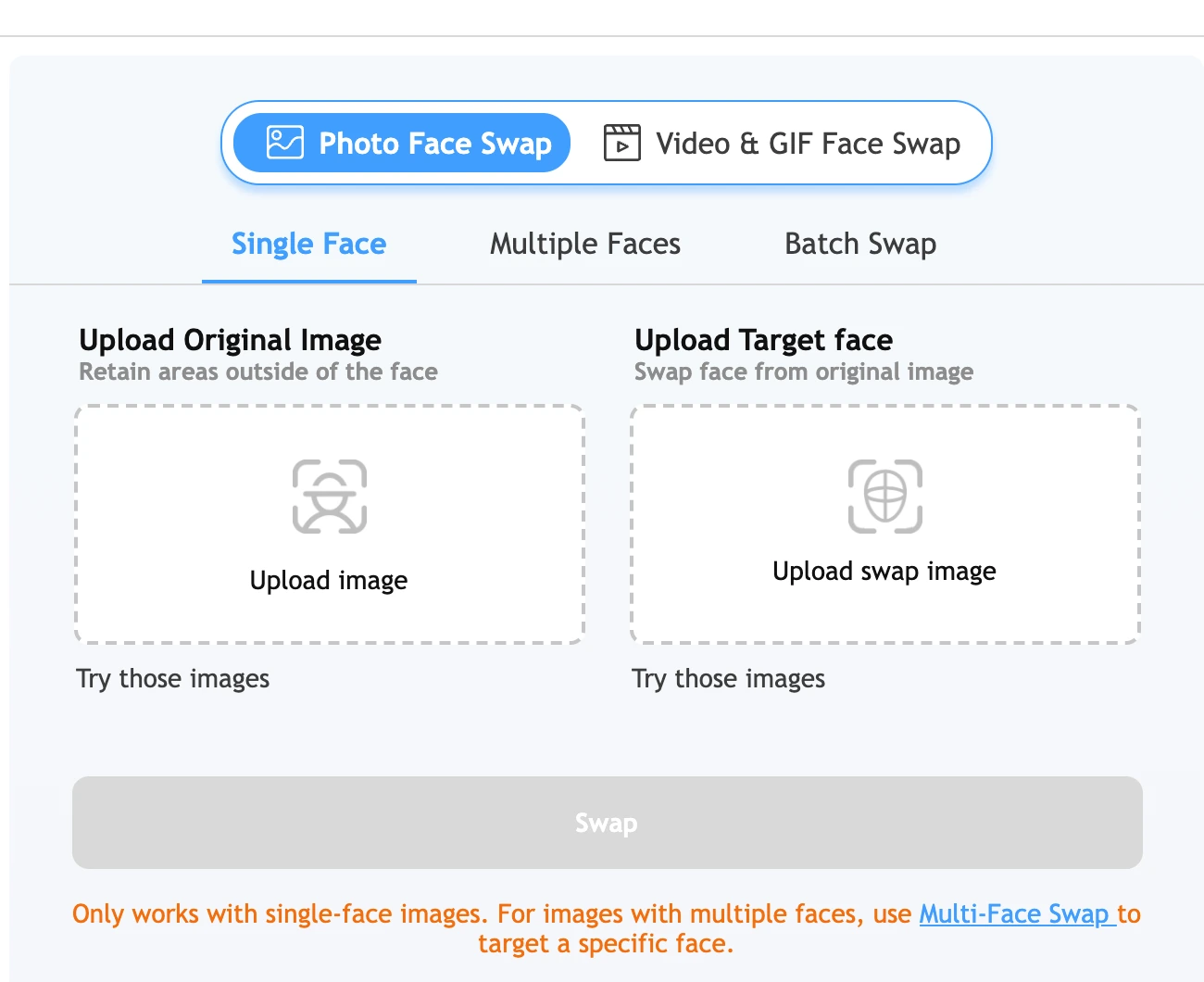
Real capture of Remaker's public face-swap workspace in a desktop browser on November 9, 2026. Two uploads, the Single Face tab, and a Swap button that stays disabled until both images are present; the workspace was not used to generate an image for this article.
That empty state is worth reading closely. There is no strength slider, mask brush, or visible model selector in the workspace we loaded, so the two images are the main controls: pick a reference face with a similar head angle and light direction, and expect the scene to be preserved rather than repainted. If your reference is a low-resolution crop, the swap inherits that limit.
Two boundaries sit outside the workspace and are easy to miss:
- Retention is short. The face-swap FAQ says uploaded and generated images "will be deleted within 48 hours." Download the export you approve in the same session rather than treating the product as storage.
- The marketing and the billing disagree. The tool page says "No sign up, no watermark," while the site's own FAQ describes free credits for new sign-ups and the pricing page sells credits for image tools, batch tools included. Check what your own export carries before relying on either line.
For video, the published limits are concrete: up to 500 MB and 30 minutes per upload, one credit per second on the single-face route, and two credits per second on the multi-face route. A full 30-minute upload would cost 1,800 credits at the single-face rate — more than three times the 530-credit pack — so the cap describes what the uploader accepts, not what a normal test should attempt.
What a credit actually buys
Remaker sells five packs. All of them are one-time purchases, and the page states that buying any amount makes the account VIP permanently.
| Pack | Price | Vendor discount · our $/credit |
|---|---|---|
| 200 credits | $5.99 | — · $0.030 |
| 530 credits | $9.99 | 38% off · $0.019 |
| 1,100 credits | $19.99 | 40% off · $0.018 |
| 3,000 credits | $49.99 | 45% off · $0.017 |
| 20,000 credits | $299 | 50% off · $0.015 |
Prices as displayed on November 9, 2026. "$/credit" is our division of price by credits, not a Remaker rate card; the discount percentages are the vendor's own labels and we did not verify the reference price they are measured against.
The per-tool table on the same page is the part that turns packs into decisions. Image operations are cheap and predictable; video operations are metered by the second.
| Tool | Published credit cost | Access label |
|---|---|---|
| AI Image Upscaler | 1 image = 1 credit | Free to Try |
| Background Remover | 1 image = 1 credit | Free to Try |
| AI Watermark Remover | 1 image = 1 credit | Free to Try |
| AI Object Remover | 1 image = 1 credit | Free to Try |
| Batch Watermark Remover | 1 image = 1 credit | VIP Only |
| Batch Images Upscaler | 1 image = 1 credit | VIP Only |
| Photo to Anime | 1 image = 2 credits | Free to Try |
| AI Headshot Generator | 2 images = 8 credits | Free to Try |
| AI Tattoo Generator | 2 images = 4 credits | Free to Try |
| Image to Video | 1 generation = 15 credits | Free to Try |
| AI Video Enhancer | 1 second = 3 credits | Free to Try |
| Video Background Remover | 1 second = 1 credit | Free to Try |
| AI Talking Photo | 1 second of audio = 4 credits | Free to Try |
| AI Live Portrait | 1 second of video = 2 credits | Free to Try |
Credit table as published on the pricing page on November 9, 2026, limited to the rows relevant to photo and face-swap work. "Free to Try" and "VIP Only" are the page's own labels.
Two arithmetic checks make the packs concrete:
- A 200-credit pack is a test budget. At one credit per image it covers 200 upscales or removals, or about three minutes and twenty seconds of single-face video. That is enough to judge whether the workflow accepts your material, not enough to deliver a batch.
- Video is where packs disappear. 1,100 credits is roughly 18 minutes of single-face footage, or 9 minutes of multi-face footage. If your deliverable is a 60-second clip, that is 60 credits single-face and 120 multi-face — before any retakes.
The photo face-swap route itself has no published per-image credit row on the pricing table, even though the video routes publish their per-second rates. Confirm the charge on the workspace before you generate, and treat any free-sounding claim on the tool page as a marketing statement to verify rather than a price.
Billing details that decide whether a trial is cheap
Remaker's one-time model removes the subscription trap, but three details still change what a test costs.
- Payment methods are narrower than the homepage suggests. The homepage FAQ says payments are processed by Stripe with card, Google Pay, and Apple Pay options. The pricing page, read on the same day, states that the service "currently support[s] Crypto and Telegram payments only" and that card payments are "not supported and won't be available in the near future." The checkout shows "Card via Telegram" as an option. Do not plan around a credit card until you have reached the payment screen.
- The refund window is narrow and specific. The Terms allow a refund only on the first purchase of an account, only if no more than 50 credits were used, and only within three days; approved refunds are returned to the original method in 5–10 business days. Crypto and Telegram Stars payments are described as non-refundable on the pricing page. A 200-credit trial is therefore refundable only if you stop after 50 credits.
- Bonus credits are not cash. Each purchase creates 10% bonus credits that are applied on your next purchase, expire if unused, cannot exceed the size of that next purchase, and must be claimed within 30 days. They do not extend the pack you already bought.
VIP status is worth reading precisely: buying any credits makes the account VIP permanently, and the two batch tools are labelled VIP Only. That is access, not an allowance — batch watermark removal still costs one credit per image.
Rights, consent, and what the terms actually say
This is the section a face-swap buyer should read first, because the product's own terms are stricter than its tool pages.
The Terms and Conditions prohibit generating, sharing, or using unlawful images or videos, "including deepfakes," and state that "likenesses of individuals cannot be utilized without proper consent." They also describe automated input analysis and a second automated review, with generation blocked when illegal elements are detected, and they reserve the right to suspend or permanently ban accounts.
The Content Policy adds the usual prohibitions — harassment, defamation, false information, personal data used to harm, discrimination, medical advice — and states that users who violate it will be banned.
Two gaps are worth naming rather than glossing over:
- There is no explicit commercial-use grant for outputs in the terms we read. The document's "Use License" section grants permission to "temporarily download one copy of the materials on our Website for personal, non-commercial transitory viewing only." That sentence is about the website's materials, not clearly about generated output, and the two are not the same thing. If you plan client work or paid advertising, ask support for written confirmation instead of inferring a licence.
- Retention and watermark claims are marketing, not guarantees. The FAQ says uploads and results are deleted within 48 hours, and the tool page markets "no watermark." Neither is a privacy guarantee you can rely on for sensitive material. Keep originals, and do not upload an image you would not want processed.
Practical rule for a swap: use footage or photos you own, get written permission from anyone whose face appears, and keep the permission with the project file. Remaker's terms put that responsibility on you, and no credit pack changes it.
The five checks worth running before you buy a bigger pack
You do not need a large test to learn whether Remaker fits. You need a test whose failure modes you can recognise. Use material you have the right to edit.
- Does the route accept your file? Confirm the single-face or multi-face split, and for video confirm 500 MB and 30 minutes cover your clip. Move on when the file uploads and the preview shows the face you meant.
- Does the swap hold at full size? Open the result at 100% and compare eyes, teeth, jawline, and the hair boundary with the reference. Move on when the frame you would publish passes at full size — a thumbnail that looks convincing is not the test.
- Does the bill match your plan? Write down the credits displayed before you submit: 1 per second for single-face video, 2 for multi-face. Move on when the quote for your actual duration sits inside the pack you intended to buy.
- Did you download before the window closes? The FAQ gives uploads and results 48 hours. Move on when the approved file is on your own disk, not only in the product.
- Do the rights cover the distribution? Name who appears, what permission you hold, and where the image will be published. Move on when all three are written down; if any is unclear, resolve it before generating.
Where Ottermind fits — and where it does not
Both products can be judged against the same job. The difference is the entry point and the review step.
| Your next task | Remaker route | Ottermind starting point |
|---|---|---|
| Replace a face in a still you own | Photo Face Swap → Single Face | Photo Face Swap: upload the target photo and the source face, describe what must stay true, compare the blend, continue in Studio |
| Replace a face in a clip | Video & GIF Face Swap, 1 credit per second | Video Face Swap: clip plus reference face, frame checks before you accept the result |
| Clean up the source portrait first | AI Photo Editor, 1 credit per image | AI Photo Editor: describe the change and the details that must survive it |
| Remove an obsolete mark from a file you own | AI Watermark Remover, 1 credit per image | Watermark Remover: for images you own or may edit; removal rebuilds texture and never creates usage rights |
The boundaries matter more than the table. Remaker advertises batch processing up to 50 images per session, video uploads up to 30 minutes, and dozens of photo effects. Ottermind does not claim those capacities, and this page will not pretend it does. If your job is a 50-image batch or a 20-minute clip, keep that step where the published limit covers it.
What carries over is the review discipline, not the tool count: two explicit inputs, a written statement of what must stay unchanged, one focused fix at a time, and a download you keep. That is also the brief the composer above hands to Studio.
Remaker AI FAQ
Is Remaker AI free?
There is a free entry point: the homepage FAQ says new users receive free credits on sign-up, and most rows in the pricing table are labelled "Free to Try." Credits are consumed per image or per second, so free credits are a trial allowance rather than an ongoing free tier. The face-swap page also markets "no sign up, no watermark," which sits awkwardly beside a pricing model built on accounts and credits — check the workspace you land in before relying on it.
Does Remaker AI have a subscription?
No. Both the homepage and the pricing page describe one-time credit purchases with no recurring billing, and the FAQ says there is no subscription to cancel. The trade-off is that you buy capacity in advance rather than paying monthly for a fixed allowance.
How much does Remaker AI cost?
Packs run from $5.99 for 200 credits to $299 for 20,000 credits, with the larger packs carrying steeper "off" labels. Image operations such as upscaling and background removal cost about one credit per image; video face swap costs one credit per second, or two for the multi-face route.
Do Remaker credits expire?
Purchased credits are described as valid permanently. Bonus credits are different: they arrive with a purchase, apply only to your next purchase, must be used within 30 days, and cannot exceed the size of that next purchase.
What is the maximum video length for a face swap?
The uploader accepts up to 500 MB and up to 30 minutes. At one credit per second, a full 30-minute clip would cost 1,800 credits, so the practical limit is usually your budget rather than the upload cap.
Can I use Remaker AI for client work?
The terms require consent for any likeness and prohibit unlawful deepfakes, but they do not contain an explicit commercial-use grant for outputs that we could find. Get written confirmation for client or advertising work, and keep the permission for every face in the project.
How long are generated images kept?
The face-swap FAQ says uploaded and generated images are deleted within 48 hours. Treat that as the working window: download the file you approve in the same session.
Where this review stops
Remaker's own pages establish what each tool accepts, what it costs, and how the terms treat consent and deletion. They do not establish whether a particular face survives a particular head turn, how long a queue takes on the day you use it, or whether an upscale will satisfy a client. We have not generated anything on Remaker, so this review assigns no score and no measured speed.
A defensible verdict is conditional. Remaker is worth a paid test when the route already accepts your file, when the per-second or per-image cost sits inside the smallest pack that covers your job, and when you can answer the consent question for every face in it. Start with the 200-credit pack, run the five checks on material you own, and confirm the payment method and the credit quote at checkout — not on the marketing page.
