Review
Napkin AI Review 2026: Is Text-to-Visual Worth It?
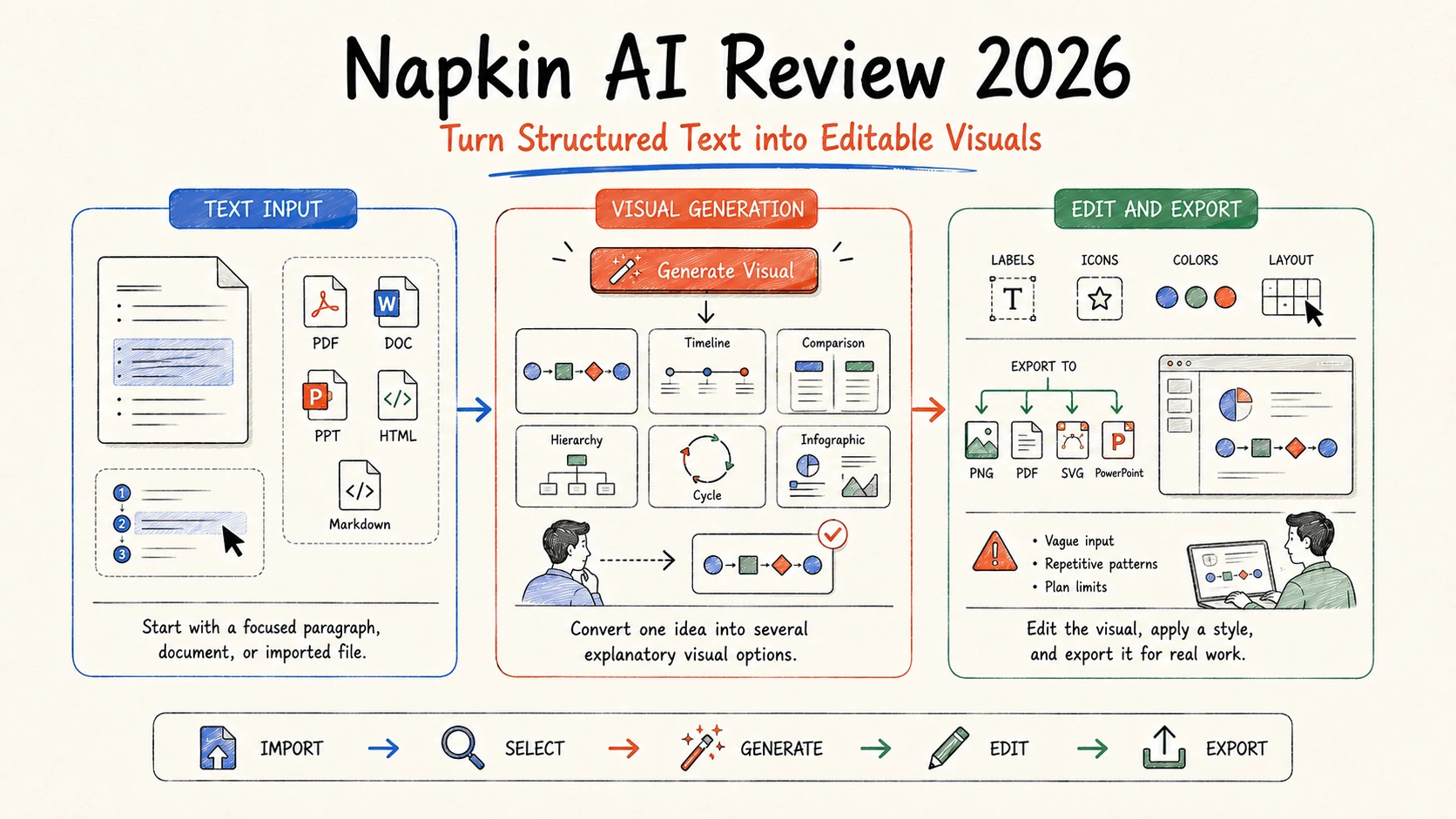
Napkin AI is a focused visual communication tool: paste or generate text, select the passage that matters, and turn it into diagrams, processes, comparisons, timelines, and other editable visuals. It is easier to recommend for creating individual explanatory graphics than as a complete replacement for PowerPoint, Canva, Figma, or a specialist diagramming tool.
The strongest use case is clear communication under time pressure. Napkin can help a marketer illustrate a framework, a consultant explain a process, or an educator turn a concept into a visual without drawing from scratch. Its limits are equally clear: vague input produces generic results, repeated use can expose template similarity, and advanced brand control and editable export formats sit behind paid plans.
Search demand and research scope: DataForSEO US data accessed August 28, 2026 reported about 27,100 monthly searches for “napkin ai” (keyword difficulty 12) and 50 for “napkin ai review” (difficulty 0). Napkin's homepage was estimated to receive about 25,500 monthly organic visits and had 69 newly ranking keywords. These are third-party estimates, not vendor analytics.
Napkin AI review: the short answer
| Decision factor | Assessment | Why it matters |
|---|---|---|
| Text-to-visual speed | Strong | Several visual options can be generated from selected text in seconds |
| Ease of editing | Strong for simple visuals | Labels, icons, colors, and layouts remain adjustable |
| Visual variety | Mixed | Useful built-in patterns can feel repetitive with frequent use |
| Full presentation workflow | Developing | Napkin Slides exists, but the product's clearest strength remains individual visuals |
| Export | Strong on paid plans | PNG, PDF, SVG, and editable PPT options support downstream work |
| Brand control | Plan-dependent | Custom styles, fonts, and watermark removal require paid tiers |
Napkin AI is worth trying if diagrams and infographics are a recurring bottleneck. The free plan is practical enough to test real material. Upgrade only after checking whether its visual vocabulary, PPT/SVG exports, and brand controls match the work you publish.
What Napkin AI does
Napkin AI converts text into editable visual structures. You can paste an existing document, import PPT, DOC, PDF, HTML, or Markdown, or generate starting text. Select a paragraph or block, choose Generate Visual, review multiple options, and edit the chosen result.
The generated output may resemble a process diagram, relationship map, comparison, hierarchy, timeline, cycle, or infographic. Napkin chooses a structure based on the selected language, then lets you adjust icons, colors, labels, and style.
Official workflow reference: Napkin's getting-started guide documents text selection, visual generation, and PDF/PNG/PPT/SVG export. Accessed August 28, 2026.
Napkin also offers a Slides product in beta. Treat that as a changing capability rather than assuming it has the maturity or breadth of established presentation editors. For a production decision, test both an individual visual and a complete deck.
Where Napkin AI is strongest
Making an abstract paragraph scannable
Many business documents contain ideas that are logically structured but visually flat: three stages, four tradeoffs, a feedback loop, a before-and-after state, or a hierarchy. Napkin detects those relationships and proposes a graphic. That is more useful than generating a decorative image because the visual is meant to explain the content.
Good source text contains explicit relationships. “Research leads to a brief, the brief guides production, and review gates publication” gives the system something to map. A vague paragraph full of adjectives does not.
Producing editable visual assets
Napkin's paid export options are unusually relevant for business users. A visual can be exported as SVG for scalable editing or PPT for use in PowerPoint. PNG and PDF cover simpler sharing. The current Slides help center says full presentations can export to editable PPTX, PDF, PNG, or SVG.
This does not guarantee that every downstream application will preserve every detail. Test one complex graphic in the actual client environment, especially if custom fonts or strict brand rules are involved.
Helping non-designers choose a structure
The product does more than apply colors to a template: it proposes a visual grammar for the text. That reduces the blank-canvas problem for users who know the idea but not whether it should become a funnel, matrix, cycle, or timeline.
Public G2 reviews praise the speed and ease of turning plain text into professional-looking visuals. Reviewers also say abstract input can be harder to interpret and that patterns may feel repetitive. Those comments are directional user feedback, not a measured success rate.
Limitations to test before paying
Input quality controls output quality
Napkin cannot repair an unclear argument simply by visualizing it. Long selections can produce crowded diagrams; vague selections can yield generic metaphors; overloaded paragraphs may map the wrong relationship. Edit the source into a short, explicit structure before generating.
A useful method is:
- Write one sentence naming the purpose of the visual.
- Limit the input to one relationship or process.
- Use parallel labels with similar length.
- Remove unsupported numbers and decorative language.
- Verify that the visual preserves the actual logic.
The visual language can become recognizable
Fast visual tools rely on a finite set of patterns, icons, and arrangements. Across a large report or content program, outputs can start to look similar. Paid brand styles help, but they do not replace an art direction system or a designer for high-stakes campaigns.
Use Napkin for explanatory structure, then decide whether the result needs a final pass in PowerPoint, Figma, Illustrator, or another design environment.
The free plan is useful but visibly limited
Free users receive standard styles and icons, PNG/PDF export, and Napkin branding. PPT and SVG export, watermark removal, and custom brand features require Plus or Pro. This is reasonable for evaluation, but it matters when the first real deliverable must be client-ready.
Data handling needs a project-level decision
Napkin's pricing page says customer data is encrypted, users can opt out of training, and subprocessors are contractually prohibited from training on customer data. That is useful vendor disclosure, not a substitute for reviewing the privacy policy, subprocessors, retention, enterprise terms, and your organization's rules before uploading confidential material.
Napkin AI pricing in 2026
| Plan | Current published price | Main limits and benefits |
|---|---|---|
| Free | $0 | 500 AI credits per week, unlimited editing and imports, PNG/PDF export, built-in styles, Napkin branding |
| Plus | $9 per person/month | 10,000 credits/month, PPT/SVG export, three Brand Styles, bold icons, no Napkin branding |
| Pro | $22 per person/month | 30,000 credits/month, exclusive designs, unlimited custom branding, font uploads, optional top-ups |
| Enterprise | Contact sales | Organization-specific terms and support |
Annual billing is advertised at 25 percent less than monthly billing. Napkin says visual generation uses approximately one credit per selected word, although more complex outputs or future features may use a different rate.
Official pricing reference: Napkin pricing and AI credit guide, accessed August 28, 2026. Prices, tax, limits, and credit rules can change.
The right budget metric is not credits per click. Track credits per accepted visual, including regenerations and cleanup time. A low subscription price is not valuable if the visual language does not fit the brand.
Napkin AI vs Gamma, Canva, and Beautiful.ai
| Tool | Best fit | Main tradeoff |
|---|---|---|
| Napkin AI | Turning specific text into explanatory visuals | Narrower than a full design or presentation suite |
| Gamma | Turning an outline into a complete web-native visual narrative | External PowerPoint fidelity needs testing |
| Canva | Broad design production across many asset types | More manual structure decisions |
| Beautiful.ai | Structured, professional business decks | Automatic slide rules can limit fine control |
Napkin can also complement these tools. Create the source-backed narrative in a document, use Napkin for the diagrams, then assemble the finished deck in the environment your team already uses.
For more options, compare the best AI presentation makers and AI document analysis tools.
Who should use Napkin AI?
Napkin fits consultants, educators, marketers, product managers, founders, and writers who repeatedly explain processes or frameworks. It is most valuable when the input already contains a sound idea and the bottleneck is finding a visual form.
Skip or delay it if you need unrestricted illustration, advanced charting from live data, engineering-grade diagrams, a mature slide master workflow, or verified enterprise controls that are not present in your evaluated plan.
Frequently asked questions
Is Napkin AI free?
Yes. The Free plan includes 500 AI credits per week, unlimited visual editing and file imports, and PNG/PDF exports. It uses standard styles and includes Napkin branding.
Can Napkin AI export to PowerPoint?
Yes, on paid plans. Individual visuals and Slides presentations can export to PPT. Napkin describes the presentation export as editable. Test a representative file in your version of PowerPoint or Google Slides before committing to a client workflow.
Is Napkin AI an infographic generator?
Yes, but that label is incomplete. It also creates diagrams, process visuals, comparisons, hierarchies, timelines, and other structures from text.
Does Napkin AI replace Canva or PowerPoint?
Usually not. Napkin is strongest at generating explanatory visual structures. Canva offers broader design production, while PowerPoint remains a more established environment for conventional slide editing and enterprise handoff.
Final verdict
Napkin AI does one valuable job with unusual clarity: it turns structured text into an editable explanatory visual. That focus is an advantage. It is easier to evaluate than an “all-in-one” promise because the acceptance test is visible: does the diagram preserve the idea, fit the brand, and export into the real workflow?
Start with the free plan and three representative inputs: a process, a comparison, and a framework. If the first options are consistently useful and paid export removes downstream friction, Plus is a reasonable step. Choose Pro only when custom branding, fonts, exclusive designs, or higher volume have measurable value.
Sources and disclosure
This review was researched from official Napkin pricing and help documentation, DataForSEO US keyword and page data, G2 review themes, and current search results on August 28, 2026. Ottermind publishes this article and operates in the broader AI workspace category. There is no claimed sponsorship, affiliate relationship, or controlled productivity benchmark.
