Guide
Document Workflow Automation: A Practical Build Guide
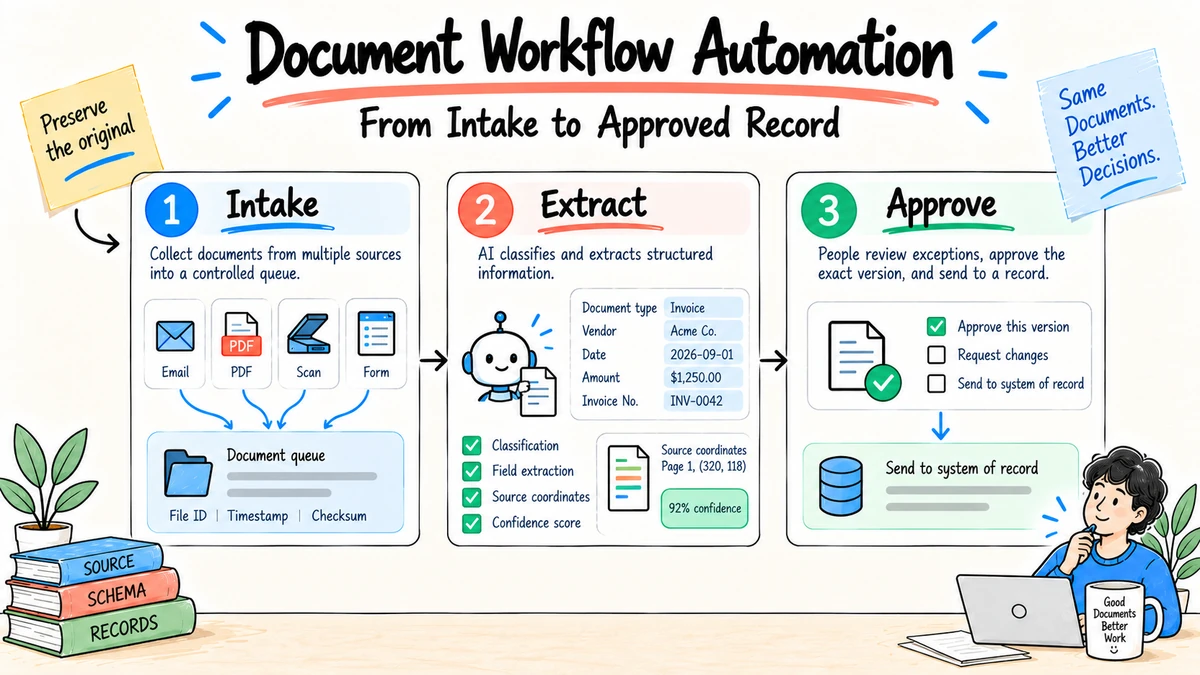
Document workflow automation moves a document through defined states such as intake, classification, extraction, review, approval, distribution, and retention. The reliable design does not simply pass files between inboxes. It preserves the original, tracks versions and owners, validates extracted data, routes exceptions, and records every consequential approval.
Research and disclosure: This guide is informed by IBM's document workflow overview, IBM's intelligent document processing guide, and NIST AI risk management guidance, reviewed September 4, 2026. The state model and templates below are original editorial frameworks.
Map the document lifecycle first
| State | Required evidence | Exit condition |
|---|---|---|
| Received | Original file, source, timestamp, checksum | File is readable and registered |
| Classified | Document type, sensitivity, owner | Classification meets threshold or is reviewed |
| Extracted | Fields, locations, confidence, model/version | Required fields exist or exception is raised |
| Validated | Rules, cross-checks, reviewer corrections | Data passes checks |
| Approved | Named approver, decision, comments, time | Authorized decision is recorded |
| Distributed | Destination and access policy | Intended recipients confirm receipt if required |
| Retained or disposed | Schedule, legal hold, deletion record | Records policy is satisfied |
Defining states prevents a document from being "processed" when extraction succeeded but approval never occurred.
Step 1: Choose one bounded document type
Start with a frequent, stable document whose errors are visible and recoverable. Examples include supplier invoices, standard intake forms, or approved marketing briefs. Avoid mixing contracts, resumes, receipts, and policy documents into the first pilot; they have different fields, risks, owners, and exception rules.
Score candidate workflows before selecting one:
| Criterion | Strong first pilot | Weak first pilot |
|---|---|---|
| Volume | Frequent enough to measure | A few documents per quarter |
| Variation | Limited known formats | Every file follows a different logic |
| Error visibility | Errors are easy to detect and correct | Errors surface months later |
| Authority | One clear process owner | Several teams dispute the rule |
| Downstream impact | Reversible draft or queued transaction | Irreversible payment or legal action |
| Baseline | Cycle time and corrections are known | No one can describe current performance |
| Source quality | Originals are available and readable | Scans are incomplete or provenance is unknown |
The best pilot is not necessarily the easiest demo. Choose a process important enough that improvement matters but bounded enough that failures can be contained.
Step 2: Preserve the source
Store the original document before transformation. Record origin, time, owner, file hash, sensitivity, and retention class. Derived text, summaries, and structured fields should link back to the page or region that produced them.
Use immutable identifiers for the source and separate version identifiers for later replacements. If a supplier resends a corrected invoice, preserve both files and mark the relationship. Do not overwrite the original and leave downstream reviewers unable to explain which version was processed.
Quarantine files that fail malware, format, size, encryption, or readability checks. The system should not send an unreadable attachment to a model and then record the model's guess as extracted data.
Step 3: Extract into a schema
{
  "document_id": "doc_123",
  "type": "invoice",
  "vendor": {"value": "Example Co", "page": 1, "confidence": 0.98},
  "invoice_number": {"value": "INV-44", "page": 1, "confidence": 0.91},
  "total": {"value": 1840.00, "currency": "USD", "page": 2, "confidence": 0.87},
  "exceptions": ["total_requires_review"]
}
Confidence is a routing signal, not proof. Validate types, totals, dates, duplicates, required fields, and relationships with deterministic rules where possible.
Separate extraction confidence from business validity
The extractor may be 99% confident that a page says $18,400, while the purchase order permits only $1,840. Extraction succeeded; business validation failed. Keep separate fields for recognition confidence, rule validation, source match, and reviewer status.
Use evidence coordinates where the format permits them: page, bounding box, table, row, cell, paragraph, or timestamp. Display the source region beside the value during review.
Version the schema
Schemas change when new tax fields, regions, document types, or business rules appear. Record which schema processed each document and define migration behavior. Required fields should fail visibly; silently dropping an unknown field can be worse than routing the whole document to review.
{
  "schema": "invoice.us.v3",
  "document_version": "2",
  "processing_version": "workflow.2026-09-04.1",
  "fields": {},
  "validation": {
    "purchase_order_match": "failed",
    "currency_allowed": "passed",
    "duplicate_check": "passed"
  },
  "review_status": "required"
}
Validation rules by document type
Invoices
Check vendor identity, purchase order, invoice number, duplicate hash, currency, line totals, tax, payment terms, bank-detail changes, and approval limit. Route any bank-detail change through a separately verified process; do not trust instructions contained only in the invoice or email.
Contracts
Check parties, version, effective date, term, renewal, governing language, signature status, required clauses, deviations from the approved template, and referenced schedules. AI can organize clauses for counsel but should not decide legal acceptability.
Marketing assets
Check product facts, prices, evidence, brand version, asset rights, required disclosures, localization status, accessibility, and named approvals. A change to a claim after approval should invalidate the relevant approval.
Intake forms
Check identity, consent, required fields, valid ranges, duplicate submissions, attachments, and routing jurisdiction. Minimize personal data before it reaches downstream systems.
Step 4: Design the exception queue
Every automation needs a named destination for unreadable files, missing fields, conflicting values, unknown document types, duplicate records, policy blocks, and unavailable downstream systems. Show the source next to the extracted value so a reviewer can correct it quickly.
Define a service target and escalation owner. An exception inbox without ownership becomes a slower version of the manual process.
Give every exception a code, priority, evidence, owner, age, and allowed resolution. Separate technical exceptions such as unreadable files from business exceptions such as an amount above an approval limit.
| Exception | Owner | Resolution evidence |
|---|---|---|
| Unsupported format | Intake operations | Converted or replacement original |
| Low-confidence required field | Document reviewer | Corrected value plus source location |
| Duplicate | Process owner | Link to prior record and disposition |
| Rule conflict | Business owner | Approved interpretation or updated rule |
| Restricted data | Privacy or security owner | Approved handling path or rejection |
| Downstream unavailable | System owner | Successful retry or manual fallback record |
Do not let reviewers type arbitrary corrections without reason codes. Structured corrections reveal which fields, formats, suppliers, or rules need improvement.
Step 5: Keep approval explicit
Separate preparation from authority. AI may draft a recommendation or highlight a clause, but the authorized person approves payment, publication, signature, record change, or deletion. Record the exact version approved and invalidate the approval when material content changes.
Sequential and parallel approval
Use sequential approval when one decision changes what the next reviewer should see, such as business owner review before legal approval. Use parallel approval when independent reviewers can assess the same fixed version, such as brand and accessibility checks on a marketing asset.
Define how conflicting decisions resolve. "Two of three approvers" may be suitable for an editorial preference but not for a required legal or security control. Mandatory reviewers should be named by role, with delegation and absence rules.
Set expiry for approvals when source data, price, policy, or risk changes quickly. Display pending age and escalation without converting silence into consent.
Change management for rules and models
Treat extraction prompts, schemas, validation rules, models, integrations, and confidence thresholds as versioned production configuration. Require peer review and a representative regression set before deployment.
Use a release record:
Change and reason:
Affected document types and fields:
Old and new versions:
Evaluation set and result:
Known limitations:
Migration or reprocessing required:
Rollback version:
Approver and release date:
Production monitoring window:
Compare production correction and exception rates after release. Roll back when material fields regress, even if the average score improves.
Step 6: Integrate and observe
Use idempotency keys to prevent duplicate downstream actions. Log transitions, corrections, retries, and access. Monitor straight-through processing, exception rate, correction rate by field, cycle time, duplicate rate, approval age, and downstream reversals.
Design integration contracts
For every downstream system, define required fields, accepted values, authentication, timeout, retry, duplicate behavior, and reconciliation. Treat a network timeout as unknown, not automatic failure: the target may have completed the action before the connection ended.
Use a durable event or queue when work spans systems. Record the source document, structured record, approval, outgoing request, target response, and final reconciliation under one workflow ID.
Monitor quality by segment
Break extraction and exception rates down by document type, template, source, language, scanner quality, model version, and field. An overall 95% field accuracy can hide persistent errors in bank details or dates, which carry much more impact than a misspelled description.
Measure human review time and downstream reversal. High straight-through processing is not success if the accounting or records team later corrects the results.
A worked invoice workflow
- A supplier emails a PDF to a controlled intake address.
- The system registers the original, scans it, assigns a document ID, and checks for a duplicate.
- Classification identifies an invoice and applies the invoice schema.
- Extraction returns vendor, invoice number, purchase order, line items, tax, total, currency, and payment details with source coordinates.
- Deterministic rules recalculate totals, compare the purchase order, validate the vendor record, and detect a changed bank account.
- The changed account creates a high-priority exception. Accounts payable verifies it through the approved independent contact process.
- The authorized approver reviews the corrected structured record and exact source version.
- The integration creates a payable with an idempotency key and records the target identifier.
- A reconciliation job confirms the payable once and attaches its status to the workflow.
- The original, extracted record, correction, approval, and action record follow the retention schedule.
The AI assists with classification and extraction. Rules, authoritative records, independent verification, and people govern the payment decision.
Security and records controls
Document workflows concentrate valuable information. Apply:
- authenticated intake instead of unrestricted public upload where possible;
- malware and file-type validation before parsing;
- encryption in transit and at rest;
- role-based access to originals, extracted fields, and exceptions;
- least-privilege service identities for integrations;
- separate secret storage, never credentials in prompts;
- logs for viewing, correction, approval, export, and deletion;
- retention by document and derived-data class;
- legal hold and verified disposal;
- backup, recovery, and a tested manual process.
Documents themselves can contain malicious instructions intended to influence an AI system. Treat document text as untrusted data. The workflow's system rules and allowed tools must remain authoritative, and extracted instructions must not grant permissions.
Roll out in five releases
Release 1: Shadow extraction
Process copies without changing the live workflow. Compare fields with human-entered records and label errors.
Release 2: Reviewer assistance
Present extracted fields and source locations to reviewers, but keep all downstream entry manual. Measure correction time and reviewer agreement.
Release 3: Low-risk straight-through cases
Allow only documents that meet defined format, confidence, validation, and impact rules. Route everything else to the exception queue.
Release 4: Controlled integration
Write approved records to a test or limited production target with idempotency, reconciliation, and rollback.
Release 5: Broader coverage
Add formats, sources, languages, or document types one at a time. Revalidate each expansion instead of assuming the original accuracy transfers.
Acceptance criteria for production
[ ] Original and every version remain traceable.
[ ] Required fields include source coordinates and schema version.
[ ] Business validation is separate from extraction confidence.
[ ] Every exception has an owner, target time, and resolution record.
[ ] Approval attaches to the exact source and structured version.
[ ] Downstream actions are idempotent and reconciled.
[ ] Sensitive data, access, retention, and deletion controls are tested.
[ ] Documents cannot change system instructions or permissions.
[ ] Quality is measured by field impact and downstream corrections.
[ ] Manual fallback, stop, rollback, and recovery have been exercised.
Workflow specification template
Document type and business purpose:
Trigger and accepted formats:
Original storage and retention:
Classification and sensitivity rules:
Extraction schema:
Validation rules:
Confidence thresholds:
Exception types and owners:
Approval authority:
Downstream systems and idempotency rule:
Audit record:
Success metrics:
Rollback procedure:
Build versus buy questions
Ask whether the platform supports your formats, handwritten or scanned content, tables, regional languages, versioning, role-based access, human correction, audit exports, data residency, retention, and integrations. Run a test on real redacted documents, including poor scans and edge cases. Vendor accuracy claims do not replace your field-level evaluation.
Also compare configuration ownership. A no-code interface may speed initial setup, but the organization still needs version control, review, testing, and a deployment path for rule changes. Ask how a corrected field becomes training or configuration feedback, how changes are approved, and whether rollback restores both schema and model behavior.
Estimate cost per accepted document, not price per page. Include ingestion, extraction, model calls, storage, exception review, integration, support, and downstream correction.
For analysis-heavy files, compare the best AI document analysis tools. For the human review stage, use the AI document review workflow.
FAQ
What is the difference between document management and document workflow automation?
Document management focuses on storing, organizing, retrieving, versioning, and retaining files. Workflow automation coordinates the tasks and decisions that move a document through its lifecycle. Strong systems connect both.
Does document automation require AI?
No. Rules, forms, and routing can automate stable work. AI helps with classification, extraction, summarization, and variable documents, but it adds evaluation and monitoring requirements.
Which documents should be automated first?
Choose a high-volume, repeatable type with clear fields, visible errors, an available owner, and reversible downstream actions. Avoid the highest-risk process as the first pilot.
How is document automation accuracy measured?
Measure at the field and workflow level: correct values, exception rate, human corrections, cycle time, duplicate actions, approval errors, and downstream reversals.
What confidence threshold should we use?
Set thresholds by field impact, document type, validation strength, and downstream action. A description may tolerate lower confidence than an account number or total. Validate thresholds on representative documents.
How should changed documents be handled?
Preserve every version, identify the relationship, rerun affected extraction and validation, and invalidate approvals that depended on changed content.
Can documents trigger agent actions?
Only through predefined workflow rules and permissions. Text inside an uploaded document is untrusted input and must not authorize sending, payment, access, deletion, or another consequential action.
Should every exception be reviewed by a person?
Every unresolved consequential exception needs an authorized disposition. Repeated low-risk technical exceptions may be handled by tested rules, but their results should remain observable and sampled.
How do we prevent duplicate processing?
Use source hashes and business keys for detection, idempotency keys for downstream actions, durable status, and reconciliation with the target system. Do not rely on file names alone.
Use Ottermind to organize a source pack, process map, exception catalog, and implementation brief before turning the workflow over to production systems.
