About this template
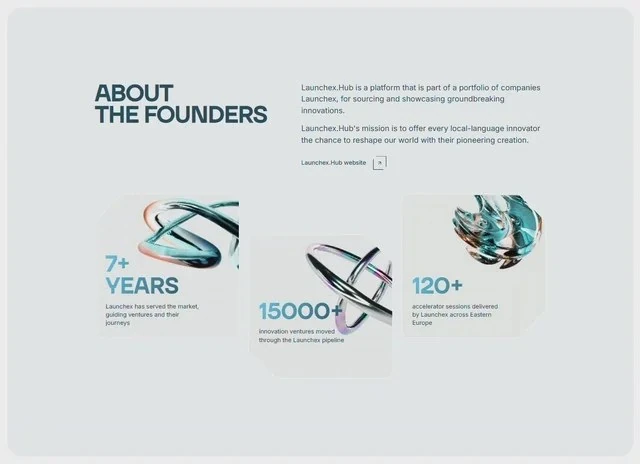
LaunchEx About is a working reference for an agency or studio: the about page laid out, measured and ready to rebuild. The colour scheme is white #F0F5F7 underneath, teal #154359 for the type and teal #4BBDF0 carrying the accents, and the page is set in Inter. The reference is built with React and Tailwind CSS, and the layout decisions are stated independently of it. Take it on when the about page needs a decided order before any new sections are added.
Designed for
- Growth teams reskinning an agency or studio about page who want the 640x464 frame kept while the offer copy changes.
- Designers who need the numbers first: type from 14px to 54px and 100vh sections, all of it quoted from the brief.
- People who brief a model on a about page will use the 6,908-character prompt as the starting point.
What's included
- One scale for type and frame. Sizes were read off the render at 640x464: type from 14px to 54px, 100vh sections and 14px spacing steps. The type and the layout share the same steps, so nothing drifts when one of them is substituted.
- Figures treated as typography. A row of stats sits above the fold, set in Inter at the top of the scale, with #4BBDF0 left for the figures that carry a claim. The figures carry the #4BBDF0 accent while everything around them stays on the ink colour. Keep the figures to one line.
- Every measurement is written down. Spacing is quoted the same way (type from 14px to 54px, 100vh sections and 14px spacing steps), not as a scale that grows on its own.
- Labels under the figures. Numbers share the interface face, so they belong to the page instead of interrupting it.
Motion & interaction
Pointers only where they help
The pointer work is small and specified: hover states on the buttons and links rather than on every card, applied to the elements that already look interactive. The states are named in the brief, so the page does not depend on a hover-effect library. Keep the pointer effects on the controls.
Static by design
The brief leaves animation out and lets the 640x464 layout carry the page, with hover and press states the only changes. Only the elements that respond to the pointer move.
The order behind the about page
Read it in order: the stats row and the card grid. Each element has one job, and the teal #4BBDF0 accent is spent only on the element you are meant to press. A agency reader gets the offer before the options.
Reading LaunchEx About as a spec
Where a mood board leaves the scale open, this brief closes it: type from 14px to 54px and 100vh sections, with the surrounding values derived from that decision. Nothing in this about page depends on a default.
What to change first in LaunchEx About
The composition is the reusable part; the subject is yours. Swap the headline, keep the type scale (type from 14px to 54px), and re-test the #4BBDF0 accent over your own media. If a new element does not help explain the offer or the next action, it belongs below the fold. Rewrite the copy and the media before you re-colour anything.
Frequently asked questions
Is the LaunchEx About prompt a finished spec or a starting point?
It is a build brief rather than a mood description: it names the composition at 640x464, the spacing and the motion values. Nothing in it treats the rendered image as the source of truth.
Why does the entry name React and Tailwind CSS at all?
LaunchEx About was built in React and Tailwind CSS, and the entry says so for provenance. The brief describes positions, sizes and timings, so it rebuilds in any framework that can set type and place elements.
How much of LaunchEx About is animated?
The motion is specified at the same level of detail as the layout: state changes settle in the sub-second range. Port the composition first and the timings second, because they are easier to match once the layout holds. The reference was captured at 640x464.