Magic Hour AI Review: Face Swap, Credits, and the Free Tier
Magic Hour sells face swaps by the second of video, with a small daily allowance you can use before signing up. If the job in front of you is a swap, write it as a brief here and continue in Ottermind Studio, where the model and the credit cost are shown before anything is generated.
Optional
This is Ottermind's composer. It does not open Magic Hour, call its models or spend its credits.
November 9, 2026 · 11 min read
Magic Hour is a browser studio plus a public API that sells one thing well: putting a face from a photo into footage you already own. Its own pages describe a platform of "100+ tools" and 31 named models, but the tool it promotes first — in the navigation, in the homepage shortcuts, in the API's sample code — is face swap. The pricing model is equally specific: credits that burn per second of video, a small free allowance that runs without an account, and a paywall on commercial rights rather than on the tool itself.
If the job in front of you is "put this face into this clip," you can write that as a brief in the composer above and continue in Ottermind Studio, where the model and the credit cost are shown before anything runs. Below is what Magic Hour documents, the arithmetic its plan cards leave out, and the checks worth running on your own footage before you subscribe.
How this review was prepared: Magic Hour's own pages were read on November 9, 2026: the homepage, the pricing page in both its monthly and annual views, the Face Swap Video and Image to Video tool pages, the FAQ, the model library, the API page, and the Terms of Service, last revised October 3, 2026. Prices and allowances are quoted from the rendered pages, not from search snippets. This is a documentation review: no Magic Hour account was created, no credits were bought, and no swap or video was generated, so this page assigns no rating and reports no output quality, queue time or speed. The cover background and the two concept illustrations were generated with GPT Image 2.5 Flare for this article; the two interface images are real captures of Magic Hour's public tool pages. No Magic Hour interface, output or benchmark is fabricated here.
What Magic Hour actually is
Three surfaces share one account and one credit balance, and they are aimed at different jobs.
| Surface | What it shows | The right entry when |
|---|---|---|
| Create | A single workspace with face swap, lip sync, talking photo, image and video generation, and editing tools | You have the media and know the operation you want |
| Tools | Individually addressable pages such as Face Swap Video, Image to Video, Subtitle Generator, Video Upscaler | You searched for one task and want to try it before signing up |
| API | REST endpoints with Python, Node, Go and Rust SDKs, sharing the same prepaid balance | You are building the operation into a product or a batch job |
The model library is where the platform's real breadth sits: 31 models across video and image, including Kling 3.0, Veo 3.1, Seedance 2.5, MiniMax H3, Wan 3.0 and LTX-2.5 for video, and GPT Image 2.5, Nano Banana Pro, Seedream 5 Pro and Flux 2 Klein for images. That list matters for two reasons. It means Magic Hour is largely a router — the output you get is the model's output, filtered through Magic Hour's settings — and it means the plan card's headline allowance is only true for the cheapest model in that list, a point the arithmetic below makes concrete.
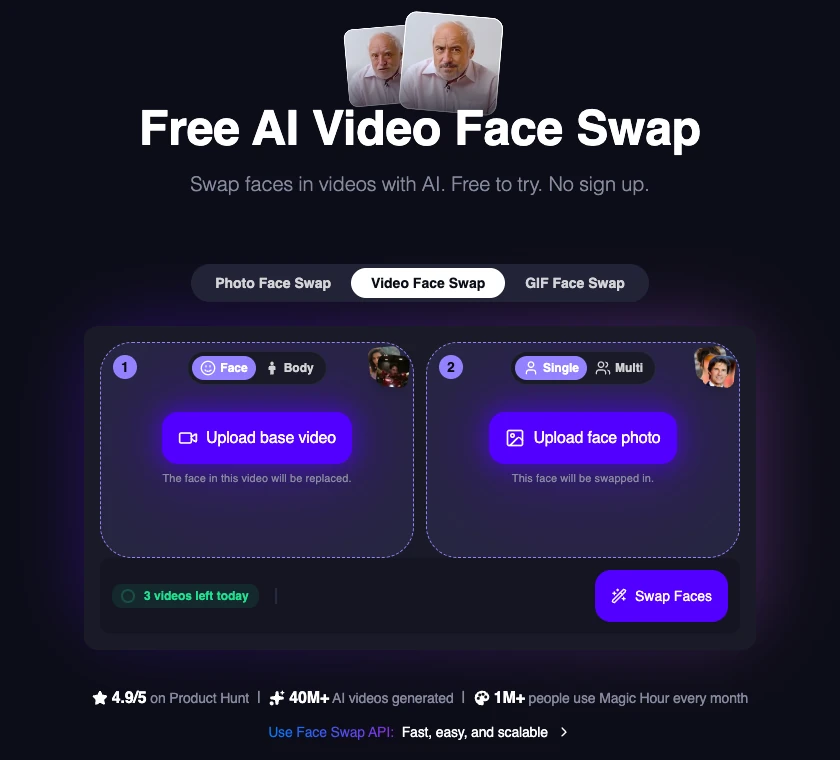
Real capture of Magic Hour's public Face Swap Video page in a desktop browser on November 9, 2026, signed out. The two-slot composer, the shared photo/video/GIF tab row and the "3 videos left today" allowance are what an unauthenticated visitor sees; the generation itself and any result were not run for this article.
Face swap is the product, and it is narrower than the tool count
The Face Swap Video page lays out the whole idea in two slots: a base video, whose face gets replaced, and a face photo, which gets swapped in. Above them sit tabs for Photo, Video and GIF, and inside the video tab a Single/Multi switch. A separate section lists the four modes with three formats each — single face swap, multiple face swap, head swap and body swap, each available for photo, video and GIF.

The four shapes the tool sells: one face, several faces, a whole head, a whole body — across a still, a clip and a short loop. AI-generated concept illustration for this article, drawn from the modes and formats Magic Hour's Face Swap Video page publishes; it is not a Magic Hour screenshot and not a Magic Hour output.
The distinctions are worth understanding before you buy, because they fail differently:
- Single face swap is the reliable default. One clearly visible, front-facing face with even light and no obstruction gives the model the most to work with, and Magic Hour's own guidance says as much.
- Multi face swap exists in the dashboard version, where you map a before-face to an after-face per person. Every extra face is another chance for the mapping to drift, so a group shot with partial profiles is a worse test than a group shot where everyone looks at the camera.
- Head swap replaces the whole head and keeps the body and pose. It is the honest choice when the source photo's face angle does not match the clip.
- Body swap puts a new person into the scene — body, outfit, framing. On the pricing page it is listed at a fifth of the image allowance of the other tools, which is a hint about how much more work it does.
Two practical details from the same pages: you can start from an uploaded file or a YouTube URL, and the source photo can come from Magic Hour's preset list if you do not want to supply one. The upload limit is plan-dependent — 2 GB on Creator, 5 GB on Pro, 10 GB on Business.
What the tool does not do is check your right to use the faces. The Terms put that squarely on you: you are responsible for the rights and consents required to use a person's image, voice or likeness, and the terms add that they do not require consent documents with each generation. For a private test that is a footnote. For client work or anything published, it is the first thing to settle, because the platform's own onboarding will not settle it for you.
What the plans cost
Prices below are the figures on the pricing page, read on November 9, 2026, in US dollars before tax. The page defaults to annual billing; the monthly column is what you pay if you do not commit to a year.
| Plan | Price | Credits |
|---|---|---|
| Creator | $19/mo, or $144/yr ($12/mo) | 12,000/mo, 144,000/yr |
| Pro | $39/mo, or $300/yr ($25/mo) | 25,000/mo, 300,000/yr |
| Business | $99/mo, or $792/yr ($66/mo) | 70,000/mo, 840,000/yr |
The same cards quote 8, 17 and 49 minutes of video per month — 1.7, 3.5 and 9.7 hours a year — at 1024px, 1472px and 4K maximum export respectively, with 3, 5 and unlimited concurrent generations and 2 GB, 5 GB and 10 GB upload limits. An annual plan charges the full year at purchase and delivers the year's credits upfront, which is why the yearly column is a lump sum rather than a discount applied month by month.
Cancelling stops the renewal but not the plan: it runs to the end of the paid period. And — the unusual part — unused credits never expire, including after cancellation. That is a materially friendlier rule than the monthly-reset model most competitors use, and it changes how you should size a plan: a bucket you draw down slowly is not wasted the way a monthly allowance would be.
Credit packs sit beside the subscriptions, with no subscription required: 4,000 credits for $10, 12,000 for $30, 32,000 for $80, 64,000 for $160 and 256,000 for $640, with promotional prices of $27, $68, $128 and $480 shown on the middle and larger tiers at the time of reading. Packs include commercial use and watermark-free exports, but they do not unlock subscription-only models, higher resolutions, faster queues, larger uploads or greater concurrency. That last sentence is the one people miss: a pack buys volume, not capability.
Also outside the table: the plan cards carry a "Customize credits" control, which implies the allocations are adjustable at checkout. The captured view did not show the resulting prices, so treat any larger tier you see there as unverified until the checkout total is in front of you.
What a credit actually buys
The plan cards quote "8 minutes of video" and "2,400 images" per 12,000 credits, which invites a simple division. The API page explains what is being divided: the image allowances assume Z-Image Turbo at 1K, priced at 5 credits per image, and the video allowances assume LTX-2.5 at 480p. Neither is the face swap you probably came for.
That footnote turns the headline numbers into a rate card:
- 12,000 credits ≈ 8 minutes of 480p LTX-2.5 video, which is roughly 1,500 credits per minute, or about 25 credits per second.
- The Face Swap Video and Image to Video pages both print "From 24 credits / sec" in their API block, next to "From $0.023 / sec". At 24 credits per second, a 15-second swap costs about 360 credits, and Creator's monthly 12,000 credits cover roughly 8 minutes 20 seconds of swapped footage.
- A face swap photo is 10 credits in the dashboard, according to the FAQ, with 2K and 4K costing more. So the same monthly allowance is 1,200 photo swaps or a little over eight minutes of video.

Why duration decides the bill: at a per-second rate, a clip four times as long costs four times as much, and resolution and model choice move the rate itself. AI-generated concept illustration for this article; it is not a Magic Hour screenshot, and the strips are not a quote for any specific job.
Three consequences follow, and they are the useful part of this review:
- The plan's "hours of video" is a floor for cost, not a promise. It is computed on the cheapest video model at 480p. Face swap at the quoted rate consumes credits at almost exactly the same pace, but a swap at higher resolution, or a generation on Veo 3.1 or Seedance 2.5, will not.
- Resolution is the hidden multiplier. Creator caps exports at 1024px, Pro at 1472px and Business at 4K. If your deliverable needs 4K, the plan decision is made for you before credits enter the conversation.
- The generator shows the cost before it runs. Magic Hour's FAQ says the creation form displays the exact credit estimate for your selections, and the FAQ also says credits are returned after technical failures but not after a result you simply dislike. That combination is the right way to test: run one real clip, read the estimate first, and judge the output against the number.
The free tier, precisely
Magic Hour's free offer is not one thing; it is two, and they behave differently.
| Allowance | Without an account | Free account |
|---|---|---|
| Video / GIF face swap | 3 generations per day, shared between the two formats | Account credits apply; saved projects and library |
| Photo face swap | 5 per day | Account credits apply |
| Head swap | 3 per day | Account credits apply |
| Credits | None — a daily tool allowance instead | 400 signup credits, plus 100 daily claims up to 7 lifetime claims |
| Watermark | Free video and GIF results may carry one; photo and head swaps are described as watermark-free | Same rules; paid plans and packs remove watermarks where applicable |
The "3 videos left today" badge in the screenshot above is that allowance, not a credit balance — it resets daily and it is separate from the 400 signup credits. The distinction matters when you plan a test: a no-signup visitor can run three short swaps today, but not a ten-clip batch, and not at a higher resolution.
The honest read of this free tier is that it is a real trial of the workflow rather than a free production allowance. Three clips is enough to learn whether the swap holds up on your footage and your face pair; it is not enough to judge consistency across a shoot. And because free video output may be watermarked, a free result is not the same deliverable as a paid one — check the export before you build a client deliverable on it.
Rights, watermarks and what you are agreeing to
The Terms of Service were last revised October 3, 2026, and they are unusually direct about the parts that decide whether the spend is safe.
You own what you make, but it may not be unique. The terms say you own the assets you create, subject to applicable law, and then state plainly that ownership does not guarantee an asset qualifies for copyright protection or is unique — the same prompt can produce the same output for someone else.
Commercial use is a paid feature. Paid subscribers, credit-pack buyers, and customers on separately agreed usage-based billing may use assets commercially, including client work. Everyone else is limited to personal, non-commercial use. This is the single most consequential line on the page for a freelancer: the free tier is not a free commercial tier.
Faces and voices are your responsibility. You must hold the rights and consents required by law to use a person's image, voice or likeness, and the terms do not require consent documents per generation. The restrictions also ban adult content, gore, and use that infringes another person's rights. Magic Hour says it does not pre-screen content but reserves the right to remove it.
Your uploads are not training data. The FAQ and the terms both say prompts, uploads and outputs are not used to train AI models, that projects are not public to other users, and that marketing use requires explicit permission. Retention varies by workflow — the FAQ tells you to download anything you want to keep rather than assume it stays in the library.
Money back is narrow. A new subscription or renewal can be refunded in full within 7 days if fewer than 400 credits have been used since that payment; a credit pack can be refunded within 7 days only if none of its credits have been used. Refunds are limited to one approved refund per customer. Pricing excludes tax, which is added at payment where applicable.
Liability is capped at six months of payments, and disputes go to binding arbitration under JAMS rules in San Francisco. That is standard for a US consumer AI product; it is still worth knowing before you build a service on the API.
Where Magic Hour stops
The FAQ is refreshingly plain about the edges, and they define who the product is not for.
- It is not a timeline editor. Magic Hour's own answer recommends "a dedicated timeline editor when you need frame-level assembly and finishing." Its AI Video Editor and Video-to-Video tools exist, but the platform positions itself as the place a shot or an asset is made, not where a cut is assembled.
- Subtitles are generated, not edited. The subtitle FAQ states you can pick a caption template before generation but cannot edit the words or timing afterwards.
- The library is not an archive. Retention varies by workflow, and the advice is to download what you want to keep.
- Plan concurrency is a web-only limit. API jobs queue separately while server capacity becomes available, and API access depends on the endpoint, model and plan — a tool being available in the web app does not guarantee an endpoint for it.
That list is not a complaint. It is the boundary that makes the pricing legible: Magic Hour sells per-second transformation of media you bring, not an editing suite.
Who should pay, and who should not
Run these five checks against a real project before choosing a plan.
- Is your work "replace this person's face" rather than "edit this footage"? If the job is a swap, a talking photo or a lip sync, the per-second model is a good fit. If the job is assembling a ten-shot sequence with titles and music, you will pay Magic Hour for the shots and still need an editor.
- How many seconds of finished swap do you need per month? Convert your own deliverable into seconds and multiply by 24 to get a rough credit floor, then compare that with the plan's allowance at your target resolution — not at 480p.
- Do you need commercial rights or 4K? Both are paid-only, and 4K means Business. If a client deliverable is the goal, the free tier cannot carry it.
- Is the face yours, licensed, or consented? The platform will not ask. If the answer is unclear, the workflow is a legal question before it is a creative one.
- Will you use the API? One account and one prepaid balance covering web and API is the platform's strongest argument for teams, and it is the reason "3 videos a day" is not the number that matters once you ship.
If four of those five point at Magic Hour, the $19 Creator plan is a cheap way to learn whether the swap holds on your footage, and its credits do not expire if it does not. If two or more point away — a long edit, a 4K master, an unclear rights position — the subscription is solving a problem you do not have.
Doing the next step in Ottermind
The task this article has been circling is one operation on media you already own: take a face from a photo, put it into a clip, and keep everything else in the frame unchanged. That operation has a natural place to continue.

Real capture of Magic Hour's public Image to Video page, signed out, November 9, 2026. One still, one optional motion description, one button — the same shape of task the Ottermind composer above is built around. This is an image of Magic Hour's page, not an Ottermind interface.
Where each part of the job actually goes:
| Your task | Where it continues | Why that destination |
|---|---|---|
| Put the face from a photo into a clip you own | Video Face Swap | Takes the clip plus a source face, then carries your "keep this unchanged" brief into Studio |
| Give a still photo motion without a new shoot | Image to Video | Same input idea as the page above: one image, a described camera move, a reviewable take |
| Assemble the swapped shots into a finished cut | Not in Ottermind | Timeline assembly, subtitle burn-in and compression live in an editor. Ottermind's pages do not do frame-level finishing, and this one does not pretend otherwise |
| Check rights before publishing | Not in any tool | Consent and likeness clearance is a human step; Magic Hour's terms put it on you and so does this page |
The brief below is the one loaded into the composer at the top of this page. It is written for a swap that has to survive a client review: the source face is attached, and everything that is not the face is explicitly frozen.
Swap the face in this clip with the face in the photo I attach. Keep the head motion, blink timing, jaw movement, camera angle, background, clothing and audio exactly as they are. Match skin tone, beard shadow and the direction of the key light so the swap reads as the same shot, and keep the swap stable frame to frame without softening the rest of the image.Two actions matter here, and they are separate. Use the swap brief above only fills the composer and scrolls to it; nothing is sent. When you send, Ottermind stages the brief and any reference image you attached and continues in Studio, where the model and the credit cost are shown before generation. Attaching the source face is what turns the brief into a task; without it, the request is still a description of a face you have not supplied.
None of those links open Magic Hour, call its models, or spend its credits. They are a separate product for the adjacent step, and the comparison worth making is about workflow shape rather than quality: Magic Hour sells per-second transformation of your media inside a very wide tool catalog, with a genuine no-signup trial and credits that never expire; Ottermind sells a brief-to-Studio path where the model and the credit cost appear before anything runs. Ottermind does not promise a free tier, unlimited output, a fixed generation time, a fixed credit cost, or a vector master.
Where this review stops
Magic Hour's own pages establish the surfaces, the model list, the plan prices, the per-second rate, the free allowances, the watermark rules and the commercial-use terms. They do not establish how good a swap looks on your clip. We have not run a swap, timed a queue, compared a 1024px export with a 4K one, or checked whether the "3 videos a day" allowance survives a face the model finds difficult. This review assigns no rating, and no speed or quality claim on this page comes from a test.
Three limits are worth stating plainly. First, the 24-credits-per-second figure is printed in the tool pages' API block; the web dashboard's video price is described only as depending on duration and resolution, so the web cost of a specific swap is unconfirmed until the form shows it. Second, the "Customize credits" control on the plan cards was not opened, so any larger allocation and its price are unverified. Third, the plan's stated video minutes are computed on LTX-2.5 at 480p, and no published table translates those minutes into face-swap minutes at 1024px or 4K.
A reasonable verdict is conditional. Magic Hour is worth a subscription if your work is face swap, lip sync, talking photos and short transformed clips at volume, if the per-second arithmetic fits your deliverable length, and if you need one balance across a web app and an API. If you need a finished edit, a 4K master, or a cleared likeness, the subscription is only one step of a longer job — and the page count will not tell you that.
Magic Hour questions worth answering
Is Magic Hour free?
Partly, and in two separate ways. Selected tools, including face swap, can be used without an account: 3 video or GIF swaps per day, 5 photo swaps per day, 3 head swaps per day. A free account adds 400 signup credits and 100 daily credits up to 7 lifetime claims. Free video and GIF output may carry a watermark, and free use is non-commercial under the Terms.
Can I use Magic Hour videos commercially?
Only with a paid arrangement: a subscription, a credit pack, or separately agreed usage-based billing. Users without one of those are limited to personal, non-commercial use. Commercial use also depends on your rights to the source footage and the face, which the platform does not verify for you.
Does Magic Hour have an API?
Yes, and it shares the account's prepaid credit balance with the web app. The API page lists per-second and per-image starting prices such as $0.023/sec for MiniMax H3 and LTX-2.5, $0.045/sec for Seedance 2.0 Mini, and $0.091/sec for Veo 3.1, with a stated assumption of full use of Business annual credits. Endpoint availability, resolution options and credit costs vary by plan and settings.
Do Magic Hour credits expire?
No. The pricing page and FAQ both say unused credits roll over forever and never expire, including after cancelling a subscription — subscription credits, credit packs, signup credits, daily claims and promotional credits alike. Remaining credits do not keep subscription-only features unlocked, so the plan still governs resolutions, models and concurrency.
Can I use Magic Hour inside Ottermind?
No. The two products are separate. This page offers an Ottermind composer and a matching brief so you can run the adjacent task, and Magic Hour's tools stay on Magic Hour's site.
What is the catch with the "hours of video" on the plan cards?
The API page states that video allowances are calculated on LTX-2.5 at 480p and image allowances on Z-Image Turbo at 1K. A 12,000-credit plan therefore means roughly eight minutes of the cheapest model at the lowest resolution, not eight minutes of a 4K face swap. Check the estimate in the generator for the model and resolution you actually intend to use.
