Product Review
Freebeat AI Review: Free Limits, Credit Math, and Song Rights
freebeat starts from a finished track, not a prompt. Below: what the agent decides, what the free tier really allows, what a three-minute video costs in credits, and who ends up owning the result.
Optional
Attach one still — cover art or a performer photo — here. Nothing is submitted until you press send, and the track itself stays on your side of the handoff.
November 11, 2026 · 10 min read
freebeat is a music-first video studio: you bring a finished song, and the agent plans shots, cuts and lyric timing around that song's structure. That is a different starting point from most AI video tools, which begin with a text prompt and treat music as a soundtrack added afterwards. On freebeat the track is the brief. Change the track and the whole treatment changes.
Three questions decide whether it fits your next release. First, do you already have the song and the right to use it — freebeat analyzes audio you paste in, but it does not clear it for you. Second, is the deliverable a full music video or a set of clips, because the duration cap and the credit cost move together. Third, will the video be published commercially, because the free tier's 500 credits are labelled non-commercial in freebeat's own terms.
If the track already exists and what you need is the visual, the composer above is the entry point: attach one still — cover art or a performer photo — describe the world you want, and review the brief before anything is generated. The track itself stays on your side of the handoff.
How this review was prepared: freebeat's own pages were read on November 11, 2026: the homepage, the pricing page, the music video generator page, the dance video page, and the Terms of Service. This is a documentation review. No freebeat account was created, no credits were bought, and no video was generated, so this page carries no quality score, no measured render time and no output sample. Of the three figures below, the first is a real capture of freebeat's public homepage taken on the check date; freebeat's pricing page sits behind a bot check this environment could not pass, so no pricing screenshot is shown and the plan data stays in native tables. The cover and the second figure were generated with GPT Image 2.5 Flare for this page; they are illustrations, not freebeat outputs. The last figure is a real capture of Ottermind's own tool page. Every price, credit rate and limit below is attributed to the page it came from, and the places where freebeat's own pages disagree are reported as disagreements rather than resolved by guesswork.
What freebeat is now — a track-first video studio
The product no longer reads as a single "song to video" button. The navigation splits it into several surfaces that share one login:
- Music Video, with the two modes its four-step guide names: Story Video and Stage Performance. The agent plans pacing, shots and atmosphere from the track.
- Dance Video, Lyric Video, Realtime Music Video, Photo Karaoke and Onbeat Effects — each a narrower job than a full directed video.
- AI Video Editor, for changing shots after the first cut.
- AI Creative Studio, which rents out the underlying image, video and music models: Seedance 2.5, MiniMax H3, Kling 4.0, Veo 3.1, Sora 2, Vidu Q4, PixVerse, plus Nano Banana Pro and GPT Image 2.0 on the image side, and Suno V5.5, Mureka V9 and ElevenLabs V4 on the audio side.
That last point matters for judging quality. "freebeat quality" is not one thing — it is whichever model you select, at whichever resolution your plan unlocks. The homepage also carries a section headed "freebeat Is Now Part of Yamaha Creator Pass," and the footer names the operating company as Random Motion Technology Inc, Newbury Park, California.
Two marketing numbers are worth filing as claims rather than facts: the homepage says "1,000,000+ creators" and "1,000,000,000+ seconds of music visualized," and calls itself "the #1 AI music video generator." None of those are independently verifiable from the page, and none of them tell you whether your track will look right.
Track in, video out: what the agent decides and what stays yours
The published four steps are short, and they describe a real division of labour:
- Upload a song or paste a link. freebeat accepts an MP3 upload or a link from Spotify, SoundCloud, YouTube, Suno, Udio, TikTok, Stable Audio or Riffusion, then maps the rhythm and the song's structure.
- Choose a mode and a style. Story Video or Stage Performance, then style, characters and direction. The agent plans pacing, shots and atmosphere.
- Generate and refine. Review the storyboard, adjust direction, regenerate scenes. The AI video editor handles changes to individual shots after the first cut.
- Add lyrics and publish. Turn on lyrics for a synced lyric video, adjust timing and highlights, then export.

Real capture of freebeat.ai's homepage on November 11, 2026, cropped to the track input and the mode chips. The entry point is the song, not a prompt: a link or an upload, then a job type. Unrelated third-party artwork elsewhere on that page failed to load at capture time and sits outside this crop.
What the agent takes over: beat detection, the shot plan, transitions, and lyric timing. What stays with you: the track and its rights, the length you cut it to, the choice of mode, and the final approval of every shot. The "no editing skills required" line is accurate about the first cut and misleading about the last ten percent — the storyboard exists precisely because some scenes will need regenerating.
The format limits are published, though not in one place:
| Setting | What freebeat states | Where it is stated |
|---|---|---|
| Aspect ratios | 16:9, 9:16, 1:1 | Pricing page feature rows; homepage FAQ |
| Resolution | 720p on Basic and Pro; 1080p on Ultimate and Creator | Pricing cards |
| Video length | "Up to 6min duration per video" on paid plans | Pricing feature row |
| Dance Video length | 60 seconds maximum | In-app message quoted on the dance page |
| Free account length | 30 seconds maximum; free videos use up to 15 seconds of the song | Pricing FAQ; in-app upsell copy |
Two of those rows disagree with a third place in the product. The pricing FAQ says "approximately 6 minutes," the plan feature row says 6 minutes, and one in-app message mentions a 5-minute limit. If a full-length cut is the reason you are subscribing, confirm the cap on your own track's length during the trial rather than trusting the marketing page.

An AI-generated illustration of the brief this article prints below: one performer, one street, neon on wet asphalt, cut for a vertical first clip. Generated with GPT Image 2.5 Flare for this page. It is not a freebeat output, and no real artist, label or release appears in it.
What the free plan actually allows
freebeat does have a free tier, and it is more generous than most: 500 credits on signup, no credit card, and the terms say those credits do not expire while you stay on the free plan. But the free tier is not a smaller paid plan — it is a different licence.
| Free-tier rule | What it says |
|---|---|
| Credits | 500 on signup, no card required, no expiry on the free plan |
| Length | 30 seconds maximum per video; free videos use up to 15 seconds of the song |
| Watermark | Present on free output; "watermark removal" is a paid-plan feature |
| Resolution | Below the paid 720p/1080p tiers — high-resolution export is listed as limited for free accounts |
| Commercial use | The Terms describe the 500 credits as "for non-commercial use" |
That last row is the one to read twice. The homepage FAQ says you retain full rights to what you generate, that freebeat does not claim ownership, and that AI-generated visuals, avatars, images and background music come with a commercial-use licence "subject to the Terms of Use." The Terms themselves, under Subscriptions & Payments, label the free allowance non-commercial. Both statements are on freebeat's own site on the same day. If the video is going anywhere near a release, an ad or a paid channel, treat the free tier as a test bed and price the paid plan in before you publish — and if the answer matters commercially, ask support in writing rather than reading either page as legal advice.
What a music video costs in credits
This is where freebeat is more transparent than most competitors, and also where the numbers surprise people. The pricing page publishes a credit table per model, quoted per second of finished video:
| Job | Published rate | Credits for a 3:00 video |
|---|---|---|
| fast model, 720p | 10 credits per second | 1,800 |
| Dance Video | 10 credits per second | not available — 60s cap, so 600 max |
| freebeat's own full-length video | 20 credits per 10 seconds | 360 |
| Lip sync | 8 credits per second | 1,440 |
| Veo 3.1 | 160 credits per second | 28,800 |
| Sora 2 Pro, 720p | 157 credits per second | 28,260 |
| Seedance 2.0 Lite, 480p | 46 credits per 5 seconds | 1,656 |
Read the first and last rows together. The cheap path is cheap because it is freebeat's own fast model at 720p. The expensive paths are the premium third-party models, and they are expensive by an order of magnitude — a three-minute cut on Veo 3.1 costs more than two months of the Creator plan. The model selector is the real budget control, not the plan tier.
Against the plans, the cheap path looks like this:
| Plan | Price (list price) | Credits | At 10 credits/sec | Max resolution |
|---|---|---|---|---|
| Basic | $4.99/week ($6.99) | 1,990 per week | ~199 seconds per week | 720p |
| Pro | $26.99/month ($34.99) | 10,000 per month | ~1,000 seconds per month | 720p |
| Ultimate | $39.99/month ($49.99) | 19,000 per month | ~1,900 seconds per month | 1080p |
| Creator | $199.00/month ($249.00) | 95,000 per month | ~9,500 seconds per month | 1080p |
A three-minute song is about 180 seconds, so one week of Basic buys roughly one three-minute video on the cheap model, with nothing left over. A standard 3:17 single at the same rate lands at 197 seconds — just inside the weekly allowance, and only if you generate nothing else. That is the number to plan around, and it is a queue rather than a budget: regenerating a chorus costs the same as the first attempt.
The plans, and the sticker price you will actually pay
The four cards share most features and differ mainly in credits, resolution and how much of the model catalogue is unlocked:
- Basic is the only weekly plan and the only one that caps at 720p without a cheaper alternative. It is the cheapest way to test whether the agent's shot planning suits your music.
- Pro moves to monthly billing with 10,000 credits — roughly five times the Basic weekly allowance — but output stays at 720p, and it adds music-model access.
- Ultimate is the first 1080p tier and adds unlimited PixVerse generations.
- Creator adds 7-day unlimited access to the image models, with a fair-use and manual-use caveat.
Three billing details are buried in the terms rather than the cards, and they matter more than the discount percentages:
- Every paid plan auto-renews, and freebeat does not send a reminder before the charge. Section 6 says so directly: to avoid the next charge you must cancel before the current period ends.
- There are no prorated refunds for an unused remainder of a paid period. Section 6 says that too, and Section 7 limits full refunds to subscriptions that are "completely unused and unexpired."
- Credit packs are non-refundable once purchased, "regardless of whether they are partially or fully used." Packs are sold as Spark (2,000 credits, $7.99), Boost (5,000, $18.99) and Power (8,000, $26.99), and the pricing page repeats the no-refund line at the point of sale.
Monthly plan credits do not roll over — unused credits expire at the end of each billing period. Bonus and boost credits are the exception: the FAQ says both never expire. Cancelling is self-service, either from the "Cancel auto-renew" control on the pricing page or from Profile → Manage Plan & Billing.
Rights: what you own, what the free tier does not give you
This section is the reason a musician should read the terms rather than the FAQ, and it is not legal advice.
- You keep your content. Section 4 says you retain rights to what you upload or generate, and Section 8 says you own content created using the service. freebeat takes a non-exclusive licence to process that content in order to run the service.
- The free allowance is licensed differently from paid credits. Section 6 describes the 500 free credits as being "for non-commercial use." Nothing in the FAQ contradicts that directly, but the FAQ's commercial-use line reads as if it applies to everything the product makes.
- Compliance is yours, not freebeat's. Section 5 says outputs may contain errors or unintended content and that you are responsible for ensuring they comply with the law, naming copyright and the EU AI Act.
- The song is the part nobody checks for you. Pasting a Spotify or YouTube link tells freebeat what to analyze; it does not grant you a licence to that recording. Using a commercial track in a published video is your exposure, and freebeat's own instructions point back to you for "third-party materials you upload."
- Disputes go to arbitration in New York. Section 16 sets New York law and binding AAA arbitration. Section 11 caps liability at the greater of $100 or the fees paid in the last 12 months.
The defensible position is narrow and practical: use the free tier to test, use paid credits for anything you publish, keep the receipt and the licence record for every track you paste in, and get written confirmation from support if your use is commercial, client-facing or platform-sensitive.
Six checks before you pay
You do not need a large test to learn whether freebeat fits. You need a test whose failure modes you can recognise. Use a track you own.
- Does it read your song's structure? Generate one 30-second section at the cheapest rate and check whether the cuts land on the beats you would have chosen. Move on when the storyboard's pacing matches the track without you re-prompting every shot.
- Does the cheap model look good enough at 720p? Compare a frame from the fast model against the premium model on the same scene. Move on when the cheap frame survives the platform you publish to; otherwise the credit math in the previous section does not apply to you.
- Does your length fit the plan? Multiply your track's duration by 10 credits per second, then compare against the weekly or monthly allowance. Move on when one finished video plus two regenerations fits inside one billing period.
- Is the free tier enough for the use you have in mind? Read Section 6 before you publish a free-tier video anywhere commercial. Move on when the answer is written down, not assumed.
- Can you answer the song question? Name the rights holder for the recording and the composition, and the licence you rely on for each. Move on when both are on file; if not, resolve that before you spend credits.
- Do you know how to stop the renewal? Find "Cancel auto-renew" on the pricing page before you subscribe, so the exit is not a discovery later. Move on when you have seen the control while the subscription is still hypothetical.
Where Ottermind fits — and where it does not
Both products end with a music video, but they start from opposite ends. freebeat starts from the track and infers the visual world from its rhythm and structure. Ottermind starts from the description and builds the visual world you specify, then carries that intent into Studio for revision.
- You have the track and need a performance-driven cut. In freebeat: Music Video in Story or Stage Performance mode, with lyrics sync if you want them. In Ottermind: AI Music Video Generator — describe the performer, mood, setting and scene arc, use cover art or a photo as a reference, and iterate in Studio.
- You need vertical clips for short-form, not a full film. In freebeat: a 15–30 second section, watermarked on the free tier. In Ottermind: AI Reel Maker — build a vertical hook-and-close around one moment rather than cropping a long cut.
- You need the stills before the video exists. In freebeat: the AI Creative Studio, on the higher tiers. In Ottermind: start from the same shared brief and settle the cover or key art first.
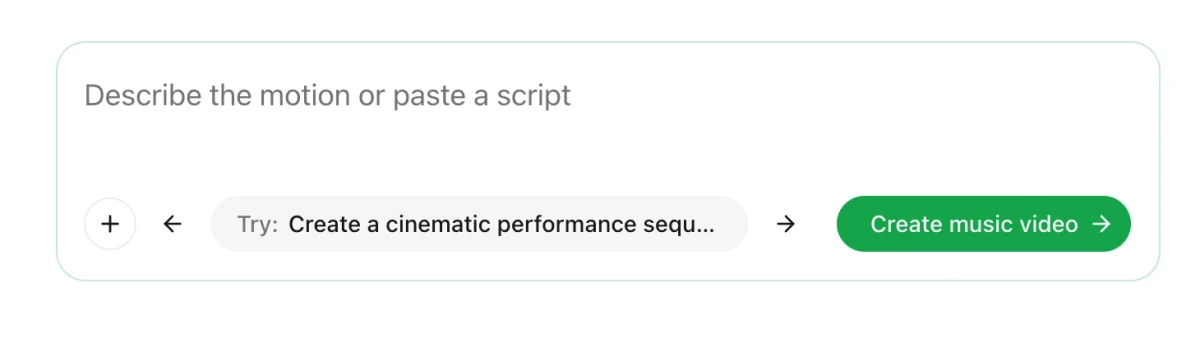
Real capture of Ottermind's own public tool page (/tools/ai-music-video-generator) in the local preview on November 11, 2026, cropped to the composer: an empty prompt, the optional reference-image control, a sample brief and the send control. It is not a freebeat interface and contains no freebeat output.
The boundary is worth stating plainly. freebeat analyzes BPM, beats and song sections, offers beat-matched dance and lip-sync avatars, and bills per second of finished video. Ottermind does not claim beat detection or a track analyzer, and this page does not pretend otherwise. What it does is take a described visual world and a reference image into a workflow you can revise — which is the right starting point when the picture exists in your head before the song does.
If the deliverable is a beat-synced cut of a finished master, judge freebeat on its analysis and its credit rate. If the deliverable is a specific visual idea, start where the description is the input.
Create a music video for the track I describe. One performer, a city street after rain, neon reflections on wet asphalt. Slow push-ins during the verse, faster cuts on the chorus drop, and a quiet sunrise in the final shot. Keep the same face, jacket and colour grade in every scene. Vertical 9:16 for the first clip; no lyrics or on-screen text.Freebeat AI FAQ
Is freebeat AI free?
There is a real free tier: 500 credits on signup, no card required, no expiry while you stay on the free plan. It is not the paid product. Free output carries a watermark, is capped at 30 seconds per video and uses at most 15 seconds of the song, and the Terms label the free credits "for non-commercial use." Treat it as a test bed, and price a plan before you publish.
How much does a music video cost?
At freebeat's own published rate of 10 credits per second for the fast 720p model, a 3-minute video is 1,800 credits. That is roughly one week of the Basic plan (1,990 credits/week) or about a fifth of Pro (10,000/month). Premium third-party models change the answer completely: Veo 3.1 is listed at 160 credits per second, which puts a three-minute cut at 28,800 credits.
Does freebeat work with any song?
It accepts an MP3 upload or a link from Spotify, SoundCloud, YouTube, Suno, Udio, TikTok, Stable Audio or Riffusion, and analyzes the structure from there. Accepting a link is not the same as licensing the recording. If you publish a video built on a commercial track, the rights question is yours to answer, and freebeat's terms put compliance on you.
Do I own the videos I make?
freebeat's terms say you retain rights to what you generate and that you own content created using the service, while freebeat takes a licence to process it. The caveat is the free tier's non-commercial label. The information needed to publish without doubt is a paid plan, a record of the track's rights, and — if the use is commercial — written confirmation from support.
Can freebeat make a full-length music video?
The paid plans advertise up to 6 minutes per video, and the pricing FAQ says the system adapts pacing to the length of the track. The published numbers are not perfectly consistent: one in-app message caps a video at 5 minutes. Test your own track's length before committing to a plan on the strength of the 6-minute figure.
Does freebeat remove the watermark?
Watermark removal is listed as a feature on every paid plan card — Basic, Pro, Ultimate and Creator. It is not listed for the free tier, and the in-app upsell copy says free output carries one. If a clean export is the only thing you need from a plan, the cheapest route is Basic, and its length cap is what to check first.
Do I need editing skills?
No for the first cut: freebeat plans the storyboard, shots and transitions from the track. Yes for the last ten percent: the workflow is built around reviewing a storyboard and regenerating individual scenes, and the AI video editor exists for changing shots afterwards. Anyone expecting a finished film from one click will spend credits on retries.
Where this review stops
freebeat's own pages establish the plan prices, the credit rates, the format caps, the free-tier licence language and the billing mechanics described above. They do not establish whether a given track will produce a convincing video, how long a render takes on the day you use it, or whether the output survives a label's review.
We did not buy credits or generate a video, so this page assigns no score and reports no measured speed. The honest verdict is conditional. freebeat is worth a paid test when you already hold a track and its rights, when your finished length fits inside one billing period at the cheap model's rate, and when you have read the free tier's non-commercial label before publishing anything. Start with the shortest commitment that lets you test your own track, run the six checks on material you own, and confirm the renewal date and the cancellation control before you commit a budget.
